User Profile

Jason120
Copper Contributor
Joined Jan 15, 2019


User Widgets
Recent Discussions
Re: Sharepoint Crawling doesn't auto run as per schedule.
Tristan999 I checked via the crawl history and is not running. moreover, i checked the log file from c:\Program Files\Common Files\microsoft shared\Web Server Extensions\16\LOGS. I'm not sure how to read the log. not sure are they related, somehow my content database show status error and unable to find the preferred time job. EventID Level Message Correlation 10/27/2023 15:01:33.03 OWSTIMER.EXE (0x1208) 0x13B4 SharePoint Foundation Database bggfq Medium UsageLoggedSqlSession: Before executing command against SharePoint_Config. Command is proc_ScheduleTimerJob 10/27/2023 15:01:33.03 OWSTIMER.EXE (0x1208) 0x12F8 SharePoint Foundation Database bggfq Medium UsageLoggedSqlSession: Before executing command against SharePoint_Config. Command is proc_StartTimerRunningJob 3b917dc6-a94a-4a85-99b0-8b22ae26024d 10/27/2023 15:01:33.03 OWSTIMER.EXE (0x1208) 0x12F8 SharePoint Foundation Timer apm5x Medium Successfully started timer job {F997A5B0-9802-468D-A875-41CEC1DC826D} [File Post Processor] in store for service {95418DC6-6319-4D4B-A528-B4699F517930}, vserver {0B2BFE01-A054-4ECF-A6FF-0A782694B240}, current target 0 3b917dc6-a94a-4a85-99b0-8b22ae26024d 10/27/2023 15:01:33.03 OWSTIMER.EXE (0x1208) 0x12F8 SharePoint Foundation Timer aoovq Medium Starting content database timer job {F997A5B0-9802-468D-A875-41CEC1DC826D} [File Post Processor] on target 0 of 1 3b917dc6-a94a-4a85-99b0-8b22ae26024d 10/27/2023 15:01:33.03 OWSTIMER.EXE (0x1208) 0x12F8 SharePoint Foundation Database bggfq Medium UsageLoggedSqlSession: Before executing command against SharePoint_Config. Command is dbo.proc_GetTimerTargetInstance 3b917dc6-a94a-4a85-99b0-8b22ae26024d 10/27/2023 15:01:33.03 OWSTIMER.EXE (0x1208) 0x12F8 SharePoint Foundation Monitoring nasq Medium Entering Monitored Scope (Timer Job job-file-post-processor). Parent=None 3b917dc6-a94a-4a85-99b0-8b22ae26024d 10/27/2023 15:01:33.03 OWSTIMER.EXE (0x1208) 0x12F8 SharePoint Foundation Logging Correlation Data xmnv Medium Name=Timer Job job-file-post-processor d021e8a0-af4e-0083-35ec-8cf5646598ca 10/27/2023 15:01:33.03 OWSTIMER.EXE (0x1208) 0x12F8 SharePoint Foundation Database bggfq Medium UsageLoggedSqlSession: Before executing command against SharePoint_Config. Command is dbo.proc_AddTimerJobHistory d021e8a0-af4e-0083-35ec-8cf5646598ca 10/27/2023 15:01:33.03 OWSTIMER.EXE (0x1208) 0x12F8 SharePoint Foundation Timer an9i8 Medium Completed processing of timer job [job-file-post-processor] with lock type [ContentDatabase] against target instance [7e548fec-7303-4fc0-aa12-435e54386067] [SPContentDatabase Name=WSS_Content]. Start time: [10/27/2023 07:01:33]. Duration: [00:00:00]. Status result: [Succeeded]. Status ressage (if any): []. d021e8a0-af4e-0083-35ec-8cf5646598ca 10/27/2023 15:01:33.03 OWSTIMER.EXE (0x1208) 0x12F8 SharePoint Foundation Monitoring b4ly Medium Leaving Monitored Scope: (Timer Job job-file-post-processor) Execution Time=7.4913; CPU Milliseconds=1; SQL Query Count=5; Parent=None d021e8a0-af4e-0083-35ec-8cf5646598ca 10/27/2023 15:01:33.03 OWSTIMER.EXE (0x1208) 0x12F8 SharePoint Foundation Usage Infrastructure d0i1 Monitorable Write trace failed for type Microsoft.SharePoint.Administration.SPTimerJobUsageEntry with errorCode 8 d021e8a0-af4e-0083-35ec-8cf5646598ca 10/27/2023 15:01:33.03 OWSTIMER.EXE (0x1208) 0x12F8 SharePoint Foundation Database bggfq Medium UsageLoggedSqlSession: Before executing command against SharePoint_Config. Command is dbo.proc_CompleteTimerRunningJob 3b917dc6-a94a-4a85-99b0-8b22ae26024d 10/27/2023 15:01:33.03 OWSTIMER.EXE (0x1208) 0x12F8 SharePoint Foundation Timer apm55 Medium Successfully completed with result 2 timer running job {F997A5B0-9802-468D-A875-41CEC1DC826D} for service {95418DC6-6319-4D4B-A528-B4699F517930}, webapp {0B2BFE01-A054-4ECF-A6FF-0A782694B240} 3b917dc6-a94a-4a85-99b0-8b22ae26024d 10/27/2023 15:01:33.04 w3wp.exe (0x2B30) 0x1E28 SharePoint Foundation CSOM bhxdp Medium Component Manager: Resolving assembly Microsoft.WSMan.Management.resources, Version=3.0.0.0, Culture=en-US, PublicKeyToken=31bf3856ad364e35 9321e8a0-2fbf-0083-35ec-8ee5d174bfaa 10/27/2023 15:01:33.04 w3wp.exe (0x2B30) 0x1E28 SharePoint Foundation CSOM bhxdp Medium Component Manager: Resolving assembly Microsoft.WSMan.Management.resources, Version=3.0.0.0, Culture=en-US, PublicKeyToken=31bf3856ad364e35 9321e8a0-2fbf-0083-35ec-8ee5d174bfaa 10/27/2023 15:01:33.06 w3wp.exe (0x0914) 0x23E8 SharePoint Foundation Usage Infrastructure d0i1 Monitorable Write trace failed for type Microsoft.SharePoint.Administration.SPTaskUsageEntry with errorCode 8 d021e8a0-9f50-0083-35ec-8b1862c83baf 10/27/2023 15:01:33.08 w3wp.exe (0x2B30) 0x1988 SharePoint Foundation CSOM bhxdp Medium Component Manager: Resolving assembly Microsoft.ApplicationServer.Caching.ManagementPS 461c94ea-0860-0001-b30e-1d466008da01 10/27/2023 15:01:33.09 w3wp.exe (0x2B30) 0x4104 SharePoint Foundation CSOM bhxdp Medium Component Manager: Resolving assembly Microsoft.ApplicationServer.Caching.Configuration 461c94ea-0860-0000-5b2b-1d466008da01 10/27/2023 15:01:33.09 w3wp.exe (0x2B30) 0x2B20 SharePoint Foundation DistributedCache 837o4 Unexpected Unexpected error while executing ExportCacheClusterConfig with parameters provider: 'SPDistributedCacheClusterProvider' , connectionString: 'Data Source=dtespdb\dtesharepoint;Initial Catalog=SharePoint_Config;Integrated Security=True;Persist Security Info=False;Enlist=False;Pooling=True;Min Pool Size=0;Max Pool Size=100;PoolBlockingPeriod=Auto;Asynchronous Processing=False;Connection Reset=True;MultipleActiveResultSets=False;Replication=False;Connect Timeout=15;Encrypt=False;TrustServerCertificate=False;Load Balance Timeout=0;Packet Size=8000;Type System Version=Latest;Application Name=".Net SqlClient Data Provider";User Instance=False;Context Connection=False;Transaction Binding="Implicit Unbind";ApplicationIntent=ReadWrite;MultiSubnetFailover=False;TransparentNetworkIPResolution=True;ConnectRetryCount=1;ConnectRetryInterval=10;Column Encryption Setting=Disabled' , path: 'System.Management.Automation.ParameterBindingException: A parameter cannot be found that matches parameter name 'Path'. at System.Management.Automation.Runspaces.PipelineBase.Invoke(IEnumerable input) at Microsoft.SharePoint.DistributedCaching.Utilities.SPVelocityPowerShellWrapper.ExportCacheClusterConfig(String provider, String connectionString, String path)'. Exception: 'System.Management.Automation.ParameterBindingException: A parameter cannot be found that matches parameter name 'Path'. at System.Management.Automation.Runspaces.PipelineBase.Invoke(IEnumerable input) at Microsoft.SharePoint.DistributedCaching.Utilities.SPVelocityPowerShellWrapper.ExportCacheClusterConfig(String provider, String connectionString, String path)'. 7121e8a0-ff8e-0083-35ec-8a8022c78c46 10/27/2023 15:01:33.09 w3wp.exe (0x2B30) 0x2B20 SharePoint Foundation DistributedCache 4y50r Unexpected Unexpected Exception in getting cache cluster security config - Exception 'System.Management.Automation.ParameterBindingException: A parameter cannot be found that matches parameter name 'Path'. at System.Management.Automation.Runspaces.PipelineBase.Invoke(IEnumerable input) at Microsoft.SharePoint.DistributedCaching.Utilities.SPVelocityPowerShellWrapper.ExportCacheClusterConfig(String provider, String connectionString, String path) at Microsoft.SharePoint.DistributedCaching.SPDistributedCachePointerWrapper.InitializeDataCacheFactory()'. 7121e8a0-ff8e-0083-35ec-8a8022c78c46 10/27/2023 15:01:33.12 OWSTIMER.EXE (0x1208) 0x47B8 SharePoint Foundation Unified Audit b10b9 Unexpected Unable to write counter value to C:\Program Files\Common Files\Microsoft Shared\Web Server Extensions\16\LOGS\SPAudit_OWSTIMER_1 with exception System.UnauthorizedAccessException: Access to the path 'C:\Program Files\Common Files\Microsoft Shared\Web Server Extensions\16\LOGS\SPAudit_OWSTIMER_1' is denied. at System.IO.__Error.WinIOError(Int32 errorCode, String maybeFullPath) at System.IO.FileStream.Init(String path, FileMode mode, FileAccess access, Int32 rights, Boolean useRights, FileShare share, Int32 bufferSize, FileOptions options, SECURITY_ATTRIBUTES secAttrs, String msgPath, Boolean bFromProxy, Boolean useLongPath, Boolean checkHost) at System.IO.FileStream..ctor(String path, FileMode mode, FileAccess access, FileShare share) at Microsoft.SharePoint.Utilities.SequenceNumbers.SequenceDataReaderWriter.<>c__DisplayClass6.<WriteData>b__4() at Microsoft.SharePoint.Utilities.SecurityContext.RunAsProcess(CodeToRunElevated secureCode) at Microsoft.SharePoint.SPSecurity.RunWithElevatedPrivileges(WaitCallback secureCode, Object param) at Microsoft.SharePoint.SPSecurity.RunWithElevatedPrivileges(CodeToRunElevated secureCode) at Microsoft.SharePoint.Utilities.SequenceNumbers.SequenceDataReaderWriter.WriteData(Int32 sequenceNumber, DateTime timestamp) 10/27/2023 15:01:33.12 OWSTIMER.EXE (0x1208) 0x3A6C SharePoint Foundation Unified Audit b10b9 Unexpected Unable to write counter value to C:\Program Files\Common Files\Microsoft Shared\Web Server Extensions\16\LOGS\SPNonAudit_OWSTIMER_1 with exception System.UnauthorizedAccessException: Access to the path 'C:\Program Files\Common Files\Microsoft Shared\Web Server Extensions\16\LOGS\SPNonAudit_OWSTIMER_1' is denied. at System.IO.__Error.WinIOError(Int32 errorCode, String maybeFullPath) at System.IO.FileStream.Init(String path, FileMode mode, FileAccess access, Int32 rights, Boolean useRights, FileShare share, Int32 bufferSize, FileOptions options, SECURITY_ATTRIBUTES secAttrs, String msgPath, Boolean bFromProxy, Boolean useLongPath, Boolean checkHost) at System.IO.FileStream..ctor(String path, FileMode mode, FileAccess access, FileShare share) at Microsoft.SharePoint.Utilities.SequenceNumbers.SequenceDataReaderWriter.<>c__DisplayClass6.<WriteData>b__4() at1.6KViews0likes2CommentsSharepoint Crawling doesn't auto run as per schedule.
Hi All, I schedule auto crawl but somehow under crawl log is not running. Every morning I need to click on "Start all Crawl in order to run manually. i tried performing the following but no luck and there's no error. Manually crawl working well but not schedule. which is the servicing should be running for the auto crawl? I'm using SharePoint 2019 on-premises, and the windows is updated as for Oct 2023 could anyone assist and what are the things to check? - Restart the timer service -Restart the VMs Thank you2.3KViews0likes4CommentsWSUS Error reset server node
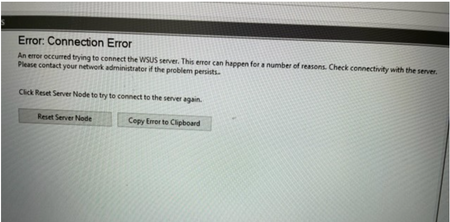
Hi All, I having issue on Windows Server Update Services. Total windows update size about 100GB Performed the changes below, however the issue persist. Appreciate if someone could assist or provide solution? 1) Under IIS Manager => Applications Pools => Wsuspool => Advance Settings => Private Memory change to 0. 2) Server Cleanup Wizard also perform already but issue persist. Attached errordownload multiples files in teams and not in zip format
Dear Everyone, From my understand Download multiples files in teams be come .zip format. Is there any solutions/work around that select and downloaded into each files and select more than 1 documents. My users don't want it to be in .zip format. Thank you JasonSolved17KViews0likes3Comments

Recent Blog Articles
No content to show