Forum Widgets
Latest Discussions

Microsoft Project Service Core Jan 2026 Update locked Plans table
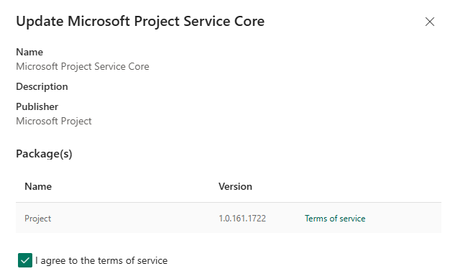
We recently noted the Microsoft Project Service Core was updated to 1.0.161.1772: This update has locked our Plans table, no changes are allowed to the forms and creating new columns is greyed out: We cannot make use of Planner in our model driven app (Planner Premium, non-default environment). After a new Plan is created, the user receives this message when opening the Plan: Two days ago we were in this version 1.0.160.2874): and everything was working as expected. Any guidance would be much appreciated as we are not sure if this is a permanent lock or once the update cycle is completed we will be able to go back to edit Plan forms and columns. Thank you in advanceWoodyFeb 06, 2026Brass Contributor694Views8likes8Comments
Issue when opening Planner via browser
Hello everyone, we are currently experiencing an issue when opening Planner via browser: every time, the sign-in screen appears and we are asked to sign in with our Microsoft account. This happens even though we open it directly via https://planner.cloud.microsoft. After we sign in, close the browser, and open Planner again, we are prompted with the sign-in screen once more. While checking the cookies, I've noticed that no authentication information was created when signing in via direct url. Using https://m365.cloud.microsoft/apps/ and open Planner from the Apps section, it creates authentication information in Edge / in the cookies. Has anyone else experienced something similar? Is this a known / general problem?MollDaFeb 06, 2026Copper Contributor50Views0likes2Comments
Upcoming Planner release @chat feature
in the upcoming release of Planner features, it mentions that the comments will be replaced with a chat. Do I assume that the chat and @mentions are tied to who is assigned to the Task? ie. if the Task is assigned to Mary, will I be able to type Mary but I won't be able to type John (as John is not assigned the task)? Tasks chats in basic plans will allow team members to collaborate directly on tasks using rich text formatting and @mentions, making it easier to discuss work and notify teammates about what needs attention.ElizabethKeoghFeb 04, 2026Copper Contributor484Views0likes4Comments TearBlind_73Feb 03, 2026Copper Contributor59Views1like1Comment
Show Checklist on Card in Premium Plans
We're demoing Project Plan 3 and trying out premium plans. I was disappointed to see that a premium plan does not offer an option to show checklists on the card. Is this in the development pipeline? Thank youmarco715Jan 28, 2026Copper Contributor1.3KViews10likes7CommentsPlanner keeps loggin out?
Hi there, Planner is asking me to login every 5 minutes or so. I'm using it on Firefox (latest update) with my Enterprise subscription. After the message pops-up I cannot add attachments from Sharepoint (need to login again). My Office session is logged on all the time. Does anyone knows how to solve this? Thanks in advance.Miguel CaldeiraJan 26, 2026Brass Contributor13KViews4likes24Comments
Filtering tasks based on custom columns in Microsoft Planner?
In Microsoft Planner, I can add a custom column, and it appears in the table view. However, I do not see an option to filter tasks based on the new column. Is this a supported feature, or is there any workaround to enable filtering on custom fields?ShubhNeevIQ2025Jan 25, 2026Copper Contributor135Views2likes1CommentNew Planner Experience not showing Premium Plan (MS Project) tasks
I have the new Planner experience in Teams. In My Tasks and My Day sections I can see Planner tasks, Loop tasks, Flagged email tasks but I don't see tasks from Premium Plans a.k.a. Projects. Everything that I have read says that I should be seeing my tasks from Premium Plans here as well. Anyone else experiencing the same issue?Brian_RamseyJan 24, 2026Copper Contributor2.1KViews0likes5CommentsGuidance on Planner Premium, Dataverse and Power Automate
Hoping this title invites you to share more knowledge around Planner Premium, Dataverse and working with Automate Scenario: I have a user inside our company saying i need access to Dataverse since he wants to automate some task creation with regards to planner premium. I am pretty ok with that, so he needs a Power Automate Premium license. Although looking at the data in the Projects data tables in the default environment their business units are the root BU - getting a little concerned. Are all projects and related data available for all people that can read the Dataverse tables? If you have some insights or experience please comment :) Could they develop that in a development or sandbox environment before piping it to a designated environment? but there are no Projects tables in dev or in sandbox environment. Main problem: there's so much information about planner and power automate that it's impossible to actually find any guidance around this scenario amongst all classic planner hits135Views0likes1Comment


Resources
Tags
- planner629 Topics
- office 365157 Topics
- developer67 Topics
- User Adoption46 Topics
- roadmap45 Topics
- App43 Topics
- admin13 Topics
- mobile9 Topics
- power automate7 Topics
- Flow6 Topics