Forum Widgets
Latest Discussions

Notifications settings missing
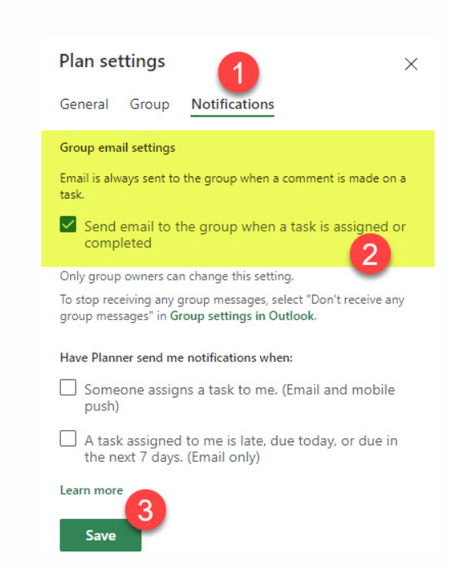
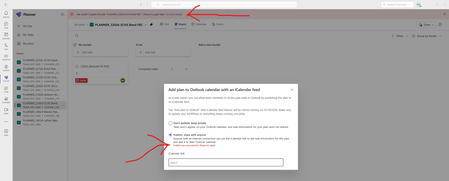
Hello, M365 Business Standard, global admin I've created a couple of plans in Planner for a couple of users, however we don't receive any notification when a new task is created or completed. Let's say I create a task - I assign this task to another user - the users completes the task - I don't get any notification. How come? It's like basic functionality, so I assume there must be something wrong with the set up. In the web I found a couple of screenshots of the setttings but they are not available in my view: My view: What am I missing ? Is it possible to check/change the setting via powershell ?mateuszit11111May 26, 2026Copper Contributor25Views0likes0Comments
Planner Plan 3 Subscription Cancelation and refund.
Hello. I have Microsoft planner plan 3 subscription which expired and has been automatically renewed which is against my intention , I tried to communicate with Microsoft support through email , live chat , phone call but without any positive progress , on phone they have an AI agent which is wasting of time , in live chat they just pass you to another departments and share wrong email address . I have been trying to fix this issue since the first day of subscription renewal but so far nothing . The subscription is under a twin alias email which I don't have access to and there is no admin , the email is under onmicrosoft domain. I need a urgent quick help for this issue so that I can get refund .Akhan84May 26, 2026Copper Contributor11Views0likes0Comments
Updated 2026 Planner Issues
The new Planner initially seemed really great and useful, but over the past month a series of problems have occurred that make it difficult to use. I have already reported everything to Microsoft, but so far no support agent has been able to help me. The issues are as follows: When I tag a colleague in the chat, they do not receive the email with the message content — this is a feature that is supposed to work by design and was working fine until last month. Often when I try to type in the chat, it either doesn't type at all, or it types in a different task. When I click in a chat, it automatically tags all the people previously mentioned, or if I want to tag just one person, it ends up tagging all the others as well. Are you experiencing these issues too?fincleanairworlditMay 21, 2026Copper Contributor81Views0likes0Comments
Improve readability of Task Chat in new Microsoft Planner (full-width option needed)
Hello, First of all, thank you for the new Planner experience and the introduction of Task Chat. I think it’s a very welcome improvement over the legacy comments system, because it allows to edit already posted comments. However, there is a significant usability issue that is affecting our daily work: 👉 The Task Chat is displayed in a narrow side panel, which makes reading longer conversations difficult and inefficient. In many real scenarios, task discussions are not just short comments. They often include detailed explanations, decisions, or back-and-forth exchanges between team members. The current layout forces users to read long messages in a very constrained width, which reduces readability and slows down collaboration. Suggested improvement: (preferred) Provide an option to expand Task Chat to full width -maybe another button like the one that already exists for 'Comments'- (or open it in a larger, dedicated view) Alternatively, allow resizing of the chat panel Even a “pop-out” experience (similar to Teams chat) would be helpful This would significantly improve usability, especially for teams, like mine, that rely heavily on Planner for collaborative work and decision tracking. Thanks for considering this feedback. I believe this change would greatly enhance the new Planner experience.JaioMay 19, 2026Copper Contributor84Views1like0CommentsNew Planner UI - What problem is actually being resolved?
This new UI is a step backwards. I get that people naturally resist change at first, but Microsoft keeps making interfaces more spaced out and less information-dense, which is frustrating in a business environment where efficiency matters. I can now only see about half of what fit on screen before. Even my Planner board headers are cut off because the font sizes and spacing have been increased unnecessarily. Microsoft has a bad habit of redesigning UIs without solving an actual problem. A lot of these changes feel like they’re being made by people who don’t actively use the tools day to day in real working environments.supermankellyMay 14, 2026Brass Contributor216Views6likes1Comment
Is there any way to connect Planner tasks to OKRs or company goals?
We use Planner for task management, and there's no native way to tie a Planner task to a higher-level goal. I looked into Power Automate but the Planner connector doesnt have a field for "parent objective" or anything like that. Are other orgs just using spreadsheets for this? Feels like there should be a better way.ElisaDelaneyMay 12, 2026Brass Contributor76Views0likes1Comment MICHAELJOEHARRISMay 07, 2026Copper Contributor43Views0likes0Comments
users with office 365 E5 license can access the planner premium
I have a question if users with office 365 E5 license can access the planner premium but not all of its features? or they can not have any access at all? i read this documentation https://learn.microsoft.com/en-us/planner/understand-planner-trial-and-license-assignments but i felt a bit confused? if Office 365 E5 users can access some features of the Planner Premium? or they can only access the standard planner, can anyone explain this in more details? the license requirements for planner premium? Thanksjohnjohn-PeterMay 05, 2026Steel Contributor75Views0likes0CommentsProject desktop vs Planner + project Plan 3
We are trying to plan our projects using ms Planner Premium (Plan 3). However, I get very confused because of the so many product names, subscription name, soon ending products, etc. my questions are: Which desktop tool of microsoft for project planning is running currently. If it's "Microsoft Project Online Desktop Client MSO" can this be synced with the planner premium (Plan 3)?, if yes how? I have an excel list of a Project plan with the columns below: can i manage my project in planner premium? if yes, are all this custom fields deployed in dataverse, so that I can access them from power bi? i have a project plan in an excel file with this columns. now i want to create this project plan in project plan 3, how to do it? Company Cost Center Name Company Number Account Number Cost Center Number Accounting Project Number Project Number Sub- Project number Project Leader Concept Vendor (provider) Total Cost (in contract currency) Contract Currency Project Initiated/Not Initiated Committed/Not committed Priority January, 2026 February, 2026 March, 2026 April, 2026 May, 2026 June, 2026 July, 2026 August, 2026 September, 2026 October, 2026 November, 2026 December, 2026 Q1/27 Q2/27 Q3/27 Q4/27 2028 2029 2030 What is the best practice project planning approach when i have complex projects that I have to manage, with resources, costs, projects, sub projects, sub sub projects. How do this on desktop and online? And also colaborative? when project managers have to input thier budgets, how can I create a mapping where they can input thier budgets and project related facts. Thank you in advance for you inputs and help F.AItecMuttenzApr 16, 2026Copper Contributor182Views1like0Comments
Can't see timeline in Microsoft Planner Plan 1
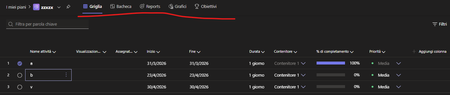
Hi, I would like to find a solution because I can't see the "timeline" menu when I create a premium plan, even if I have a Planner Plan 1: It happens both with Web app and Local app Best regardssamuelebrtlsApr 16, 2026Copper Contributor76Views0likes0Comments
Tags
- planner637 Topics
- office 365160 Topics
- developer68 Topics
- User Adoption46 Topics
- roadmap45 Topics
- App45 Topics
- admin14 Topics
- mobile9 Topics
- power automate7 Topics
- Flow6 Topics