Forum Widgets
Latest Discussions

Planner personal plan bucket deletion inconsistent across tenants
Hello, we are seeing inconsistent behavior when deleting buckets in Microsoft Planner personal plans and would like to confirm whether this is an expected limitation or a known issue. In a Planner personal plan that is not connected to Microsoft Teams or a Microsoft 365 Group, tasks can be deleted successfully but buckets cannot be deleted and return a 403 Forbidden error even when the DELETE request includes a valid If-Match header with the latest odata etag value. The same scenario works correctly in other tenants where bucket deletion in personal plans succeeds using the same API calls and permissions. We have confirmed that this issue is not related to retention policies such as Microsoft Purview because bucket deletion works in group based plans when performed by a Global Administrator. It is also not related to GPO or Intune policies, and the request format and permissions have been validated by testing both as the plan creator and as a Global Administrator. Based on this behavior, bucket deletion in Planner personal plans appears to behave differently depending on the tenant even when the scenario and permissions are the same. Could you please confirm whether bucket deletion in Planner personal plans is officially supported, whether this tenant specific behavior is an expected design limitation, whether this is a known issue that can be escalated as a bug, and whether there are any recommended approaches for managing or cleaning up personal plans in enterprise environments. Thank you. (403 Forbidden)kekDec 29, 2025Copper Contributor2Views0likes0Comments
Easily assign person(s) to subtasks
Hi all, I'm wondering if there's an option to easily assign person(s) to all subtasks of a summary task at one go. In our situation, we would like to assign all these subtasks of a summary task to the same person(s). However, at the moment is seems you have to assign the subtasks individually, which is quite labour intensive. Does anyone of you know a good workaround? Thanks in advance for your response, JasperJasperDalemanDec 24, 2025Copper Contributor6Views0likes0CommentsPlanner Integration with Loop Tasks
Need some guidance - We are starting to use Planner to keep track of a large number of tasks. Currently planner is setup with: Approx 10 buckets (in kanban view), and a list of tasks below each. We are using this mainly just for tasks, so the Timeline view isn't needed. We want to connect tasks recorded in Teams meetings, and in Loop to our main Planner. Whats the best work around for this? When using Loop, and we create a task and we connect it to Planner, it will create a new Plan and put the tasks under that. To me, this is dysfunctional, because we want all tasks to be under the main Plan in Planner. I like to use the GRID view of the Plan, which enables me to make subtasks under the main tasks, but others prefer to use the kanban view. However you can't see the subtasks that are under the "main task" like in Grid view. There's lots of videos showing how these parts of Teams work together, but in reality, it doesn't really work that well when it scatters tasks created in different parts to different Planners. Any suggestions would be helpful, and thank you in advance for your help. JimjtpiazzaDec 16, 2025Copper Contributor366Views1like5Comments% Complete - doesn't seem to calculate properly, what am I missing?
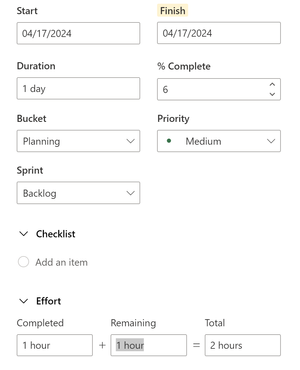
I am fiddling with Project for the Web / Premium Planner in an attempt to make YouTube tutorial content. I'm creating tasks, trying to make some sample content, and setting the completed/remaining hours to be partially done to simulate an in-progress project. What I'm noticing is that the %Complete tries to auto-update, but seems to be calculating really oddly? Like it's coming out with 6% complete for 1 hr completed + 1 hr remaining = 2 hr total. Am I misinterpreting what it's trying to do or is it not functioning? When I try to manually set the %Complete to 50% to override, it changes out the hours to be very different and it still doesn't come out right.christinepaytonDec 16, 2025Iron Contributor715Views5likes4Comments
Bulk import of Tasks in the Premium Planner [not supported] - Any workarounds?
I am trying to simply bulk add tasks to a Planner Project. They have removed the Excel import capability, but you can export. If you cannot use to restore then much efficiency is lost. You can no longer import a .mpp file. Lastly, I just found out through many attempts that the Power Automate to add tasks to premium plan projects is also not supported. Power Automate cannot create records in the msdyn_projecttask table. The Dataverse plugin ProjectServiceCore explicitly blocks this. You’ll always get the error: "You cannot directly do 'Create' operation to 'msdyn_projecttask'. Try editing it through the Resource editing UI via Project." This restriction applies even if you're an admin and have full Dataverse access. This is very disappointing. This is a basic capability in numerous tools for fractions of the cost. I have been using MS Project since they were on 3.5" floppies, and this is almost a deal breaker. I lobbied for this product for my GCC thinking what better tool to leverage all the Microsoft tools we already use...Teams, Outlook, O365, etc. and to now have a fully integrated, more collaborative PM tool (Planner) sounded perfect. There are already many other limitations and now this one.SirWinstonDec 09, 2025Copper Contributor125Views1like2Comments
Show Checklist on Card in Premium Plans
We're demoing Project Plan 3 and trying out premium plans. I was disappointed to see that a premium plan does not offer an option to show checklists on the card. Is this in the development pipeline? Thank youmarco715Dec 05, 2025Copper Contributor1KViews10likes5CommentsTask History, exact date/time instead of relative?
Looking at Task History in premium plan tasks, all the changes are showing in relative periods (a month ago, several hours ago, etc.) instead of the actual date/time. Is there a way to change this? And was that a change itself? I thought it used to show me the actual date/time of a change, but maybe I'm remembering incorrectly.Ian BrucknerDec 04, 2025Brass Contributor72Views0likes1CommentDowngrade from Premium plan
We've been testing Planner Premium for a while and have decided to stop using Premium and go back to Basic plans. There are a number of problems with Premium plans and we find the Premium experience to be worse than Basic. And at a much higher cost. So we knew it was possible to downgrade our upgraded plans from Premium to Basic - otherwise we would never have upgraded our plans. But it turns out downgrading apparently means switching back the the Basic plan that has been saved somewhere since we upgraded to Premium. The result of downgrading is basically that we throw out all the updates that were done while it was a Premium plan. For context, we have some plans we use indefinitely to manage tasks in our teams - we don't create new plans for each new initiative, so we have a lot of updates and would lose a lot of information and a lot of new tasks if we just reverted back to the Basic plan. Can anyone suggest how we can downgrade our plans from Premium to Basic without losing a few months of updates?Jens_Bech_MadsenDec 03, 2025Brass Contributor1.7KViews4likes4Comments


Resources
Tags
- planner625 Topics
- office 365157 Topics
- developer65 Topics
- User Adoption46 Topics
- roadmap45 Topics
- App42 Topics
- admin11 Topics
- mobile9 Topics
- power automate6 Topics
- Flow6 Topics