Forum Widgets
Latest Discussions

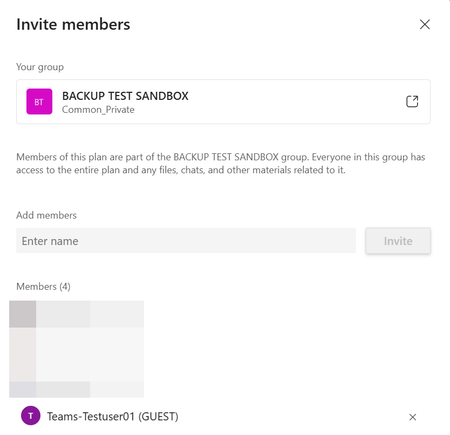
Can GUESTS access t Premium Plan in Teams?
I created a Teams Team and want to manage a premium plan project therein. I have the Planner-Plan 1 license. One external supplier is a guest in my Team but he cannot see the Premium plan. Is this by design or is there any wrong setting in my system? I could not find any information on this in the Microsoft documentation. Facts The guest user is part of the teamRFURDO1605Jan 18, 2026Copper Contributor120Views0likes1Comment
Restore or recover deleted Plan (where O365 Group was NOT deleted)
I know that if there are Plans associated with an O365 Group and that Group is deleted, the Plans are also deleted. If the Group is restored/recovered, then the Plan(s) is(are) also restored. However, in the case of a Plan that is deleted without deleting the O365 Group, is there any way to recover that? The deletion dialog states that "You are about to permanently delete this plan and all of its tasks" but, invariably, users click right through without reading or understanding the warning.Chad_V_KealeyJan 15, 2026Iron Contributor23KViews0likes7Comments
New Planner Experience not showing Premium Plan (MS Project) tasks
I have the new Planner experience in Teams. In My Tasks and My Day sections I can see Planner tasks, Loop tasks, Flagged email tasks but I don't see tasks from Premium Plans a.k.a. Projects. Everything that I have read says that I should be seeing my tasks from Premium Plans here as well. Anyone else experiencing the same issue?Brian_RamseyJan 14, 2026Copper Contributor2KViews0likes4CommentsUpcoming Planner release @chat feature
in the upcoming release of Planner features, it mentions that the comments will be replaced with a chat. Do I assume that the chat and @mentions are tied to who is assigned to the Task? ie. if the Task is assigned to Mary, will I be able to type Mary but I won't be able to type John (as John is not assigned the task)? Tasks chats in basic plans will allow team members to collaborate directly on tasks using rich text formatting and @mentions, making it easier to discuss work and notify teammates about what needs attention.ElizabethKeoghJan 12, 2026Copper Contributor190Views0likes3Comments
Assigned tasks in "My Tasks" or "My Day" in Teams from Planner plans in non-default Environments
Hi, We recently implemented a Planner Premium setup for our Engineering Department to plan their work and do capacity planning. We wanted to leverage the "My Tasks" or "My Day" functionalities from the Planner app in Teams so that Engineers can execute the assigned tasks. Unfortunately, tasks from plans outside the default environment are not synced to the "My Tasks" or "My Day" functionalities in the Planner app in Teams. Anyone else experiencing the same frustrations? Any ideas how we can cope with this and if Microsoft has plans to allow that synchronization from non default environments to the Planner app in Teams? Thank you for your input. Nic.nswijngedouwJan 12, 2026Copper Contributor59Views0likes1CommentPlanner release - combining of Simple and Premium Plans
In the Ignite series the slides mention combining Simple Plan and Premium Plans. If we are on E5 license, will existing users get access to Premium Plans when Simple and Premium Plans come together?ElizabethKeoghJan 11, 2026Copper Contributor40Views1like0CommentsPlanner release Custom Templates
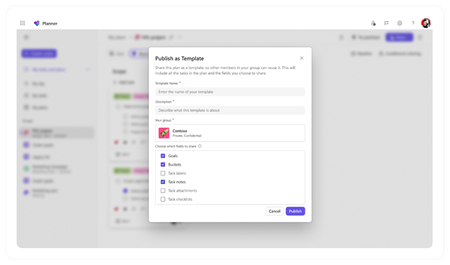
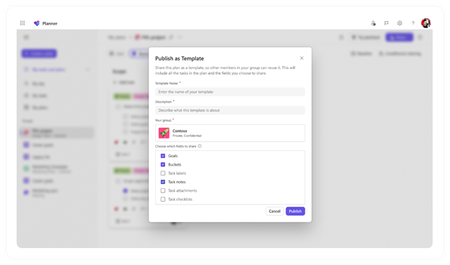
From the ignite series pack, about Publishing a plan as a Custom Templates, the screen shot shows “Goals”, which I understand is only available in Premium Plans. Can you create Custom Templates from a Simple Plan? Or is it only available in Premium? Or is this screen shot showing post the feature where Simple and Premium Plans are combined into one? Is the combining of Simple and Premium Plans also being deployed as part of this major release?ElizabethKeoghJan 11, 2026Copper Contributor59Views0likes0CommentsPlanner Major release Custom Templates
microsoft are there any support materials or steps on how users will create Custom Templates? What are the sequence of steps users need to follow to be abel to "Publish as Template" This slide is from the ignite pack. I'm building end user support materials to educate users about the upcoming release. I can't see these changes ahead of my users.ElizabethKeoghJan 11, 2026Copper Contributor18Views1like0Comments

Resources
Tags
- planner626 Topics
- office 365157 Topics
- developer65 Topics
- User Adoption46 Topics
- roadmap45 Topics
- App42 Topics
- admin11 Topics
- mobile9 Topics
- power automate6 Topics
- Flow6 Topics