

Forum Widgets
Latest Discussions
 254Views2likes8Comments
msoFileDialogFolderPicker compiler error
I have searched the net and not seen this issue. I developed a stand alone program in Excel Vba using msoFileDialogFolderPicker. It runs no problem. The function is as follows: Function PickFolder() As String With Application.FileDialog(msoFileDialogFolderPicker) If .Show = -1 Then PickFolder = .SelectedItems(1) End With End Function This was then added to a larger program with exactly the same code on the same PC and I get 'compile error' variable not found with 'msoFileDialogFolderPicker' highlighted.Nemmi69Jan 19, 2026Copper Contributor22Views0likes1CommentExcel Challenge - Pivoting poorly structured data
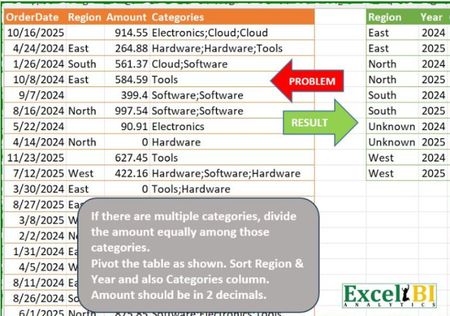
This is from an ExcelBI challenge. I thought it may be worth while posting my solution here as a demonstration of modern Excel methods. Challenge Like many of such challenges, the natural solution approach is to use BYROW but that creates the usual 'array of arrays' error. Solution: Gradually I am moving to a point at which I have no formulas showing in the workbook other than calls to Lambda functions. In this case, the worksheet formuloa is = PIVOTBYCATEGORYλ(OrderTbl) The function works row by row apportioning the amounts against the listed categories PIVOTBYCATEGORYλ // Groups and pivots table by category = LAMBDA(table, LET( normalised, BYROWλ(table, APPORTIONλ), // Identify fields from normalised table dimension, TAKE(DROP(normalised,,1),,2), category, TAKE(normalised,,1), partCost, TAKE(normalised,,-1), // Pivot by category return, PIVOTBY(dimension, category, partCost, SUM,,0,,0), return ) ); The function APPORTIONλ divides the amount between categories so each record within the source data returns a number of rows APPORTIONλ // Splits by category and assigns costs = LAMBDA(record, LET( category, TOCOL(REGEXEXTRACT(INDEX(record,4),"\w+",1)), amount, INDEX(record,3) / COUNTA(category), year, YEAR(INDEX(record,1)), region, IF(LEN(INDEX(record, 2)), INDEX(record, 2), "Unknown"), broadcast, B∕CASTλ(HSTACK(region, year, amount), category), return, HSTACK(category, broadcast), return ) ); /* FUNCTION NAME: B∕CASTλ DESCRIPTION: Broadcasts the terms of a vector over the shape of a second array */ B∕CASTλ = LAMBDA(vector, array, IF({1}, vector, array)); The key to making the formula work is the function BYROWλ that I wrote to generalise the inbuilt but over-restrictive BYROW function. The PIVOTBY function returned the required crosstab from the normalised data arrayPeterBartholomew1Jan 19, 2026Silver Contributor147Views2likes6Comments
Current Date and time per cell
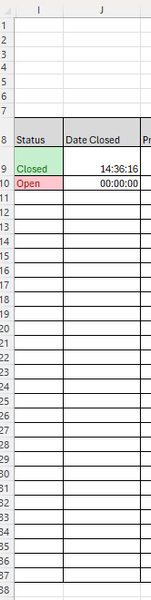
I have a table with one column listing rows with a dynamic text box (open; closed) in the next column I would like to display the date and time when the status changes. The purpose is to show when a task was completed, I have used the now() function but it keeps refreshing, I need it stay the date The snip of the sheet below shows how is is currently working, so can any one help with some code for column J please. thank you LeeBuilditJan 19, 2026Copper Contributor88Views0likes5CommentsWelcome to the Excel Community
The Excel Community is a place we've built for all of you. You can learn more about how to do something with Excel, discuss your work, and connect with experts that build and use the product. With over half a billion Excel customers, we want to engage with you in fundamentally different ways and the community is a starting point for that. Our community helps answer your product questions with responses from other knowledgeable community members. We love hearing feedback and feature requests from you which helps us build the best version of Excel ever. If you have found an outage or a bug please post at our Answers forum. We look forward to getting to know you! Sangeeta Mudnal & Olaf Hubel on behalf of the Excel TeamSangeeta MudnalJan 18, 2026Former Employee63KViews30likes86Comments
Hyperlinks not working on Macbook air
I have had an issue with permissions for accessing files with excel, in my Macbook Air (Apple M4 - Tahoe 26.2) for almost a year now. When I insert a link to a pdf and then I try and open the link, excel does one of three things. It either warns me that some files may have viruses etc etc and when I click open it opens the file it tells me that opening the file may cause issues etc etc and when I choose to open the file, it goes into the message above (1) and eventually opens the file it asks me to grant access to the file and it shows the file path and I need to click select, then it goes to the folder where the pdf is located and I need to click grant access - but when I do, it says that the file cannot be opened. I have gone into my system settings and excel has access to my full disk and files and folders. I have googled the issue and it was suggested to give excel access to the particular folder where the files are located but I don't know how to do this, other than in system settings. I have tried clicking on the folder where the files are located when option 3 above has come up but when I click on the folder, the grant access button at the bottom is greyed out. Can someone please suggest something, as it is driving me crazy now. I have inserted the links through the 'insert', 'add a link' button on the excel menu. Thanks.Gracie1Jan 18, 2026Copper Contributor45Views0likes2Comments
Printing Labels from Excel
Have created a data base of names and addresses in Excel. How do I print an address label from this Excel spreadsheet?SolvedRichard1943Jan 18, 2026Copper Contributor125KViews0likes8CommentsExcel crashes whenever file tab is clicked
I have been having a lot of issues with Excel on a vm that we use, and I cannot try and fix these issues due to not being able to click on the file tab. Whenever the file tab is clicked, excel freezes and if anything clicked again goes to not responding. I do not get anything from windows diagnostics. I have also reinstalled Office 365 several times and excel always has this issue. the VM is a 2019 data Center and excel is 32 bit. running in safe mode does nothing. Book.xltx or Sheet.xltx is not in the XLSTART folder, if it was, I would have to wait for plant downtime to restart the vm. Deleted the excel key in HKEY_CURRENT_USER\Software\Microsoft\Office\16.0\Excel, restarted excel and issue still persists.JimmyPeiskerJan 18, 2026Copper Contributor32Views0likes1Comment



Resources
Tags
- excel43,532 Topics
- Formulas and Functions25,231 Topics
- Macros and VBA6,534 Topics
- office 3656,258 Topics
- Excel on Mac2,711 Topics
- BI & Data Analysis2,462 Topics
- Excel for web1,992 Topics
- Formulas & Functions1,716 Topics
- Need Help1,703 Topics
- Charting1,682 Topics