Forum Widgets
Latest Discussions

Can't see 'line focus' option
Hi all, I find the fade of the background in Edge frustrating as it dims the images and wanted to remove the fade (or make the images remain in focus). I thought maybe the 'line focus' option would help, but I can't find it in my browser. I click 'reading mode (F9)', but see no option for 'reading preferences' in the top bar - instead I see what I've attached. I'm using Version 150.0.4078.48 (Official build) (64-bit). Can anyone please help?NiallASDJul 08, 2026Copper Contributor78Views0likes3Comments
Windows Edge not forgetting email address.
On one of my Windows 10 computers, I no longer want my email address associated with it. I did the following: 1- I signed out of the Microsoft account on my PC and logged in as a local account. 2- Under Email and Accounts, I deleted my email account shown in control panel. None show any longer. 3- All windows and credentials for windows and web were removed. 4- Signed out of edge. 5- Repaired and edge. (Microsoft does not allow an uninstall.) 6- Told control panel to stop automatically sign in. Now when I start edge, a welcome screen shows. Edge wants you to sign in. It still shows the email address that I want my PC to forget. The profile won't delete. I created a second profile and switched to it hoping to delete the old, suggested email profile but my old, suggested email keeps showing up. To proceed, you do need credentials, but I just assume the PC does not show anything at all and that it forgets my email address. I do not want someone that I may let someone use my computer to even know my outlook email address. Microsoft Edge offers other way to credential the machine (SMS, emails etc.) I do not want anyone who is lent the machine sees any of this either. Why is Microsoft being so "helpful" when I don't want them to be. This is all a terrible security breach. I can't safely let someone use nor sell my computer without stripping down to the bare bones. And who know, will Microsoft tell the PC the email address since it has the serial number from the motherboard. (For those of you old enough do you remember when Intel put serial numbers in 80386 CPU? Deja vu?) Simply, how do I completely expunge my email from the computer altogether and stop this email stickiness?CA1Jul 07, 2026Copper Contributor48Views0likes1Comment
Edge not functioning properly after playing games?
After I have played a video game, I noticed Edge has forgotten all my website and cache data? No website icons and logged out of websites. This only happens after I've played a video game, never has it happened from just opening it up.risknetJul 07, 2026Copper Contributor34Views0likes1Comment
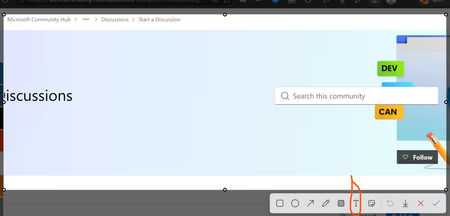
Text annotations disappear if saved while the text box is still focused in Edge Screenshot editor
Hi Edge team, I found a reproducible issue in the built-in Screenshot feature in Microsoft Edge. When I add a text annotation to a screenshot using the Text tool, the annotation disappears from the saved image if I click Save while the text box is still focused. The text is only included in the final image if I manually click outside the text box first. Steps to reproduce: Step 1: Open Microsoft Edge. Step 2: Use the built-in Screenshot feature to take a screenshot. Step 3: In the Screenshot editor, select the Text tool. Step 4: Type any text annotation on the screenshot. Step 5: Without clicking outside the text box, click Save. Step 6: Open the saved image. Expected result: The text annotation should be automatically committed and merged into the screenshot when clicking Save, even if the text box is still focused. Actual result: The active text annotation is not merged into the final image. The saved screenshot does not contain the text annotation, and the text is silently lost. Impact: This can cause users to lose important notes or ideas when using the Screenshot feature for documentation, study notes, bug reports, or productivity workflows. Since the screenshot appears to save normally, users may not notice that the annotation is missing until later. Suggested fix: When the user clicks Save, Edge should automatically commit any active text box before exporting the screenshot. Environment: Microsoft Edge version: 150.0.4078.48 Official build Channel: Stable Operating system: Windows 11EDGEUSER989898Jul 06, 2026Copper Contributor13Views0likes0CommentsBug Report: Extensions info page opens links twice
Version 149.0.4022.98 (Official build) (64-bit) Issue: 1. Go to any extension installed in your browser 2. Click on View in Microsoft Edge Add-ons Store, or Open extension website 3. It opens the link twice when it shouldn'tButterfly_HanaJul 06, 2026Copper Contributor52Views0likes2CommentsWorkaround for edge://flags/#edge-new-pdf-viewer but the New PDF View showing blank pages
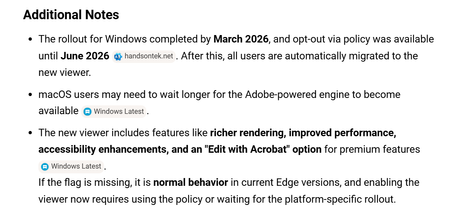
Hello All -we use Microsoft edge to view PDFs of our vendors invoices. We found that with one vendor the invoices were appearing as a blank page in the browser, I did my research and found it was a known bug with edge for pdf's with a certain logo type or watermark in the header...something to that effect which made sense the way the invoices looked. The fix for this was to Disable the New PDF View option in flags which worked up until now where they don't allow Disabling of that anymore. Since the bug is clearly not fixed, is there another workaround I can supply to the users other then to use another browser. Additionally is this bug officially logged with Microsoft and is there a reference or issue number I can follow for resolution? Thanks in advancectedesco3307Jul 06, 2026Tin Contributor202Views0likes1CommentWeb Speech API stopped working on Edge starting with v.134
Starting with version 134 of the Edge Browser (Windows 10, Edge Stable Version 134.0.3124.51, released March 6, 2025), the functionality of speech recognition (WebSpeechAPI) has been broken. This issue potentially impacts millions of users. Requests to Microsoft servers return a "Network error." For more details, please refer to this ticket: https://github.com/speech-translator-ext/speech-translator-readme/issues/50 An easy way to test speech recognition: https://www.google.com/intl/en/chrome/demos/speech.html About Web Speech API: https://developer.mozilla.org/en-US/docs/Web/API/Web_Speech_API#browser_compatibility PS: It’s also unfortunate that, as a web browser extension developer, the "App Assure" functionality is not available. (App Assure: Facing issues with your business apps or websites on the latest version of Microsoft Edge? Microsoft will help you resolve them at no additional cost.) And in general it's very unclear where to report such issues.SolvedKappaFlowJul 03, 2026Tin Contributor17KViews4likes30CommentsFavicons for bookmarks broken since Edge v149 update
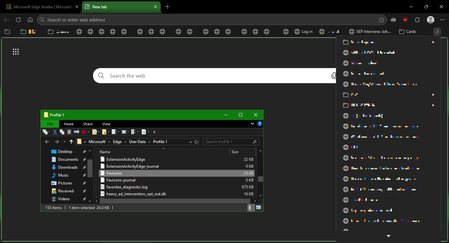
I've recently had Edge update to the v149.0.4022.52 stable-channel releases, and ALL my bookmarks now have no favicons. When I visit any webpage, Edge successfully loads the favicon for the tab of that website. But when I visit a bookmark, the favicon doesn't get updated after it has loaded for the site. And new bookmarks I add also don't show a favicon. If I go into my Edge profile-folder (which can found via edge://profile-internals/ , clicking the heading, then looking next to "Profile Path"), then it is still creating the "Favicon" and "Favicons-journal" files, but I assume isn't populating them with anything? I've tried deleting both files, restarting my PC, but even after Edge recreates them, no bookmarks are gaining any favicons. Is anyone else getting this issue...? OS: Windows 10 Home 22H2 x64 (OS Build: 19045.7291 : May 2026 ESU)Solved



Tags
- edge674 Topics
- canary226 Topics
- feature199 Topics
- Feedback189 Topics
- suggestion180 Topics
- BUG152 Topics
- macos107 Topics
- mac103 Topics
- request102 Topics
- suggestions101 Topics