Recent Discussions

Can't redeem Microsoft Cashback
If you know of a better place to post this, let me know. Needless to say, the regular Microsoft Support has been worse than useless. Until last month, Microsoft Cashback (within Microsoft Edge) worked well for me. But early in August, Microsoft Cashback announced that three amounts, $7.00 and $1.25 twice, were "Ready to redeem". However, the amount reflected in the "Current balance" and "Redeem your earnings" was only $1.25. I submitted a trouble report. After receiving no initial help, I tried performing a redemption anyway. Microsoft Cashback sent $1.25 to my PP acount, but then falsely marked all three amounts as "Redeemed"! Week after week, Microsoft Support assured me that my case was still open, but without a solution. Recently, I myself noticed that the missing amounts were now again marked "Ready to redeem", but still with no way to actually get the money! Just today, Microsoft Support now announces that my case is closed--without ever solving the problem! Moreover, the passage of time has brought another $1.25 into "Ready to redeem" status, so Microsoft now owes me $9.00 that it is unwilling to give me. Does anyone know whether Microsoft is even working on this Cashback problem? Or has Microsoft simply abandoned its Cashback program?55Views0likes5Comments
Feature Requests: Keyboard Shortcut to hide/show vertical tab bar
I'm loving the vertical tab bar natively, but just have a few simple feature requests that would make it that much nicer for a power user: 1) Provide a keyboard shortcut to collapse and expand the vertical tab bar. I love the vertical tab bar for allowing for titles to be visible even when you have a decent number of tabs, but it does take up a lot of horizontal space, so I am often switching between it being and expanded and collapsed. A keyboard shortcut (something that requires only left hand) would make this so great. 2) Remove the 'x' from each tab unless the pointer is hovering over it. The 'x's on every tab just takes away space for showing more of the tab titles.9.7KViews46likes18Comments
Vertical Tabs! Enable control of pin/collapse pane (please!)
Edge's native implementation of vertical tabs when combined with tab groups make it an ideal browser for organized productivity and that's why I continue to use it as my daily driver on all desktop platforms. There is just one major pain point I find with using the vertical tab features: toggling its visibility. Of course, using vertical tabs makes more efficient use of screen real-estate (for landscape-oriented displays), but that does mean less screen space for actual webpage content, a reality which becomes obvious with 2+ vertical-tab-enabled browser windows open side-by-side. Thankfully, Edge includes convenient UI buttons to "Collapse" and "Pin" the vertical tab pane's visibility, but this is currently the only way to toggle this behavior, diminishing productivity of keyboard-centric use. Recently, the Edge team added the keyboard shortcut Ctrl+Shift+,(comma) — which switches the UI between vertical and classic tabs at the top. This is great, but it negates the value of having a collapsible vertical tab pane which would still show webpage favicons in the same visual paradigm of a vertical list and feels like a much more natural UI toggle. Some other users in the Edge Insider community have pointed out that such a side-panel collapse/expand key shortcut exists in many other popular programs as well. I've been trying to find some way of automating the collapse/pin behavior of the vertical tab pane, but it doesn't seem feasible without a proper menu option. Please consider adding a key shortcut specifically for this behavior, or instead include an option in the alt-menu dropdown that can be triggered via something like Power Automate. Thanks again to Edge team for all their work9.6KViews24likes5Comments
HEVC/H265 Hardware Decoding Fails in Edge on Intel Graphics
Environment Operating System: Windows 11 24H2, Build 26100.3194. Microsoft Edge Version: 152.0.4191.66. GPU: Intel(R) Graphics, PCI Device ID 0xA7AB. Intel Graphics Driver Version: 32.0.101.7088. Hardware acceleration is enabled in Microsoft Edge. Issue Description Microsoft Edge fails to play an MP4 video encoded with HEVC/H.265 Main Profile at 1920 × 1080 resolution. The video source itself is accessible, and HTTP Range requests are supported normally. Microsoft Edge can successfully detect the video stream as HEVC Main Profile. However, playback fails when Edge attempts to initialize the hardware video decoder. GPU Capability Reported by Microsoft Edge According to edge://gpu, hardware video decoding is enabled. The Intel GPU is correctly detected and active. Microsoft Edge also reports hardware decoding support for HEVC Main and HEVC Main10. The relevant capabilities shown in edge://gpu include: Decode hevc main Decode hevc main 10 This indicates that the GPU and graphics driver expose HEVC hardware decoding capability to Microsoft Edge. Media Pipeline Failure According to edge://media-internals, Microsoft Edge successfully recognizes and creates the HEVC video stream. The media pipeline then attempts to use MediaFoundationVideoDecoder with DXVA hardware acceleration. The decoder initialization process uses a D3D11 device for DXVA. The following messages are recorded: Use MediaFoundationVideoDecoder for DXVA Starting Initialization of DXVAVDA Using D3D11 device for DXVA Cannot select VDAVideoDecoder status = DecoderStatus::Codes::kFailed After VDAVideoDecoder initialization fails, the other decoder candidates are also unable to handle the HEVC video stream. The decoder initialization eventually fails with: video decoder initialization failed DecoderStatus::Codes::kUnsupportedConfig The playback pipeline finally reports: PipelineStatus::DECODER_ERROR_NOT_SUPPORTED Error code: 15 Control Test I performed a control test on the same computer using the same Windows installation, GPU, graphics driver, network environment, website, and HEVC video file. The same HEVC video can be played normally in Quark Browser. Quark Browser reports that its Apollo media player pipeline is being used. The video plays normally through the Apollo media pipeline without the HEVC decoder initialization failure seen in Microsoft Edge. This indicates that the HEVC video file itself is valid. It also indicates that the same computer is capable of decoding and playing the video when another browser media pipeline is used. Expected Behavior Microsoft Edge should successfully initialize the HEVC hardware decoder when edge://gpu reports that HEVC Main hardware decoding is supported. The HEVC MP4 video should play normally without returning DECODER_ERROR_NOT_SUPPORTED. Actual Behavior Microsoft Edge successfully recognizes the HEVC video stream and reports HEVC hardware decoding support. However, the D3D11/DXVA VDAVideoDecoder initialization fails during actual playback. As a result, no available decoder is selected and the video playback pipeline stops. Preliminary Analysis Based on the current evidence, this issue does not appear to be caused by the Intel GPU lacking HEVC hardware decoding capability. Microsoft Edge itself reports HEVC Main and HEVC Main10 decoding capability in edge://gpu. The same HEVC video also plays successfully on the same computer using Quark Browser. The failure therefore appears to occur during the interaction between the Microsoft Edge/Chromium media pipeline, Media Foundation, DXVA/D3D11, and the Intel graphics driver. In particular, Microsoft Edge detects HEVC decoding capability successfully, but VDAVideoDecoder cannot be initialized during actual HEVC playback. Request for Investigation Could the Microsoft Edge media team please investigate why VDAVideoDecoder fails to initialize for HEVC playback on this Intel graphics configuration? Could you also verify whether there is a compatibility issue between the Microsoft Edge Chromium media pipeline, Media Foundation, DXVA/D3D11, and Intel Graphics driver version 32.0.101.7088? Since edge://gpu already reports HEVC Main/Main10 hardware decoding support, I would also like to understand why this capability cannot be successfully used by the actual video decoder during playback. If additional logs, GPU diagnostic information, Media Internals data, or a reproducible HEVC sample video are required, I can provide them for further investigation.21Views0likes0Comments
How do you handle sensitive PDF files in Edge without third-party cloud uploads?
Hi everyone, When working with sensitive PDF documents (like financial or personal files), most online PDF editors require uploading files to third-party cloud servers. This raises obvious privacy and security concerns for many users. The most reliable way to maintain data privacy today is using Client-Side Browser Processing (WebAssembly & JavaScript), where operations run entirely inside the local browser memory without transmitting any data over the internet. Key advantages of pure client-side processing: Total Privacy: Zero file transfers or external server logs. Instant Speed: Processing relies on your local CPU, bypassing slow upload/download waiting times. No Software Installation: Works directly inside browsers like Microsoft Edge. For those looking for a practical example of this architecture, https://pdfdocflow.com is a free tool offering 24 browser-based tools (merging, splitting, compressing, watermarking, and signing) operating 100% locally with zero server uploads. How do you usually handle sensitive PDFs while browsing, and do you prefer client-side web tools over installing dedicated software?26Views0likes0Comments
Edge 152 made Magnify significantly got worse
In Edge 151, Magnify worked very well with a mouse: Double ctrl to Open Magnify Move the pointer over the Popup Use the mouse wheel to zoom in and out After updating to Edge 152, mouse-wheel zoom no longer works. The only way to change magnification is to click the + / - buttons. There is also a new UI bug: once I click one of those buttons, the Magnify controls sometimes remain visible even after I move the mouse pointer away from the controls. So the new behavior introduces two regressions at once: A fast and convenient mouse-wheel interaction was removed. The replacement controls have broken hover/visibility behavior and can remain stuck on screen. The Magnify feature itself still works, and zooming is still possible using the buttons. The regression is specifically the removal of mouse-wheel zoom and the broken control overlay behavior. Please restore mouse-wheel zoom in Magnify and fix the controls so they reliably disappear when the pointer leaves the UI.18Views0likes0Comments
TargetVersionPrefix and Extended Stable
With the changes to the release cycle, I would expect more companies will be opting into the extended stable channel. A major feature release every month is difficult enough, and now that it's every other week makes it even more challenging. Which raises two questions…. First, we need TargetVersionPrefix to actually do what the name suggests. We should be able to use that to actually target the major releases, while continuing to receive the security updates. There no logical reason why this doesn't work today. Chrome has had this from early on, and Edge's update mechanism is based directly on Chrome's updater. Second, can we get a direct link to the latest extended stable MSI? Currently it's only accessible from the main download page, and you're forced to pick the even numbered version. It's not labeled as such, nor is there a way to query the update API to get the version. Which means that there is currently no way to automate an evergreen installer specifically for the extended channel.99Views0likes1Comment
Microsoft Edge Sync Issue
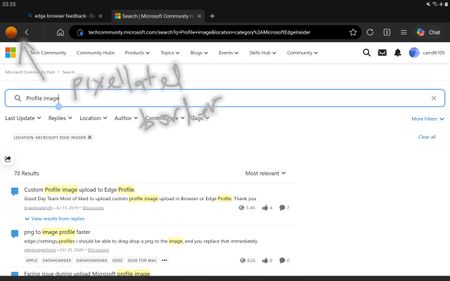
My Microsoft Edge on specific laptop keeps on having sync issue / logging out. (Not the website logout, the account on Microsoft Edge. It doesnt happen on other microsoft application. The error is "We can't sync to your account since we need to confirm that it's you. Please sign in again to verify your account." What is strange is that, it doesnt happen everytime I close and open the browser, or restart. It happens randomly. Even if Microsoft Edge is open (not being closed), then suddenly I noticed the "Sign-in" button is orange again and "We can't sync to your account since we need to confirm that it's you. Please sign in again to verify your account." if you hover the mouse. It is quite annoying that it keeps on happening. Im not sure how to fix. I even formatted the laptop multiple times. Any advise thanks. I tried https://browserhow.com/how-to-fix-sync-is-paused-sign-in-again-in-microsoft-edge/ this but still have made any changes.5.6KViews2likes8CommentsEdge >=150 blocks ALL extensions on *.cloud.microsoft (regression from 149) - no policy override
Starting with Edge 150, a hardcoded extension blocklist applies to *.cloud.microsoft (M365 Copilot and Microsoft 365 app surfaces). Extensions no longer run on these pages. This is a regression - on Edge 149 and earlier it worked fine on the same pages. The block affects all extensions, not a specific category, and it is not overridable via ExtensionSettings (runtime_allowed_hosts), ExtensionInstallForcelist, or any other policy we have tested. It hits both regular user-installed extensions and admin-approved, force-installed extensions on managed devices - so admins have no way to re-enable trusted extensions on these surfaces either. Confirmed breakage so far: - Password managers - verified with Bitwarden (users end up copy/pasting credentials out of the manager on Copilot pages, a real security regression) - Corporate training / user-adoption extensions - Accessibility extensions relied on by employees Ask to the Edge team: restore the pre-150 behavior, or ship an override so extensions can run on *.cloud.microsoft pages (for example, honor runtime_allowed_hosts / the force-install list on these surfaces). If this is by design, please document it clearly so users and admins stop chasing a config that cannot work. Environment: Edge Stable >=150 (works on 149 and earlier), Windows, both unmanaged and MDM-managed (Intune/GPO). Reproducible on a clean profile with a single extension. Are other users / admins / extension vendors seeing the same thing after updating to 150? Please add your affected extension below so Microsoft can gauge the blast radius.1.1KViews2likes11Comments
How to type on a PDF?
Hi everyone, I need to type directly on a PDF, but the document does not contain fillable form fields. I can open it in Microsoft Edge, but I’m not sure whether there is a reliable way to add text anywhere on the page and save the changes without affecting the original layout. Is there a built-in or free way to do this, especially if I need to change the font size and move the text into the correct position? I’d prefer not to convert the PDF to Word first, as that may change the formatting. Any suggestions would be appreciated. Thanks!166Views0likes1CommentPossible to disable profile locking?
After restarting my machine without first closing the Edge browser, it is no longer possible to start it from the desktop shortcut. Attempting from the command line gives this error: [37244:37244:0826/131736.409175:ERROR:chrome/browser/process_singleton_posix.cc:378] This profile appears to be in use by another Microsoft Edge process (4185043) on another computer (fedora). Microsoft Edge has locked this profile to prevent corruption. If you're sure no other processes are using this profile, you can unlock it and relaunch Microsoft Edge. [37244:37244:0826/131736.409233:ERROR:chrome/browser/ui/views/message_box_dialog.cc:201] Unable to show message box: Microsoft Edge - This profile appears to be in use by another Microsoft Edge process (4185043) on another computer (fedora). Microsoft Edge has locked this profile to prevent corruption. If you're sure no other processes are using this profile, you can unlock it and relaunch Microsoft Edge. Notice that the message gives no information about how to unlock my profile. It is additionally not possible to use features of Edge to unlock the profile, because Edge refuses to open any windows (thinking the profile ought to be locked). Since this feature has not been adequately designed and is unable to serve its most basic purpose, is there a way to configure Edge so that it never locks the profile?194Views0likes0CommentsMisleading title "Microsoft Cares About Your Privacy" in Edge
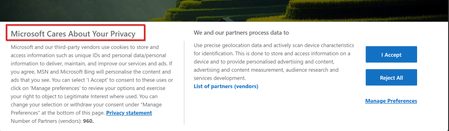
Hello, I want to report error in title of main page that user see after opening Edge. It says "Microsoft Cares About Your Privacy" but content says that you must consent constant web surveillance by Microsoft, State services and its 960 partners of web history, device used, other device in network, tracking location and do other private life intrusive things. Please consider correcting title to reflect the content, i.e. "Consent for surveillance" or any other matching content title. Also, im not sure that it's allowed in EU,202Views0likes0CommentsBring Multi-Account Container Tabs to Edge
Elliot Kirk David Rubino I really hope that Multi-Account Container Tabs feature is in the todo list of Edge team. As you know, Firefox is the first major browser to introduce this innovative functionality for safe and organized browsing experience. But Multi-Account Containers can also be used by web developers as an important and time saving tool. This can be one of the big differentiating features of Edge. The Problem While building multi-role web applications we need to constantly logout and login with different user accounts. There should be a better way to improve this workflow. Current Solutions Incognito mode: Gives only one extra session. Multiple profiles: Different profiles are separate instances. Currently it is not possible to sync among multiple profiles. So even profiles allow multiple sessions, it is very difficult to use as a workaround for multi-container tabs. Specially without history, bookmarks, and passwords the benefit of multiple session is very little. Better Solutions Multi-Account Container tabs Allow syncing among multiple local Edge profiles. Because it is not possible to create so many real online Outlook accounts to get container tabs like benefit. To make it even helpful allow automatically merging data of selected local profiles to one chosen Outlook profile. Show option to re-create those local profiles when logs into Edge in another machine with that consolidated Outlook profile. Thanks for reading Minkul64KViews80likes31CommentsPinning Edge on taskbar for each different profile makes some not display the profile name
Hey folks, I use Edge with several profiles as I need to do testing and also keep logged into the same portal as many different users, for example managing different Office 365 tenants. I pin each profile on the taskbar for easy access, and I noticed some of these profiles are not displaying with the profile name, but just as "profile 1" and so on. Renaming them doesn't take effect into the taskbar. Strangely, some profiles I created are displayed with the right name. Is this a bug or done by design?Solved29KViews1like17CommentsRename tabs (custom name for each tab) on Microsoft Edge Browser
I need an option to rename the tab in Microsoft Edge, on right-click menu. This is useful when we are researching and we open many tabs, there should be an option to let us rename the tab with a custom name (and adding emoji maybe) so we could access tabs faster at a glance, and this helps not double-checking the tab content. as mentioned on this thread, there are some Chrome extensions like "https://chrome.google.com/webstore/detail/tab-modifier/hcbgadmbdkiilgpifjgcakjehmafcjai?hl=en" to do this, but it would be great and very useful if Edge allow us to rename tabs. at least by enabling a special flag!83KViews42likes11CommentsEdge version 150 JavaScript speechSynthesis.getVoices() undefined voices
For the past few days JavaScript speechSynthesis has had a problem in Edge browser. Sometimes it gets the proper list of voices but most of the time it returns: "Microsoft undefined Online (Natural) - undefined" for every single Natural voice. It then uses the default voice (Microsoft David) for speaking the utterance. Can you fix this bug? Edge Version 150.0.4078.83 (Official build) (64-bit) Thank you.Solved556Views1like4CommentsFeature Request: Per-profile default account selection in Microsoft Edge
Summary Allow the default account and external-link account-selection behavior to be configured independently for each Microsoft Edge profile. Description Microsoft Edge supports multiple profiles, which are commonly used to work with different Microsoft Entra ID / Microsoft 365 tenants and accounts. Currently, settings such as “Default profile for external links” and related account-selection behavior are shared across Edge profiles. This can cause one profile's account-selection preferences to affect the behavior of other profiles. We would like these settings to be profile-specific. For example: Profile A → user work account Profile B → admin (onmicrosoft.com) account When a user opens an external link while working in Profile B, Edge should consistently use the account/profile configured for Profile B, without inheriting or being affected by the preferences configured for Profile A. Expected behavior Each Edge profile should have its own configurable default account/profile for external links and related account-selection behavior. Changing the setting in one Edge profile should not change or override the corresponding setting in another profile. Use case This is particularly useful for administrators, consultants, developers, and users who regularly work across multiple organizations or Microsoft 365 tenants. Having profile-specific account selection would make multi-tenant workflows more predictable and reduce the risk of opening links with the wrong organizational account. Requested functionality Please make the relevant default-account and external-link account-selection settings profile-scoped rather than globally shared across Edge profiles.96Views0likes0Comments



Events
Recent Blogs
- 8 MIN READMicrosoft Edge for Business, the new, dedicated work experience for the Microsoft Edge browser, is now available in Microsoft Edge stable version 116. All customers who sign into Edge using Microsoft...Aug 04, 2023302KViews2likes73Comments
- Microsoft Edge for Business, the new, dedicated work experience for Microsoft Edge, is in preview today! Microsoft Edge for Business is planned to be the standard browser experience for organi...Jul 11, 202310KViews3likes2Comments