Forum Discussion

Test call option not showing up in Teams?
Hi
I've downloaded a personal version of Teams and need to test it.
However, the 'Test call' option is not available?
I've tried 2 methods:
1) typing 'Test call' in the search bar and pressing enter - nothing happens when I do this!
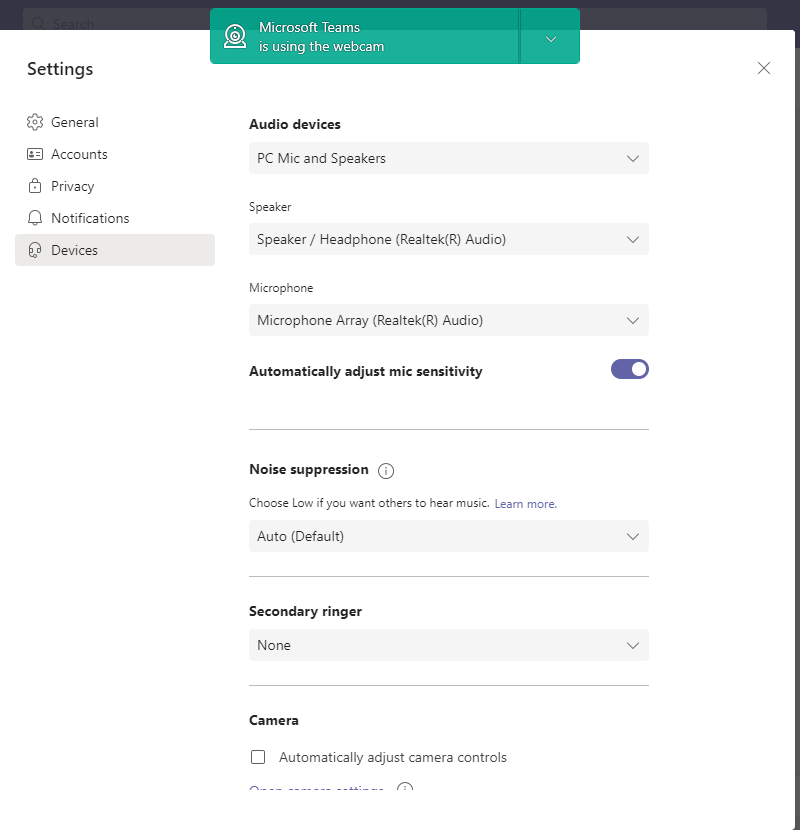
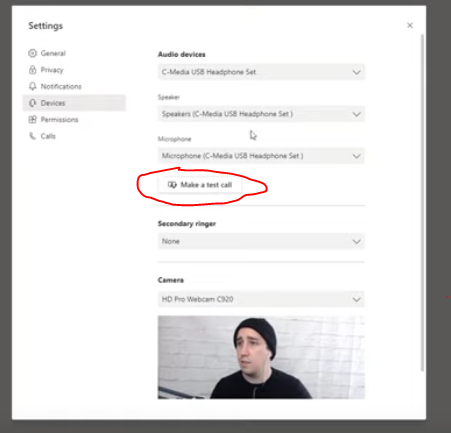
2) going to Settings then Devices then checking for the 'Test call' option - but it's not there!
I've attached what I can see when I got to Devices and what I should be able to see (from a video I watched online)
I'm using Version 1.4.00.22472 (64-bit).
Can anyone please advise?
19 Replies
 Terster09Copper Contributor
Per Robolovsky comments from below...do this
You can test both Camera and Mike in Teams Free Version. To do this you just click Meet and create a meeting in your own name. You then opt to join and it takes you to a screen where you can test both camera and Mike. Clicking 'Join' again, takes you to the larger screen. You can then easily cancel the meeting and use the same process again for further checks. IT_Support247Copper Contributor
Why "Make a Test Call" Not Available in your Teams?
https://youtu.be/B7ksG15BdLA
 underscore1395Copper Contributor
The "make a test call" button will not show up if you're signed up with your personal account. Only "professional" account. Just witnessed it.
Why, only God knows. And Microsoft, presumably.
Thanks as always, Microsoft 👍 👍
- Little_JoeBronze Contributor
Hello,
This version of Teams desktop client should have "Make a test call" feature see below my client with same version on Win10. Did you using the same version running on other OS?
- JMW4567Copper Contributor
Hi Little_Joe thanks for your response.
I've only got one OS, at the moment - Windows 10.....
Do you have any other ideas for how to fix the problem, please?
Thanks
- Little_JoeBronze ContributorHello,
Suggest you uninstall the current version of Teams client and download the latest one from below link:
https://www.microsoft.com/en-us/microsoft-teams/download-app