Forum Discussion

Teams/Sharepoint member sync issue
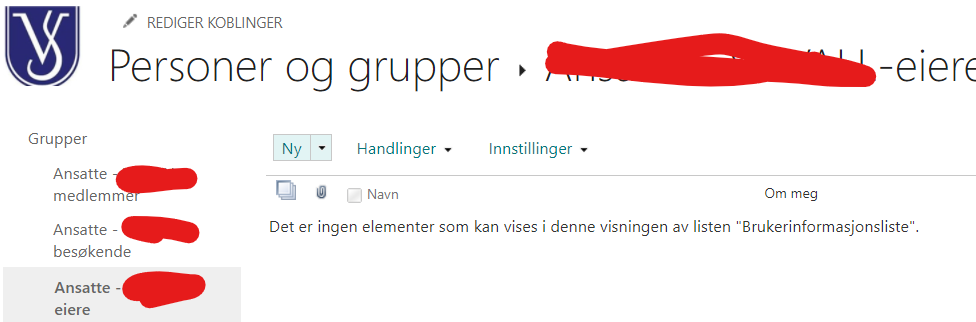
Hi. I have a Team with 90 members. When I access the sharepoint site, the members do not get access to the file structure. I have checked that they are all members also in the sharepoint area (not deleted by accident), and they have limited access /read only. Still they can't access files from Teams or Sharepoint. When I check the advanced settings, the users section is empty... (see picture). If I manually add one of the members, he will get access, but what has happened to the rest?
5 Replies
- EnricoBeyerBrass ContributorDid you grant access on the Site Collection level or document library level? Normally, when you change it on document library level it will be the same on channel level (folder under the library). All members are normally in the member area. The area in your picture is the Owner area.
All members are members of the M365 group. So if you want to grant access on a different way you should add the manually. hakon50Copper Contributor
EnricoBeyer Thanks for reply. I'm granting access in Teams. I thought that would grant access to everyting I do in sharepoint. There are 94 members on site level, if I press members and advanced level (see file Sharepoint access) I get deeper into the system. In this setup (sharepoint access 2) I may make further restrictions, but when I press the members listing, it's empty - there is no office 365 group defined in it (in my last post I showed the owners section, but it is just as empty in the members section).
- EnricoBeyerBrass ContributorThe yellow box shows me that the permission is not the standard permission within this library. So you have to check that. Normally there is an information: "This library inherits permissions from its parent."
You can invite users as you want but if the permission on library level is not correct nobody gget access to it. . So you have to check the library setting on top level and add there the group as member or visitor. All channels/folder inherit from top level.
I assume you created the team site first and then the teams team?