Forum Discussion

Teams/Sharepoint member sync issue

All members are members of the M365 group. So if you want to grant access on a different way you should add the manually.
 hakon50Apr 13, 2021Copper Contributor
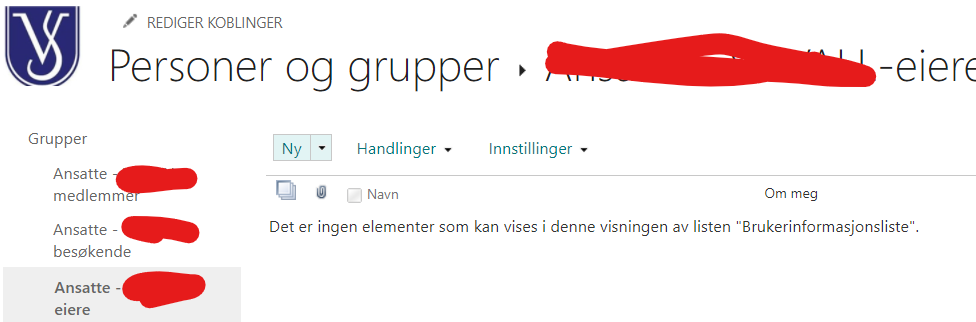
EnricoBeyer Thanks for reply. I'm granting access in Teams. I thought that would grant access to everyting I do in sharepoint. There are 94 members on site level, if I press members and advanced level (see file Sharepoint access) I get deeper into the system. In this setup (sharepoint access 2) I may make further restrictions, but when I press the members listing, it's empty - there is no office 365 group defined in it (in my last post I showed the owners section, but it is just as empty in the members section).
- EnricoBeyerApr 16, 2021Brass ContributorThe yellow box shows me that the permission is not the standard permission within this library. So you have to check that. Normally there is an information: "This library inherits permissions from its parent."
You can invite users as you want but if the permission on library level is not correct nobody gget access to it. . So you have to check the library setting on top level and add there the group as member or visitor. All channels/folder inherit from top level.
I assume you created the team site first and then the teams team?- hakon50Apr 20, 2021Copper Contributor
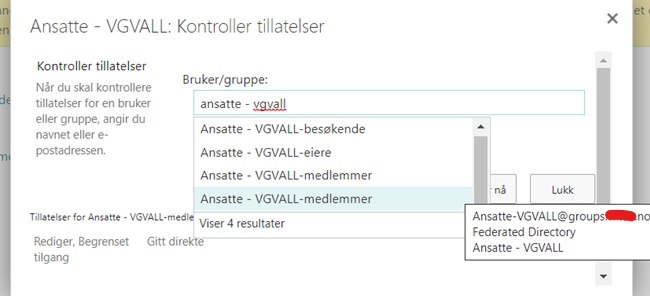
EnricoBeyer Thanx again. I have discovered something interesting. If I check the access permissions I have TWO registered groups named members. One looks like the original group since when I point the cursor at the name, the same name popps up (ansatte - vgval - medlemmer), whereas the identical group below genereates an email adress: groups.xxx.no. The latter group has no permissons and the former the settings that belong to the parent level (read, contribute) Still how can I access these two groups and delete the malfunctioning one?