Forum Discussion

Teams/Sharepoint member sync issue
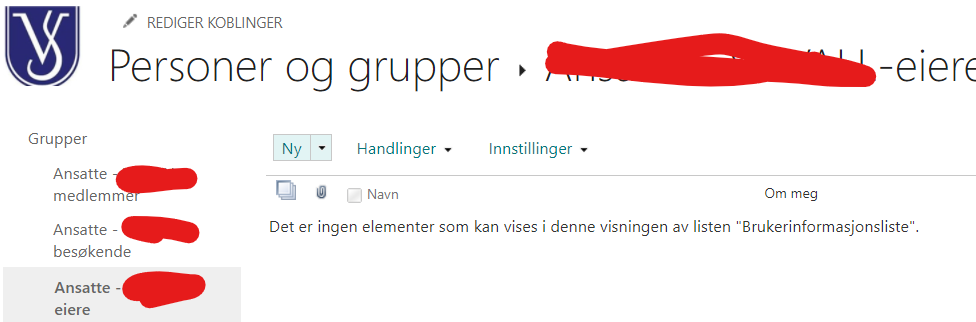

EnricoBeyer Thanks for reply. I'm granting access in Teams. I thought that would grant access to everyting I do in sharepoint. There are 94 members on site level, if I press members and advanced level (see file Sharepoint access) I get deeper into the system. In this setup (sharepoint access 2) I may make further restrictions, but when I press the members listing, it's empty - there is no office 365 group defined in it (in my last post I showed the owners section, but it is just as empty in the members section).


You can invite users as you want but if the permission on library level is not correct nobody gget access to it. . So you have to check the library setting on top level and add there the group as member or visitor. All channels/folder inherit from top level.
I assume you created the team site first and then the teams team?
- hakon50Apr 20, 2021Copper Contributor
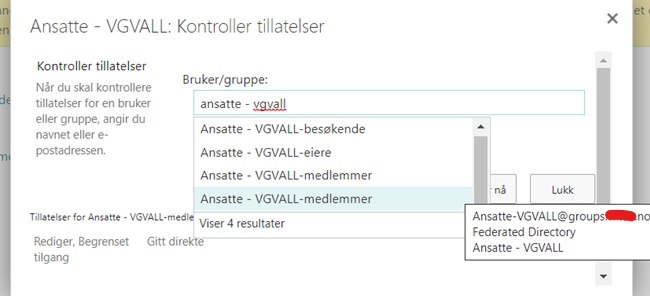
EnricoBeyer Thanx again. I have discovered something interesting. If I check the access permissions I have TWO registered groups named members. One looks like the original group since when I point the cursor at the name, the same name popps up (ansatte - vgval - medlemmer), whereas the identical group below genereates an email adress: groups.xxx.no. The latter group has no permissons and the former the settings that belong to the parent level (read, contribute) Still how can I access these two groups and delete the malfunctioning one?
- hakon50Apr 20, 2021Copper ContributorOK. I just discovered that I could add the unintelligible account name in the members group and then the members seem to be getting their access back. Seems to have been deleted at some point. All members groups seem to have two entries, one with a group e-mail address and one with a long string called account