Forum Discussion

MTSBob
Dec 13, 2021Steel Contributor
Teams Admin Center - Call Timeline
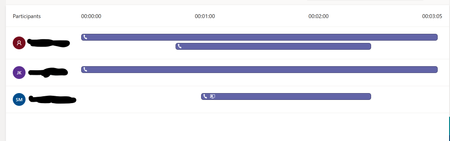
In the Teams admin center, there's a new (to me) "Timeline" view of calls. Does anyone know how to interpret these diagrams? Is this Timeline view documented anywhere (couldn't locate anything). ...

Dec 14, 2021
No documentation for this AFAIK. Just click on "Participant details" box to the right and you'll see the same information but in another format.

Dec 14, 2021
A simple search in Google can return some interesting results:
- https://techcommunity.microsoft.com/t5/microsoft-teams-public-preview/now-in-teams-admin-center-preview-real-time-telemetry-for/m-p/2800175
- https://docs.microsoft.com/en-us/microsoftteams/use-real-time-telemetry-to-troubleshoot-poor-meeting-quality
- https://techcommunity.microsoft.com/t5/microsoft-teams-public-preview/now-in-teams-admin-center-preview-real-time-telemetry-for/m-p/2800175
- https://docs.microsoft.com/en-us/microsoftteams/use-real-time-telemetry-to-troubleshoot-poor-meeting-quality
- MTSBobDec 14, 2021Steel ContributorI'm not sure that what I sent a screen shot of is the same as RT telemetry. It appears to be something different called "Call Timeline" but thanks for trying.
- Dec 14, 2021I hear you, and you're not the first one asking about that particular timeline either. But as previously mentioned, just look at the other box instead with the details in plain text instead and you'll get the picture. Cheers!
- MTSBobDec 14, 2021Steel ContributorBut it doesn't. I don't know how to interpret either view. For example, in the picture I show, a second line starts for the first participant at about 50 seconds into the call. What is that? Answering a Call Queue? The participant view doesn't shed any light. I'm sure it is an attempt to depict the pathway an incoming call took through the attendant/call queue, being put on hold, being transferred, being picked back up, etc...but it's entirely unclear.
- Dec 14, 2021Added 4 days ago 😄
