Forum Discussion

Mr_Radar
Jan 05, 2022Brass Contributor
Cannot hide gallery in "focus on content" or "full screen" mode
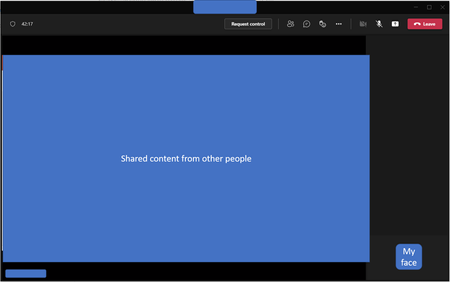
Hi There, Previously, when I selected "focus on content" on Teams, the gallery would be hidden. Recently, I reinstalled my laptop and found out that after "focus on content" is select, all the ot...
- Jan 14, 2022
We are sorry to hear that you have experienced this issue with focus mode in meetings. The feature team is aware of the issue and has an internal fix in testing. We'll keep you posted as soon as the fix is rolling out.
Update: Fix is now rolling out to production.


jomigo
Jan 28, 2022Copper Contributor
From the additional feedback everyone is providing I would agree, probably dependent on which build your IT department has deployed.
Still sounds like though regardless of build, Microsoft is still missing the message that a true full screen is needed (that has no black bars/space anywhere on the screen with a hover menu)
Still sounds like though regardless of build, Microsoft is still missing the message that a true full screen is needed (that has no black bars/space anywhere on the screen with a hover menu)

NickD_CA
Jan 28, 2022Brass Contributor
The issue has been fixed now for me now in version 1.4.00.35564 (64-bit). It was last updated on 1/25/2022.
I had to manually check for updated in Teams today to get this version (wasn't automatic yet).
I had to manually check for updated in Teams today to get this version (wasn't automatic yet).
 TheMivocJan 29, 2022Copper Contributor
That is weird... I also got the update for 1.4.00.35564 (Desktop version, on windows 10) a few days ago, but the issue is not fixed. Focus is still displaying the "empty gallery" black bar on the right side.
EDIT: Today on 31.01, focus is working again as expected. Interestingly Teams version didn't change and it still shows last updated on 24.01, although behaviour changed completely from 29. till 31...