Forum Discussion

Block File Sharing in Teams
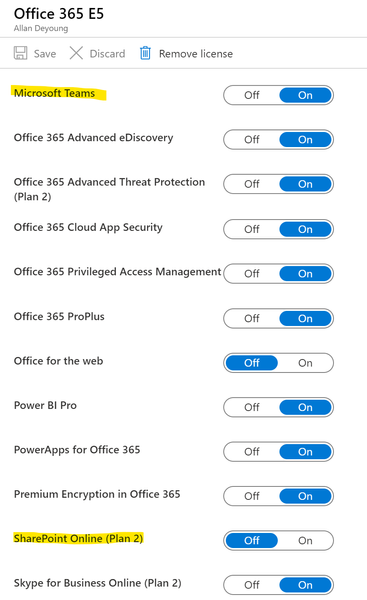
- Feb 06, 2020Hi,
As referred to in the previous link you can control external sharing on SharePoint and OneDrive at a tenant level or at a site level (with permissions), or you can apply Data Loss Prevention policies on content within SharePoint/OneDrive from the Office 365 Security and Compliance Centre
Here are the links
https://docs.microsoft.com/en-us/sharepoint/turn-external-sharing-on-or-off
https://docs.microsoft.com/en-us/microsoft-365/compliance/data-loss-prevention-policies
Best, Chris


No, I don't think that is possible. If you disable OneDrive for users Teams will use OneDrive for file sharing in chats anyway. If you disable Sharepoint for users, Teams will use Sharepoint anyway for sharing in Channels.
If you disable Team creation for users and don't create any Teams and don't create any Teams for them, they won't be able to create Teams. And if you disable Chat they won't be able to chat and share files there. But then I don't see why you want to use Teams.
Why do you want to stop users from collaborating with files?
 Tony_from_Centrus740Apr 03, 2020Copper ContributorBecause of DLP (Data Loss Prevention) concerns. Inside user could share sensitive files with outside people as a means to get data out of the company and avoid emailing or other means. Our systems have to be locked down to keep information inside. We have rules and security guidance implied by certain contracts that we have to follow. For instance PC are blocked from using removable media (USB and CDROM) but we also see the benefit of having the option to chat and do meetings with teams.
 JuliaWuFeb 06, 2020Former Employee
To prevent data loss in the organization.
 AnqB0VVRJMzsO6zVDec 08, 2021Iron Contributordata loss is a complicated thing, all the answers here is the way to stop share, they can't prevent loss.
if you are an engineer, yes, do these things because it's a job
if you are a manger or want to RCA, classify data, let people know how and why. these functions in machine is the last thing you need as tips.- Dec 18, 2021Thanks, the question raised was on blocking sharing so I would expect solutions on blocking sharing, not data loss. If you want to stop data loss on the device, use endpoint DLP, WIP or app protection policies, or even better, transition to AVD/Windows 365 and remove the hardware out of the question, nothing will be able to be copied onto the device connected to the session.
- LinusCansbyFeb 06, 2020MVP
I would say it is better to use the data loss prevention and disable external sharing (read the links from Chris) instead of disabling file sharing. File sharing and working with files together in Teams is a big part of Teams.
- Feb 06, 2020Hi,
As referred to in the previous link you can control external sharing on SharePoint and OneDrive at a tenant level or at a site level (with permissions), or you can apply Data Loss Prevention policies on content within SharePoint/OneDrive from the Office 365 Security and Compliance Centre
Here are the links
https://docs.microsoft.com/en-us/sharepoint/turn-external-sharing-on-or-off
https://docs.microsoft.com/en-us/microsoft-365/compliance/data-loss-prevention-policies
Best, Chris