Forum Widgets
Latest Discussions
Surface Laptop 2 Keyboard Issues (Hid Mini Driver)
Upon imaging a Surface Laptop 2 with our basic image from the older Surface laptop model the Surface Hid Mini Driver driver fails to power and thus the keyboard doesn't work. if I revert back to 03/27/2017 driver it works fine... but then the laptop automatically updates itself to the latest version that brakes again. I have blocked the update in WSUS. Is anybody aware of a fix for the latest driver? Does the PC somehow think its a Surface Laptop 1st gen and somehow downloading the incorrect driver possibly? I also downloaded the latest firmware/driver package from MS and tried that version and it also doesn't work. Seems to be the same exact version that gets downloaded from Windows Update.SolvedWC_KStillJan 11, 2021Brass Contributor73KViews0likes25Comments
Surface Laptop 5 not recognizing USB A or USB C ports - have tried everything
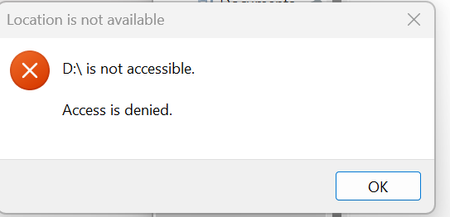
Brand new Surface Laptop 5 - Brand new Windows 10 - upgraded to Windows 11 - ran all software, OS and firmware updates, multiple times. Also disabled/re-enabled all USB options in Device Manager, but nothing works. I need to set this laptop up for work, but I don't know what to do next. Please help. I keep getting this message. I have verified that this USB works on other PCs/laptops.Maria-MullinSep 14, 2023Copper Contributor1.2KViews0likes5Comments
Surface Laptop Studio IT Pro Drivers?
Is there an ETA to when the driver pack for the Surface Laptop Studio will be available?Jeff HustonOct 11, 2021Copper Contributor2.5KViews0likes5CommentsMS Surface keyboard issue
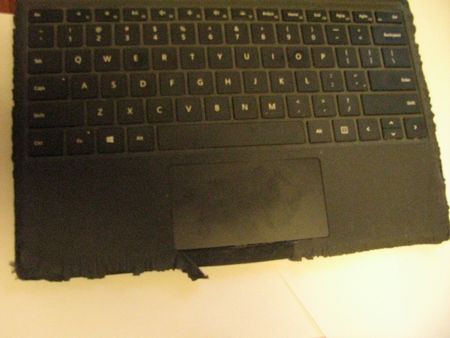
Hello, I have a Surface Pro with a detachable keyboard. It works fine; however, the keyboard covering is peeling and flaring. Is this normal when the keyboard starts to age? I am including a picture, hoping what I describe is noticeable, Thanks! SagaSagaV9Sep 25, 2025Copper Contributor191Views1like4Comments
Surface Latop Studio 1964 i7 replacement fan
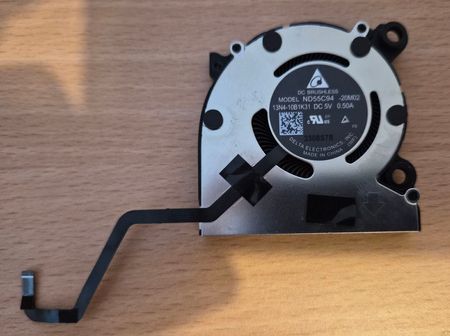
I have a Surface Latop Studio 1964 i7 and need to obtain a replacement right-hand fan (model: ND55C94 20M02). I'm baed in the UK and have done endless googling without success. Can some kind person point me towards a supplier of a suitable fan? Many thanks in advance.SolvedDesCallaghanAug 20, 2025Copper Contributor737Views0likes4CommentsSurface Laptop 7 ARM64 – KB5121003 breaks Teams and New Outlook
We are seeing a repeatable issue on a Microsoft Surface Laptop, 7th Edition (ARM64/Snapdragon) running Windows 11 Enterprise 25H2. After installing KB5121003, both Microsoft Teams (new) and New Outlook for Windows stop working. They either fail to launch or close immediately. Classic Outlook, Word, Excel, and other Win32 applications continue to work normally. This machine had recently been factory reset and was working properly for several days before KB5121003 was installed. During troubleshooting, I found the following: Microsoft.OutlookForWindows reported Status: DependencyIssue AppModel Runtime logged 0x80073CFC The Outlook failure specifically referenced GetPackageToken Windows reported an error while checking the application's machine-level package status New Outlook's package showed PackageStatus = 64 (0x40) Teams AppModel logs showed the application process/container being created successfully, but the process terminated almost immediately Teams also showed a previous package status of 0x40 before AppModel reset it to 0x0 As a test, I uninstalled KB5121003. Teams immediately started working again. This is especially concerning because we experienced an almost identical issue earlier this year after installing KB5094126 on the same Surface. At that time, Teams and New Outlook also stopped functioning, and removing the update restored them. During that incident, MicrosoftWindows.Client.CBS also reported a DependencyIssue. Since the machine was factory reset between these incidents, this does not appear to be the result of an old or heavily modified Windows installation. The pattern we have now seen twice is: Surface is working normally Windows cumulative update installs New Teams and New Outlook stop launching AppX/MSIX package-state errors appear The cumulative update is removed The affected applications work again Has anyone else seen this behavior on Surface Laptop 7 / Snapdragon / ARM64 devices? I am particularly interested in whether anyone has seen: KB5121003 causing Teams or New Outlook failures 0x80073CFC GetPackageToken errors DependencyIssue on Microsoft.OutlookForWindows PackageStatus 0x40 Similar recurring AppX/MSIX issues after cumulative Windows updates At this point, I am concerned there may be a Windows 11 ARM64 servicing or AppModel/MSIX compatibility issue affecting these applications. I have also opened a Microsoft support case because repeatedly uninstalling cumulative security updates is obviously not a sustainable solution.Brian-BBCMAug 17, 2026Copper Contributor353Views2likes3CommentsBattery Report Summary – Surface Laptop 7 (Snapdragon X Elite)
Report Date: November 27, 2025 Device: Microsoft Surface Laptop 7, Snapdragon X Elite Charge Cycles: 9 1. Key Data Battery Name: SurfaceBattery Manufacturer: SWD Design Capacity: 52,330 mWh Full Charge Capacity: 53,850 mWh Cycle Count: 9 2. Usage Observations Despite the battery being new (only 9 cycles), the report shows abnormally fast discharge. Examples from the report: On November 25, the battery dropped from 30% (16,340 mWh) to 23% (12,520 mWh) in ~20 minutes of use. On November 27, during “connected standby,” the battery fell from 77% (41,200 mWh) to 55% (29,440 mWh) within about one hour. These behaviors are inconsistent with expectations for a new device with full capacity. . Technical Analysis Battery authenticity: The data indicates the battery is original (manufacturer SWD, capacity matches design). Primary issue: The discharge rate is unusually fast and unstable, which is not normal for a battery with so few cycles. Possible causes: Defect in the Battery Management System (BMS). Internal cell imbalance. Firmware/driver issue affecting power management. 4. Conclusion and Request The Surface Laptop 7 is showing abnormal battery behavior despite being new and original. Any idea where this problem comes from? Any solution? Thanks in advance!Tor_SNov 27, 2025Copper Contributor417Views0likes3CommentsOnenote Notebook will not open in new office installation.
Just bought a new Surface Pro 8. Installed Office on it. Now I am trying to read a Onenote notebook that is in one drive but i keep getting an error message everytime I try and open it? This is getting very frustrating because the notebook will open in my other two Surface Laptop devices?TroutyMontrealOct 25, 2021Copper Contributor1.3KViews0likes3CommentsTouchscreen stopped working after firmware update
Hi , SF Laptop 3 13.5 inch touch screen stopped working after a recent firmware update, it does not work in the UEFI BIOS either. Support wants to replace the whole machine and cost me £500! The whole unit is in mint condition and just ran out of warranty a month back. Any advise what to do?gizmoGuruJun 24, 2021Copper Contributor2.3KViews0likes3Comments
Surface Laptop 3 - applications starts up slow and with delay
Problem Description: Every application starts up with a delay of 1-2 seconds. Opening another screen of an running program does initalize instantly though.. Build and Firmware I'm running the 20H2 build 19042.685 and have the Surface Laptop 3 firmware from november 2020 installed (SurfaceLaptop3_Win10_18362_20.101.8577.0) Examples: - Applies to any application, offline tooling such as Draw.io, command prompt - Opening a new tab in Chrome is instantly, but when I go to an URL it tends to take seconds before the page is initialized to actually perform and connect to the designated URL. - Opening Git bash takes 2 seconds and then it takes up to a minute to load its content before I can perform any commands Does anyone have any experience regarding my current state?Ruofan8Dec 23, 2020Copper Contributor1.6KViews0likes3Comments

Tags
- Surface Laptop15 Topics
- community3 Topics
- ARM642 Topics
- Surface Accessories1 Topic
- bluetooth1 Topic
- aluminum1 Topic
- windows 111 Topic
- Windows Hello1 Topic
- update1 Topic