Forum Widgets
Latest Discussions

Surface Pro 8 Signature Keyboard Defect: Internal bulge at hinge breaks connection
Hi everyone, I am writing to the community to report and seek advice on a connection failure with my Surface Pro 8 Signature Keyboard. While the exterior of the hinge looks mostly normal at a casual glance, there is a distinct abnormality hidden within that strongly suggests a structural defect. The Issue and Diagnosis: Tactile Anomaly: Although difficult to spot visually without close inspection, there is a noticeable internal bulge or swelling that can be clearly felt by touch on the backside of the hinge area. This indicates that internal components, likely the flexible cable, have deteriorated and are pressing outwards from the inside. Angle-Dependent Connection: The keyboard only works when the pen storage flap is opened to a very specific angle. Moving it to use the device or closing the flap causes the connection to drop instantly. My Usage History and Treatment of the Device: I am a university student, and shockingly, this is the second time a Surface Signature Keyboard has failed on me within my 5 years of study. This current keyboard has failed in less than two years since I purchased it. I have treated this premium accessory with the utmost care. I always store and carry my Surface in a soft, padded PC sleeve to protect it from any external stress. It has never been dropped, bent backward forcefully, or exposed to liquid. This failure occurred purely from the inside out, despite my extremely gentle usage. My Demand for Microsoft Support: This tactile internal deformation is a clear sign that this is not a user-inflicted physical damage issue, but rather a severe material or design failure in the hinge mechanism that should not happen in a premium product of this price point. I am extremely disappointed and frustrated. While I know this issue is difficult to capture in a photograph, it is very real to the touch. I am hoping a Microsoft moderator or support agent can review this unique case. My priority is to ask for a replacement as a special exception due to the nature of the failure. If that is absolutely not possible, I would at least expect a significant discount code for a replacement purchase as a necessary relief measure. Has anyone else encountered this same issue? Any advice on how to get Microsoft to investigate this as a manufacturing weakness would be appreciated. Thank you.cowcowuserJul 10, 2026Copper Contributor72Views0likes1Comment
Surface Thunderbolt 4 Dock monitor(s) support
Hi Everyone! I am planning a setup with my Surface Thunderbolt 4 Dock and three monitors: 1x HP M24 23.8 inch webcam monitor (connected using USB-C) 2x HP 524sh 23.8 inch monitors (connected through DP ports DP-> HDMI cables) I want to know if it's possible to run all three monitors simultaneously as I have shown above with my Microsoft Surface Pro 11. Any tips, experiences, and limitations will be appreciated. I am already running the 2x HP 524sh monitors and want to purchase the M24 monitor for my meetings. This is for a Home Office setup!! :)srazalirMar 22, 2026Copper Contributor81Views0likes0Comments
Screen protector for surface pro 11 and slim pen
Hi everyone. I’ve had my surface pro 11 for a few weeks now and have been avoiding using the pen much because I haven’t been able to find a good screen protector. I hand write a lot for work and don’t want any scratches. I got a tempered glass matte screen protector and I can barely write with the slim pen. It’s not great with responsiveness but it’s also really tough to write on. The pen barely moves and just gets stuck. Any suggestions that will allow me to use my slim pen properly but also protect my screen?Kayla123Mar 15, 2026Copper Contributor100Views0likes0Comments
Surface Pro 8 Cover defect
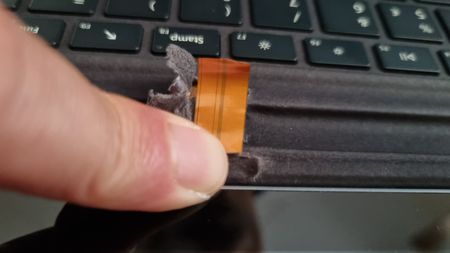
Hello everyone, I’d like to share my experience with the Microsoft keyboard for the 13-inch Surface Pro 8 with pen holder compartment. After a little more than two years of use, the keyboard stopped working. At first, I thought it was a software problem, so (after checking for updates) I followed all the reset and diagnostic procedures recommended on Microsoft’s website, including those suggesting a safe mode restart, up to a full system reset. None of this worked. I then checked on Microsoft’s website to see if it was still under warranty, but unfortunately, the two years had just passed, and the site suggested I send it in for a paid repair... Instead, I decided to look into the issue myself and discovered that the flex cable connecting the keyboard’s connector was cleanly cut right after the pen holder slot, which is made of metal. The cut occurred exactly where the metal base that holds the pen ends, at the point where the keyboard bends (see photo). It is clear that the flex cable has no protective layer to prevent the metal from cutting into it when the keyboard is bent. In my opinion, this is an obvious manufacturing defect that should be covered under warranty. It would be nice if Microsoft gave some acknowledgment in this regard. Best regards, AdamoAdamoLAug 26, 2025Copper Contributor498Views1like1Comment
Laptop Recommendations
I currently have an old MacBook pro 16' from late 2019, it is constantly heating up and crashing. I use my laptop specifically for college and use applications like Excel. Would you recommend the surface pro, or the surface go 3.Are there any key differences?Jennflo5Apr 15, 2025Copper Contributor50Views0likes0CommentsSurface Pen not charging
Surface pen not able to charge. I am using the keyboard to charge my slim pen. Not very sure why but it always show this ⚠ sign and my pen is not able to charge. there is no light shown on the pen as well (the pen is flat alr). tried all the trobleshoot things but not working as well even tho the pen and keyboard are both connected to my device alr.. pls helpppVvFeb 03, 2025Copper Contributor674Views0likes7Comments
Surface Dock 1 firmware update problems
Hi! I own a Surface Pro 6 that has been updated to the latest version of Windows 11 24H2 and I have recently come into possession of a Surface Dock 1. Follow the page at this address: https://learn.microsoft.com/it-it/surface/surface-dock-firmware-update I tried to update the firmware installing the file: Surface_Dock_FwUpdate_1.53.139_Win10_17763_20.075.41193_0_AMD64.msi but the update apparently fails. In fact running the command: Reg query "HKLM\SOFTWARE\Microsoft\Windows NT\CurrentVersion\WUDF\Services\SurfaceDockFwUpdate\Parameters" I get the following result: HKEY_LOCAL_MACHINE\SOFTWARE\Microsoft\Windows NT\CurrentVersion\WUDF\Services\SurfaceDockFwUpdate\Parameters Component10FirmwareUpdateStatus REG_DWORD 0x5 Component10CurrentFwVersion REG_DWORD 0x4ac3970 Component20FirmwareUpdateStatus REG_DWORD 0x5 Component20CurrentFwVersion REG_DWORD 0x49e3d70 Component10OfferFwVersion REG_DWORD 0x4ac3970 Component20OfferFwVersion REG_DWORD 0x4a1d570 Component10FirmwareUpdateStatusRejectReason REG_DWORD 0x0 Component20FirmwareUpdateStatusRejectReason REG_DWORD 0x0 As can be seen, the value of Component10CurrentFwVersion is correct, while that of Component20CurrentFwVersion (which should be 0x4a1d570) is different. In the Event Viewer I read the following entries: Informazioni 11/10/2024 16:00:29 SurfaceDockFwUpdate 2011 Nessuna Informazioni 11/10/2024 16:00:29 SurfaceDockFwUpdate 2012 Nessuna Informazioni 11/10/2024 16:00:29 SurfaceDockFwUpdate 2012 Nessuna Informazioni 11/10/2024 16:00:29 SurfaceDockFwUpdate 2008 Nessuna Informazioni 11/10/2024 16:00:29 SurfaceDockFwUpdate 2007 Nessuna Informazioni 11/10/2024 16:00:29 SurfaceDockFwUpdate 2004 Nessuna Informazioni 11/10/2024 16:00:29 SurfaceDockFwUpdate 2004 Nessuna Informazioni 11/10/2024 16:00:29 SurfaceDockFwUpdate 2001 Nessuna The last entry contains the following detail: Dock firmware end of telemetry. SurfaceDockFwUpdate END dock telemetry hr=0. DriverTelemetry EventCode = 2011. I've already tried all the things mentioned on the page linked at the beginning, but the update never seems to succeed. Does anyone know how to do it?mauriziovaccaOct 11, 2024Copper Contributor329Views0likes0CommentsHow to detach dock hardware on new surface.
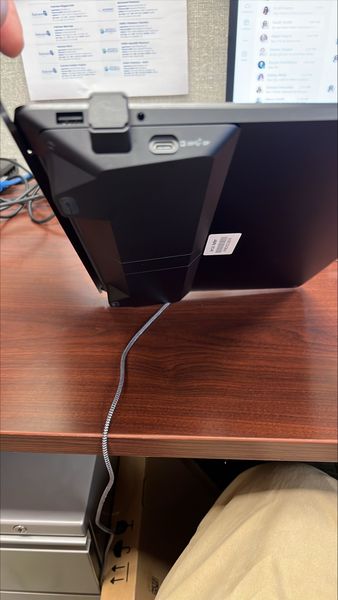
I received a new Surface laptop and it came with what looks like a docking station attached to the bottom. I am strggling to figure out how to detach it. Any tips would be appreciated. It is convenient but it takes away from the overall Thin profile that I bought it for. Does any one even know what it is called or has seen it before? I cannot seem to find anything on line.srautenstrauchOct 10, 2024Copper Contributor140Views0likes0Comments


Tags
- Surface Accessories7 Topics
- Fat Fingers2 Topics
- Keyboards2 Topics
- New Build1 Topic
- Modular Surface Smart Phone1 Topic
- microsoft1 Topic
- usb-c1 Topic
- Surface Book 21 Topic
- headphones1 Topic
- earbuds1 Topic