Forum Widgets
Latest Discussions

Teams Account picker list empty on Welcome screen?
We have a shared computer (conference room), on which people sign in into Teams with "This App only". After the meeting, they sign out. Teams restarts and shows the Welcome screen with the text "Pick an account to continue". Suddenly, this list with saved accounts is now empty. Did something changed in the last update(s) of Teams? If it is an improved security/privacy update, why is the text still shown "pick an account..." if this list remains empty?Josh86Jul 13, 2026Copper Contributor137Views0likes3CommentsClassic Theme - Can't use dark them for meetings
Appearance settings have changed. "Always use dark theme for calls and meetings" no longer works when selecting the "Classic" theme. It does work for "Light" theme. When Classic theme is selected the "Always use..." setting is grayed out. (Light theme title bars are hard to read (extremely poor contrast) so I have been using Classic theme. Dark theme works very well in meetings, but I don't like it for anything else in Teams) Version: 26149.1201.4759.7166RickG2Jun 10, 2026Brass Contributor2KViews7likes1CommentViva Engage Community Notifications
The communities are showing in the teams chat view, which is great! However, why don't notifications appears in the chat view for a new post? That's one big pain point right now before rolling this out company wide. Thoughts? Pending Updates? Workarounds?Munr0eMattMay 21, 2026Copper Contributor75Views0likes1Comment
Viva Engage Communities Integration Not Available
Does anyone know if Engage Communities Teams integration is still rolling out in Public Preview? I know that the GA rollout has been delayed to May. I have some users in Targeted Release and some others with Public Preview turned on, and none of them sees this feature. I've followed the steps in "Admin requirements for Viva Engage experiences in Teams" and "How to Set Viva Engage experiences in Teams" in this https://learn.microsoft.com/en-us/microsoftteams/teams-viva-experiences to no avail.PatrikP1210Apr 07, 2026Copper Contributor116Views0likes1Comment
Remote Access in Pro Portal not working with Public Preview R3.6
When I try to use Remote Access via the Pro Portal, I can connect to the MTR but the image is flashing. I cant seem to have a stable session with the MTR. The screen will go to black for around 5 seconds, then it shows what is on the screen for less then 1 second. I tried it on 2 MTR devices that I have in our labo but the issue remains. When I revert the option for Public Preview back to off, I am able to connect and use Remote Access via the Pro Portal without any issue. We are using MTRoW and have the latest updates.Jeremy-SSep 08, 2025Copper Contributor101Views0likes0CommentsIssue with missing Teams in Chat section after 25227.201.3887.7121
After my upgrade to 25227.201.3887.7121 I can't access teams I am part of. If I restart the client, I see the teams under chat for few hours then they disappear again in a while. Sometimes the top menu flashes and disappears.NimajAug 26, 2025Copper Contributor247Views0likes0Comments
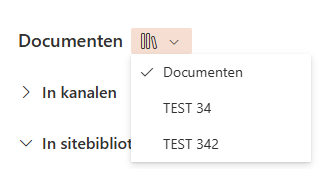
The ''library switcher'' in teams is missing after the newest update
The ''library switcher'' in teams is missing after the newest update: current version 25153.1010.3727.5483. I did some troubleshooting, but I can't roll back the teams version to try. Nothing worked on this version atleast to get the library switcher back.KeepvogelJun 26, 2025Copper Contributor116Views0likes0CommentsCall Transfer: Search not showing Global Contacts or Speed Dials
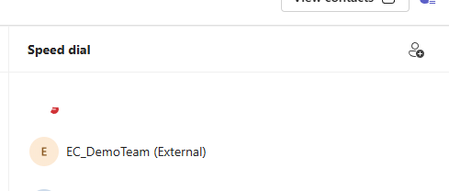
Anyone else experiencing an issue with the list of possible recipients for a call transfer? (Teams v 25153.1010.3727.5483) The search list for call transfer only shows tenant users, it doesn't include any of the global contacts, individual's contacts, or Speed Dials. Sample speed dial entry: Active call transfer window:Kittin306Jun 19, 2025Copper Contributor719Views1like7CommentsPresence on transfer consult
WE're currently on 25153.1005.3719.1487 and have just noticed when you try to consult before transfer, when you choose the user to consult with, their image has lost the presence indicator. Allways used to be there, so you didn't try consulting a user who wasn't available!Huw_W1Jun 13, 2025Tin Contributor131Views0likes0Comments



Tags
- preview133 Topics
- teams32 Topics
- microsoft teams23 Topics
- public preview17 Topics
- Shared Channels9 Topics
- New Teams9 Topics
- Shared Channel7 Topics
- Teams Preview6 Topics
- BUG6 Topics
- New Teams client5 Topics