Forum Widgets
Latest Discussions

Teams Account picker list empty on Welcome screen?
We have a shared computer (conference room), on which people sign in into Teams with "This App only". After the meeting, they sign out. Teams restarts and shows the Welcome screen with the text "Pick an account to continue". Suddenly, this list with saved accounts is now empty. Did something changed in the last update(s) of Teams? If it is an improved security/privacy update, why is the text still shown "pick an account..." if this list remains empty?Josh86Jul 22, 2026Copper Contributor195Views0likes3Comments
New Teams: New meetings/chats opening on wrong screen
With the new Teams version when I join a meeting the window opens on the wrong screen. Formerly the window opened on the same screen as the main Teams window. Now it opens on the main screen. Since I am running an RDP session on the main screen and the window opens in the background of it, I don't see the window. That makes the new version unusable to me. The same thing happens to chats when I start a chat out of the new "Persons" app (actually Personen since I am using the German version) that seems to have replaced the old Contacts in the Chat app. That happens even though I have configured all chat windows to open in the main window. Please fix before you force this on everyone. (I hope someone from Microsoft is listening here. The "Share your feedback" button unfortunately doesn't work, it links to a site that says "Service unavailable".)WolfgangKiendlJul 16, 2026Brass Contributor6.9KViews8likes17CommentsClassic Theme - Can't use dark them for meetings
Appearance settings have changed. "Always use dark theme for calls and meetings" no longer works when selecting the "Classic" theme. It does work for "Light" theme. When Classic theme is selected the "Always use..." setting is grayed out. (Light theme title bars are hard to read (extremely poor contrast) so I have been using Classic theme. Dark theme works very well in meetings, but I don't like it for anything else in Teams) Version: 26149.1201.4759.7166RickG2Jun 12, 2026Brass Contributor2.1KViews7likes1CommentViva Engage Community Notifications
The communities are showing in the teams chat view, which is great! However, why don't notifications appears in the chat view for a new post? That's one big pain point right now before rolling this out company wide. Thoughts? Pending Updates? Workarounds?Munr0eMattJun 11, 2026Copper Contributor151Views0likes1Comment
Viva Engage Communities Integration Not Available
Does anyone know if Engage Communities Teams integration is still rolling out in Public Preview? I know that the GA rollout has been delayed to May. I have some users in Targeted Release and some others with Public Preview turned on, and none of them sees this feature. I've followed the steps in "Admin requirements for Viva Engage experiences in Teams" and "How to Set Viva Engage experiences in Teams" in this https://learn.microsoft.com/en-us/microsoftteams/teams-viva-experiences to no avail.PatrikP1210Apr 07, 2026Copper Contributor148Views0likes1CommentPreview exited, now GA: Out of Office Scheduling
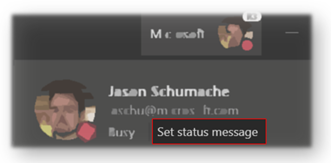
Description Set up a message to let others know you're on vacation or not available to reply. Your out of office status will also sync with your Outlook calendar, your presence and contact card information. Flighting status Rolling out this week on Desktop and Web. How to enable Two ways to access the Out of Office feature 1) Through "Profile" Click profile then Set status message Click Schedule out of office 2) Through "Settings" Click Settings General -> Out of Office -> Schedule Now, from within the Scheduler Include an Out of Office message Note – Text is required to be compatible with Outlook scheduling. Click Save Options Send replies outside my organization Include text to auto reply Send replies only during a time period Pick dates and times to begin and end the Out of office status message and presence state. Outlook You will be able to see your changes in Outlook as well as update them there. How to Disable Change the Turn on automatic reply setting in Teams radio button to off and save Change the Send automatic replies setting in Outlook to off and save Note: If you need information about enabling the public preview itself, see “Enable the public preview for Teams” below. Microsoft 365 workloads and dependencies Product, workload, or area Dependency (Yes/No) If yes, version requirements and other dependencies Exchange No Sharepoint, files No Skype for Business No Outlook add-in No Azure AD No OneDrive No Office No Supported clients and platforms Windows 10 macOS iOS Android Linux Chrome Firefox Safari Edge Internet Explorer Yes Yes - - Yes Yes Yes Yes Yes - Known issues None Known limitations As mentioned in the guide an Out of Office Message needs to be included for Teams to save the configuration and set your presence to Out of Office. Enable your Teams client for the public preview First, IT admins need to set an update policy that turns on Show preview features. Learn how at Public preview in Microsoft Teams - Microsoft Teams | Microsoft Docs. Users then choose to join the public preview individually. See Get early access to new Teams features - Office Support (microsoft.com) for instructions. Summary of public preview features For a history of features in the Office and Teams public previews, see Release Notes Current Channel (Preview) - Office release notes | Microsoft Docs. Send us your feedback Got feedback on features in the public preview or other areas of Teams? Let us know straight from Teams via Help > Give feedback. Thank you, Preview Team Jason Schumaker Quality & Customer Obsession, Microsoft TeamsKaushal-MehtaDec 17, 2025Microsoft7.6KViews4likes14CommentsNow in public preview: Automatic lowering of a user's Raised Hand after speaking
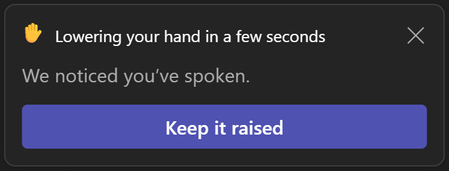
Description To reduce the number of stale raised hands in meetings, we now suggest users to lower their raised hand after we detect they spoke in the meeting. If users don't take any action on the suggestion notification, we'll automatically lower their hand. This should ensure smoother meeting facilitation for organizers and presenters. Flighting status Available to everyone in Public Preview channel. How to enable Users who raise their hand in a Teams meeting and speak in the meeting will see a notification informing them that their hand will automatically be lowered soon. They will be able to choose to keep their hand raised. If the user doesn't take action on the notification, their hand will automatically lower. This should ensure smoother meeting facilitation for organizers and presenters. Note 1: If you need information about enabling the public preview itself, see “Enable the public preview for Teams” below. Note 2: To be able to use this feature, user needs to be in Public Preview. Other meeting participants are not required to be in Public Preview. Supported clients and platforms Windows macOS iOS Android Linux Google Chrome Firefox Safari Microsoft Edge Yes Yes Known issues None Known limitations Users will not see the notification and their hand will not be automatically lowered if Noise suppression is turned off in their Teams devices settings. Please note that Noise suppression is automatically turned off when your device has high CPU usage in order to preserve resources. Enable your Teams client for the public preview First, IT admins need to set an update policy that turns on Show preview features. Learn how at Public preview in Microsoft Teams - Microsoft Teams | Microsoft Docs. Users then choose to join the public preview individually. Learn how at Get early access to new Teams features - Office Support (microsoft.com) Send us your feedback Got feedback on features in the public preview or other areas of Teams? Let us know straight from Teams via Help > Give feedback. This is on the bottom left of your client. Thank you, Preview Team Quality & Customer Obsession, Microsoft TeamsJan_SteberlNov 20, 2025Former Employee26KViews6likes40CommentsHide Team options missing
Just tested the preview version of Teams since a lot of key users are struggling with the new interface. I noticed for myself that the "Hide Team" option is missing and that my Teams that were hidden are not hidden anymore. We are an organisation where users are a member of a lot of Teams and a key option for our organisation is to hide Teams that are less important so that your Teams where you are working in on a daily basis are always visible. Is this coming back or do you do this differently now?MartijnvtNov 06, 2025Tin Contributor3.3KViews9likes7Comments
Remote Access in Pro Portal not working with Public Preview R3.6
When I try to use Remote Access via the Pro Portal, I can connect to the MTR but the image is flashing. I cant seem to have a stable session with the MTR. The screen will go to black for around 5 seconds, then it shows what is on the screen for less then 1 second. I tried it on 2 MTR devices that I have in our labo but the issue remains. When I revert the option for Public Preview back to off, I am able to connect and use Remote Access via the Pro Portal without any issue. We are using MTRoW and have the latest updates.Jeremy-SSep 08, 2025Copper Contributor114Views0likes0Comments



Tags
- preview133 Topics
- teams32 Topics
- microsoft teams23 Topics
- public preview17 Topics
- Shared Channels9 Topics
- New Teams9 Topics
- Shared Channel7 Topics
- Teams Preview6 Topics
- BUG6 Topics
- New Teams client5 Topics