Recent Discussions

INTUNE: Problems with the Google address (Managed Google Play)
Hello everyone, Ever since we added our email address under “Managed Google Play” (in the Intune Admin Center), we can no longer use that address to sign in to Google, Google Docs, Google Drive, or similar services... Is this normal? - If not, what settings do I need to adjust, and where, to get it working again? The error message looks something like this: "Error message: We’re sorry, but you don’t have access to Google Docs. Please log in to your Admin Console to enable it" Thanks and best regards Chris4Views0likes0CommentsCompliance Policies - Device Health Attestation failing (Syncml 404 / 0x87d10194)
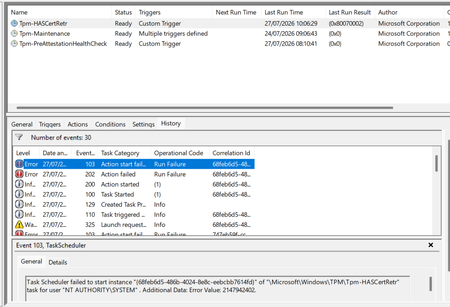
Windows 11 devices are non compliant in Intune against BitLocker, Secure Boot and Code Integrity, all three returning the Syncml 404 error. The settings are genuinely enabled. The real cause is the device can't retrieve a Device Health Attestation certificate, so the health cert status sits at 65535 and the retrieval task fails. What I've found: the TPM is healthy (present, ready, attestation capable, firmware not vulnerable), and the endorsement key cert is valid, chaining to Nuvoton TPM Root CA 2111. But the EK chain check comes back invalid with zero intermediate certificates, because the Nuvoton key is signed straight off the root with no intermediate for the chain walk. A Hyper-V VM on the same build and tenant works fine, but only because it has no manufacturer EK cert, so it skips that chain check entirely. What I've tried: patching TPM firmware (ruled out the older ADV190024 issue), refreshing the local trusted TPM certificate store, and rerunning the retrieval task. None fixed it. This matches Rudy Ooms' well known call4cloud writeup, where he concluded it's a service side trust problem that can't be fixed from the device. It's now appearing on brand new Dell hardware too, so I can't just exclude the old kit and move on. Is this a known issue with the Nuvoton root chain, and is there a supported fix or position from Microsoft? Screenshots below showing the compliance errors and the failure.188Views0likes4Comments
Intune Install Printer Driver
I am trying to install a Printer driver via a Win32app using System to install. Have set configuration as below: Its a simple powershell script which runs perfectly when installing on a device as an administrator. $printdriver = "PCL6 V4 Driver for Universal Print" C:\Windows\system32\pnputil.exe /add-driver "r4600.inf" /install Add-PrinterDriver -name $printdriver However installing it via Intune I get an event id 215 with failed error code 0x0 HRESULT 0x80070705 on the device. Any help appreciated.211Views1like3Comments
Bitlocker key requested on the boot, but I don’t have any key
My laptop (Windows 10, version 22H2, build 19045), that I have been using more than 6 years already, suddenly started asking for the BitLocker recovery key at startup, which is blocking access to the system entirely. What I've already checked/tried: - Checked account.microsoft.com/devices/recoverykey while signed in with my Microsoft account, no key appears for this device. - Contacted Microsoft Support directly, they said they can no longer assist with Windows 10 issues and suggested posting here instead. Is there any way to recover access to this drive?90Views0likes3Comments
Advanced Microsoft Intune capabilities - Coming to Education A5?
The Advanced Microsoft Intune capabilities (what was the Intune Suite has now arrived for E5 customers (and some of the features to E3 customers. Can anyone give any clarity as to if/when these features will be coming to A5 customers? I can see we seem to have some of the features (Remote Help, Endpoint Privilege Management) but could really do with knowing if the rest of the features are coming. Can't seem to find any information online about it.41Views0likes2CommentsStarting Wait for ODJ Blob
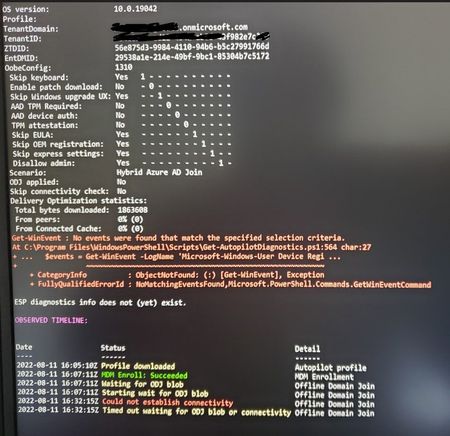
This is the status where I am having problems joining the device to Hybrid Autopilot domain. Not sure whether this is a connectivity issue between the laptop to the INTUNE connector? I can ping the domain controller from Intune connector and no problem.Solved43KViews0likes43Comments
problem with Auto-Enrollment for windows devices in Hybrid enviroument
Hi everyone, I am in the process of setting up Intune for automatic enrollment on Windows devices within our hybrid environment. Here are the steps I have taken so far: 1. Configured Entra ID sync to synchronize a selected OU with Entra ID. 2. In the Intune Portal, set the Automatic enrollment MDM user scope to "All." 3. Created a GPO linked to that OU, which includes the settings to "register domain-joined computers as devices" and "Enabled automatic MDM enrollment using default Azure credentials" based on User Credential. 4. Prepared a clean computer, free of any software, and joined it to the Domain (on-prem server). 5. Moved the computer to the appropriate OU for syncing with Entra ID. 6. At this point, I can see the computer listed in the Entra ID portal under devices as Entra Hybrid joined 7. A regular domain user with a Business Premium license logged into the computer.( Only sign-in to windows, we don't have office app or add this account to windows.) 8. I ran GPupdate /force and rebooted the computer several times, but it still does not appear in the Intune portal. 9.Windows client is windows 11 Pro version 25H2 OS build 26200.8893 Dsregcmd output shows: ✅ Device is domain joined ✅ Device is synced to Entra ID ✅ Device authentication is working ✅ User has a valid PRT (Primary Refresh Token) ✅ Hybrid Join is successful On second test computer2, I installed office desktop app, then sign-in with test user to activate it. After few minutes the computer appeared on Intune portal. but on test computer 1 without user's interaction, it doesn't show up. would you be able to help me with this? Does it really need user to attach his/her account manually to "work or school account" or sing-in to any office desktop apps?77Views0likes5CommentsAndroid Multi-App Kiosk. (Required apps not installing)
Hi I have an issue on my devices, I set Microsoft Teams as a required app for all devices (filter for corporate android devices) But It get's stuck, Saying installing for hours, nothing happens, this is for all apps I set as required except applications as Managed Home Screen , Authenticator, etc. But extra apps all have this issue. If I manually press Cancel in Google Play store and the press install again, it installs instantly. But without me manually doing that the apps are stick at Installing. Device install status in Intune. The application failed to install, possibly because of insufficient storage or an unreliable network connection. The installation will be retried automatically. (0xC7D24FBA). In Google Play you just see the app saying Installing. Now this is for all apps I add. Running Android 11 Samsung tablet, managed dedicated multi app kiosk.2.9KViews0likes2Comments
AD Naming Conventions vs Intune/AutoPilot Conventions
In Active Directory we use a 20 or so character naming convention of all of our PC's, basically it is the location, cart, and serial number, and this works well for us as we are a school district, and it allows us to locate the pc's quickly. However, we are moving to Intune and eventually AutoPilot. Currently AutoPilot has a 15-character limitation. And to the best of my knowledge that cannot be changed or extended, correct? But here is my question, as we want to move to Autopilot for deploying our new machines, can a Group Tag or other automated device be used to allow me to use a longer name, or at least a way of filtering and finding a name more efficiently in Intune? And also, from a reporting standpoint to create reports of School 3's computer inventory vs schools 2's inventory? As I don't believe this is possible, we will continue to build pc's using Kace or SCCM and then import them into Intune and manage them as a hybrid machine, rather than as a Joined machine. Our ultimate goal is to have them all be Joined, and eliminate AD, but we have not figured out a way of doing this yet. Would switching from standard Intune to Intune for Education benefit us in any way for this situation?2.9KViews0likes2Comments
iOS Enrollment and Conditional Access
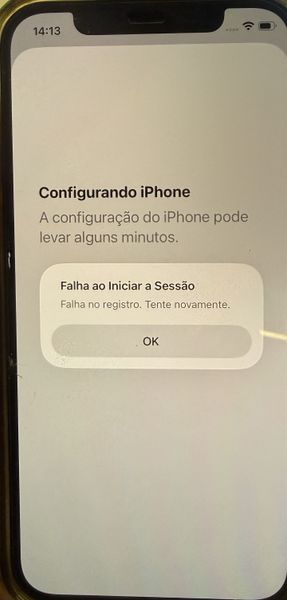
Hello everyone, I need some help! We are configuring Intune to allow BYOD on iOS devices using the Account Driven User Enrollment method. In this scenario, the user enrolls the device by following the path: Settings > General > VPN & Device Management > Sign in to your Work or School Account The enrollment process was working correctly until we configured a Conditional Access policy to ensure that only BYOD-managed devices can access company resources. In other words, only devices that have successfully completed enrollment and are marked as Compliant in Intune should be allowed to use corporate applications. However, after applying the policy, we are no longer able to complete the enrollment process. During one of the enrollment steps, the device displays the following message: Translate English "Setting Up iPhone iPhone setup may take a few minutes. Sign-In Failed Enrollment failed. Please try again. OK" 1. Target resources (Include) 2. Target resources (Exclude) 3. Device Platform: iOS 4. Filter for devices: device.mdmAppId -notIn ["0000000a-0000-0000-c000-000000000000"] 5. Grant: Require device to be marked as compliant This is our current Conditional Access policy configuration. Has anyone encountered this behavior before, or can identify whether there is any setting that might be blocking the enrollment process during the compliance validation stage?30Views0likes1Comment
Disallow O365 access from 'outside' of the Android for Work work profile?
Is there a way to block Android for Work users to connect to Office 365 with apps that are installed outside of the work profile? For example on my Android for Work capable device I have a work profile with eg. Outlook, which I can use to read my mail. However, i'm also able to use the Outlook app in my personal space to connect to Office 365, I was kinda expecting to only be able to connect to Office 365 from my work profile (?)13KViews0likes23CommentsMicrosoft EPM – Random CMD / PowerShell / OpenConsole popups
Hello everyone, we are currently testing Microsoft Endpoint Privilege Management (EPM) and are seeing some unexpected behavior on several devices. Symptoms Users occasionally see random: CMD windows PowerShell windows OpenConsole windows The windows usually appear shortly after logon and disappear automatically after a short time. Some developers also reported issues related to: VS Code terminal integration Copilot terminal actions Windows Terminal WSL / Debian Additional observations However, we have also seen PowerShell popups on a user who is not currently part of the EPM pilot group Some affected devices still have Admin By Request installed Current EPM Configuration At the moment we only have an Elevation Settings Policy assigned with User Confirmed enabled. We currently do not have any custom elevation rules, file hash rules, publisher rules or automatic elevations configured. The issue appears in a configuration that is essentially limited to: EPM client installed Elevation Settings Policy assigned User Confirmed elevation workflow enabled This is one of the reasons why we are unsure whether the behavior is directly related to an EPM policy configuration or to an interaction between: EPM agent Windows Terminal / OpenConsole VS Code WSL Admin By Request Questions Has anyone experienced random CMD / PowerShell / OpenConsole windows after introducing EPM? Has anyone seen issues between EPM and: Windows Terminal OpenConsole.exe VS Code terminal WSL Has anyone run Admin By Request and Microsoft EPM on the same device and observed unexpected console windows? Are there any EPM-specific logs that provide detailed parent/child process relationships for these launches? Any ideas or similar experiences would be greatly appreciated. Thanks!130Views0likes3Comments
IOS Enrollment Policys - User affinity with modern auth, does not work with Company Portal VPP
IOS Enrollment Policys - User affinity with modern auth, does not work with Company Portal VPP I am trying to test the newer iOS Enrollment Policies using User Affinity with Modern Authentication instead of the older Enrollment Profiles. One thing I've noticed is that the "Install Company Portal with VPP" setting exists in Enrollment Profiles, but I don't see an equivalent setting in the new Enrollment Policies. My test Policy configuration is using: User Affinity with Modern Authentication Company Portal deployed as a VPP app I tested deploying Company Portal as a required VPP app, and it installs successfully. However, when I launch Company Portal and sign in with my Entra ID credentials, it immediately prompts me to set up company access and download a management profile. This doesn't seem correct because the device was already enrolled through ADE. If I select Postpone, Company Portal reports that I can't access company resources, and when I check further, it states that the device must be managed before apps can be installed. this has to be a bug or something right? the microsoft docs on this are very confusing or missing details. I also noticed that the device initially appears in Intune/entra as "iPad". After some time, the name eventually updates in entra and intune, However, within the Company Portal app, I end up seeing two devices: "iPad" (This is the Ipad that you're currently using) "ipad123-testing" ( this is the proper name and matches intune / entra) Under Settings > General > VPN & Device Management, I can see the correct Intune management profile installed. Sync and restart actions from Company Portal also work successfully. It appears that Company Portal is not associating itself with the existing ADE enrollment record. Instead, it seems to be attempting a user-driven enrollment workflow on a device that is already enrolled and managed through ADE. Has anyone else seen this behavior when using the new iOS Enrollment Policies with User Affinity and Modern Authentication? its unusable in this state. i saw a random blog about using an app config to set xml for the company portal app but that cant be right for such a vanilla use case? didnt need to do that with the old profiles.I am trying to test the newer iOS Enrollment Policies using User Affinity with Modern Authentication instead of the older Enrollment Profiles. One thing I've noticed is that the "Install Company Portal with VPP" setting exists in Enrollment Profiles, but I don't see an equivalent setting in the new Enrollment Policies. My test Policy configuration is using: User Affinity with Modern Authentication Company Portal deployed as a VPP app I tested deploying Company Portal as a required VPP app, and it installs successfully. However, when I launch Company Portal and sign in with my Entra ID credentials, it immediately prompts me to set up company access and download a management profile. This doesn't seem correct because the device was already enrolled through ADE. If I select Postpone, Company Portal reports that I can't access company resources, and when I check further, it states that the device must be managed before apps can be installed. this has to be a bug or something right? the microsoft docs on this are very confusing or missing details. I also noticed that the device initially appears in Intune/entra as "iPad". After some time, the name eventually updates in entra and intune, However, within the Company Portal app, I end up seeing two devices: "iPad" (This is the Ipad that you're currently using) "ipad123-testing" ( this is the proper name and matches intune / entra) Under Settings > General > VPN & Device Management, I can see the correct Intune management profile installed. Sync and restart actions from Company Portal also work successfully. It appears that Company Portal is not associating itself with the existing ADE enrollment record. Instead, it seems to be attempting a user-driven enrollment workflow on a device that is already enrolled and managed through ADE. Has anyone else seen this behavior when using the new iOS Enrollment Policies with User Affinity and Modern Authentication? its unusable in this state. i saw a random blog about using an app config to set xml for the company portal app but that cant be right for such a vanilla use case? didnt need to do that with the old profiles.38Views0likes2CommentsMicrosoft Store-App (Legacy) - Url for Endpoint Manager
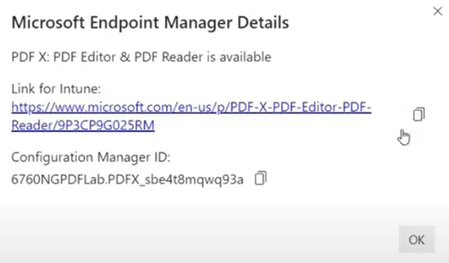
Hello Everyone, can anybody tell me, where i can find the "Appstore-Url" for every app within the MS App Store. In the past you were able to find it under the headliner "Developer and IT" --> Endpoint Manager. The link should look something like this: I want to deploy some apps via Microsoft Store-App (legacy) Thanks a lot!5.6KViews0likes5CommentsDell Firmware Very Slow to Appear in Intune Driver Updates
Have an instance where the Dell 5520 latest firmware release (1.51.0 released 09/06/26) has still not appeared in the Intune Driver Updates which means we have vulnerable laptops in the field. We do not utilise Dell Command update on the laptop to reduce the attack surface so do rely on Intune to deliver these updates in a timely manner. I'm aware that it can take a little while for Dell releases to appear on the Microsoft side, but this is over 6 weeks now. We have spoken to Dell Support, but they have deemed this a Microsoft problem. We then spoke to Microsoft Support, and it was deemed that we would have to pay for support on this given it fell outside of the scope of our service level. So essentially no-one wanted to take responsibility or assist with this! Does the forum have any insights into what may be going on here and how we can move this forward?121Views0likes2CommentsIs it possible to automate Minimum Windows OS version compliance policy?
Is it possible to set a Windows compliance policy for Minimum OS Version that automatically updates each month and marks the device noncompliant after 14 days? This would work if we normally allow users 2 weeks after Patch Tuesday to get their device updated. We would like to avoid having to have someone remember to manually edit the compliance policy every month to update the minimum build number in the policy.129Views0likes2CommentsWindows App Application Protection Policy
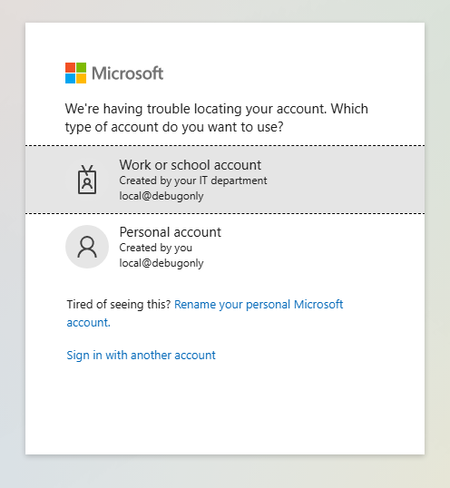
I have been testing out an Intune MAM policy to restrict copy/paste and drive redirection to AVD session hosts based on the link here: https://learn.microsoft.com/en-us/windows-app/require-device-security-compliance-intune?tabs=web#related-contentHowever, I've run into problems (in two separate tenants) that have halted me from being able to test. Setup Intune App Protection Policy targeting Windows Devices & Microsoft Edge\ Conditional Access Policy enforcing App Protection Policy when users access 'Azure Virtual Desktop' target resource via https://windows.cloud.microsoft.com Results First When signing into a user account targeted by the policy, they are prompted to Switch Edge Profile which signs in the user to a new Edge profile for 'Work or School Account'. The account has to sign in again. The account can access Windows App resources When launching a desktop session, this authentication page pops up for an account "local@debugonly" Second When signing into a user account targeted by the policy, they are prompted to Switch Edge Profile which signs in the user to a new Edge profile for 'Work or School Account'. The account has to sign in again. After sign in, the account loops with 'Switch Edge Profile' and gets stuck here I'm curious if anyone has gotten this to work and what was your setup? Or if Microsoft or provide some assistance or if this is in the wrong forum, any help would be appreciated.Intune Graph API deviceStatuses missing device shown in portal
Hello, I am retrieving device status for an Intune configuration profile using Microsoft Graph API. API request: GET https://graph.microsoft.com/beta/deviceManagement/deviceConfigurations/{policyId}/deviceStatuses Issue: In the Intune portal, a device shows Success status for the configuration profile under: Devices → Configuration profiles → Device status However, when retrieving the same data using the Graph API endpoint above, that device does not appear in the API response. Observations: In the Intune portal, the policy shows one device with Success status. But the Graph API response returns different devices and does not include the device visible in the portal. Example response (sanitized): deviceDisplayName: Device-A status: unknown deviceDisplayName: Device-B status: unknown Questions: Why would a device appear in the Intune portal device status but not in the Graph API deviceStatuses response? Is there a delay in data synchronization between the Intune portal and Graph API? Is there another Graph endpoint recommended for retrieving all device configuration status results? Additional details: Graph API version: beta Permission used: DeviceManagementConfiguration.Read.All Tested using Graph Explorer Any insights would be appreciated.160Views0likes1Comment
Have OneDrive or SharePoint files/folders on home screen of iPad without internet connection?
This. I'm on a big iOS project. We have several users who need files on an ipad when traveling, and be able to open them when there is no internet connectivity. These files aren't intended to be edited, just 'read only.' These files do not contain any sensitive corporate data. The content lives in SharePoint online and I'm using OneDrive as a bridge to their sharepoint site. BUT the files can only be viewed on the ipad within the OneDrive app without internet access. These are devices using user affinity enrollment. Initially, the solution for users was to use the 'Mark Offline' feature within the OneDrive iOS app. I used Power Automate to have it fetch new files found in OneDrive and move them to the teams SharePoint site. These shared devices are locked down (an understatement). These will be used by the least computer savy/literate people and so having them dive through OneDrive folder after folder, even offline, is a tall order to ask. I totally get it and don't want them doing that either. So now I have to move onto plan B. How can we put the files that live within OneDrive/Sharepoint onto the home screen without an internet connection when the ipad is 'out in the field.?' This would make it infinitely easier for them. The key here is to not have end users manually moving files around. We don't want them to even have to go into OneDrive and mark folders/files offline, if possible. We don't have the SharePoint app on them. I tried the SP app a while back, and it is a hot mess of garbage. I could revisit it. Whatever I can get to work of course we'll have to modify our Intune polices. Thoughts?135Views0likes1Comment
Sync SharePoint Document Library on Macos
Hi community, we have some Mac managed by intune and we have more Document Library. we would like to sync the Document Library automatically with a policy\script. With Windows we do not have a problem, but with Mac I don’t found a solution. can you help me?525Views0likes2Comments

Events
Recent Blogs
- By: Madison Cooks, Product Manager | Microsoft Intune IT admins need a reliable way to confirm how Windows devices are configured, especially when troubleshooting, validating compliance, or investi...Jul 28, 202610KViews2likes10Comments
- 4 MIN READSee what's new in Intune, including agent security baselines, custom macOS compliance, and Samsung firmware controls.Jul 28, 202613KViews3likes1Comment