Recent Discussions

Android 15 - CredentialProviderPolicy not surfaced by Intune
I have been having an issue with Android 15 devices. We use Authenticator as our password autofill provider. As soon as a device is updated from Android 14 to Android 15, the password autofill provider is no longer set and the setting to change it is 'blocked by work policy.' I have already tried removing all policies that apply to the devices (device config and device compliance policies) and factory resetting them. Simply having them enrolled as corporate owned fully managed devices causes this to happen. I raised the issue in the Android Enterprise community blog. A link to that is included below. Someone on that thread found that there is a policy in Android 14/15 called the credentialproviderpolicy. When that policy is blocked or unconfigured, this behavior happens. I cannot find anywhere in Intune where I can set this policy. It seems that it is allowed by default when managing Android 14 with Intune, but not set or blocked when the device switches to Android 15. Is there any way to specifically set a policy that is not reflected in the Intune UI? This is a blocker for being able to move more phones to Android 15. Link to Android Enterprise thread: https://www.androidenterprise.community/t5/admin-discussions/android-15-cannot-set-default-password-app/m-p/8827#M2105 Thanks, Tom6.4KViews14likes31CommentsWrap up: Manage, Configure, and Secure Devices with Microsoft Endpoint Manager Post Day
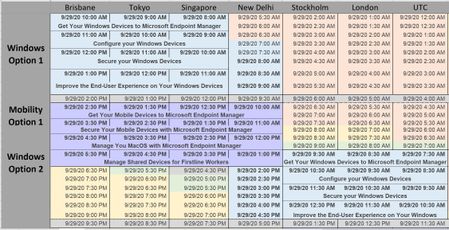
Thanks to the thousands of people who attended our Post Day! A few housekeeping things ------------------------------------------------- You've asked about the recordings for the event. You should be able to still access the recordings for now by using the AKA links below. It will start Teams Live Events and you can just click Play to watch the whole thing. (and if that doesn't work, let me know!) We're working on the "greatest hits" complication, and we'll post that to the VideoHub when we get that. I'm working on cleaning up the decks for posting - there's some accessibility stuff I need to do - and then I'll attach them to this thread when I have them. We were thrilled with all the great feedback we got about the 24-hour, round-the-world marathon training we offered - and we'd still love more feedback! We've already announced there will be another Microsoft Ignite in March 2021 - should we do this again? If so, what topics should we cover? What should we change (besides the registration process)? Reply here! --------------------------------------------------- The product team for Microsoft Endpoint Manager usually does a pre-day event at Ignite but this year we're doing a post-day event the week after. We'll have two 4-hour Teams Live Events about how to get the most out of Microsoft Endpoint Manager. It's free! When you go to register, you'll see three options for each track to accommodate time zones around the world. Most of the dates are September 29, but depending on your time zone a session may show up on Sept 28 or Sept 30, so check all three dates to be sure. You don't need to take them in order and you can take anything that fits your schedule, even if you need to jump around the options. You'll get a calendar invite for a 4-hour block but here's how the blocks break down. (and I know some of you are getting an error message, so I'm including the direct links to the Teams Live Events down below - as long as you have that link it will connect you to the meeting, but until we start the session it will just sit there and say the meeting hasn't started yet.) Track 1: Manage, Configure, and Secure Windows Devices with Microsoft Endpoint Manage Hour 1 - Get Your Windows Devices to Microsoft Endpoint Manager Hour 2 - Configure your Windows Devices Hour 3 - Secure your Windows Devices Hour 4 - Improve the End-User Experience on Your Windows Devices Track 2: Manage, Configure, and Secure Mobile Devices with Microsoft Endpoint Manage Hour 1 - Get Your Mobile Devices to Microsoft Endpoint Manager Hour 2 - Secure Your Mobile Devices with Microsoft Endpoint Manager Hour 3 - Manage You MacOS with Microsoft Endpoint Manager Hour 4 - Manage Shared Devices for Firstline Workers Here's how it maps out, based on what we figure are the best times for each part of the world Asia/Pacific/Japan and Europe/Middle East/Africa Windows Option 1: https://aka.ms/MEMPDC/WINREG01 Mobility Option 1: https://aka.ms/MEMPDC/MOBREG01 Europe/Middle East/Africa and Americas (Windows) Windows Option 2: https://aka.ms/MEMPDC/WINREG02 Mobility Option 2: https://aka.ms/MEMPDC/MOBREG02 Europe/Middle East/Africa and Americas (Mobility) Windows Option 3: https://aka.ms/MEMPDC/WINREG03 Mobility Option 3: https://aka.ms/MEMPDC/MOBREG03 Register now! (or grab the AKA links above and make your own calendar invite to remind you it's time)46KViews14likes24Comments
Request: Manage Apple Vision Pro with Intune MDM
Hi, At our company, some teams are working with Apple Vision Pro because they are hoping to find new technical solutions for the business. We would also like to include Apple Vision Pro in the management of our other mobile devices via Intune MDM. Since Apple has also offered an MDM interface for Apple Vision Pro with the visionOS 1.1 update, the glasses could in principle also be managed by an MDM, but the MDM must also support the glasses. Hence my question: When will this be possible via Intune MDM? As a company, we recently switched to Intune MDM with over 110,000 devices (both mobile devices and fat clients) and we are confident that Microsoft will also support new technical products (such as the Apple Vision Pro).9.3KViews13likes10CommentsNew Intune Training Video Series - Intune.Training
StevenHosking and I have started a new Intune Training series called Intune.Training. We have published 5 episodes so far and have been releasing a new one every week (so far). Please check it out and give us your feedback. We'd also love to know what other topics you'd be interested in seeing covered. I've made a playlist that I'll update with each release: https://www.youtube.com/playlist?list=PLcmROu_w9HU8rJ8-QJE04hNaq4EWSwY_m&fbclid=IwAR1RNiIGUWuhI3xHhzhTbftnG4z81fjlMjCDeJz-jyhRKp2dLk8VbAgmvS0 You can also subscribe to our channel to be notified directly. https://www.youtube.com/channel/UCfmMlhX5TW8cicxHw6ExYVA/videos You can also find us on Twitter at https://www.twitter.com/AdamGrossTX and https://www.twitter.com/OnPremCloudGuy.Solved11KViews12likes1CommentAnnouncing Windows 10 in Cloud Configuration
Today we released a recommended set of settings for Windows 10 devices that makes devices easy to deploy, highly secure, and cloud-first. Windows 10 in cloud configuration enables organizations to provide frontline workers, remote workers, and other individuals with a select set of applications, cloud-based data storage, and a familiar Windows experience. Want to learn more? Check out the official announcement in the Windows IT Pro Blog.3.6KViews12likes3CommentsHow to create a backup of your Microsoft Endpoint Manager (Intune) infrastructure!
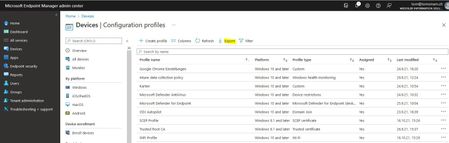
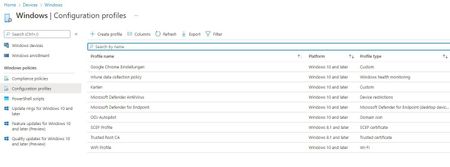
Dear Microsoft Intune Friends, Imagine the following situation. You have invested several hours to build your Microsoft Endpoint Manager (Intune) infrastructure. After the final tests, everything is now working exactly as you imagined. Now the question arises how can I backup all these settings and configurations? I will answer this question in this article. Note: I will describe how to compare and restore the backup in a next article. https://techcommunity.microsoft.com/t5/microsoft-intune/compare-and-restore-a-microsoft-endpoint-manager-intune-backup/m-p/2993736 What we can do in the Microsoft Endpoint Manager portal is export configuration settings to a CSV file. However, this is not exactly what I wanted. To create a complete backup of our tenant we need the power of PowerShell (power of PowerShell - funny ) I used the PowerShell ISE for this configuration. But you are also very welcome to use Visual Studio Code, just as you wish. Please start with the following steps to begin the deployment (the Hashtags are comments): #The first two lines have nothing to do with the configuration, but make some space below in the blue part of the ISE Set-Location Clear-Host #Customize the ExecutionPolicy (absolutely OK for this demo) Set-ExecutionPolicy -ExecutionPolicy Unrestricted #Install the Module Install-Module -Name Microsoft.Graph.Intune -Verbose -Force -AllowClobber #Install the Module Install-Module -Name MSGraphFunctions -Verbose -Force -AllowClobber #Import the Module Import-Module -Name MSGraphFunctions #Install the Module Install-Module -Name AzureAD -Verbose -Force -AllowClobber #Install IntuneBackupAndRestore from the PowerShell Gallery Install-Module -Name IntuneBackupAndRestore -Verbose -Force -AllowClobber #Update the Module Update-Module -Name IntuneBackupAndRestore -Verbose #Import the Module Import-Module IntuneBackupAndRestore #Connect to Microsoft Graph Connect-MSGraph Here you must agree to the extended permissions. #Create a folder New-Item -ItemType Directory -Path C:\Backup\IntuneBackup #Switch to the folder Set-Location C:\Backup\IntuneBackup #Create the Full-Backup Start-IntuneBackup -Path 'C:\Backup\IntuneBackup' It starts with the creation of the backup. #Let's look at the content Get-ChildItem -Path 'C:\Backup\IntuneBackup' Let's start Windows Explorer and navigate to our backup folder, Bingo....we have a complete backup! I know that was nothing spectacular, but I still wanted to share my experience with you. Thank you for taking the time to read this article. Kind regards, Tom Wechsler P.S. All scripts (#PowerShell, Azure CLI, #Terraform, #ARM) that I use can be found on github! https://github.com/tomwechsler52KViews10likes14CommentsMicrosoft #IntuneForMSPs resource guide
Welcome to your home for all things #IntuneForMSPs! Our goal is to help you grow your Microsoft Managed Service Provider (MSP) business by combining productivity apps, intelligent cloud services, and the world-class security of Microsoft 365 with the multi-tenant management capabilities of our partners. Navigate to: Guidance and tutorials | Marketing and business development | Multi-tenant management partners | Additional resources #IntuneForMSPs community meetups Gain valuable insights from first-hand experiences with configuring and managing customer tenants. Up next: Follow this page for the next batch of #IntuneForMSP Community Meetups. We will reconvene in September. On demand: #IntuneForMSPs Community Meetup: June edition Hands on with device configuration and policy From box to business‑ready with Windows Autopilot Advanced automation and PowerShell for Intune Planning your customers' Intune migration Getting started with Microsoft #IntuneForMSPs Guidance and tutorials We hear from many MSPs that time for learning is limited. To help you ramp up quickly, we’ve pulled together ready-to-use decks, videos, and interactive demos you can follow step-by-step for the most common scenarios. A great place to begin is the checklist available by downloading Enhancing Security with Microsoft 365 Business: A Hands-on, Effective Guide. Microsoft 365 Business Premium deployment best practices Download PowerPoint decks that build on the videos listed below. They go deeper with additional guidance, context, and tips you can apply in customer environments. Identity and access controls (14.81 MB) Device enrollment (15.92 MB) Email and app protection (38.84 MB) Device security (17.89 MB) Data security (36.49 MB) Videos and demos ▶️ Achieve greater security and productivity with Microsoft Intune and Microsoft 365 - Follow along with each step of the checklist with complementary videos. Watch on one screen and follow along in your own tenant on the other. We’ll keep expanding this playlist with new content that goes beyond the checklist, so follow along on our social channels for the latest updates. 🖱️ Microsoft Intune guided demos - Learn how to configure app protection policies and Conditional Access, update Windows from the cloud, manage corporate devices, deploy and manage line of business (LOB) apps, enable Universal Print, protect corporate resources on personal-owned devices, utilize Windows Autopilot for new device delivery, and reduce update bandwidth consumption. Marketing and business development Step 1: Join Microsoft Partner programs AI Business Solutions for Partners Microsoft Security Partners Step 2: Join the Partner Skilling Hub Go to the Microsoft Partner Skilling Hub and create your free account. Select solution areas of interest. (Hint: Intune content: AI Business Solutions, Security) Explore these recommended modules: Implement with impact: Endpoint management with Microsoft Intune Implement with impact: Implement identity and access management with Microsoft Entra Step 3: Download turnkey campaign assets "Protect my devices" campaign-in-a-box (119.20 MB) Multi-tenant management partners Microsoft Intune is proud to collaborate with leading global providers of multi-tenant Intune management solutions. These companies are building innovative capabilities on top of Microsoft Intune, Microsoft Security solutions, and the broader Microsoft 365 platform. Their companion solutions empower you to: Centrally view and manage all customer tenants and action items through a unified partner dashboard. Take action across environments, leveraging Intune for device management, cloud security, and compliance. Standardize security settings, automate onboarding, and ensure policy consistency at scale-no more repetitive, manual tasks or risky policy drift. Want an introduction to multi-tenant management? ▶️ Watch this video from Jonathan Edwards. AvePoint is the global leader in data protection, unifying data security, governance, and resilience to provide a trusted foundation for AI. More than 28,000 customers rely on the AvePoint Confidence Platform to secure, govern, and rapidly recover data across multi‑cloud environments. Through AvePoint Confidence Platform: Elements Edition, AvePoint extends Microsoft Intune with secured multi‑tenant automation, lifecycle management, and centralized visibility—enabling partners to scale Intune delivery profitably and consistently across customers. With a single platform for governance, lifecycle control, and recovery, partners reduce operational overhead, prevent sprawl, and accelerate Copilot readiness. AvePoint supports a global partner ecosystem of 6,000 MSPs, VARs, and SIs, with solutions available in over 100 cloud marketplaces. CyberDrain CIPP provides MSPs with a centralized, multi-tenant management platform for Microsoft 365. It enables partners to securely manage tenants at scale, automate common administrative tasks, enforce standards across environments, and gain deep visibility into tenant security and configuration. With built-in automation, governance controls, and extensibility, CIPP reduces reliance on custom scripts and manual processes. MSPs can standardize operations, streamline user and tenant management, monitor security posture, and respond quickly to issues across all customers from a single interface. CIPP is supported by one of the largest and most active MSP communities in the Microsoft ecosystem, with thousands of partners contributing feedback, automation ideas, and best practices. As one of the most widely adopted platforms for Microsoft 365 multi-tenant management, CyberDrain CIPP continues to evolve rapidly to meet the needs of modern MSPs. inforcer empowers MSPs to standardize Microsoft 365 and Intune policies across all tenants, automate environment configuration, monitor compliance in real time, and reduce risk through policy drift detection. Its reporting and automation features free teams from manual, error-prone scripting and help deliver consistent, secure customer experiences, setting MSPs up to deliver advanced AI services to their customers. Nerdio brings deep automation and analytics to Intune, Windows 365, Azure Virtual Desktop, and the broader Microsoft cloud. MSPs benefit from multi-tenant dashboards, global policy insights, role-based access, centralized app deployment, and automatic policy versioning with rollback and drift correction. Nerdio’s tooling is designed specifically for MSPs and scales from small teams to large enterprise portfolios. Tenant Manager helps MSPs run Microsoft Intune across multiple customer tenants with consistency and control. MSP teams can standardize policies, manage applications and devices across environments, monitor configuration drift, perform device actions across their entire estate, and maintain cross-tenant visibility through reporting with scheduled email delivery and customer-facing report access, from a single platform. The platform runs entirely on Microsoft Azure with region-selectable deployment for your data protection requirements. It includes CIS certified security baselines, Secure Score monitoring, and license harvesting, helping MSPs deliver secure, repeatable Intune services as their customer portfolios grow, even without in-depth Intune knowledge . Additional resources Microsoft 365 Blog: small and medium business content Microsoft 365 Partner on LinkedIn Microsoft Intune Blog: MVP community content12KViews9likes5CommentsUse PowerShell to retrieve all assigned Intune policies and applications per Azure AD group!
==>>A special thanks to Timmy Andersson for the PowerShell script!!<<== Dear Microsoft Intune Friends, In Microsoft Intune, it is possible to work with configuration profiles, among other things. OK, this is nothing new. But which Azure Active Directory groups have been assigned to the configuration profiles? I am confronted with this question again and again. This is where PowerShell comes into play. Let's explore this together. I used the PowerShell ISE for this configuration. But you are also very welcome to use Visual Studio Code, just as you wish. Please start with the following steps to begin the deployment (the Hashtags are comments): The first two lines have nothing to do with the configuration, but make some space below in the blue part of the ISE. Set-Location C:\Temp Clear-Host #Install the module Install-Module -Name Microsoft.Graph.Intune -AllowClobber -Verbose -Force #Connect and change the scheme Connect-MSGraph -ForceInteractive Update-MSGraphEnvironment -SchemaVersion beta Connect-MSGraph #Which group do you want to check? $groupName = "AutoPilot Geräte" $Group = Get-AADGroup -Filter "displayname eq '$GroupName'" ####Config Start#### Write-host "Azure Active Directory Group: $($Group.displayName)" -ForegroundColor Green #Apps $AllAssignedApps = Get-IntuneMobileApp -Filter "isAssigned eq true" -Select id, displayName, lastModifiedDateTime, assignments -Expand assignments | Where-Object {$_.assignments -match $Group.id} Write-host "Number of Apps found: $($AllAssignedApps.DisplayName.Count)" -ForegroundColor cyan Foreach ($Config in $AllAssignedApps) { Write-host $Config.displayName -ForegroundColor Yellow } #Device Compliance $AllDeviceCompliance = Get-IntuneDeviceCompliancePolicy -Select id, displayName, lastModifiedDateTime, assignments -Expand assignments | Where-Object {$_.assignments -match $Group.id} Write-host "Number of Device Compliance policies found: $($AllDeviceCompliance.DisplayName.Count)" -ForegroundColor cyan Foreach ($Config in $AllDeviceCompliance) { Write-host $Config.displayName -ForegroundColor Yellow } #Device Configuration $AllDeviceConfig = Get-IntuneDeviceConfigurationPolicy -Select id, displayName, lastModifiedDateTime, assignments -Expand assignments | Where-Object {$_.assignments -match $Group.id} Write-host "Number of Device Configurations found: $($AllDeviceConfig.DisplayName.Count)" -ForegroundColor cyan Foreach ($Config in $AllDeviceConfig) { Write-host $Config.displayName -ForegroundColor Yellow } #Device Configuration Powershell Scripts $Resource = "deviceManagement/deviceManagementScripts" $graphApiVersion = "Beta" $uri = "https://graph.microsoft.com/$graphApiVersion/$($Resource)?`$expand=groupAssignments" $DMS = Invoke-MSGraphRequest -HttpMethod GET -Url $uri $AllDeviceConfigScripts = $DMS.value | Where-Object {$_.assignments -match $Group.id} Write-host "Number of Device Configurations Powershell Scripts found: $($AllDeviceConfigScripts.DisplayName.Count)" -ForegroundColor cyan Foreach ($Config in $AllDeviceConfigScripts) { Write-host $Config.displayName -ForegroundColor Yellow } #Administrative templates $Resource = "deviceManagement/groupPolicyConfigurations" $graphApiVersion = "Beta" $uri = "https://graph.microsoft.com/$graphApiVersion/$($Resource)?`$expand=Assignments" $ADMT = Invoke-MSGraphRequest -HttpMethod GET -Url $uri $AllADMT = $ADMT.value | Where-Object {$_.assignments -match $Group.id} Write-host "Number of Device Administrative Templates found: $($AllADMT.DisplayName.Count)" -ForegroundColor cyan Foreach ($Config in $AllADMT) { Write-host $Config.displayName -ForegroundColor Yellow } ####Config End#### Now let's check all the groups from Azure Active Directory. $Groups = Get-AADGroup | Get-MSGraphAllPages ####Config Start #### Foreach ($Group in $Groups) { Write-host "Azure Active Directory Group Name: $($Group.displayName)" -ForegroundColor Green #Apps $AllAssignedApps = Get-IntuneMobileApp -Filter "isAssigned eq true" -Select id, displayName, lastModifiedDateTime, assignments -Expand assignments | Where-Object {$_.assignments -match $Group.id} Write-host "Number of Apps found: $($AllAssignedApps.DisplayName.Count)" -ForegroundColor cyan Foreach ($Config in $AllAssignedApps) { Write-host $Config.displayName -ForegroundColor Yellow } #Device Compliance $AllDeviceCompliance = Get-IntuneDeviceCompliancePolicy -Select id, displayName, lastModifiedDateTime, assignments -Expand assignments | Where-Object {$_.assignments -match $Group.id} Write-host "Number of Device Compliance policies found: $($AllDeviceCompliance.DisplayName.Count)" -ForegroundColor cyan Foreach ($Config in $AllDeviceCompliance) { Write-host $Config.displayName -ForegroundColor Yellow } #Device Configuration $AllDeviceConfig = Get-IntuneDeviceConfigurationPolicy -Select id, displayName, lastModifiedDateTime, assignments -Expand assignments | Where-Object {$_.assignments -match $Group.id} Write-host "Number of Device Configurations found: $($AllDeviceConfig.DisplayName.Count)" -ForegroundColor cyan Foreach ($Config in $AllDeviceConfig) { Write-host $Config.displayName -ForegroundColor Yellow } #Device Configuration Powershell Scripts $Resource = "deviceManagement/deviceManagementScripts" $graphApiVersion = "Beta" $uri = "https://graph.microsoft.com/$graphApiVersion/$($Resource)?`$expand=groupAssignments" $DMS = Invoke-MSGraphRequest -HttpMethod GET -Url $uri $AllDeviceConfigScripts = $DMS.value | Where-Object {$_.assignments -match $Group.id} Write-host "Number of Device Configurations Powershell Scripts found: $($AllDeviceConfigScripts.DisplayName.Count)" -ForegroundColor cyan Foreach ($Config in $AllDeviceConfigScripts) { Write-host $Config.displayName -ForegroundColor Yellow } #Administrative templates $Resource = "deviceManagement/groupPolicyConfigurations" $graphApiVersion = "Beta" $uri = "https://graph.microsoft.com/$graphApiVersion/$($Resource)?`$expand=Assignments" $ADMT = Invoke-MSGraphRequest -HttpMethod GET -Url $uri $AllADMT = $ADMT.value | Where-Object {$_.assignments -match $Group.id} Write-host "Number of Device Administrative Templates found: $($AllADMT.DisplayName.Count)" -ForegroundColor cyan Foreach ($Config in $AllADMT) { Write-host $Config.displayName -ForegroundColor Yellow } } ####Config End#### I hope this article was useful. Thank you for taking the time to read the article. Best regards, Tom Wechsler P.S. All scripts (#PowerShell, Azure CLI, #Terraform, #ARM) that I use can be found on github! https://github.com/tomwechsler104KViews9likes17CommentsIntune Re-Enrollment Registry Key "MmpcEnrollmentFlag"
Hey there, In the last few weeks, we encountered issues with clients (Entra Hybrid Joined) losing their Intune connection after setting an incorrect group policy. Although the group policy change was quickly reverted, about 10 clients were removed from Intune. I attempted to re-enroll these clients using various methods (MEMC Co-management, GPO, Scheduled Task, and even using psexec to directly start auto-enrollment), but the enrollment process consistently failed with the following error under Microsoft-Windows-DeviceManagement-Enterprise-Diagnostics-Provider\Enrollment: Auto MDM Enroll: Device Credential (0x1), Failed (Bad request (400).) and/or following in CoManagementHandler.log Failed to get management URL with error 0x80070002 Eventually, I discovered a registry key that was not present on the working clients: Path: HKEY_LOCAL_MACHINE\SOFTWARE\Microsoft\Enrollments Value: MmpcEnrollmentFlag Data: 0x00000002 After deleting this key and restarting the enrollment, everything worked immediately. I am curious about how and why this registry key is created and what its function is. Looking forward to your input.Solved29KViews7likes3Comments
Outlook App Update 4.2115 crashing on ios devices - Intune managed
This morning we started receiving a good number of tickets that their outlook on iOS devices is crashed after it was auto updated to 4.2115. Any others seen this issue yet? is it MDM related or widespread across all mobile devices?14KViews7likes22CommentsMicrosoft Managed Home Screen: Unwanted Samsung One UI 8.0 Elements Appearing
Hello Tech Community, Our organization is currently deploying a configuration in Microsoft Intune using a Corporate-owned dedicated device enrollment profile. We’ve applied a device restriction policy to configure Samsung tablets in Multi-app Kiosk mode, with Managed Home Screen set as the launcher. Instead of using an app configuration policy, Managed Home Screen is configured through the device restrictions policy. We’ve left the device navigation options unconfigured, which should hide the following UI elements: Android Overview button Android Home button Android App drawer Once all policies and required apps are installed, Managed Home Screen successfully acts as the launcher for end-users to sign in. Overall, this works well; however, we’ve encountered an intermittent issue: After multiple lock/unlock cycles, the navigation bar sometimes reappears, showing the Overview, Home, and App Drawer buttons. This allows users to access background apps that are not exposed through Managed Home Screen, which defeats the kiosk experience. Device details: Samsung Galaxy Tab S10 FE Android 16, One UI 8.0 Managed Home Screen version: 2.2.0.107721 Has anyone experienced this behavior or have recommendations to prevent these UI elements from reappearing? I’ll gladly provide additional details about our configuration if needed. Thank you!489Views6likes2CommentsLinux Managed Device Chrome support
Hi, We are in process of On-boarding Linux devices as all other OS'es must pass Conditional Access Managed/Compliant Device check. We are stumbling on a lot (a lot) of user resistance with forcing them on switch to use (only) Edge. Is there any roadmap or date when will Chrome Extension (at least chrome) be available for Linux and Managed device check during sign-in?1KViews6likes1CommentOutlook for iOS (MAM only Call Identification)
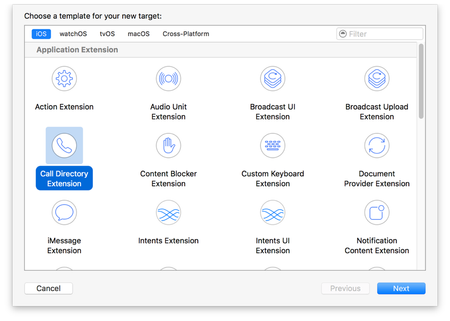
In order of the implementation of O365/M365 and with it Microsoft Intune, Outlook for iOS has become the standard mail client on iOS devices for many customers today. This is due to the excellent user experience and the constant stream of new features implemented by Microsoft. From a security perspective, in addition to the provision on managed devices (managed by Intune), the secure use on unmanaged devices with MAM or App Protection Policies (APP) is a big argument for using Outlook for iOS. Currently, many ouf our customers are working on a BYOD setup for blue collar worker, who typically have a maximum of one email inbox. A big pain point for many users who use Outlook for iOS in an MAM-only setup (and for MDM setup with Intune) is the missing caller identification of Exchange Online (EXO) contacts. Outlook for iOS supports a one-way contact export process whereby contacts from within Outlook for iOS can be exported into the personal (unmanaged) part of the native iOS Contacts app. This means a contact must first be imported into the users personal contacts directory of EXO and then exported from Outlook for iOS to the native (unmanaged) iOS Contact app in order to see who is calling. This functionality enables Caller-ID, iMessage, and FaceTime integration for users’ Outlook contacts. The exported Outlook contacts are considered unmanaged and are accessible by unmanaged, personal apps. Especially for European customers who are subject to GDPR compliance, this is a no go, as personal data and company data must not be mixed. The unintentional outflow of contact data worthy of protection to commercial platforms, such as WhatsApp or Google, and the unintentional synchronization of address books with social media apps, represents a significant GDPR risk. Although the user's personal EXO contacts can be synchronized, there is currently no option to synchronize the GAL. Furthermore, there is currently no provision in Outlook for iOS to synchronize the GAL cyclically. The user has to add a GAL contact to his personal contacts as described above and then within the Outlook for iOS app export the contact to his native iOS contacts app to be able to see who is calling. To meet the GDPR compliance, we need to prevent the contact export. So this is not a solution. The question to ask is: Why does a user need to export a GAL/personal contact to their native iOS Contact app? There are already several paid app solutions that close exactly this gap (ebf Contacts, Secure Contacts, etc.) which offer more or less the same range of functions. The app builds a container and downloads the managed address books (GAL, personal) of the user and then enables the resolution of the CallerID or identification of the caller via the so-called Apple CallKit integration. Apple has been offering the so-called CallKit integration for years. With CallKit you can integrate your calling services with other call-related apps on the system. CallKit provides the calling interface, and you handle the back-end communication with your VoIP service. For incoming and outgoing calls, CallKit displays the same interfaces as the Phone app, giving your app a more native look and feel. CallKit also responds appropriately to system-level behaviors such as Do Not Disturb. In addition to handling calls, you can provide a Call Directory app extension to provide caller ID information and a list of blocked numbers associated with your service. When a phone receives an incoming call, the system first consults the user’s contacts to find a matching phone number. If no match is found, the system then consults your app’s Call Directory extension to find a matching entry to identify the phone number. This is useful for applications that maintain a contact list for a user that’s separate from the system contacts, such as a Outlook for iOS. For example, consider a user who is a colleague to Jane, but doesn’t have her phone number in their contacts. If the Outlook for iOS app has a Call Directory app extension, which downloads and adds the phone numbers of all of the user´s colleagues. When the user gets an incoming call from Jane, the system displays something like “(App Name, e.g. Outlook) Caller ID: Jane Appleseed” rather than “Unknown Caller”. The effort to integrate the Call Directory Extension is minimal and would solve many pain points from both a security and user experience perspective. Apple has documented CallKit excellently on the developer site: https://developer.apple.com/documentation/callkit With the possibility of using Apple CallKit in combination with Outlook for iOS and the contact synchronization (personal/GAL) of a managed EXO mailbox, the use of M365 in a BYOD scenario for customers Blue Collar workers will massively increase. Furthermore, the use of contact synchronization is then also possible for devices managed by Intune. This creates an outstanding user experience while increasing user adoption! This article was also published as feedback in the Outlook Forum for iOS: https://feedbackportal.microsoft.com/feedback/idea/a80414f4-9598-ed11-a81b-000d3ae32cd0 There are already other requests within the Microsoft community that I would like to link here: PatrickF11 : Outlook for iOS + Caller Identification - Microsoft Community Hub Daniel Huttenlocher: https://feedbackportal.microsoft.com/feedback/idea/bbfc8763-da97-ed11-a81b-000d3ae32cd06.1KViews6likes8CommentsHow to deploy a Win-32 app with Microsoft Intune!
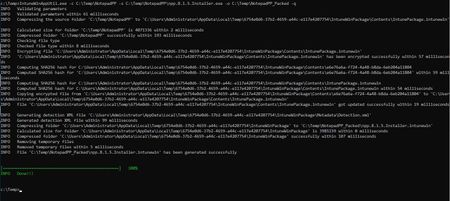
Dear Microsoft Intune Friends, Deploying a .msi app is a more or less simple matter in most cases. However, if you need to deploy an .exe app, it gets a bit more complicated. It takes a little art and science to deploy the app. What exactly do I mean by that? Well, an .exe app can't just be uploaded to the Intune portal and then deployed. Before we even get started with Intune, we need to figure out how to install and uninstall the Win32 app. This means we need a machine (identical to the machines you manage with Intune) to perform a test install and uninstall on. The challenge here is that installation and uninstallation are performed "seamlessly", more precisely without interaction of a person. I use Notepad++ as an example in this article. The installation and uninstallation of Notepad++ works something like this: Installation (/S for silent - case sensitive): npp.8.1.5.Installer.exe /S We need the complete program path later in Intune. "C:\Program Files (x86)\Notepad++\notepad++.exe" The uninstallation works like this: "C:\Program Files (x86)\Notepad++\uninstall.exe" /S (/S for silent - case sensitive) With this knowledge in hand, we can move forward. No, not in Intune but on our local computer. I have already downloaded the executable file for the test installation. We cannot work with the .exe file in Intune, we have to make this Intune compatible. For this we use the Microsoft Win32 Content Prep Tool from Microsoft (Thanks to the Microsoft team). https://github.com/microsoft/Microsoft-Win32-Content-Prep-Tool Now start a command prompt with elevated privileges and navigate to the IntuneWinAppUtil.exe file. Now you need the complete path to your Notepad++ .exe file and a path for the "packaged" Intune version. It may look something like this: IntuneWinAppUtil.exe -c C:\Temp\NotepadPP -s C:\Temp\NotepadPP\npp.8.1.5.Installer.exe -o C:\Temp\NotepadPP_Packed -q -c <setup_folder> Setup folder for all setup files. All files in this folder will be compressed into .intunewin file. Only the setup files for this app should be in this folder. -s <setup_file> Setup file (e.g. setup.exe or setup.msi). -o <output_file> Output folder for the generated .intunewin file. -q is specified, it will be in quiet mode. Now we move on to the Microsoft Endpoint Manager Admin Center. https://endpoint.microsoft.com Navigate to the Apps. Select the platform in my example Windows. Select Add. Select Windows app (Win32). Now locate your "packaged" Notepad++ file. Enter some information about the app (especially the required fields). Now our collected information on installation and uninstallation comes into play. If your app still has special return codes enter them as well. Select operating system and and version, the rest is optional. Now we need to configure the dection rules. We don't want Notepad++ to be installed on a system where Notepad++ is already present. There are no dependencies in my example. This app does not replace any existing app. Now you can specify who should receive this app I choose "All Devices" and "All Users". Navigate to a system in Intune and click Sync. This is simply to force the installation of the app. If you have the possibility to force the synchronization on the physical one, you can check faster if the installation works. Now wait a few minutes and Voila the app is there!!! Sure, that wasn't the huge highlight now. I just wanted to share my experience. I hope this article was useful. Thank you for taking the time to read the article. Best regards, Tom Wechsler P.S. All scripts (#PowerShell, Azure CLI, #Terraform, #ARM) that I use can be found on github! https://github.com/tomwechslerAutologin to kiosk not working as expected
We recently answered a customer support question regarding kiosk and Windows desktop and figured it would be useful to share the answer here. The customer ran into a scenario where the kiosk profile was successfully deployed through Intune, but the autologin to the Kiosk account was not working as expected. Through the troubleshooting, we discovered the customer was using a VM for testing, which is not supported. While our Windows docs team is updating their documentation to share that kiosk does not support RDP, we also found Michael Niehaus' blog here: https://blogs.technet.microsoft.com/mniehaus/2018/06/07/deploying-a-kiosk-using-windows-autopilot/ which calls out that restriction in virtual TPM's.10KViews6likes4CommentsDecks for Endpoint Management Acceleration Day
Many thanks to all of you who attended any or all of our sessions for Endpoint Management Acceleration Day! We hope we were able to give you useful information! If you didn't get a chance to fill out the survey during the sessions, please fill it out now - there's a different one for each track. Mobility Survey Windows Survey If you'd like to go back and watch any of them again, or view the Q&A transcript, just use the same link you used to join the session: Mobility https://aka.ms/EMAD/MobReg01 https://aka.ms/EMAD/MobReg02 https://aka.ms/EMAD/MobReg03 Windows https://aka.ms/EMAD/WinReg01 https://aka.ms/EMAD/WinReg02 https://aka.ms/EMAD/WinReg03 I'm attaching the PDFs of the slides we used in the presentations. I'll have to do a separate post to add the Windows decks - scroll down to see those. Thanks again!
Android Fully Managed - Backup & Restore
With the requirement to factory reset mobile devices to enroll into Android enterprise (Fully managed), it is becoming increasingly more apparent that a solution to backup data on pre-factory reset devices and then restore said data onto the post-factory reset devices is needed. At the moment it appears that all restore functionality is disabled in the android fully managed solution. We would have previously used Samsung's smart switch application, which is now blocked. An example: - - User currently has a legacy managed device, loaded with photos, messages and configurations. - In order to migrate to Android fully managed, user needs to factory reset phone. - User wants to migrate all data onto the newly managed device post factory reset, however all restore functionality is disabled in a fully managed device. This case example is stopping us from progressing forward with Android fully managed. Any ideas/workarounds would be greatly appreciated? - We have been trialing Samsung cloud but have found this to be relatively unreliable. Thanks in advance!31KViews5likes25CommentsIs it possible to protect the *.microsoft.com management portals with MFA?
We recently had this question pop up on twitter (@intunesuppteam) and thought it would be good to answer here since it's not the first time it's been asked. Azure MFA can be set to “required” and enforced on a per user account to require MFA for any authentication. The Azure Portal (https://portal.azure.com) also has an option to require MFA for any admin account - see this discussion https://stackoverflow.com/questions/35559006/enabling-multi-factor-authentication-for-the-azure-portal. Lastly, Conditional Access can be set to require MFA on selected cloud services.2.9KViews5likes0CommentsIntune Assignment Checker - Get All Assigned Policies, Profiles and Applications
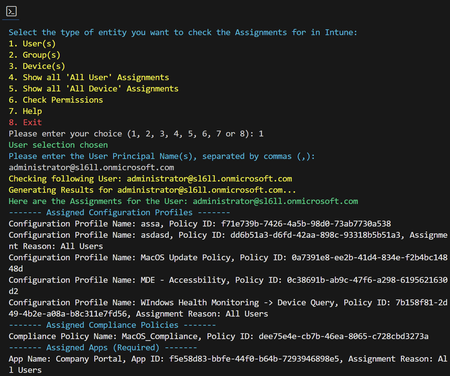
Hello everyone, I published a script that will provide a detailed overview of assigned Intune Configuration Profiles, Compliance Policies, and Applications for user, groups and devices. I have also added a option that will list all Assignments to "All users" and "All devices". Download and Setup Guide: https://intuneassignmentchecker.ugurkoc.de/ I hope that this little script will be helpful for you 🙂 Best regards Ugur7.4KViews5likes5Comments










Events
Recent Blogs
- By: Madison Cooks, Product Manager | Microsoft Intune IT admins need a reliable way to confirm how Windows devices are configured, especially when troubleshooting, validating compliance, or investi...Jul 28, 202610KViews2likes10Comments
- 4 MIN READSee what's new in Intune, including agent security baselines, custom macOS compliance, and Samsung firmware controls.Jul 28, 202613KViews3likes1Comment