Forum Widgets
Latest Discussions

'Registering user becomes local admin on Joined Devices' - WHAT
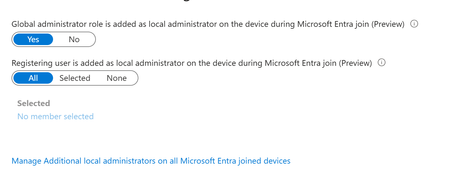
Stumbled on a tenant with 'JOIN' available for all users. Haven't worked with this much - most tenants I see only have registration. But then I noticed the horrifying 'Registering user is added as local administrator on the device during Microsoft Entra join' option was ALSO set to ALL. This is a tenant we just took on, but I've never seen that control before. This is terrifying, considering AFAIK, there is no real way for a registering user to know if they're registering or joining. Beneath it is an option to 'Manage Additional local administrators on all Microsoft Entra joined devices', which leads to the Role page for Device Administrators, which is empty. Under Description, this describes what APPEARS to be to be the same thing mentioned in the previous control - 'Users with this role become local machine administrators on all Windows 10 devices that are joined to Microsoft Entra'. But no one is assigned this. Conveniently, on my own tenant, I happened to let someone JOIN yesterday. We have this limited to 2 (now 3) people - most just register... But this user Joined, and the 'Joining user becomes local admin' option was on ALL. But I can't validate that the user ever become local admin. They don't have the role, their device shows as joined, but there's no additional roles. The audit logs don't look weird. They're not in that 'Device Administrators' group, which describes itself as 'Users with this role become local machine administrators on all Windows 10 devices that are joined to Microsoft Entra'. Thoughts? Freaking out, honestly. We have a mix of DC and Cloud users. I've inherited them all, and had the understanding that Join was essentially registration but with Org ownership. I've tried to get some input from Copilot, but he has basically waffled between 'No, this setting is just badly named' and 'no, actually it's this other setting' and 'no, you know what, it all makes sense somehow'. 1. Does that option actually set the joining user as global admin? Is that really the default setting? 2. can you validate this ANYWHERE in Entra? Or does it just disappear? 3. what is that Device Admin group? A separate group, independent of these two settings, that gives local admin? 4. Is there a graph endpoint that can be used to set this? ThanksunderQualifriedApr 22, 2026Brass Contributor54Views0likes1Comment
MFA Options for Employees without Phones
Hello everbody, we're currently trying to implement MFA in our company, but approximately 1/10 of our employees have a workphone and are not allowed to use their personal phone. Since we also recently introduced Intune, the idea was to just use Windows Hello for Business, but when trying to provision it, we realized that you need to have MFA active for an account to be able to even activate it? Which kinda defeats the purpose. So my question is, is there some way to circumvent the MFA requirement for WHfB? Or what other options do we realistically have? Thanks in Advance!FabianUniApr 15, 2026Copper Contributor125Views0likes3CommentsHybrid Join Lifecycle Model
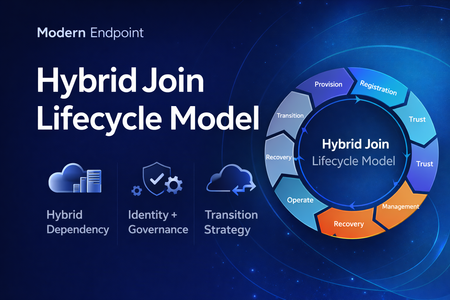
Microsoft Entra hybrid join is still a common reality in enterprise environments. For many organizations, it remains necessary because legacy applications still rely on Active Directory machine authentication, Group Policy is still in use, and on-premises operational dependencies have not fully been retired. At the same time, the long-term direction for endpoint identity is increasingly cloud-native. That creates an important architectural question: Should hybrid join be treated as a permanent device state, or as a lifecycle stage in a broader modernization journey? In practice, hybrid join is often discussed as a binary condition: the device is either hybrid joined or it is not. But from an operational perspective, that view is too limited. In real enterprise environments, hybrid join behaves much more like a lifecycle. A device moves through provisioning, registration, trust establishment, management attachment, steady-state operation, recovery, retirement, and eventually transition. That distinction matters because most hybrid join issues do not fail loudly. They usually appear as stale objects, pending registrations, broken trust, inconsistent management ownership, and environments that remain temporarily hybrid far longer than intended. Why a lifecycle model is useful Treating hybrid join as a lifecycle helps explain why so many organizations struggle with it even when the initial implementation appears technically correct. The challenge is usually not the first successful join. The challenge is everything that happens around it: Provisioning quality Trust validation Management ownership Drift detection Stale object cleanup Exit criteria for transition to Entra join Without that lifecycle view, hybrid join often becomes a static design decision with no clear operational model behind it. The eight phases 1. Provisioning The lifecycle starts when the device is built, imaged, or provisioned. This stage is more important than it looks. If the device is provisioned from a contaminated image, or if cloning and snapshot practices are not handled carefully, later identity issues are often inherited rather than newly created. Provisioning should be treated as an identity-controlled event, not just an OS deployment task. 2. Registration The device becomes known to Microsoft Entra. This is where many environments confuse visibility with readiness. A device object may exist in the cloud, but that does not automatically mean the hybrid identity state is healthy or operationally usable. 3. Trust Establishment This is the point where hybrid join becomes real. A device should not be considered fully onboarded until both sides of trust are present and healthy. In operational terms, this means the device is not only registered, but also capable of supporting the expected sign-in and identity flows. 4. Management Attachment Once trust exists, governance becomes the next question. Many organizations still balance Group Policy, Configuration Manager, Intune, and legacy application dependencies at the same time. That is exactly why hybrid join often persists. But if management ownership is not clearly defined, organizations end up with overlapping policy planes, inconsistent control, and unclear accountability. 5. Operational Steady State Hybrid join does not stop at successful registration. The device must remain healthy over time, and that means monitoring trust health, registration state, token health, line-of-sight to required infrastructure, and management consistency. A device that was healthy once is not necessarily healthy now. 6. Recovery Every real environment eventually encounters drift. Pending states, broken trust, orphaned records, reimaged devices, and inconsistent registration scenarios should not be treated as unusual edge cases. They should be expected and handled with formal recovery playbooks. Recovery is not an exception to the lifecycle. It is part of the lifecycle. 7. Retirement Retirement is one of the weakest areas in many hybrid environments. Devices are replaced or decommissioned, but their identity records often remain behind. That leads to stale objects, inventory noise, and administrative confusion. A proper lifecycle model should include a controlled retirement sequence rather than ad hoc cleanup. 8. Transition This is the most important strategic phase. The key question is no longer whether a device can remain hybrid joined, but whether there is still a justified reason to keep it there. Hybrid join may still be necessary in many environments today, but in many cases it should be treated as transitional architecture rather than the target end state. Practical takeaway Looking at hybrid join as a lifecycle creates a more useful framework for architecture decisions, operational ownership, troubleshooting, directory hygiene, governance, and transition planning toward Microsoft Entra join. That is the real value of this model. It does not replace technical implementation guidance, but it helps organizations think more clearly about why hybrid join exists, how it should be operated, and when it should eventually be retired. Final thought Hybrid join is still relevant in many enterprise environments, but it should not automatically be treated as a default destination. In many cases, it works best when it is managed as a lifecycle-driven operating model with defined phases, controls, and exit criteria. That makes it easier to stabilize operations today, while also creating a clearer path toward a more cloud-native endpoint identity model tomorrow. Full article: https://www.modernendpoint.tech/hybrid-join-lifecycle-modelMenahemApr 14, 2026Brass Contributor110Views0likes0CommentsAdvice required for temp / agency staff
Hi All I hope you are well. Anyway, I'm hoping someone can point me in the right direction. We have Android devices in Entra Shared Device Mode (Multi App) which any of our employees with a valid UPN can logon to. All good there. What we need is a solution for temporary or agency staff. This would be staff that could be called on at very short notice and may not stay around for long. For security and audit reasons, we'd rather not create "userless" accounts. Is there anything in Entra / Entra Shared Device Mode that can achieve this? Info greatly appreciated. SKStuartK73Apr 13, 2026Steel Contributor29Views0likes1Comment
Understand Why a Service Principal Was Created in Your Entra Tenant
Are you a tenant admin or member of a security team in your organization and find yourself asking “Why was this service principal created in our tenant?” Historically, answering this required correlating audit logs with Microsoft Graph queries or going through long investigations. Microsoft Entra now introduces enhanced audit log properties that make it significantly easier to understand the origin and intent behind newly created service principals directly from tenant audit logs. These new improvements surface additional insights within the Add service principal activity under the ApplicationManagement category—helping administrators determine whether a service principal was provisioned automatically by Microsoft services, triggered by a purchased subscription, or explicitly created by user or application activity. What’s in it for me as an Admins or member of the Security Team When a service principal is created, new metadata is now captured within Microsoft Entra audit logs that enables faster root‑cause analysis. These properties help distinguish between Microsoft‑driven provisioning processes and tenant‑initiated actions, allowing teams to quickly assess whether an event is expected platform behavior or something requiring deeper investigation. For example, administrators can now: Identify provisioning initiated by Microsoft services versus internal users or automation. Determine which tenant subscription or service plan enabled just‑in‑time provisioning. Recognize provisioning linked to Azure resource onboarding or managed identities. Investigate service principal creation without relying on additional Graph lookups. By leveraging these enriched audit logs, security teams can streamline investigations into newly created enterprise applications and reduce manual dependency on downstream data sources. This ultimately improves visibility into application onboarding events and supports faster decision‑making when assessing potential risk or unexpected provisioning activity within the tenant. Learn more here- Understand why a service principal was created in your tenant - Microsoft Entra ID | Microsoft LearnmilgoApr 09, 2026Microsoft47Views0likes0Comments
Entra CBA Preview Bug: Issuer Scoping Policy fails group claim (AADSTS500191)
I am deploying a zero-trust, cloud-native Certificate-Based Authentication (CBA) architecture for a break-glass emergency access account in Microsoft Entra ID. I am intentionally bypassing Intune/MDM to prevent circular dependencies during an outage. The PKI is generated via OpenSSL (Offline Root CA -> Client Cert). The cryptography is flawless: - The OpenSSL chain verifies perfectly (openssl verify -CAfile...). - The Root SKI and Client AKI are a perfect 1:1 hex match. - The client cert EKU includes TLS Web Client Authentication. - The client cert SAN includes othername: UPN::[break-glass-UPN]. - The Root CA and CRL are uploaded to Entra and publicly accessible via Azure Blob Storage. The Issue: When I attempt to restrict the Root CA using the "Certificate issuer scoping policy (Preview)" targeted to a specific Security Group (e.g., sg_cba), the TLS handshake drops and Entra throws: Error: AADSTS500191: The certificate authority that issued your certificate has not been set up in the tenant. Troubleshooting Performed: 1. Group Architecture: Verified via Microsoft Graph that the user is a direct, static member of sg_cba (Security Enabled, non-dynamic, not nested). 2. Micro-Group Bypass: Created a brand-new cloud-only micro-group with only the break-glass user. Waited for replication. Same 500191 error. 3. The Control Test (Success): If I completely remove the Preview scoping policy and move the targeting to the Generally Available (GA) tenant-wide trust ("All Users"), the login succeeds immediately. (I am securing this via High-Affinity binding matching the SKI to CertificateUserIDs). The Ask: Because the tenant-wide GA policy works perfectly, it mathematically proves the certificates, CRL, and bindings are correct. The failure is entirely isolated to the Preview scoping engine failing to correlate the incoming certificate to the Security Group claim fast enough. - Has anyone successfully deployed the "Certificate issuer scoping policy (Preview)" using a targeted security group without it dropping the trust? - Are there undocumented constraints on group evaluation during the CBA TLS handshake that cause this Preview feature to fail closed?alejlwApr 04, 2026Copper Contributor118Views0likes2Comments
Introducing the Entra Helpdesk Portal: A Zero-Trust, Dockerized ITSM Interface for Tier 1 Support
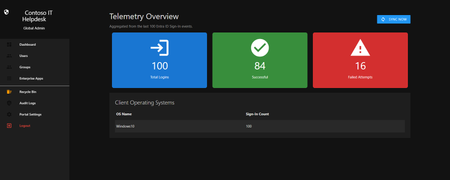
Hello everyone, If you manage identity in Microsoft Entra ID at an enterprise scale, you know the struggle: delegating day-to-day operational tasks (like password resets, session revocations, and MFA management) to Tier 1 and Tier 2 support staff is inherently risky. The native Azure/Entra portal is incredibly powerful, but it’s complex and lacks mandatory ITSM enforcement. Giving a helpdesk technician the "Helpdesk Administrator" role grants them access to a portal where a single misclick can cause a major headache. To solve this, I’ve developed the Entra Helpdesk Portal (Community Edition)—an open-source, containerized application designed to act as an isolated "airlock" between your support team and your Entra ID tenant. Why This Adds Value to Your Tenant Instead of having technicians log into the Azure portal, they log into this clean, Material Design web interface. It leverages a backend Service Principal (using MSAL and the Graph API) to execute commands on their behalf. Strict Zero Trust: Logging in via Microsoft SSO isn’t enough. The app intercepts the token and checks the user’s UPN against a hardcoded ALLOWED_ADMINS whitelist in your Docker environment file. Mandatory ITSM Ticketing: You cannot enforce ticketing in the native Azure Portal. In this app, every write action prompts a modal requiring a valid ticket number (e.g., INC-123456). Local Audit Logging: All actions, along with the actor, timestamp, and ticket number, are written to an immutable local SQLite database (audit.db) inside the container volume. Performance: Heavy Graph API reads are cached in-memory with a Time-To-Live (TTL) and smart invalidation. Searching for users or loading Enterprise Apps takes milliseconds. What Can It Do? Identity Lifecycle: Create users, auto-generate secure 16-character passwords, revoke sign-in sessions, reset passwords, and delete specific MFA methods to force re-registration. Diagnostics: View a user's last 5 sign-in logs, translating Microsoft error codes into plain English. Group Management: Add/remove members to Security and M365 groups. App/SPN Management: Lazy-load raw requiredResourceAccess Graph API payloads to audit app permissions, and instantly rotate client secrets. Universal Restore: Paste the Object ID of any soft-deleted item into the Recycle Bin tab to instantly resurrect it. How Easy Is It to Setup? I wanted this to be universally deployable, so I compiled it as a multi-architecture Docker image (linux/amd64 and linux/arm64). It will run on a massive Windows Server or a simple Raspberry Pi. Setup takes less than 5 minutes: Create an App Registration in Entra ID and grant it the necessary Graph API Application Permissions (e.g., User.ReadWrite.All, AuditLog.Read.All). Create a docker-compose.yml file. Define your feature toggles. You can literally turn off features (like User Deletion) by setting an environment variable to false. version: '3.8' services: helpdesk-portal: image: jahmed22/entra-helpdesk:latest container_name: entra_helpdesk restart: unless-stopped ports: - "8000:8000" environment: # CORE IDENTITY - TENANT_ID=your_tenant_id_here - CLIENT_ID=your_client_id_here - CLIENT_SECRET=your_client_secret_here - BASE_URL=https://entradesk.jahmed.cloud - ALLOWED_ADMINS=email address removed for privacy reasons # CUSTOMIZATION & FEATURE FLAGS - APP_NAME=Entra Help Desk - ENABLE_PASSWORD_RESET=true - ENABLE_MFA_MANAGEMENT=true - ENABLE_USER_DELETION=false - ENABLE_GROUP_MANAGEMENT=true - ENABLE_APP_MANAGEMENT=true volumes: - entra_helpdesk_data:/app/static/uploads - entra_helpdesk_db:/app volumes: entra_helpdesk_data: entra_helpdesk_db: 4.Run docker compose up -d and you are done! I built this to give back to the community and help secure our Tier 1 operations. If you are interested in testing it out in your dev tenants or want to see the full architecture breakdown, you can read the complete documentation on my website here I’d love to hear your thoughts, feedback, or any feature requests you might have!86Views0likes0Comments
Entra ID Private Access - data flow
Hello, I am successfully testing Entra Private Access. From outside, I can easily access my shared permissions. However, I have one more question. What happens if I my device on the internal network? If I access the shares directly, I get about 1GB/s. What happens if the "Global Secure Access" client is active? Do all the data go through the Entra portal, or just the authentication? If all the data go through the Entra portal, there could be challenges with the internet connection (all data in and out). Thank you for your support StefanStefan31Mar 24, 2026Copper Contributor100Views0likes2CommentsChallenges with custom data provided resource reviews
I was thrilled to see the ability to review disconnected applications in Entra, and even more thrilled to see that the permission and its description are available to the reviewer, which addresses a significant gap present in group-based reviews. However, the current decision-tracking approach does not adequately replicate the closed-loop remediation model typically found in traditional IGA access reviews for integrated applications. Requiring reviewers to upload confirmation that revocations have been completed is problematic. This approach does not mitigate the core risk: access may remain in place due to fulfillment errors or be incorrectly retained, and the reviewer may unknowingly validate an inaccurate state. This can lead to a compliance incident or audit finding. A more effective solution would allow reviewers to upload a current export of access data, enabling the review system to reconcile intended revocations against the actual state. Any discrepancies could then be flagged for remediation where revocations were missed or have failed, or for validation where access was revoked and immediately reinstated (e.g., due to reviewer misjudgement), ideally supported by corresponding ticketing or justification. There are currently a lot of gaps in Entra ID access reviews, and while this new feature arguably resolved the worst one, I think it's headed down the wrong path. I am curious about other people's thoughts.ritmo2kMar 17, 2026Copper Contributor39Views0likes0CommentsEntra ID Object Drift – Are We Measuring Tenant Health Correctly?
In many enterprise environments: Secure Score is green. Compliance dashboards look healthy. Yet directory object inconsistency silently accumulates. Stale devices. Hybrid join remnants. Intune orphan records. Over time, this becomes governance debt. In large tenants this often leads to inaccurate compliance reporting and Conditional Access targeting issues. I recently wrote a breakdown of: • Entra ID drift patterns • Hybrid join inconsistencies • Intune orphan objects • Lifecycle-based cleanup architecture Curious how others approach object hygiene at scale. Full article: https://www.modernendpoint.tech/entra-id-cleanup-patterns/?utm_source=techcommunity&utm_medium=social&utm_campaign=entra_cleanup_launch&utm_content=discussion One pattern I keep seeing is duplicate device identities after re-enrollment or Autopilot reset. Curious how others handle lifecycle cleanup in large Entra ID environments.209Views0likes3Comments


Tags
- Azure Active Directory (AAD)1,567 Topics
- Identity Management616 Topics
- Access Management439 Topics
- microsoft 365380 Topics
- Azure AD B2B221 Topics
- Conditional Access171 Topics
- Active Directory (AD)170 Topics
- Authentication140 Topics
- Azure AD Connect131 Topics
- azure117 Topics