mfa
117 Topics
Passkey/FIDO2 for users in mainland China – recommended approach?
Hi, We are currently evaluating the adoption of Passkey/FIDO2 in Microsoft Entra ID as part of our strategy to move users away from traditional authentication methods such as SMS and voice and towards phishing-resistant authentication. Our Microsoft Entra ID tenant is a global tenant (not Azure China operated by 21Vianet), but we have a group of users who are physically located in mainland China. For users in other regions, we are evaluating Passkeys in Microsoft Authenticator and FIDO2 security keys. However, before defining the approach for our users in China, we would like to better understand the supported and recommended architecture for this particular scenario. We have reviewed the Microsoft documentation and understand that: Passkeys are not available for Microsoft Azure operated by 21Vianet. On iOS, Microsoft Authenticator Passkeys can be used to sign in to global organizations while the user is in China. On Android, Passkey authentication has dependencies such as Google Play Services, which raises questions for devices operating in mainland China. Our main questions are: For users physically located in mainland China but authenticating against a global Microsoft Entra ID tenant, what is Microsoft's recommended approach for deploying phishing-resistant authentication with Passkey/FIDO2? Is Microsoft Authenticator Passkey on iOS considered a fully supported option for users permanently located in mainland China, rather than only users temporarily traveling there? For Android users in mainland China, what is the recommended approach considering the dependency on Google Play Services? Is Passkey in Microsoft Authenticator a realistic supported option in this scenario? Would physical FIDO2 security keys be the preferred or more consistent alternative for users in China when mobile Passkeys cannot be reliably used? Are there any other Microsoft-supported Passkey providers or authentication approaches that should be considered specifically for mainland China? From an enrollment perspective, what would be the recommended bootstrap process for these users? For example, would Temporary Access Pass (TAP) be the recommended method to allow users to register their Passkey/FIDO2 credential before SMS/Voice is removed? Are there any additional regional, connectivity, mobile OS, or application compatibility considerations that should be taken into account before enforcing a phishing-resistant Authentication Strength through Conditional Access? Our objective is not simply to enable Passkey in the tenant, but to define a supported and sustainable authentication model for users located in mainland China before starting a broader rollout. Any experience, Microsoft guidance, or recommended architecture for this type of scenario would be greatly appreciated. Thanks in advance.54Views0likes1CommentSynced iCloud Keychain passkey registration succeeds despite Device-Bound-only passkey profile
a { text-decoration: none; color: #464feb; } tr th, tr td { border: 1px solid #e6e6e6; } tr th { background-color: #f5f5f5; } We have Microsoft Entra passkeys enabled only for a pilot group. The assigned Default Passkey Profile is configured as: Passkey Type = Device-bound Key Restrictions enabled Microsoft Authenticator iOS and Android AAGUIDs only Despite this, a pilot account successfully registered a synced iCloud Keychain passkey. The Security Info page explicitly shows: "Passkey (Synced) - iCloud Keychain" The tenant also displays a warning banner stating: "All users enabled for SMS or voice authentication are in scope for passkey auto-enablement and will be assigned to a system-managed passkey profile that allows all passkey types without restrictions." Can Microsoft explain how tenant-managed passkey profiles interact with the system-managed passkey auto-enablement profile? Is the system-managed profile overriding or supplementing tenant-defined passkey restrictions?179Views0likes4Comments
Security Info blocked by conditional access
Hello, We have a conditional access policy in place where a specific group can only access Microsoft 365 (deny all apps, except Office 365). The moment a user clicks on Security Info in My Account, the user is blocked by this policy. I cant find a way to exclude the app "My Signins" (AppId 19db86c3-b2b9-44cc-b339-36da233a3be2). Since MFA is forced for this group, they can't change their authenticator app registration. Is there a solution for this? Initial MFA setup works by the way. UPDATE jan 23, 2025: I contacted Microsoft support and this was their answer (in short): " MySignin is a very sensitive resource that is not available in the picker and cannot be excluded in the conditional access policy. Also, the application is calling Microsoft Graph. I understand that this is not the information you are looking to hear at this time, I would have loved to help but the application cannot be excluded from the policy. "9.6KViews3likes15Comments
Entra ID 53003: How to identify primary authentication when Authentication Details are empty?
We are investigating repeated interactive Microsoft Entra ID sign-ins with the following pattern: - ErrorCode: 53003 (BlockedByConditionalAccess) - isInteractive: true - AppDisplayName: OfficeHome - Authentication requirement: Multifactor authentication Conditional Access correctly blocks these requests because they originate outside our trusted locations. We have already confirmed through controlled testing that the authentication flow can reach 53003 after the correct credentials are provided. Our current problem is different: We need to determine what mechanism satisfied the primary/first authentication factor for the observed 53003 events. For these events, Authentication Details are empty: - Authentication method: empty - Authentication method detail: empty - Result detail: empty Therefore, we cannot determine whether primary authentication was performed using a password, an existing token/session claim, PHS, PTA, federation, Seamless SSO, or another mechanism. Our questions are: 1. Is there any tenant-visible telemetry that can identify the primary authentication mechanism when AuthenticationDetails is empty? 2. Can fields such as AuthenticationProcessingDetails, AuthenticationProtocol, IncomingTokenType, OriginalTransferMethod, or AuthenticationMethodsUsed reliably distinguish between password validation and reuse of an existing authentication/token? 3. If additional authentication infrastructure is used: - can PTA Authentication Agent logs be correlated using RequestId or CorrelationId? - should Seamless SSO generate a corresponding Kerberos 4769 event for AZUREADSSOACC$? - should federated authentication be traceable in AD FS logs? 4. For Password Hash Synchronization, is there any tenant-visible telemetry confirming that Entra ID actually validated the password for a specific sign-in request? 5. If this information is not exposed to the tenant, can Microsoft Support retrieve backend authentication telemetry for a specific Sign-in ID / RequestId / CorrelationId and determine how primary authentication was satisfied? Our goal is not to determine why Conditional Access generated 53003 — that part is already understood. We specifically need to identify what satisfied primary authentication before the Conditional Access evaluation.128Views0likes0Comments
Locked account due to many attempts from malicious IP
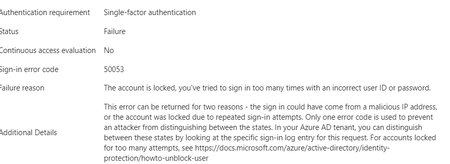
Hello experts, today, a user contacted me that she cannot access M365 and asked to unlock her account. 1st thing I've checked were her log-ins in MS Entra and there I've found many and many attempts to log in from different countries - like India, Russia, Demark etc... that happened with just few seconds delay.... As a result, the user's account got blocked. Had to deal 1st time with this kind of issue.... See pictures below. Now, it looks like there was another user under the same attack few days ago (who is on vacation so doesnt know he is blocked for now :)).... Anyway, wondering - how I can prevent these types of attack? We have MFA (app auth) configured so even if the password got broken, MFA should prevent the attacker to sign in. I was going to create a conditional access but there are countries like Italy, Denmark (and other EU ones) etc that I don't want to block. We have M365 E3 with M365 E5 Security subscriptions assigned to all users. Would be grateful for any advise.3.2KViews0likes4CommentsLooking for an on-prem MFA solution for Active Directory and RDP
Hi everyone, We're reviewing options for adding MFA to our on-premises Active Directory environment. Most of our users authenticate with Active Directory, while administrators also use RDP for managing Windows servers. Because part of our infrastructure is isolated from the Internet, we'd prefer an on-premises MFA solution instead of relying on a cloud-only service. Has anyone implemented something similar recently? I'm interested in hearing: Which solution did you choose? How difficult was the deployment? Did you run into any compatibility or performance issues? Is there anything you'd do differently if you were deploying it again? Any real-world experience or recommendations would be greatly appreciated. Thanks!685Views1like6Comments
MFA Options for Employees without Phones
Hello everbody, we're currently trying to implement MFA in our company, but approximately 1/10 of our employees have a workphone and are not allowed to use their personal phone. Since we also recently introduced Intune, the idea was to just use Windows Hello for Business, but when trying to provision it, we realized that you need to have MFA active for an account to be able to even activate it? Which kinda defeats the purpose. So my question is, is there some way to circumvent the MFA requirement for WHfB? Or what other options do we realistically have? Thanks in Advance!2.2KViews1like4CommentsFido passkeys blocked by policy
Hi all I'm helping out a customer with deploying physical passkeys and I'm running into a weird error. I've activated the sign in method and selected the two AAGuids for the Authenticator app and I've added the right AAGuid for the brand and model of passkey we are using. We can select the authentication method and enroll the security correctly but when trying to sign in using it we get the error as displayed in the attached picture. When checking the sign in logs i get this error message FIDO sign-in is disabled via policy and the error code is: 135016 I've not been able to track down any policy that would be blocking passkeys. anyone got any ideas?7.4KViews0likes8Comments
Disabling PIN-based login on Entra-joined PCs
Hi guys. Yesterday I took two machines off the domain and Entra joined them. The goal was 1) remove their access to domain resources 2) have tenant users login to the machine and get enriched tokens every time. this works as desired. The problem is every user gets prompted to set a pin. these are both shared secondary/tertiary PC's - there is no point to having a 6 digit PIN on them. I thought the new Authentication Methods tools had controls for this, but apparently not. A script was run to change certain related Reg Keys (by my onsite tech) but this had no change on reboot. textreg add "HKEY_LOCAL_MACHINE\SOFTWARE\Policies\Microsoft\PassportForWork" /v Enabled /t REG_DWORD /d 0 /freg add "HKEY_LOCAL_MACHINE\SOFTWARE\Policies\Microsoft\PassportForWork" /v DisablePostLogonProvisioning /t REG_DWORD /d 1 /f HKEY_LOCAL_MACHINE\SOFTWARE\Policies\Microsoft\PassportForWork Enabled key was set to 0, and DisablePostLogonProvisioning was set to 1. These are from various help threads I found here and other resources. Unfortunately, they do not work. Not sure what to do here. I've read there are InTune controls for this - but I don't really have the time to work out WindowsPC ennrollment profiles for 2 machines. The site has InTune, but only for iOS mobile management. Thoughts?5.8KViews0likes7CommentsReport suspicious activity (Preview)
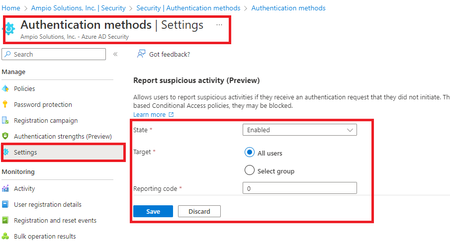
Allows users to report suspicious activities if they receive an authentication request that they did not initiate. This control is available when using the Microsoft Authenticator app and voice calls. Reporting suspicious activity will set the user's risk to high. If the user is subject to risk-based Conditional Access policies, they may be blocked.12KViews2likes8Comments