microsoft 365
385 Topics
Microsoft Entra provisioning Agent Error
Hello, I have deployed the Microsoft Entra provisioning agent in my organization, with synchronization configured from AD to Microsoft Entra ID. I am encountering an issue on the server where the Cloud Sync agent is installed: when connecting to Microsoft endpoints via a Squid proxy, I receive the error shown in the screenshot. The synchronization itself works perfectly, and the configuration status in the cloud is "Healthy." I frequently see the error shown in the screenshot (error code 12015), and I also occasionally encounter error code 12011. Has anyone experienced a similar issue? Could you please advise on how to resolve it? Thanks.34Views0likes1Comment
Entra ID 53003: How to identify primary authentication when Authentication Details are empty?
We are investigating repeated interactive Microsoft Entra ID sign-ins with the following pattern: - ErrorCode: 53003 (BlockedByConditionalAccess) - isInteractive: true - AppDisplayName: OfficeHome - Authentication requirement: Multifactor authentication Conditional Access correctly blocks these requests because they originate outside our trusted locations. We have already confirmed through controlled testing that the authentication flow can reach 53003 after the correct credentials are provided. Our current problem is different: We need to determine what mechanism satisfied the primary/first authentication factor for the observed 53003 events. For these events, Authentication Details are empty: - Authentication method: empty - Authentication method detail: empty - Result detail: empty Therefore, we cannot determine whether primary authentication was performed using a password, an existing token/session claim, PHS, PTA, federation, Seamless SSO, or another mechanism. Our questions are: 1. Is there any tenant-visible telemetry that can identify the primary authentication mechanism when AuthenticationDetails is empty? 2. Can fields such as AuthenticationProcessingDetails, AuthenticationProtocol, IncomingTokenType, OriginalTransferMethod, or AuthenticationMethodsUsed reliably distinguish between password validation and reuse of an existing authentication/token? 3. If additional authentication infrastructure is used: - can PTA Authentication Agent logs be correlated using RequestId or CorrelationId? - should Seamless SSO generate a corresponding Kerberos 4769 event for AZUREADSSOACC$? - should federated authentication be traceable in AD FS logs? 4. For Password Hash Synchronization, is there any tenant-visible telemetry confirming that Entra ID actually validated the password for a specific sign-in request? 5. If this information is not exposed to the tenant, can Microsoft Support retrieve backend authentication telemetry for a specific Sign-in ID / RequestId / CorrelationId and determine how primary authentication was satisfied? Our goal is not to determine why Conditional Access generated 53003 — that part is already understood. We specifically need to identify what satisfied primary authentication before the Conditional Access evaluation.151Views0likes0CommentsSingle group for TEAM AND Lighthouse (Security Group + 'Unified' group)
Trying to simplify our groups, since we are a 20+ year old firm, the variety of groups we have has bloated over the years. I'm trying to clean these up, but I've met a hitch. Our Service Desk dept has their own Internal team. Aka a 365 Group. Aka a 'unified' group. We use Lighthouse, which only takes Security Groups - it can't take the above 365 Group. First instinct is to create a Security group that can be used for both. But I can't seem to find a way to do this. The 365 Group is unable to nest a Security group. The Security group is unable to nest a 365 Group. So there's no single source of truth. I thought I could use Dynamic Grouping as a workaround - using the MemberOf property. But according to this, this Preview Feature is being abandoned and disabled. Anyone have workarounds/advice? Here's the output I get, when trying to do this via EOM PS C:\Users\lmtpo\Downloads> New-MgGroupMember -GroupID (team) -DirectoryObjectId (sec) New-MgGroupMember : Non-Unified Security Groups cannot be added to Unified Groups. paramName: Members, paramValue... PS C:\Users\lmtpo\Downloads> New-MgGroupMember -GroupID (sec) -DirectoryObjectId (team) New-MgGroupMember : A Unified Group cannot be added as a member of a Distribution List or Security Group or Elevated Group. paramName: Members, paramValue: , objectType: Microsoft.Online.DirectoryServices.Group133Views0likes0Comments
Need Microsoft support to resolve a historical tenant association with a domain I recently acquired
Hello, I recently became the legitimate and independent registrant of a domain that had previously been owned or used by an unrelated organization. I have no affiliation whatsoever with the previous domain holder or that organization. I have now received a Microsoft Power Platform notification at an email address under my domain concerning a Default environment belonging to the previous organization. The notification includes a Tenant ID and Environment ID, and the environment name corresponds to that organization. I do not own, administer, or have access to this tenant or Power Platform environment, and I am not seeking access to or control over it. My main concern is that there may still be a historical association between my domain or its email addresses and the previous organization's Microsoft tenant or related services. I would like Microsoft to investigate this and, where necessary, properly separate my domain and its email addresses from any unrelated historical Microsoft accounts, tenants, directories, or services. Most importantly, I want to ensure that this historical association will not adversely affect my ability in the future to use my domain and its business email addresses to create, verify, and use my own Microsoft 365, Microsoft Entra, Power Platform, or other Microsoft business services. At present, I do not have a Microsoft business account, Microsoft 365 tenant, or Power Platform tenant of my own. As a result, I appear to be unable to use some of the normal business support channels that require an existing tenant or administrator account. Could someone please advise me on the appropriate way to get this matter reviewed by Microsoft Support? If a Microsoft employee or official support representative can assist or direct me to the appropriate private support channel, I would greatly appreciate it. For privacy and security reasons, I have intentionally not posted the actual domain name, email address, Tenant ID, or Environment ID publicly. I am happy to provide all of the relevant details privately to an authorized Microsoft support representative if required. Thank you for any guidance.490Views0likes1CommentGroup-Based Licensing (E3 → Business Premium): MutuallyExclusiveViolation – Months Unresolved
We operate a Microsoft 365 environment with Entra ID, Intune, and Exchange Online. For months, we have been dealing with a critical issue that remains unresolved to this day — despite an active Microsoft Support ticket. The Technical Problem: During the migration of approximately 87 user accounts from Microsoft 365 E3 to Business Premium (SPB) via group-based licensing in Entra ID, all affected accounts receive a MutuallyExclusiveViolation error. Microsoft's backend treats E3 and Business Premium as mutually exclusive, blocking the SPB assignment — despite sufficient licenses being available. A sequential approach (removing E3 first, then assigning Business Premium) is not an acceptable solution: a test run proved that this causes a complete loss of Exchange Online access. For a rollout across 87 productive user accounts, this is not viable. What is required is a seamless, atomic license swap at the backend level — exclusively via group-based licensing. The Support Problem: Two support engineers assigned — zero technical progress. Instead of a substantive solution, we received standard documentation steps that do not address the actual problem. A false resolution notice was issued — the issue had demonstrably not been resolved. Our own PowerShell tests (Get-MgUser, Get-MgSubscribedSku) and CSV exports from the Entra ID portal disproved this conclusively. Committed updates from the Engineering Team were not delivered. Instead, automatically generated follow-up emails were sent with no substantive relation to the ongoing case. An additional unexplained behavior: a test user appears in the error report of a license group they were never added to — a further backend inconsistency that has not been investigated. Current Status: The ticket has been open for months. 87 user accounts cannot be migrated to Business Premium. An escalation to the Team Manager has been initiated. No resolution is in sight. My Question to the Community: Has anyone experienced a similar issue with MutuallyExclusiveViolation in group-based licensing (E3 → Business Premium)? Is there a known workaround or an official Microsoft statement on this? Ticket Reference: #2604241410000669780Views0likes3Comments
Using Cloud sync to sync AD to existing Entra Accounts
I want to sync in premise AD accounts with existing Entra accounts. The email on both accounts is the same, and I added the Entra/o365 suffix to the domain and set the UPN to that suffix, making both UPN(s) the same. It did not sync. It created a NEW Entra account. I thought I covered all my bases. How can I get on premise AD and existing Entra accounts to sync? thank youSolved577Views0likes5CommentsBest approach to detect multiple user accounts signing in from the same physical device
Hi Everyone, Working on environment: D365 Finance & Operations (cloud). Goal: I need to detect when more than one Dynamics user account is being used from the same physical device, and ideally count how many distinct users are active on that device. The business reason is this is not permissible to login with more than one account in the same device. For example: User X has device D1, User Y has device D2. User X logged in with his account using Device D2 (which is user's Y device). I want to know if this happened, cause it's not permissible behavior in the organization. For more illustration some users have blank devices id when I see Microsoft Entra. Or if I could find out when a user logs in and integrate it with D365 F&O to store the device the user logged into in a custom log table or anything that tells me that this user account is opened on more than one device or this device has more than one logged-in user account. .309Views0likes1CommentHybrid Join Lifecycle Model
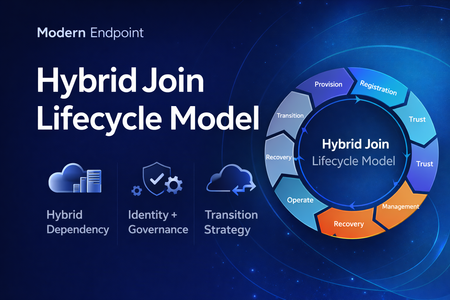
Microsoft Entra hybrid join is still a common reality in enterprise environments. For many organizations, it remains necessary because legacy applications still rely on Active Directory machine authentication, Group Policy is still in use, and on-premises operational dependencies have not fully been retired. At the same time, the long-term direction for endpoint identity is increasingly cloud-native. That creates an important architectural question: Should hybrid join be treated as a permanent device state, or as a lifecycle stage in a broader modernization journey? In practice, hybrid join is often discussed as a binary condition: the device is either hybrid joined or it is not. But from an operational perspective, that view is too limited. In real enterprise environments, hybrid join behaves much more like a lifecycle. A device moves through provisioning, registration, trust establishment, management attachment, steady-state operation, recovery, retirement, and eventually transition. That distinction matters because most hybrid join issues do not fail loudly. They usually appear as stale objects, pending registrations, broken trust, inconsistent management ownership, and environments that remain temporarily hybrid far longer than intended. Why a lifecycle model is useful Treating hybrid join as a lifecycle helps explain why so many organizations struggle with it even when the initial implementation appears technically correct. The challenge is usually not the first successful join. The challenge is everything that happens around it: Provisioning quality Trust validation Management ownership Drift detection Stale object cleanup Exit criteria for transition to Entra join Without that lifecycle view, hybrid join often becomes a static design decision with no clear operational model behind it. The eight phases 1. Provisioning The lifecycle starts when the device is built, imaged, or provisioned. This stage is more important than it looks. If the device is provisioned from a contaminated image, or if cloning and snapshot practices are not handled carefully, later identity issues are often inherited rather than newly created. Provisioning should be treated as an identity-controlled event, not just an OS deployment task. 2. Registration The device becomes known to Microsoft Entra. This is where many environments confuse visibility with readiness. A device object may exist in the cloud, but that does not automatically mean the hybrid identity state is healthy or operationally usable. 3. Trust Establishment This is the point where hybrid join becomes real. A device should not be considered fully onboarded until both sides of trust are present and healthy. In operational terms, this means the device is not only registered, but also capable of supporting the expected sign-in and identity flows. 4. Management Attachment Once trust exists, governance becomes the next question. Many organizations still balance Group Policy, Configuration Manager, Intune, and legacy application dependencies at the same time. That is exactly why hybrid join often persists. But if management ownership is not clearly defined, organizations end up with overlapping policy planes, inconsistent control, and unclear accountability. 5. Operational Steady State Hybrid join does not stop at successful registration. The device must remain healthy over time, and that means monitoring trust health, registration state, token health, line-of-sight to required infrastructure, and management consistency. A device that was healthy once is not necessarily healthy now. 6. Recovery Every real environment eventually encounters drift. Pending states, broken trust, orphaned records, reimaged devices, and inconsistent registration scenarios should not be treated as unusual edge cases. They should be expected and handled with formal recovery playbooks. Recovery is not an exception to the lifecycle. It is part of the lifecycle. 7. Retirement Retirement is one of the weakest areas in many hybrid environments. Devices are replaced or decommissioned, but their identity records often remain behind. That leads to stale objects, inventory noise, and administrative confusion. A proper lifecycle model should include a controlled retirement sequence rather than ad hoc cleanup. 8. Transition This is the most important strategic phase. The key question is no longer whether a device can remain hybrid joined, but whether there is still a justified reason to keep it there. Hybrid join may still be necessary in many environments today, but in many cases it should be treated as transitional architecture rather than the target end state. Practical takeaway Looking at hybrid join as a lifecycle creates a more useful framework for architecture decisions, operational ownership, troubleshooting, directory hygiene, governance, and transition planning toward Microsoft Entra join. That is the real value of this model. It does not replace technical implementation guidance, but it helps organizations think more clearly about why hybrid join exists, how it should be operated, and when it should eventually be retired. Final thought Hybrid join is still relevant in many enterprise environments, but it should not automatically be treated as a default destination. In many cases, it works best when it is managed as a lifecycle-driven operating model with defined phases, controls, and exit criteria. That makes it easier to stabilize operations today, while also creating a clearer path toward a more cloud-native endpoint identity model tomorrow. Full article: https://www.modernendpoint.tech/hybrid-join-lifecycle-model370Views1like0CommentsIntroducing the Entra Helpdesk Portal: A Zero-Trust, Dockerized ITSM Interface for Tier 1 Support
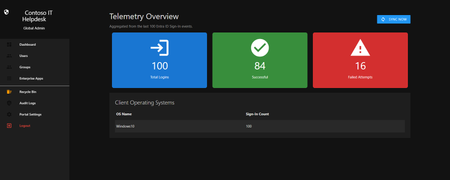
Hello everyone, If you manage identity in Microsoft Entra ID at an enterprise scale, you know the struggle: delegating day-to-day operational tasks (like password resets, session revocations, and MFA management) to Tier 1 and Tier 2 support staff is inherently risky. The native Azure/Entra portal is incredibly powerful, but it’s complex and lacks mandatory ITSM enforcement. Giving a helpdesk technician the "Helpdesk Administrator" role grants them access to a portal where a single misclick can cause a major headache. To solve this, I’ve developed the Entra Helpdesk Portal (Community Edition)—an open-source, containerized application designed to act as an isolated "airlock" between your support team and your Entra ID tenant. Why This Adds Value to Your Tenant Instead of having technicians log into the Azure portal, they log into this clean, Material Design web interface. It leverages a backend Service Principal (using MSAL and the Graph API) to execute commands on their behalf. Strict Zero Trust: Logging in via Microsoft SSO isn’t enough. The app intercepts the token and checks the user’s UPN against a hardcoded ALLOWED_ADMINS whitelist in your Docker environment file. Mandatory ITSM Ticketing: You cannot enforce ticketing in the native Azure Portal. In this app, every write action prompts a modal requiring a valid ticket number (e.g., INC-123456). Local Audit Logging: All actions, along with the actor, timestamp, and ticket number, are written to an immutable local SQLite database (audit.db) inside the container volume. Performance: Heavy Graph API reads are cached in-memory with a Time-To-Live (TTL) and smart invalidation. Searching for users or loading Enterprise Apps takes milliseconds. What Can It Do? Identity Lifecycle: Create users, auto-generate secure 16-character passwords, revoke sign-in sessions, reset passwords, and delete specific MFA methods to force re-registration. Diagnostics: View a user's last 5 sign-in logs, translating Microsoft error codes into plain English. Group Management: Add/remove members to Security and M365 groups. App/SPN Management: Lazy-load raw requiredResourceAccess Graph API payloads to audit app permissions, and instantly rotate client secrets. Universal Restore: Paste the Object ID of any soft-deleted item into the Recycle Bin tab to instantly resurrect it. How Easy Is It to Setup? I wanted this to be universally deployable, so I compiled it as a multi-architecture Docker image (linux/amd64 and linux/arm64). It will run on a massive Windows Server or a simple Raspberry Pi. Setup takes less than 5 minutes: Create an App Registration in Entra ID and grant it the necessary Graph API Application Permissions (e.g., User.ReadWrite.All, AuditLog.Read.All). Create a docker-compose.yml file. Define your feature toggles. You can literally turn off features (like User Deletion) by setting an environment variable to false. version: '3.8' services: helpdesk-portal: image: jahmed22/entra-helpdesk:latest container_name: entra_helpdesk restart: unless-stopped ports: - "8000:8000" environment: # CORE IDENTITY - TENANT_ID=your_tenant_id_here - CLIENT_ID=your_client_id_here - CLIENT_SECRET=your_client_secret_here - BASE_URL=https://entradesk.jahmed.cloud - ALLOWED_ADMINS=email address removed for privacy reasons # CUSTOMIZATION & FEATURE FLAGS - APP_NAME=Entra Help Desk - ENABLE_PASSWORD_RESET=true - ENABLE_MFA_MANAGEMENT=true - ENABLE_USER_DELETION=false - ENABLE_GROUP_MANAGEMENT=true - ENABLE_APP_MANAGEMENT=true volumes: - entra_helpdesk_data:/app/static/uploads - entra_helpdesk_db:/app volumes: entra_helpdesk_data: entra_helpdesk_db: 4.Run docker compose up -d and you are done! I built this to give back to the community and help secure our Tier 1 operations. If you are interested in testing it out in your dev tenants or want to see the full architecture breakdown, you can read the complete documentation on my website here I’d love to hear your thoughts, feedback, or any feature requests you might have!313Views0likes0Comments
PIM
Hello, everyone. I need some help. We already use PIM for Just-in-Time activation of administrative functions in Entra ID, but we would like something more granular. For example, we want certain administrative actions in Microsoft 365, such as accessing sensitive data or performing critical tasks, to only be possible upon specific request and approval, even if the user has already activated the function in PIM. Is this only possible with PIM, or is there another feature in Microsoft 365 for this type of control?187Views0likes1Comment