conditional access
174 Topics
Security Info blocked by conditional access
Hello, We have a conditional access policy in place where a specific group can only access Microsoft 365 (deny all apps, except Office 365). The moment a user clicks on Security Info in My Account, the user is blocked by this policy. I cant find a way to exclude the app "My Signins" (AppId 19db86c3-b2b9-44cc-b339-36da233a3be2). Since MFA is forced for this group, they can't change their authenticator app registration. Is there a solution for this? Initial MFA setup works by the way. UPDATE jan 23, 2025: I contacted Microsoft support and this was their answer (in short): " MySignin is a very sensitive resource that is not available in the picker and cannot be excluded in the conditional access policy. Also, the application is calling Microsoft Graph. I understand that this is not the information you are looking to hear at this time, I would have loved to help but the application cannot be excluded from the policy. "9.5KViews3likes15CommentsEntra External ID email OTP send event requestType always set to "signIn" regardless of user action
Hi, In a recent workload, I'm assisting a client with implementation of Entra External ID for identity management and app authentication, which includes sending OTP codes with customized email templates. To accomplish this, a custom authentication extension has been created that authorizes the request and then communicates with an email service via an event-driven, loosely coupled architecture. While implementing and testing this feature together with the client, we noticed that it seems like the different modes or states in the user flows are not reflected in the requestType property in the request payload posted to the OnOtpSend auth extension configured. E.g., if a user tries to sign in but has forgotten their password and navigates to the password reset view and requests to send the OTP code to their email address to reset the password, the following payload is sent to the auth extension endpoint (the original payload below was logged with Application Insights, with identifiers below then redacted and formatted, otherwise intact): { "type": "microsoft.graph.authenticationEvent.emailOtpSend", "source": "/tenants/aaaaaaaa-bbbb-cccc-dddd-eeeeeeeeeeee/applications/11111111-2222-3333-4444-555555555555", "data": { "@odata.type": "microsoft.graph.onOtpSendCalloutData", "otpContext": { "identifier": "email address removed for privacy reasons", "oneTimeCode": "<REDACTED>" }, "tenantId": "aaaaaaaa-bbbb-cccc-dddd-eeeeeeeeeeee", "authenticationEventListenerId": "22222222-3333-4444-5555-666666666666", "customAuthenticationExtensionId": "33333333-4444-5555-6666-777777777777", "authenticationContext": { "correlationId": "44444444-5555-6666-7777-888888888888", "client": { "ip": "192.0.2.10", "locale": "en-gb", "market": "en-gb" }, "protocol": "UNDEFINED", "requestType": "signIn", "clientServicePrincipal": { "id": "55555555-6666-7777-8888-999999999999", "appId": "11111111-2222-3333-4444-555555555555", "appDisplayName": "Example Web App", "displayName": "Example Web App" }, "resourceServicePrincipal": { "id": "55555555-6666-7777-8888-999999999999", "appId": "11111111-2222-3333-4444-555555555555", "appDisplayName": "<client-app-name>-Web", "displayName": "<client-app-name>-Web" } } } } The above payload was captured using browser-based authentication (native auth is not used), with the below parameters passed (identifiers, tenant name etc. redacted, otherwise intact): https://example.ciamlogin.com/ aaaaaaaa-bbbb-cccc-dddd-eeeeeeeeeeee/oauth2/v2.0/authorize ?response_type=code &client_id=11111111-2222-3333-4444-555555555555 &redirect_uri=https%3A%2F%2Fexample.com%2Fsignin%2Fcallback%2F &scope=openid+profile+email &state=<REDACTED> &prompt=login &ui_locales=de-DE &mkt=de-DE &nonce=<REDACTED> &code_challenge=<REDACTED> &code_challenge_method=S256 Following having navigated to the authorize endpoint above, the issue can be reproduced by entering an email address or an existing user identity, then on the password entry view, press the “Forgot Password?” link under the password input field, and then press the button/element “Email code to <user-email>”. I have looked at using the requestType in the email OTP send event payload to determine which email template and email content are used as per client requirement, but noted that the requestType seemingly always contains the value "signIn" even if the OTP code was sent as part of a password reset operation. At first glance, it would seem like this property indicates which step in the UI the user is currently at, even though I’m not certain whether that is what the property is actually meant to represent or indicate or not. However, for the above scenario and requirement, some identifier or value indicating the action would be needed in order to tailor the email content. The alternatives to having a reliable context property in the payload to indicate user action would require more or less significant additional components and infrastructure, thus increasing the complexity of the solution. Based on its name and values, it would seem like the requestType property appears be a good candidate to carry a user action context identifier. A suitable alternative solution has been adopted currently, using a generalized OTP template, which works well, but the requirement that it would be preferable to tailor the content based on user context and intent, e.g., whether the request was triggered as part of a password reset action or for another authentication scenario, is still present, ideally via the event payload sent from Entra External ID to the auth extension. If there would be any further/follow-up questions on the above, e.g., to clarify the requirement, or further explain the reproduction steps and behaviour observed, or anything else, please tell, and I'll ensure to get back as soon as possible. Also, would someone have some input on potential other/additional ways to make the requestType include a context identifier, that would be much appreciated as well, thanks! Regards Kristoffer135Views0likes0Comments
Locked account due to many attempts from malicious IP
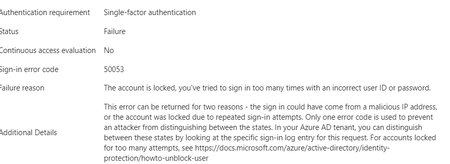
Hello experts, today, a user contacted me that she cannot access M365 and asked to unlock her account. 1st thing I've checked were her log-ins in MS Entra and there I've found many and many attempts to log in from different countries - like India, Russia, Demark etc... that happened with just few seconds delay.... As a result, the user's account got blocked. Had to deal 1st time with this kind of issue.... See pictures below. Now, it looks like there was another user under the same attack few days ago (who is on vacation so doesnt know he is blocked for now :)).... Anyway, wondering - how I can prevent these types of attack? We have MFA (app auth) configured so even if the password got broken, MFA should prevent the attacker to sign in. I was going to create a conditional access but there are countries like Italy, Denmark (and other EU ones) etc that I don't want to block. We have M365 E3 with M365 E5 Security subscriptions assigned to all users. Would be grateful for any advise.3.1KViews0likes4CommentsGuest accounts and MFA via Conditional Access in MS Entra
Hi experts, trying to get some help on my scenario and issue that external users started to experience since I've enabled MFA for external identities & guest users via Conditional Access. We have lots of external partners that we share some documentation with from our SharePoint. Some time ago, I have enabled "MS Entra B2B Integration for SharePoint and OneDrive" so that any external user that access shared files/folders in our SharePoint gets a GUEST account created in our tenant. This was also preparation for enabling MFA for External users via Conditional Access. I believe these are called "B2B Collaboration guests" Now, few days ago, I have enabled MFA via Conditional Access for all external users and guests, enabled for all cloud apps and require MFA to grant access. Until now, I got feedback from two external partners that their existing access doesnt work anymore - and they need to go through MFA (which is expected). The problem is that when they go through MFA set up, it ends up in a "loop" - meaning, they go through all steps but when completing the last step they are returned back to the very 1st step again. So they: scan QR code successfully authenticate get the page that it was successful get back to the 1st step asking to install or use MS Auth app The user tried different browsers also with Incognito tabs... When I am checking sing-in logs: guest account is created fine the status is: "Interrupted" additional details: The user was presented options to provide contact options so that they can do MFA. conditional access forcing MFA is marked as FAILED as MFA was not completed Both external partners that reported this are using MS Entra and I see their IDENTITY as ExternalAzureAD. Have not heard back from anyone else using other than ExternalAzureAD so not sure if there is something extra that needs to be configured. Anyone experienced this issue? Any idea what can be wrong? I do not have any cross-tenant collaboration etc configured...2.4KViews0likes5CommentsUnexpected button behaviour when using the prompt=create parameter in Entra External ID user flows
Hi, In a recent workload, I'm assisting a client to implement Entra External ID for streamlined authorization as well as single sign-on for associated registered external facing third-party applications for external customer users through their Entra External ID identity, as well as assisting the client with auth branding and other UI customizations, and preparing Entra ID federation custom OIDC providers and configuration for enabling SSO with organizational internal and remote work- and school accounts etc. The sign-up / create account experience is of importance to the client, as a rather substantial amount of users are expected to sign-up via self-service sign-up following having received an invite via another app. To ensure that the user lands on the create account view, in order to minimize the number of steps and actions the users need to take to get there, the prompt=create parameter is used to pre-select the sign-up/register experience in the user flows UI. Having stress-tested the user flows and experience recently, we noticed that in a specific scenario, some UI elements behave in a manner that could be described as unexpected, and even though a workaround has mitigated it to some extent, the behaviour of some elements could probably be improved a bit to ensure an even more consistent user experience in the built-in user flows. Specifically, if the user flow is invoked with the prompt parameter set, the user lands on the create account screen as expected, however, unless custom CSS modification is applied, the Back button that would typically be there, as if having arrived there from the initial sign-in screen where it’s also displayed. If pressing the Back button displayed on the Create account view when having navigated there with the prompt=create set in the /authorize request, pressing the button seemingly doesn’t have any impact or result in any action, one can click it, but nothing happens. I'd suspect it's perhaps a "remnant" from if the flow is invoked without any prompt parameter set, or with prompt=login set, but when prompt=create is set, there is no state/page history in the UI to navigate back to, as no previous page has been displayed or rendered yet and added to the history, and the Back button click thus doesn’t have any effect. In general, I think buttons that don't have any tangible action should not be displayed, also, if prompt=login is set, the Back button isn't shown then either on the very initial user flow view shown then, so it would seem the built-in user flows actually already follow such approach in fact, but not when the prompt=create has been set, thus causing some inconsistency in the UI that users could notice unless custom CSS styling is applied. The expected behaviour for our business case would be that if prompt=create is set, then, similar to the prompt=login, no Back button should be displayed, or, if shown, it should result in some navigation (perhaps something like javascript.go(-1), but that could/would be dependent on from where the user arrived, e.g., going back a step in the browser history won't work if the user clicked a link from an invite email ) and preferably not be non-actionable. Furthermore, on the topic of the Back button and its behaviour when the prompt=create parameter is set, there is another case at which we observed some unexpected button behaviour as well, that could probably benefit from some attention. At a specific second scenario, it seems that the Continue button is displayed without providing any action, and when clicking the Back button then, clicking it seemingly resets the "create account", state likely set by the prompt=create initially, and instead switches the flow back to the sign-in state, which can at least affect the display text of some subsequent buttons shown in later steps in the UI. The user arrives at a built-in Entra External ID user flow /authorize endpoint, with the prompt=create query parameter set The user triggers the OTP challenge by entering an email address to verify the email address The user receives the OTP code but enters it incorrectly, i.e., doesn't copy the full code length of eight digits, and instead enters/pastes six of the eight code digits. The UI then shows an error message that the code could not be used/validated, and the email address field is displayed again with the email address that was used for the verification attempt prefilled. If the user clicks the Continue button at this stage, nothing happens. If the user clicks the Back button instead (given that it’s not hidden), it shows the same view one more time, with the Back and Continue buttons at the bottom. However, if the user clicks the Continue button this time, it works and a new code is sent. On the next screen, where the newly sent code can be entered, instead of a button named "Continue", it will now instead show a button with the text "Sign-in" (it would seem like the create account state has gotten lost somewhere along the way at this point, perhaps when the back button in the step 5 above was pressed). If one omits the prompt=create parameter, or when using prompt=login, things seem to work fine, the above occurs when the prompt=create is set. The reason why is the prompt=create is used is due to a business requirement to try to minimize the steps, especially in conjunction with the registration/sign-up, as far a possible when signing up. We have opted for the built-in user flows, not the self-hosted native authentication UI pages, for this project, and then as I understand it, it is the prompt=create parameter that can/should be used to enable the user to land directly on the registration page without having to navigate there manually via the sign-up link, that is otherwise shown on the initial sign-in page. It would thus be great if the prompt=create parameter could have some attention (or perhaps if a dedicated sign-up user flow type could be added potentially, even though that would perhaps warrant some update to the user flow app linking as well, as my understanding is that one user flow can be linked to one app registration at a time currently) to avoid that some buttons become unresponsive when the parameter is used, or falls back to sign-in, to improve the built-in user flows further, as the prompt=create fulfils the business requirement well otherwise. If there would be any further/follow-up questions on the above, e.g., to clarify the requirement, or further explain the reproduction steps and behaviour observed, or anything else, please tell, and I'll ensure to get back as soon as possible. Also, would someone have some input on potential other/additional ways to pre-select the create account/sign-up experience, that would naturally be much appreciated as well, thanks! Regards Kristoffer282Views0likes0Comments
Can the built-in "No account? Create one" link redirect to a custom sign-up page?
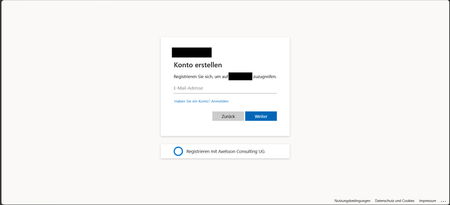
I'm using Microsoft Entra External ID with a built-in sign-in/sign-up user flow. On the Microsoft-hosted sign-in page, the "No account? Create one" link always redirects users to the default Entra sign-up page. I already have a custom registration page and would like this built-in link to redirect to my custom URL instead. Is there any supported way to customize the destination of this link in a built-in user flow? If not, could someone confirm whether this behavior is fixed by design? Thanks!418Views0likes2Comments
Orphaned TPM-bound Entra Workplace Join device — no tenant access, backend deletion required
I have a personal Windows device that remains stuck in a TPM-protected Workplace Join to a former Microsoft Entra ID tenant. I no longer have tenant access and am not an admin. Local remediation completed: - dsregcmd /leave executed as SYSTEM - All MS-Organization / AAD certificates removed - Device still reports WorkplaceJoined : YES Azure Support ticket creation fails with: AADSTS160021 – interaction_required Application requested a user session which does not exist. Tenant inaccessible / user not present in tenant. This is an orphaned Entra ID device object. Requesting guidance or escalation for backend deletion. Tenant ID: 99f9b903-8447-4711-a2df-c5bd1ad1adf7 Device ID: f47987f4-a20b-4c34-a5f7-40ab0f593c6c424Views0likes1Comment
MFA Options for Employees without Phones
Hello everbody, we're currently trying to implement MFA in our company, but approximately 1/10 of our employees have a workphone and are not allowed to use their personal phone. Since we also recently introduced Intune, the idea was to just use Windows Hello for Business, but when trying to provision it, we realized that you need to have MFA active for an account to be able to even activate it? Which kinda defeats the purpose. So my question is, is there some way to circumvent the MFA requirement for WHfB? Or what other options do we realistically have? Thanks in Advance!2.1KViews1like4Comments
Fido passkeys blocked by policy
Hi all I'm helping out a customer with deploying physical passkeys and I'm running into a weird error. I've activated the sign in method and selected the two AAGuids for the Authenticator app and I've added the right AAGuid for the brand and model of passkey we are using. We can select the authentication method and enroll the security correctly but when trying to sign in using it we get the error as displayed in the attached picture. When checking the sign in logs i get this error message FIDO sign-in is disabled via policy and the error code is: 135016 I've not been able to track down any policy that would be blocking passkeys. anyone got any ideas?7.3KViews0likes8Comments
Global Secure Access - Conditional Access Require GSA - Android Blocked
Hello all, I am currently working on deploying Global Secure Access client with Microsoft Forward Traffic profile and a conditional access policy to block access to M365 services unless connected through the GSA client. I have this working as I want it for Windows and mobile devices in a tenant we use for development. However, when I set this up at our live tenant, I cannot get the Android device to work. My setup is a Personally Owned Work Profile with the Defender app deployed and configured to enable GSA. I can connect to Global Secure Access and it does show some traffic tunneling to Microsoft. However, when I go to login to another app like Outlook, it blocks the sign-in. This is not the case for an iPhone I have personally enrolled and my Entra Joined laptop. Upon investigation of any differences between our development tenant (working fully) and our tenant (Android not working) I found that in the GSA section under Services, there is an extra service called “Microsoft Entra Channel Access”. This service does not show up when I am logged in our developer tenant. Even on the same phone by removing work profiles and signing in to both tenants, our live tenant shows the new channel, and the developer tenant does not have it. I did some log review with the advanced diagnostics feature and the app and noted a few things I am lead to believe that the issue is with this new Entra Channel that has been deployed to our live tenant and not to our dev tenant yet. When I go to sign-in to the Outlook application in the work profile for the developer tenant, I can see the authentication traffic being tunneled through the Microsoft 365 profile. (login.live.com, login.microsoftonline.com, and aadcdn.msftauth.net). However, in our production tenant when doing the same test I do not see those destinations being tunneled at all. I do see the traffic being collected in the “Hostname” section, but is not being tunneled. Another interesting point with this is that on an iPhone I am testing; I do see the authentication destinations being tunneled through the Entra Channel. Here are the screenshots of my findings. https://imgur.com/a/82r3HQC I have an open Microsoft support case and hoping to get the attention of a Microsoft employee or MVP who may be able to get this in front of the Entra product team to see if this is a bug.341Views1like1Comment