Forum Widgets
Latest Discussions

Azure Active Directory Webinar Community
Our 12-part AAD Webinar program has now concluded. Check back here soon to learn about our FY21 webinar plans! Want to watch and listen to these webinars? Check back a few weeks after each webinar session at https://aka.ms/AADWebinarRecordings. Time & Date Webinar Topics March 5, 2020 1. 0700 PT / 1000 ET / 1500 GMT 2. 1100 PT / 1400 ET / 1900 GMT Registration closed Your journey to passwordless (You will learn about options to minimize use of passwords today and how to work toward a passwordless future.) March 12, 2020 1. 0700 PT / 1000 ET / 1400 GMT 2. 1100 PT / 1400 ET / 1800 GMT Registration closed Manage Partner Access with B2B (You will learn how to collaborate with your partners in a secure manner.) March 19, 2020 1. 0700 PT / 1000 ET / 1400 GMT 2. 1100 PT / 1400 ET / 1800 GMT Registration closed Enable New Customer Experiences with B2C (You will learn how to enable new customer experiences with Azure AD B2C.) June 11, 2020 1. 0700 PT / 1000 ET / 1400 GMT 2. 1100 PT / 1400 ET / 1800 GMT Registration closed Identity Governance for Modern Organizations (We will introduce tools to govern the lifecycle of user and guest identities in your Azure AD and Office 365 deployment.) June 18, 2020 1. 0700 PT / 1000 ET / 1400 GMT 2. 1100 PT / 1400 ET / 1800 GMT Registration closed Getting started with Azure AD Reporting and Insights (You will learn how to Interpret Azure AD Logs, Integrate with your SIEM tools and Gather Insights about your Azure AD Service.) June 25, 2020 1. 0700 PT / 1000 ET / 1400 GMT 2. 1100 PT / 1400 ET / 1800 GMT Registration closed Azure AD as the New Security Control Plane (You will learn how to assess and implement a modern approach to secure your organization identities with Azure AD.) 2019 Webinar Dates 2019 Webinar Topics September 5, 2019 1. 0700 PT / 1000 ET / 1500 GMT 2. 1100 PT / 1400 ET / 1900 GMT Registration closed Getting started with hybrid identity Learn how and why to integrate your on-premises identities with Azure AD. September 12, 2019 1. 0700 PT / 1000 ET / 1500 GMT 2. 1100 PT / 1400 ET / 1900 GMT Registration closed Integrating your applications with Azure Active Directory Learn how integrating your line of business and SaaS apps using Azure Active Directory enables advanced security, single sign-on, and convenience for you and your users. September 19, 2019 1. 0700 PT / 1000 ET / 1500 GMT 2. 1100 PT / 1400 ET / 1900 GMT Registration closed Take your apps to the next level with provisioning Simplify identity lifecycle management with Azure AD automatic user and group provisioning for SaaS applications. October 3, 2019 1. 0700 PT / 1000 ET / 1500 GMT 2. 1100 PT / 1400 ET / 1900 GMT Registration closed Upgrade your security with multi-factor authentication Protect your users by leveraging Azure AD and 3rd party multi-factor authentication. October 10, 2019 1. 0700 PT / 1000 ET / 1500 GMT 2. 1100 PT / 1400 ET / 1900 GMT Registration closed Starting your journey to Zero Trust with Conditional Access & Identity Protection Today's cloud technology and mobile workforce challenge traditional approaches to security. Learn how to shore-up your environment by following zero trust methodologies and Azure AD technologies. October 17, 2019 1. 0700 PT / 1000 ET / 1500 GMT 2. 1100 PT / 1400 ET / 1900 GMT Registration closed Empower your users with better IT scalability Learn how Azure AD enables your users to reset their passwords securely and manage their own security and allows you to scale IT management of groups. Want to listen to the recording? Check back a few weeks after the webinar session at https://aka.ms/AADWebinarRecordings.Derek MathisAug 08, 2019Former Employee83KViews36likes49CommentsAzure Active Directory Webinar Recordings
Below you will find links for the recordings of the Azure Active Directory webinar sessions in YouTube format. Note, these webinar recordings will be available roughly 2-3 weeks after each of the live webinars. Live links will be posted as soon as they are available. We will also post a pdf of the PPT used in each webinar as soon as we have that available. ALSO NOTE: COVID has delayed recordings of March and June sessions, but we hope to have those posted below by end of June / early July. Please also note: Depending on your Internet connection it may take up to fifteen seconds or so for the recording to start. Check in at our webinar community for FY21 updates: https://aka.ms/AADWebinarCommunity. Date Topic Recording PPT Presentation March 5, 2020 Your journey to passwordless (You will learn about options to minimize use of passwords today and how to work toward a passwordless future.) YouTube Link March 12, 2020 Manage Partner Access with B2B (You will learn how to collaborate with your partners in a secure manner.) YouTube Link March 19, 2020 Enable New Customer Experiences with B2C (You will learn how to enable new customer experiences with Azure AD B2C.) YouTube Link June 11, 2020 Identity Governance for Modern Organizations (We will introduce tools to govern the lifecycle of user and guest identities in your Azure AD and Office 365 deployment.) YouTube Link June 18, 2020 Getting started with Azure AD Reporting and Insights (You will learn how to Interpret Azure AD Logs, Integrate with your SIEM tools and Gather Insights about your Azure AD Service.) YouTube Link June 25, 2020 Azure AD as the New Security Control Plane (You will learn how to assess and implement a modern approach to secure your organization identities with Azure AD.) YouTube Link 2019 Recordings & PowerPoint Presentations September 5, 2019 Getting started with hybrid identity Learn how and why to integrate your on-premises identities with Azure AD. YouTube Link September 12, 2019 Integrating your applications with Azure Active Directory Learn how integrating your line of business and SaaS apps using Azure Active Directory enables advanced security, single sign-on, and convenience for you and your users. YouTube Link September 19, 2019 Take your apps to the next level with provisioning Simplify identity lifecycle management with Azure AD automatic user and group provisioning for SaaS applications. YouTube Link October 3, 2019 Upgrade your security with multi-factor authentication Protect your users by leveraging Azure AD and 3rd party multi-factor authentication. YouTube Link October 10, 2019 Starting your journey to Zero Trust with Conditional Access & Identity Protection Today's cloud technology and mobile workforce challenged traditional approaches to security. Learn how to shore-up your environment by following zero trust methodologies and Azure AD technologies. YouTube Link October 17, 2019 Empower your users with better IT scalability Learn how Azure AD enables your users to reset their passwords securely and manage their own security and allows you to scale IT management of groups. YouTube Link Thanks for watching and please feel free to share these links!Derek MathisAug 08, 2019Former Employee54KViews22likes48CommentsAzure AD group-based license management for Office 365 and more
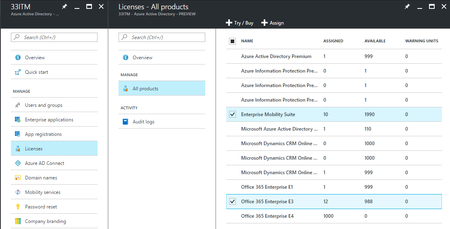
This looks awesome - simplify licence management for Office 365, EMS, Dynamics 365 and more with the https://blogs.technet.microsoft.com/enterprisemobility/2017/02/22/announcing-the-public-preview-of-azure-ad-group-based-license-management-for-office-365-and-more/: Microsoft cloud services such as Office 365, Enterprise Mobility + Security, Dynamics CRM, and other similar products require licenses to be assigned to each user who needs access to these services. Until now, licenses could only be assigned at individual user level, which can male large-scale management difficult for our customers. We have introduced a new capability of the Azure AD license management system: group-based licensing. It is now possible to assign one or more product licenses to a group. Azure AD will make sure that the licenses are assigned to all members of the group. Any new members joining the group will be assigned the appropriate licenses and when they leave the group those licenses will be removed. This eliminates the need for automating license management via PowerShell to reflect changes in the organization and departmental structure on a per-user basis. Here is the documentation with the steps to get started - https://docs.microsoft.com/en-us/azure/active-directory/active-directory-licensing-whatis-azure-portalSolvedCian AllnerFeb 22, 2017Silver Contributor24KViews12likes38CommentsThe final push to GA "Azure AD in new Azure Portal": We need your help!
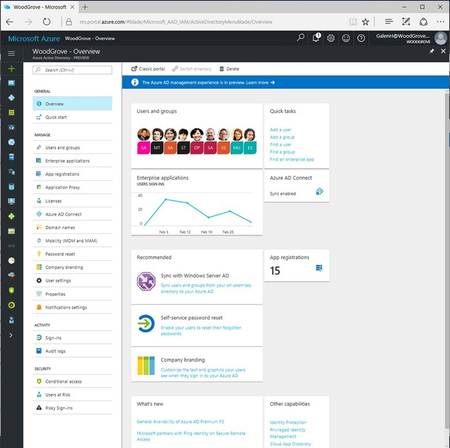
Hello folks, We`re making our final push to the General Availability of "Azure Active Directory in the new Azure Portal", and we need your help to make sure it is great for you. As Alex Simons shared: "Last September we shared the first preview of the new administration experience for Azure Active Directory in the new Azure portal. Since then, we’ve added lots of new functionality, including reporting, app management, conditional access, B2B, and licensing. Many of you are using the new experience regularly – in fact, over half a million of you are using it, from almost every country in the world, with usage increasing by about 25% each month. We appreciate all your positive feedback, and love the constructive feedback that’s helped us make an even stronger product. But there are still a LOT of you using the old portal. Late last week we turned on the another set of feature updates, and the new experience now has all of the features identity admins frequently use. With that update, we’ve entered our final push to GA the UX in the next ~60 days. And that’s where we need your help: We need everyone to move over to using the new portal for production tasks so we can uncover any last minute lingering issues." Please, do read Alex` blog post for more details and send us your feedback in the ‘Admin Portal’ section of our feedback forum. Let us know what you think!6.7KViews11likes14CommentsWelcome to the Azure Active Directory B2B Collaboration Community!
The Azure Active Directory B2B Collaboration Community is a place we've built for all of you. You can learn more about the capabilities, discuss your work with Azure AD B2B collaboration, and connect with experts that build and use Azure Active Directory B2B Collaboration. Our community is a great place for engagements with us and connecting with other customers like you. Get your questions answered, give us feedback, make your favorite feature requests. Help us shape the future of the product. We are listening! Azure AD B2B collaboration capabilities enable IT Pros and Information Workers to work closely with users in any other organization on the planet. They can provide access to documents, resources and applications, while maintaining complete control over their internal data. Developers can use the Azure AD business-to-business APIs to write applications that bring two organizations together in a secure way that appears seamless to Information Workers and is intuitive for them to navigate. So, jump in! We look forward to getting to know you! Sarat Subramaniam and Mary Lynch Thanks, Sarat5.1KViews10likes6CommentsAzure Active Directory AMA session coming September 26!
Interested in the opportunity to connect directly with identity experts to have all your Azure Active Directory questions answered in real time? Please save the date and join us live on Twitter September 26th for a one hour (0800 PT / 1100 ET / 1600 GMT) ‘Ask Me Anything’ session on #AzureAD deployment. This session will complement the AAD webinars you have been attending during the month of September through our https://aka.ms/AADWebinarCommunity. Stay tuned on Twitter via the https://twitter.com/azuread handle for more details. We look forward to seeing you there! #AMAMicrosoftEntraTeamSep 23, 2019Iron Contributor1.4KViews9likes2Comments
SCIM provisioning - custom app authentication
Hi, in the documentation for https://learn.microsoft.com/en-us/entra/identity/app-provisioning/use-scim-to-provision-users-and-groups#handling-endpoint-authentication, two methods are given: 1) a "long-lived token" (i.e. a secret key that has to be pasted in-clear by the admin) 2) "Microsoft Entra bearer token" - similar to other services (e.g. callbacks for MS Teams bots), Microsoft sign the outgoing calls, and the app being provisioned can validate them against Microsoft's public keys To me, option (2) is by far the best - each message is signed individually, there is no manual handling of secrets etc. As said in the documentation - "Apps that use Microsoft Entra ID as an identity provider can validate this Microsoft Entra ID-issued token." - great! So why on earth does it then say "The token generated by the Microsoft Entra ID should only be used for testing. It shouldn't be used in production environments." ? Why not? The whole system of Entra bearer tokens is only for test? And production should go back to secret keys, with all the problems they have? It doesn't seem right.. What am I missing here?YannickMalinsNov 19, 2024Copper Contributor229Views7likes0Comments
23H2 Passkeys: default to security key instead of mobile devices
Microsoft invested time & money to introduce Passkeys in Windows 11 23H2, as it should. Unfortunately, it defaults to a mobile device (iPhone, iPad or Android device) everytime you try to log on. This is very annoying for everybody that is using a Security Key (FIDO2). Before we just needed to enter our PIN but now we need multiple clicks to log on. I'm not aware of a solution to manage these options (manually or through Intune). Is anyone aware of a solution? I'm quite amazed Microsoft didn't think of this.3.2KViews7likes2Comments- EricStarkerJul 06, 2017Former Employee2.2KViews6likes4Comments
Detailed video overview of Azure Active Directory B2B collaboration
Lead engineer for Microsoft Identity Services Sarat Subramaniam, goes over Azure Active Directory B2B collaboration, which as of 4/12/ 17 is now generally available. If you are unfamiliar with Azure AD B2B: It is service that simplifies the secure sharing of your Apps and services with your external business partners and colleagues. It allows users to easily share common Apps and services to collaborate with their peers and IT to add and manage these external users without having to add them to the corporate directory or requiring partners to have Azure Active Directory in place. Further, conditional access authorization policies - including Multi-factor authentication enabled by Azure Active Directory keep data safe. More information can be found here: aka.ms/AddB2Busers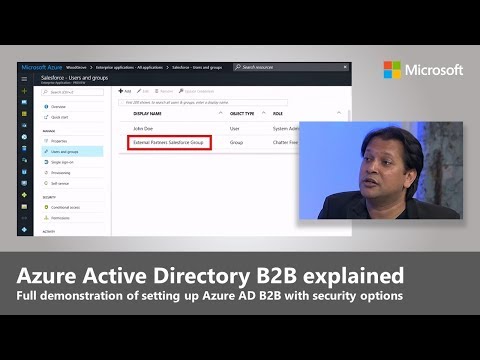 Zachary-CavanellApr 12, 2017Bronze Contributor5.7KViews6likes0Comments





Tags
- Azure Active Directory (AAD)1,567 Topics
- Identity Management616 Topics
- Access Management439 Topics
- microsoft 365380 Topics
- Azure AD B2B221 Topics
- Conditional Access171 Topics
- Active Directory (AD)170 Topics
- Authentication140 Topics
- Azure AD Connect131 Topics
- azure117 Topics