Recent Discussions
Who Can Access What? Designing RBAC and Identity in Azure
Who should be allowed to access an Azure resource? Azure makes it easy to create resources. The harder question comes afterwards: who should be allowed to access them? A Function App may need to read secrets from Key Vault. A Logic App may need to call APIs through API Management. A developer may need to deploy to Dev but have no access to Production. A CI/CD pipeline may need to deploy infrastructure without becoming an Owner of the entire subscription. This is where Azure Role-Based Access Control (RBAC) and Managed Identity become critical. In this article, I look at how to design access around people, applications and deployment pipelines, while keeping permissions as narrow as practical. The article covers: Azure RBAC and access scopes Least-privilege access Managed Identities Developer vs Production access boundaries Application identities CI/CD deployment permissions RBAC vs API authentication Privileged access and PIM Common RBAC design mistakes One of the key principles is simple: Give an identity only the permissions it actually needs. For example, if a Function App only needs to read secrets from Key Vault, giving it Contributor access to the entire Resource Group solves the problem with a much broader permission than necessary. Good RBAC design is not about assigning more permissions. It is about understanding: Who needs access? Why do they need it? What exactly do they need to do? At what scope should access be granted? How can that access be managed securely over time? I would be interested to hear how others approach RBAC and identity design in enterprise Azure environments. Full article: https://www.linkedin.com/pulse/who-can-access-what-designing-rbac-identity-azure-chethan-raj-ud6gc/20Views0likes0CommentsWho Can Access What? Designing RBAC and Identity in Azure
Who should be allowed to access an Azure resource? Azure makes it easy to create resources. The harder question comes afterwards: who should be allowed to access them? A Function App may need to read secrets from Key Vault. A Logic App may need to call APIs through API Management. A developer may need to deploy to Dev but have no access to Production. A CI/CD pipeline may need to deploy infrastructure without becoming an Owner of the entire subscription. This is where Azure Role-Based Access Control (RBAC) and Managed Identity become critical. In this article, I look at how to design access around people, applications and deployment pipelines, while keeping permissions as narrow as practical. The article covers: Azure RBAC and access scopes Least-privilege access Managed Identities Developer vs Production access boundaries Application identities CI/CD deployment permissions RBAC vs API authentication Privileged access and PIM Common RBAC design mistakes One of the key principles is simple: Give an identity only the permissions it actually needs. For example, if a Function App only needs to read secrets from Key Vault, giving it Contributor access to the entire Resource Group solves the problem with a much broader permission than necessary. Good RBAC design is not about assigning more permissions. It is about understanding: Who needs access? Why do they need it? What exactly do they need to do? At what scope should access be granted? How can that access be managed securely over time? I would be interested to hear how others approach RBAC and identity design in enterprise Azure environments. Full article: https://www.linkedin.com/pulse/who-can-access-what-designing-rbac-identity-azure-chethan-raj-ud6gc/12Views0likes0CommentsHow Should You Structure Dev, UAT, Staging and Prod in Azure?
This is one of those decisions that can look simple at the beginning of a project and become increasingly important as the environment grows. Should each environment have its own Resource Group? Should Production have a separate Subscription? Where should shared services live? How should naming, tagging and CI/CD fit into the design? There isn't one universal answer. The right structure depends on factors such as security boundaries, ownership, lifecycle, deployment processes and operational requirements. In this article, I look at: Dev, UAT, Staging and Production environment boundaries Resource Groups vs Azure Subscriptions Production isolation Naming conventions Azure tagging CI/CD considerations Blue/Green deployment considerations Common environment architecture mistakes The main idea is that environment architecture should be designed around clear operational and security boundaries rather than simply creating more Resource Groups. I would be interested to hear how others structure Dev, UAT, Staging and Production in enterprise Azure environments. Full article: https://www.linkedin.com/pulse/how-should-you-structure-dev-uat-staging-prod-azure-chethan-raj-ktfac/16Views0likes0CommentsHow should Dev, UAT, Staging and Production be structured in Azure?
This is one of those decisions that can look simple at the beginning of a project and become increasingly important as the environment grows. Should each environment have its own Resource Group? Should Production have a separate Subscription? Where should shared services live? How should naming, tagging and CI/CD fit into the design? There isn't one universal answer. The right structure depends on factors such as security boundaries, ownership, lifecycle, deployment processes and operational requirements. In this article, I look at: Dev, UAT, Staging and Production environment boundaries Resource Groups vs Azure Subscriptions Production isolation Naming conventions Azure tagging CI/CD considerations Blue/Green deployment considerations Common environment architecture mistakes The main idea is that environment architecture should be designed around clear operational and security boundaries rather than simply creating more Resource Groups. I would be interested to hear how others structure Dev, UAT, Staging and Production in enterprise Azure environments. Full article: https://www.linkedin.com/pulse/how-should-you-structure-dev-uat-staging-prod-azure-chethan-raj-ktfac/16Views0likes0Comments
AADSTS5000228 - Locked Out of Trial Tenant
I created a free trial tenant, and was immediately locked out. Upon doing research, I basically discovered that the tenant is locked due to unknown reasons, and I have to contact support. I have tried calling 4 different support numbers a total of 8 times. I have never made it through the laughable automated phone system to a real person, I eventually get hung up on for no reason. I've tried creating chats from personal accounts to basically just be told to log in with my new tenant account and submit a ticket. I can't log in, I would love to be able to log in. I am at a loss for what to do. I can't open a case. I can't call a number. I can't log in. Does anyone have any advice on how to get this taken care of? At this point, I just want to cancel the tenant so when the auto-renew comes up, it doesn't charge my card.23Views0likes1CommentAzure Virtual Desktop Regional host pools public preview open to all
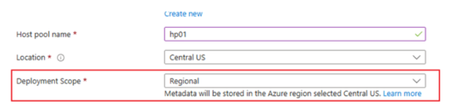
Earlier this year we announced a public preview for a new type of host pool, referred to as a "Regional" host pool. This brings enhanced resiliency and increased options for data soverignty. Today we are expanding the public preview to everyone. A new drop down box called "Deployment Scope" will appear on the Basics tab of the Create a host pool deployment, when you choose a region that supports regional host pools in preview. At this point those regions are East US 2 and Central US. Further regions will be shortly added to provide even further choice. Ultimatley every Azure region where Azure Virtual Desktop is supported will be supported. Please deploy and connect to some new Regional host pools to test this functionality. Please refer to this blog post: https://techcommunity.microsoft.com/blog/azurevirtualdesktopblog/now-in-public-preview-azure-virtual-desktop-regional-host-pools/4474598 and the Microsoft Learn documentation: https://learn.microsoft.com/en-us/azure/virtual-desktop/regional-host-pools105Views0likes0CommentsAzure Virtual Desktop Application Group limit increase
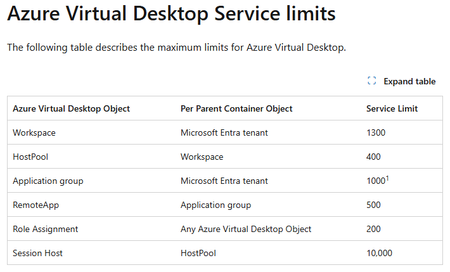
We have increased the Azure Virtual Desktop limits to allow a higher number of Application Groups per tenant. We have doubled the limit to 1000 Application groups. This enable customers with a requirement for more app groups. Customers wishing for more than 1000 will still need to open a support ticket to get this reviewed All Azure Virtual Desktop limits are documented in the full Azure subscription and service limits, quotas, and constrains document: https://learn.microsoft.com/en-us/azure/azure-resource-manager/management/azure-subscription-service-limits#azure-virtual-desktop-service-limits28Views0likes0Comments
ACS Teams interop meeting chat suddenly returns 403 Forbidden on all sends since late Aug 2026
Since approximately Aug 24, 2026, every Azure Communication Services (anonymous interop) user joining Microsoft Teams meetings in our tenant gets 403 Forbidden on ALL meeting chat operations, while calling, roster, and screen-share work normally. This broke suddenly with no changes on our side. The error on both ChatThreadClient.sendMessage and sendTypingNotification is "CommunicationError" Code "Forbidden", Message "The initiator doesn't have the permission to perform the requested operation." ACS users also receive no thread messages (Teams-native participants chat with each other fine in the same meeting), and the communication-react composite shows "You are no longer in this chat thread" immediately on join - so the ACS user appears to never be attached to the meeting chat thread, even though the call roster add works. What we have verified and ruled out - Reproduces with the minimal azure/communication-react (1.32.0) CallWithChatComposite quickstart and a freshly minted ACS identity (voip+chat scopes) - not our application. - Reproduces on BOTH Graph-app-created online meetings AND a meeting created by a human organizer in the Teams desktop app with default options. - Fails on chat api-versions 2024-06-05-preview and 2025-03-15. - All CsTeamsMeetingPolicy instances have MeetingChatEnabledType = Enabled (verified via Teams PowerShell as Global Admin). - ACS federation is configured. EnableAcsUsers = True and our ACS resource's immutable ID is in AllowedAcsResources. External access policies have EnableAcsFederationAccess = True. EnableExternalAccessRestrictionsForChatParticipants and EnableMutualFederationForChatParticipants are both False. - Per-meeting allowMeetingChat = enabled. Anonymous join allowed. BlockedAnonymousJoinClientTypes empty. - User is fully admitted and call state is Connected when sends fail (not the known join-timing issue), and the failure persists for the entire meeting. Sample failing request - POST to (resource).canada.communication.azure.com /chat/threads/19%3Ameeting_...%40thread.v2/messages?api-version=2025-03-15 returns 403, Ms-Cv IGMF4wkAI0+MIaxuFQ0kJw.0, 2026-08-31 16:04:38 UTC (Canada region resource). Was there a recent service-side change or rollout to how ACS interop users are added to Teams meeting chat threads, or a new tenant/meeting setting that now gates this? Is anyone else seeing this since late August 2026? We can share tenant ID, resource ID, and additional Ms-Cv values privately with Microsoft engineers. An Azure support case is also being opened in parallel. Also posted on Microsoft Q&A - https://learn.microsoft.com/en-us/answers/questions/5990218/acs-teams-interop-meeting-chat-suddenly-returns-4071Views0likes2Comments
I built an open-source tool for running ARG governance checks on a schedule and tracking findings
Most of the Azure governance work I have done over the last ten years ended the same way. Someone writes a sharp Resource Graph query, it finds something real, it gets pasted into a chat, and then it lives in that person's terminal history until they move on. The failure that costs more is quieter. A check that stops running does not turn red. It stays green, and the estate keeps drifting behind a number that nobody has any reason to distrust. Disclosure before I name anything: I built the tool below and I maintain it. RuleBeat runs the governance checks your team writes for Azure on a schedule, tracks every finding over time, and never holds write access. A check is a rule you author against Azure Resource Graph or Microsoft Graph, in a visual builder or as raw KQL. It ships 158 checks out of the box, 15 built-in rules plus the 143-rule APRL pack. Findings keep their lifecycle across scans, so they move through new, active and fixed and reopen on their own, and a suppression needs a reason and can carry an expiry date. The trade-offs, so nobody has to discover them after installing: - Read-only, permanently. It never holds write credentials and never creates its own service principal. You create the credential, so you can see in Azure RBAC exactly what it was granted. The cost is real: there is no one-click fix. Remediation stays your action under your own identity. - Self-hosted, one container, SQLite inside. Nothing about your tenant leaves your deployment and there is no telemetry. The cost is that you run it. Demo mode runs the real UI over a generated database with no Azure credential, if you would rather look before wiring anything up. - Honest numbers. A rule that has never run, or whose last run failed, is reported as unknown rather than passing. The posture number is uglier for it, and that is the point. On where this does and does not belong next to the native stack: Azure Policy is for enforcing a standard, and it does that better than anything I would write. Defender for Cloud covers its own scope well. If your assignments are enforcing, your Workbook answers the question you actually ask, and one person owns the whole loop, you do not need this. Where I kept running out of road was the organization-specific check that no built-in standard covers, and the question of who owns a flagged row once more than one person has to care about it. It is open source under Apache-2.0 and free, and it is v0.2, early on purpose. I build it with AI assistance from Claude, which the public commit history shows in the co-author trailers, and every change is human-reviewed and gated by the test suite in CI before it ships. Repo: https://github.com/rulebeat/rulebeat Docs: https://docs.rulebeat.com The question I would rather ask than answer: for those of you running recurring governance checks today, what do you do with a finding that is accepted on purpose? Every version of this I have seen was a tag, a wiki page, or a spreadsheet, and all three drift away from the query that produced them. I would like to know what has actually held up for you.How to setup customer to obtain AADB2C token for an API exposed through APIM
I am setting up Azure APIM instance behind a Azure Application gateway. Developer portal will be exposed so external customers will be able to subscribe to products containing the APIs and obtain the subscription key that way. There will be approvals required for subscription. I want to setup OIDC on top of the subscription key validation. For that I believe I have to setup a Validate JWT policy on the API in APIM, using this guide below and use scopes/roles:- https://learn.microsoft.com/en-us/azure/api-management/validate-jwt-policy And seems like I will have to setup client credentials flow for customers to be able to obtain token from AADB2C, using the below KB:- https://learn.microsoft.com/en-us/azure/active-directory-b2c/client-credentials-grant-flow?pivots=b2c-custom-policy Q1 - Firstly, is that the correct way of setting it up? Secondly, with client credentials flow seems like customers will have to use the POST request (or PowerShell) like the one below to obtain the token:- https://<tenant-name>.b2clogin.com/<tenant-name>.onmicrosoft.com/<policy>/oauth2/v2.0/token But this will mean that I will have to document my B2C token endpoint in Developer portal documentation to advise customers on how to obtain token. I have 2 questions related to that:- Q2 - Is advising/advertising B2C token endpoint good practice from security point of view? Q3 - With client credentials flow, setting up the calling app APP Registration in B2C and providing related APP secret will become a manual process. This will remove the benefit of having Product/API subscriptions process automated through APIM and bring in the complexity of securely communicating the secret to customers. Is there a better way of doing this?56Views0likes1Comment
EntraID portal UI updates affecting visibility of proxy addresses
I have an open support case (TrackingID#2608010010000071) but the support engineer also recommended I post here. A recent update to the EntraID portal UI has implemented a stylesheet with a really tight rendering box around the list of proxy addresses that can be viewed from the flyout panel on an identity's account. The result is proxy addresses are being truncated after just a few characters making it very difficult to view the list of valid email aliases for an identity. I've confirmed, using DevTools to inspect the source data, that the full addresses are being sent to the client. It is the tight rendering box (120 pixels) that is causing the truncated display. If I override the style sheet to use a larger "width" value I can force the display of the entire proxy address.Solved143Views0likes2CommentsHow to Build a Self-Improving AI Agent on Azure: A Practical Technical Guide
A traditional chatbot answers a question. A more advanced AI agent can reason about a task, use tools, retrieve information, interact with APIs, and complete multiple steps on behalf of a user. Link to the post56Views1like0CommentsSyncing Multiple Azure DevOps Orgs to One ServiceNow Instance Without Forcing a Shared Workflow
If your organization runs more than one Azure DevOps org, whether from an acquisition, a spun-up subsidiary, or business units that never consolidated onto one instance, you already know the visibility gap. Central ServiceNow has no idea what's happening in any of them unless someone checks manually. Your team ends up pulling status updates by hand, chasing changes across orgs, and reconciling what got closed where. That works well for a couple of orgs, but it falls apart past that. Why a Shared Workflow Usually Creates a Bigger Problem Migrating everyone onto a single Azure DevOps org would close the visibility gap on paper. Each org's area paths, iterations, states, and processes took years to get right, and a forced migration undoes all of it. A sync layer between each Azure DevOps org and your central ServiceNow instance closes the same gap without touching how any individual org works day to day. Each org keeps its own configuration. ServiceNow ends up with a rolled-up view across all of them. Common Use Cases Post-Acquisition Org Sprawl Current Setup: A company acquires another company, or runs several business units, each with its own Azure DevOps org and its own way of working. Problem: Central ops has no single view across orgs, and checking each one by hand doesn't scale past a few teams. Solution: Connect each Azure DevOps org to the central ServiceNow instance separately, each with its own sync rules. ServiceNow gets one rolled-up view, and no org has to change how it works. Bi-Directional Status Sync Between Delivery and Support Current Setup: Support logs incidents in ServiceNow. Development tracks the corresponding work in Azure DevOps, sometimes across several orgs. Problem: Support has to ask developers for status or check Azure DevOps boards directly, and developers end up relaying the same update twice. Solution: Sync status, comments, and priority both ways, so an update in either system shows up automatically on the other side. Field-Level Control Per Org Current Setup: Each business unit or subsidiary has its own rules about what data can leave its Azure DevOps org. Problem: A single shared integration with one set of mapping rules risks exposing fields an org never agreed to share outside its own boundary. Solution: Give each org's connection its own outgoing rules, so a subsidiary decides exactly which fields leave its Azure DevOps org, field by field. Handling Closed and Read-Only Work Items Current Setup: ServiceNow blocks writes to closed incidents through ACLs, and Azure DevOps can hit a similar restriction on closed or read-only work items. Problem: A sync that keeps trying to write to a closed item throws the same error repeatedly, and the real problems get buried under the noise. Solution: Filter closed and read-only states out of the sync, or let the errors surface if operations wants visibility into them. What to Evaluate When Choosing an Approach A few criteria matter more than others once you're running this across multiple orgs. Decentralized configuration: does each Azure DevOps org get its own connection and its own rules, or does everything route through one shared setup? Filtering: can you scope the sync with something like WIQL queries on the Azure DevOps side, by area path, iteration, work item type, or tag? Field mapping: does it handle the difference between ServiceNow's field structure and Azure DevOps work item fields without dropping data? Common pairs are ServiceNow State to Azure DevOps State, ServiceNow Priority to Azure DevOps Priority, and ServiceNow Assignment Group to Azure DevOps Area Path. Custom fields usually need explicit mapping rules. Conflict handling: what happens when both sides update the same field at the same time, and what happens with closed or read-only items specifically? Security: Entra ID or OAuth authentication, PAT management per org, role-based access, audit logging, and whatever compliance certifications your security team asks for during review. Direction: bidirectional where both teams update shared fields, one-way where only one side should ever write. Technical Approaches Service Hooks and REST APIs Azure DevOps Service Hooks paired with the ServiceNow REST API give you sync in both directions. A change in Azure DevOps triggers a Service Hook, which calls the ServiceNow API to update the record, and the same flow runs in reverse. This is the most direct route if you're comfortable building and maintaining the webhook logic yourself. Custom Middleware For anything more complex, custom middleware gives you full control over field transformation, routing, and error handling. Azure Functions, Logic Apps, or a small Node.js or Python service usually does the job. The trade-off is maintenance. You own the retry logic, the error handling, and every update when either platform changes its API. Dedicated Integration Platforms Plenty of teams skip building this from scratch and use a dedicated integration platform instead. These typically come with pre-built connectors for both Azure DevOps and ServiceNow, a way to configure field mapping and filters without writing much code, and managed infrastructure so you're not hosting your own sync server. What they usually cover: Pre-configured connectors that already understand both platforms' data structures Visual or scripting configuration for field mapping and filters Managed infrastructure, so nothing runs on your own servers Built-in retry and error handling for API failures Audit logging for tracking what synced and when Support for multi-org routing and conditional logic out of the box The trade-off runs the other way: a subscription cost instead of a one-time build, less control over the exact implementation, and your data passing through a third party's infrastructure. For teams running more than 2 or 3 orgs against one ServiceNow instance, this usually ends up being less overhead than maintaining custom middleware long-term. Every org here has probably solved a version of this differently. Curious what's worked for you, especially with 3 or more Azure DevOps orgs feeding into one ServiceNow instance, and which part of the setup gave you the most trouble.47Views1like0Comments
Azure Networking: Request for Granular Control of “Allow Azure Services and Resources”
I would like to get the Azure community’s thoughts on a networking/security improvement that I believe could help organizations implement a stronger least-privilege model. Several Azure resources provide an option similar to: “Allow Azure services and resources to access this resource.” This is useful when an Azure service needs to access another Azure resource, but the current option can be quite broad. Example: Power BI → Azure SQL For example, suppose Power BI Service needs to access an Azure SQL Server. The actual requirement might be: Power BI → Specific Azure SQL Server = Allow However, the available option may require enabling: “Allow Azure services and resources to access this server” This effectively creates a much broader trusted-service exception than the actual requirement. Ideally, I would like to see something like: Azure SQL Server │ ├── Power BI Service → Allow ├── Azure Data Factory → Deny ├── Azure Functions → Deny ├── Azure App Service → Deny └── Other Azure Services → Deny Proposed improvement Could Microsoft provide an additional option such as: “Allow selected Azure services and resources” where customers can explicitly select which Azure service/resource is allowed to bypass the network restriction? Depending on the Azure service, the selection could potentially be based on: Specific Azure service Specific Azure resource Resource ID Subscription Resource group Tenant Managed identity / Entra identity Specific service instance For example: Trusted Azure Services / Resources Power BI → Production Analytics → Allow All other Azure services → Deny Why I think this would be useful This would give customers a middle ground between: Disabling public access and implementing Private Endpoint/private connectivity, or Allowing all Azure services/resources through the broad trusted-service exception. A granular trusted-service model would allow: Only the Azure service/resource that actually requires access is trusted. This would better support least privilege, Zero Trust, security, and compliance requirements. Broader Azure applicability My suggestion is not specifically for Azure SQL. The Power BI → Azure SQL scenario is just an example. I think this could be a common Azure networking capability for all Azure resources that currently support a trusted Azure services / “Allow Azure services and resources” type of bypass. I would be interested to hear from the Azure community and Microsoft: Is there already a way to achieve this level of granularity? Are there architectural/security reasons why this cannot currently be implemented? Is Microsoft considering a more granular trusted-service model? Would a feature like “Allow selected Azure services/resources” be technically feasible? I would appreciate any feedback or guidance from the Azure networking/service teams.80Views0likes0CommentsThree Cloud Myths I Believed Before Studying Azure Fundamentals
While preparing for AZ-900, I realized that several assumptions I had about cloud computing were incomplete. ☁️ Myth 1: The cloud is always cheaper Cloud services can reduce upfront costs, but unused resources, incorrect sizing, and poor planning can quickly increase the bill. 🖥️ Myth 2: The cloud means there are no servers The physical infrastructure still exists. What changes is how much of it is managed by the cloud provider. ⚙️ Myth 3: More control is always better Additional control also means additional responsibility for patching, monitoring, configuration, security, and maintenance. My biggest takeaway was that cloud computing is not automatically cheaper, simpler, or better. It is about finding the right balance between cost, control, responsibility, and speed. For beginners interested in exploring these concepts, Microsoft Learn provides an official learning path: https://learn.microsoft.com/en-us/training/courses/az-900t00?wt.mc_id=studentamb_615882 Which cloud misconception did you believe when you first started learning?52Views0likes0CommentsWindows App - you can't get there from here
Hi, Since moving to Windows App (The issue did not occur on the old Remote Desktop client), users when they come to do the 90 day forced SSPR (Company policy), it pops up with a message that you can't get there from here, its been baffling us for a while. However in the non-interactive log, it shows Windows App is instigating Microsoft Graph to do the password reset, and this shows as being blocked, we have excluded Azure Virtual Desktop client etc from the policy but you cannot exclude graph, like I said it seems the old Remote Desktop client didn't use Microsoft Graph to do this, but Windows App does. The only workaround we have is for the user to select sign out and sign in with a different account with the same credentials (Not ideal and it causing tickets to be raised) this method does not seem to use Microsoft Graph then, they have asked if they can go back to the old Remote Desktop Client which did not have the issue. Anyone else come across this or any permeant solution? Thanks179Views0likes2CommentsFound inconsistencies in the Address Autocomplete API results between Bing Maps and Azure Maps
Hi Team, We are currently in the process of upgrading our application from Bing Maps to Azure Maps. As part of this migration, we are evaluating the Azure Maps Address Autocomplete API to ensure it provides functionality comparable to our existing Bing Maps implementation. During our evaluation, we observed several inconsistencies in the https://samples.azuremaps.com/rest-services/autocomplete API results between Bing Maps and Azure Maps, particularly for addresses in India. and would appreciate your assistance in investigating these issues. As part of our testing, we searched for below address: Everest Nivara Infotech Park Mumbai International Airport IIT Bombay The address is correctly returned in the Bing Maps portal: https://www.bing.com/maps However, when performing the same search using the https://samples.azuremaps.com/rest-services/autocomplete, the expected address is either not returned or is displayed incorrectly. Additionally, we observed that business (POI) addresses are not being returned by the Azure Maps Address Autocomplete service. As part of our testing, we searched famous place name in the Address Autocomplete sample. The business was not returned in the autocomplete suggestions, even though it is searchable in the Bing Maps portal. We would appreciate your guidance on resolving these issues. Thanks!123Views0likes2Comments







Events
Recent Blogs
- 7 MIN READToday Azure Storage introduces in preview a new List Blobs optimization that accelerates listing operations by up to 25x with up to 15x lower client-side CPU utilization allowing customers to return ...Sep 03, 202662Views0likes0Comments
- Use advanced ServiceNow response-plan filters in Azure SRE Agent to match the incidents your team owns, choose the responder, preview results, and set the right autonomy level.Sep 03, 202638Views1like0Comments