Recent Discussions

Product key not accepted
I bought a new laptop. It's not accepting my product key for Microsoft Office Professional Plus 2013. It keeps asking for the key. I tried using Word as admin: it didn't work. Sunday (April 5th) I be kicked out of Office 2013 (even though I BOUGHT it, marketed as life time use). I need a solution ASAP. 🙏🏼🚨65Views0likes0Comments
Can I uninstall individual Office apps and reinstall them later?
Hello everyone, My C: drive is running out of space, and I've noticed that installed Office applications take up a lot of storage. I don't use Access, Publisher and OneNote for now, so I'd like to know if it's possible to uninstall these apps separately to free up space. I have an authentic perpetual Office Professionnel Plus 2016 license that came with my Lenovo laptop when I bought it. Will uninstalling these apps cause any issues with the license? And will I be able to reinstall them later if I need them? Thanks for your feedback.159Views0likes0Comments
Office 2016 Product Key Redeemed But License Not Showing in Account
Hello, I purchased Office 2016 and I'm facing an unusual issue with my product key activation. **The Problem:** When I try to activate Office 2016 with my product key, the system tells me the key was redeemed by the email address c****email address removed for privacy reasons. I have access to this email account, so I tried logging into office.com to check, but surprisingly there is NO Office license associated with this account. **What I've Done:** 1. I contacted Microsoft support. The first agent confirmed no Office was linked to that email address. 2. After a few minutes, the same agent then confirmed that the product key WAS indeed activated on that email account - but they said they couldn't help much because Office 2016 is already end-of-life. 3. When I try to sign into Office apps (Word, Excel, etc.) with that email, it says the account has no Office license. 4. However, when I use the product key, it says it's been redeemed on that email account. **The Contradiction:** There's a clear disconnect: the product key system says it's redeemed on my email, but the Office account management system says there's no license on that same email. **My Question:** How can I proceed to use my Office 2016 license? Is there a way to recover or re-link the license, or migrate it despite Office 2016 being end-of-life? Thank you for any guidance.233Views0likes1Comment
Deactivate Office Product Key
I recently got a new laptop and moved Office Home and Student 2013 with Publisher to the new laptop. I deleted it from the old laptop, but when I opened Powerpoint on the new laptop I got a message saying that the Product Key cannot be activated because it has already been activated the maximum number of times allowed by the license. What can I do to enable activation of the Product Key on my new laptop so I can use all the apps on the new laptop? Thanks.111Views0likes0Comments
Why Microsoft doesn't get back when refund is involved?
This has been going on for well over a year. My Office Personal account was opened with email address removed for privacy reasons as the primary email. I also paid for PDFX but at some stage probably when Office became MS 365 my membership registration got corrupted. This meant that I couldn't update and when I changed my device I couldn't use it. Before you redirected registration to redirect to support it used to give me an error. I spent 7 hours on the chat and when the trouble was found I was told that it would be corrected the next day. But it wasn't and the judgment on the case was that I had already installed it on another machine. But, that was discussed during the Chat and was found to be mixed up with a new device. The old device has been decommissioned, running Linux with no office. I wrote to PDFX who checked their servers and found out that I had not logged in since the new subscription in October 2023. So they refunded my subscription but to Microsoft because the payment took place through Microsoft. But Microsoft never refunded me, not even for the PDF X portion. I had no choice but to sign up with MS365 Business and pay again. They had the same problem: The original subscription email in the registrar could not be changed. This was why if you changed your primary email address or if the registrar record was corrupted, third party licences don’t propagate down the servers from the registrar. The path to the registrar in not two way for obvious reasons. So no matter what you do at the levels below the registrar can not be copied to the Master server. Of course Microsoft support, not having a system wide authority or even understanding refused to escalate the issue. Instead they mocked my explanation. They kept denying it despite my article in LinkedIn providing step by step instructions on how to recreate the problem. At some stage my account was sorted out for my business subscription never quite acknowledging what the problem was but the support for Personal 365 is based in South Asia (obvious from their thick accents on the phone), probably India who seem to have the cultural shamelessness to admit that they won’t escalate the issue in no uncertain terms. Maybe they are scared of losing their jobs. So I never got my refund or account corrected. Now that my personal MS 365 has expired, I keep being asked to resubscribe. What a cheek? All of this can be verified through the records and the repayment of my PDF-X to Microsoft but no one even ever tried. I have piles of evidence but it takes a mountain of evidence of numerous remote connections under the assumption I must surely be new to software and computer science in general despite my stated education, profession, 45 years experience and Microsoft exams I have passed. It would take a whole team of lawyers to put them together when a simple audit of payments would demonstrate it depending on the point of view of a reasonable person, something that is absent in Microsoft.220Views0likes1Comment
Shortcuts now requires shift after windows update
I’m using a Belgian AZERTY keyboard on Windows 11 with Microsoft 365 Excel. Until recently, I could trigger shortcuts such as “Increase Decimal” command using the Ribbon access key sequence Alt → H → 0 by pressing the unshifted “à” key. After the latest Windows update, Excel only recognizes the digit 0 if I press Shift + à during the sequence. This breaks my workflow because I don’t have a numpad and my Quick Access Toolbar is already optimized for other commands. Question: Is there a Windows or Office setting that changed how Ribbon access keys interpret digits on AZERTY keyboards? How can I restore the old behavior so the unshifted “à” key acts as 0 in Ribbon sequences?140Views0likes0Comments
O365 has stopped working on our PC using Windows 10
We understand that support for Windows 10 has ended, but why are we unable to use our Word and Excel programs? I have paid the annual renewal fee. When I log in to my Microsoft account it says that the account is active on my laptop but has been disabled on our PC. Our PC is an older computer which can't run Windows 11 but is otherwise sound. We have files on this computer which we need to access. When we try to open Word or Excel we get a window saying "Something went wrong. Please try again later. 0X80070426" which indicates that an update has been unable to install, presumably an update for Windows 11. Is there a way to turn off updates for Word and Excel and use them in their prior (perfectly acceptable) version? I can't get an answer, or a person, from Microsoft.287Views0likes2CommentsMoving Office 2019 license
Hello, due to end of support for Office 2019, it's no longer possible to get phone and chat support from Microsoft Support for licenses. I'd like to move my license from one e-mail adress to another. Chat Agent recommended to reach out on techcommunity forum for solution.118Views0likes0Commentso365 apps end of support in Server 2016
Hi, As per https://learn.microsoft.com/en-us/microsoft-365-apps/end-of-support/windows-server-support I know that running 0365 apps on Server 2016 will no longer be 'supported' beyond Oct 2025 but what exactly is meant by 'supported'. Will it: A: Immediately cease to function. B: Keep working but with no feature or security updates (obviously not something we want to do for long !). Migrating to Server 2025 will buy us more time, but I would still like to know exactly what this 'end of support' means. Thanks.763Views0likes3CommentsOffice 2019 users getting error when opening files in app from sharepoint
Hi, since two days ago, our users who didnt upgrade to office 365 and still use office 2019 are getting an error when trying to sign in from office to their cloud account. The error is: "Your account is in bad state. Please sign-in to this account online to address the issue" Now I know support for cloud connectivity for office 2019 has officially ended in october 10, two days ago, in microsoft website its stated that: "In practical terms, what this means is that older Office versions might not be able to use all the latest functionality and features of Microsoft 365 services... No active measures will be made to block older Office versions from connecting to Microsoft 365 services if they're in extended support and are kept up to date. For example, Office 2019 and Office 2016, both of which are in extended support until October 14, 2025."https://learn.microsoft.com/en-us/deployoffice/endofsupport/microsoft-365-services-connectivity So why it looks like Microsoft actively blocked office 2019 connection to cloud?470Views0likes0CommentsVBA problem - Excel for Mac
Welcome I'm working on a Macbook Pro, macOS, in Arabic. I have a problem with the Visual Basic Editor in Excel, when I type commands, they don't work. When I write it outside the editor and then copy it to the editor page, it works. I contacted support, but they did not help me find a solution to the problem and referred me to the Microsoft Office technical community to solve the problem. Please guide me to the correct and radical solution to the problem, thank you.433Views0likes0CommentsSupport update for InfoPath Forms Services in Microsoft 365
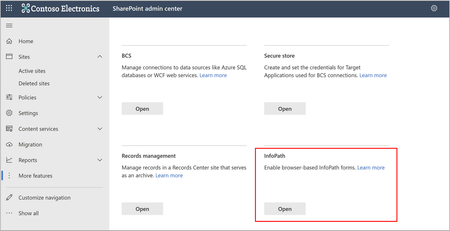
In a recent blog post, it was announced that InfoPath Forms Services in SharePoint Online will be retired in 2026. Learn more about the end-of-support process and how to prepare for it here: Support update for InfoPath Forms Services in Microsoft 365910Views2likes0CommentsStandalone office 2019 and Office 365
Our office is currently using standalone installs of mostly Office 2019 and some Office 2021. I understand the support will end this year for them but will they still work with Exchange online if we go with Microsoft 365 Business Basic subscription? We only have 30 or so users and cannot justify the cost of moving everyone to the next step up. I work for a small government agency and all costs are very scrutinized. I anticipate we could in the next couple years, but not before the October deadline. Will the older office clients get blocked like happened to Office 2013 and 2016?1.1KViews0likes0Comments 571Views0likes0Comments
- 540Views0likes0Comments
1 TB storage with subscription of Office 365 not assigned
I have had a subscription to Office 365 for over 5 years. Just received an email stating that my cloud storage (considerably less than 1 TB) was full. How do I set up the 1 TB cloud storage. Also, how do I set up saving files to my computer and not to One Drive.3.1KViews0likes3Comments 435Views0likes0Comments


Events
Recent Blogs
- What’s changing? Microsoft is announcing the end of support and retirement for Office Online Server effective December 31, 2026. After this date, Office Online Server will no longer receive securit...Oct 21, 2025DeletedOffice End Of Support Blog36KViews1like47Comments
- 4 MIN READOffice 2016/2019 Support Ends Today — Prepare for Office LTSC 2021 End of Support Next YearOct 14, 20252.4KViews0likes1Comment