support
23 TopicsI'm not able to activate my license for Office
I've purchased Office 2021 Home&Student on May 2024. Since yesterday I'm not able to use it anymore as Office application cannot find the license assigned to my Microsoft account and forces me to buy Office 365 subscription. Uninstalling and reinstalling doesn't helped. Just to be clear, I'm downloading installation package from My Account - Subscriptions page on Microsoft website. I've contacted Microsoft support and they sent me installer link to downgrade Office to older version which in support opinion should work but it's not working either. I know that Office 2021 is not supported anymore with updates etc. but there is a note that product should work anyway. I'm really pissed off because I paid for lifetime license to avoid subscriptions and on that time when I bought Office 2021 Home&Student there was no Office 2024 in sale because it was released in October 2024. If Microsoft will not fix this problem I will claim money refund for my purchase because I can't use my license anymore for buying lifetime license. This is not fair in relation to customers.90Views2likes2Comments
Announcing the retirement for Office Online Server
What’s changing? Microsoft is announcing the end of support and retirement for Office Online Server effective December 31, 2026. After this date, Office Online Server will no longer receive security updates, bug fixes, or technical support from Microsoft. This change is part of our ongoing commitment to modernizing productivity experiences and focusing on cloud-first solutions. To help stay secure and compliant, begin planning now to move to supported options, such as Microsoft 365. What does end of support mean? No more security updates. Systems running Office Online Server may be vulnerable to the evolving threat landscape. No bug fixes or technical support. Potential compliance risks. Unsupported software may put regulated organizations at risk of non-compliance. Why is this happening? Office Online Server was designed to provide browser-based versions of Word, Excel, PowerPoint, and OneNote for on-premises environments. As organizations have adopted Microsoft 365, Microsoft is focusing its browser-based Office app investments on Office for the Web to deliver secure, collaborative, and feature-rich experiences through Microsoft 365. What is the alternative for Office Online Server? If your organization relies on Office Online Server for browser-based document editing and collaboration, our recommended path is to transition to Microsoft 365, which includes cloud-powered versions of Word, Excel, PowerPoint, and OneNote. Microsoft 365 offers: Real-time collaboration and sharing. Automatic updates and ongoing support. Enhanced security and compliance features. Integration with Microsoft Teams, Outlook, SharePoint Online, and OneDrive for Business. Access to Microsoft 365 Copilot for AI-powered productivity. Learn more about https://www.microsoft.com/microsoft-365/microsoft-365-enterprise. And for organizations with 150+ licenses, consider engaging https://www.microsoft.com/fasttrack/microsoft-365 to support your planning and migration to Microsoft 365. SharePoint Embedded enables real-time collaboration on Word, Excel, and PowerPoint documents directly within line-of-business or custom applications using Microsoft 365’s native co-authoring services. This allows users to securely create, edit, comment, and manage Office files without leaving the app—while still benefiting from enterprise-grade compliance, versioning, and lifecycle management through Microsoft Purview. https://aka.ms/spe-start. For organizations using SharePoint Server Subscription Edition or Exchange Server Subscription Edition, Microsoft 365 Apps for Enterprise and Office LTSC 2024 remain supported desktop clients for viewing and editing documents hosted on those servers. If your organization uses Office Online Server to host Excel workbooks in Power BI Report Server, that functionality will no longer be supported. Alternatives include viewing workbooks in the Excel desktop application or migrating to the https://learn.microsoft.com/office365/servicedescriptions/power-bi-service-description. Prepare to make your move Support for Office Online Server ends December 31, 2026. Continuing to use it after this date may expose your organization to security, compliance, and productivity risks. We therefore strongly encourage all customers to begin planning their transition to supported solutions today. Microsoft is committed to helping you prepare. Use the resources below to help you get started: Explore https://www.microsoft.com/microsoft-365/microsoft-365-enterprise for modern, cloud-powered collaboration. Engage your Microsoft account team and https://www.microsoft.com/fasttrack/microsoft-365 (150+ seats) for migration planning. See the https://learn.microsoft.com/officeonlineserver/configure-office-online-server-for-sharepoint-server-2016/configure-office-online-server-for-sharepoint-server-2016#disconnect-sharepoint-server-2016-from-office-online-server. Thank you for being a Microsoft customer!40KViews1like48Comments
Office Home and Student 2019 license bound to Microsoft account but keeps prompting for activation
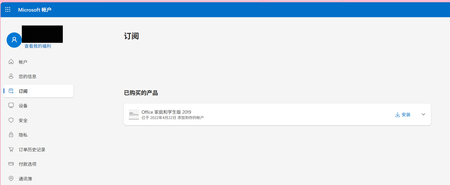
Hello, I own Office Home and Student 2019 perpetual license, and this license is already bound to my Microsoft account. I can confirm the license exists on the account.microsoft.com/services page. However, local Office applications keep showing "Unlicensed Product" and repeatedly ask for activation. I have completed these troubleshooting steps: Signed out all accounts inside Office, closed all Office programs, rebooted PC and signed‑in again with my correct Microsoft account. Cleared local Office license cache by running ospp.vbs commands. Performed Quick Repair and Online Repair for Microsoft Office. Unfortunately, the activation problem still remains. I have attached two screenshots: Screenshot showing my Microsoft account page with Office Home and Student 2019 license. Screenshot showing Word unlicensed‑product warning. Could you please help fix the license synchronization issue between my account and local device? Thank you.204Views0likes0Comments[Office 2016] - "Save As" OneDrive displays a malformed login page.
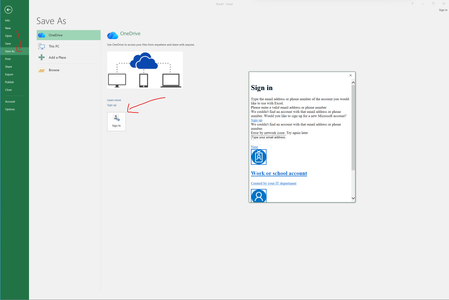
Hello! In Excel 2016 (build 16.0.20501.30554), when clicking on Save As - OneDrive - Sign In, it displays a malformed login page, displayed below. I did a Fiddler2 Classic trace, and all requests seem to be trying the following URL: http://odc.officeapps.live.com:443 And when attempting to access the URL, it returns 404: PS C:\Users\HugoCaetano> iwr https://odc.officeapps.live.com Invoke-WebRequest: The resource you are looking for might have been removed, had its name changed, or is temporarily unavailable PS C:\Users\HugoCaetano> The following URL is a pastebin containing a stripped-down HAR file I took from the Fiddler2 Classic trace: https://pastebin.com/raw/ZFgP23G2 This issue was first observed on September 1st, 2026. Thanks.351Views0likes0Comments
Office 2016 Product Key Redeemed But License Not Showing in Account
Hello, I purchased Office 2016 and I'm facing an unusual issue with my product key activation. **The Problem:** When I try to activate Office 2016 with my product key, the system tells me the key was redeemed by the email address c****email address removed for privacy reasons. I have access to this email account, so I tried logging into office.com to check, but surprisingly there is NO Office license associated with this account. **What I've Done:** 1. I contacted Microsoft support. The first agent confirmed no Office was linked to that email address. 2. After a few minutes, the same agent then confirmed that the product key WAS indeed activated on that email account - but they said they couldn't help much because Office 2016 is already end-of-life. 3. When I try to sign into Office apps (Word, Excel, etc.) with that email, it says the account has no Office license. 4. However, when I use the product key, it says it's been redeemed on that email account. **The Contradiction:** There's a clear disconnect: the product key system says it's redeemed on my email, but the Office account management system says there's no license on that same email. **My Question:** How can I proceed to use my Office 2016 license? Is there a way to recover or re-link the license, or migrate it despite Office 2016 being end-of-life? Thank you for any guidance.552Views0likes1Comment
Product key not accepted
I bought a new laptop. It's not accepting my product key for Microsoft Office Professional Plus 2013. It keeps asking for the key. I tried using Word as admin: it didn't work. Sunday (April 5th) I be kicked out of Office 2013 (even though I BOUGHT it, marketed as life time use). I need a solution ASAP. 🙏🏼🚨265Views0likes0Comments
Moving Office 2019 license
Hello, due to end of support for Office 2019, it's no longer possible to get phone and chat support from Microsoft Support for licenses. I'd like to move my license from one e-mail adress to another. Chat Agent recommended to reach out on techcommunity forum for solution.323Views0likes0Comments