Recent Discussions

Edge >=150 blocks ALL extensions on *.cloud.microsoft (regression from 149) - no policy override
Starting with Edge 150, a hardcoded extension blocklist applies to *.cloud.microsoft (M365 Copilot and Microsoft 365 app surfaces). Extensions no longer run on these pages. This is a regression - on Edge 149 and earlier it worked fine on the same pages. The block affects all extensions, not a specific category, and it is not overridable via ExtensionSettings (runtime_allowed_hosts), ExtensionInstallForcelist, or any other policy we have tested. It hits both regular user-installed extensions and admin-approved, force-installed extensions on managed devices - so admins have no way to re-enable trusted extensions on these surfaces either. Confirmed breakage so far: - Password managers - verified with Bitwarden (users end up copy/pasting credentials out of the manager on Copilot pages, a real security regression) - Corporate training / user-adoption extensions - Accessibility extensions relied on by employees Ask to the Edge team: restore the pre-150 behavior, or ship an override so extensions can run on *.cloud.microsoft pages (for example, honor runtime_allowed_hosts / the force-install list on these surfaces). If this is by design, please document it clearly so users and admins stop chasing a config that cannot work. Environment: Edge Stable >=150 (works on 149 and earlier), Windows, both unmanaged and MDM-managed (Intune/GPO). Reproducible on a clean profile with a single extension. Are other users / admins / extension vendors seeing the same thing after updating to 150? Please add your affected extension below so Microsoft can gauge the blast radius.9Views0likes0CommentsText annotations disappear if saved while the text box is still focused in Edge Screenshot editor
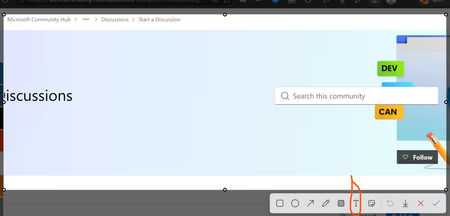
Hi Edge team, I found a reproducible issue in the built-in Screenshot feature in Microsoft Edge. When I add a text annotation to a screenshot using the Text tool, the annotation disappears from the saved image if I click Save while the text box is still focused. The text is only included in the final image if I manually click outside the text box first. Steps to reproduce: Step 1: Open Microsoft Edge. Step 2: Use the built-in Screenshot feature to take a screenshot. Step 3: In the Screenshot editor, select the Text tool. Step 4: Type any text annotation on the screenshot. Step 5: Without clicking outside the text box, click Save. Step 6: Open the saved image. Expected result: The text annotation should be automatically committed and merged into the screenshot when clicking Save, even if the text box is still focused. Actual result: The active text annotation is not merged into the final image. The saved screenshot does not contain the text annotation, and the text is silently lost. Impact: This can cause users to lose important notes or ideas when using the Screenshot feature for documentation, study notes, bug reports, or productivity workflows. Since the screenshot appears to save normally, users may not notice that the annotation is missing until later. Suggested fix: When the user clicks Save, Edge should automatically commit any active text box before exporting the screenshot. Environment: Microsoft Edge version: 150.0.4078.48 Official build Channel: Stable Operating system: Windows 1113Views0likes0Comments
Why Stability Matters More Than New Features for Many Users
To Microsoft Edge Leadership and Product Management, I am writing as a long time Microsoft user who is seriously considering moving away from Microsoft Edge because of the cumulative frustration caused by frequent updates and the disruption they create. The immediate issue prompting this letter is the recent Edge update that caused website favicons in Favorites to disappear and be replaced with generic globe icons. While this may seem like a minor issue to some, it significantly affects how I use the browser. I maintain a large, organized collection of Favorites, and I rely on visual recognition of icons to quickly locate websites. Removing that functionality has made navigation slower and more frustrating. However, this letter is not really about favicons. My larger concern is the direction that modern software development appears to have taken. Years ago, software updates were less frequent and more deliberate. New versions were released perhaps once a year. Users had time to learn the software, become comfortable with it, and develop confidence that it would continue working in familiar ways. Today, it feels as though major applications are updated continuously. Changes arrive monthly, weekly, and sometimes even more frequently. Features move. Interfaces change. Workflows are altered. Bugs appear in areas that previously worked correctly. Users are expected to adapt constantly. What is most frustrating is the feeling that stability has become secondary to rapid deployment. I understand that no software is perfect. I understand that bugs happen. What concerns me is the impression that organizations increasingly accept a certain level of user disruption as an unavoidable cost of doing business. Perhaps each individual problem affects only a small percentage of users. But over time, those small percentages accumulate. Each issue chips away at customer trust and confidence. Many users do not take the time to complain. They simply become frustrated and eventually leave. History has shown that dominant technology companies can lose their position when they stop listening closely to the user experience. Yahoo once seemed untouchable as a search engine and email provider. Google succeeded because it focused on simplicity, reliability, and making things easier for users. As a customer, I want software that is dependable. I want updates that improve my experience without disrupting established workflows. I want to feel that stability is valued as highly as innovation. Most importantly, I want to feel that the people making decisions about products understand how those decisions affect the people who use them every day. The recent Edge issue may be resolved in a future update. My concern is that the issue reflects a broader trend that many users are experiencing across modern software. I hope Microsoft will place greater emphasis on quality assurance, stability, backward compatibility, and the long term user experience. Those qualities are often what build customer loyalty, and what keep users from looking elsewhere. Sincerely, A frustrated but long time Microsoft customer41Views1like0CommentsMicrosoft Graph Webhook Filtering Using Custom MAPI Properties for Weather Messages
Hi everyone, I'm working on an integration that uses Microsoft Graph change notifications (webhooks) to receive notifications for new email messages in a mailbox. Our use case is specific to Weather messages generated by our Messaging platform. Currently, we subscribe to mailbox notifications and receive events for all incoming emails, which results in significant post-processing on our side. I'm looking for a way to perform server-side filtering so that only Weather-related messages trigger webhook notifications. Current Situation We use Microsoft Graph webhook subscriptions on mailbox messages. Weather messages are delivered as standard emails. Subject-based filtering is sufficient for our requirements. We would like to avoid processing every incoming email after receiving notifications. Proposed Approach We are considering stamping weather emails with a custom MAPI extended property when the message is created, for example: Message subject = Weather using a custom single-value extended property. Questions Can Microsoft Graph webhook subscriptions filter notifications based on custom MAPI extended properties? If not directly in the subscription, can $filter be used on message queries against these custom properties after receiving notifications? Has anyone successfully implemented a solution where a custom MAPI property acts as a service tag for weather messages? Are there any recommended alternatives for reducing webhook traffic when only a subset of messages is relevant? Would Outlook categories, message classes, or other Exchange attributes provide a better filtering mechanism than custom MAPI properties? Our goal is to identify weather messages reliably while minimizing unnecessary webhook notifications and mailbox processing. Any guidance, examples, or best practices would be greatly appreciated. Thanks!58Views0likes0Comments
Proposal: AI‑Powered News Reliability Label for Microsoft Edge
AI‑Powered News Reliability Label for Microsoft Edge Problem: Digital news often contains misleading or exaggerated content, especially in tabloid-style articles that use sensational headlines, omit context, or distort facts to drive clicks. This creates a consumer harm because users waste time on low-quality content, misinformation spreads easily, and trust in online information continues to decline. Digital news is monetised, yet unlike physical products, it has no transparency standards. Proposed Solution: Introduce an optional, user-controlled AI reliability label that appears above online news articles in Microsoft Edge. This label would analyse the article using AI and assign a simple colour-coded reliability score: 🟩 Green — High Reliability 🟨 Yellow — Missing Context 🟧 Orange — Low Reliability 🟥 Red — Click-bait / Misleading Content The label would not block or hide content. It simply provides transparency so users can make informed decisions. Why This Is Safe: • Optional (off by default) • Does not restrict access • Does not censor or demote publishers • AI-generated analysis, not editorial judgement • Equivalent to a “nutrition label” for information Benefits to Users: • Helps avoid misleading content • Builds trust • Saves time • Improves digital literacy • Reduces exposure to sensationalism Benefits to Microsoft Edge: • Differentiates Edge from other browsers • Demonstrates responsible AI leadership • Provides a meaningful use of Copilot • Aligns with Microsoft’s safety and trust principles • Could become an industry standard Technical Feasibility: Microsoft already has the required components: Edge integration, Copilot models, SmartScreen-style UI patterns, and Responsible AI frameworks. Summary: This feature enhances user trust, improves digital literacy, and positions Edge as the first browser to address the growing problem of misleading online content—without restricting access or interfering with press freedom.38Views0likes0Comments
Picture-in-Picture seek controls bypass MediaSession ad restrictions on YouTube
In Microsoft Edge, the Picture-in-Picture overlay exposes functional +10s/-10s seek controls during YouTube ad playback. The seek action advances the ad playhead even when YouTube has declared the seekforward action as unavailable via the Media Session API. Repro: InPrivate window, logged out of YouTube Play any video on youtube.com When pre-roll ad starts, click the in-player PiP icon Press +10s seek-forward on the PiP overlay Observed: a non-skippable NPCI ad followed by a Maggi ad were both bypassed in ~10 seconds of wall-clock time. The main <video> element briefly buffers during seek, consistent with HTMLMediaElement.currentTime being mutated directly rather than dispatched through the page's registered MediaSession action handlers. Cross-browser: verified the same flow in Google Chrome on the same Windows install. Seek-forward during ad playback does NOT advance the playhead, confirming YouTube's MediaSession setup is correct and isolating the issue to Edge's PiP implementation. Impact: affects any site using the Media Session API to restrict seek — live streams, DRM-protected content, ad-bound playback. Not YouTube-specific. Environment: Edge version: latest stable channel OS: Windows 11 - Chrome compared: latest stable channel56Views0likes0Comments
Edge on Wayland flickering when navigate
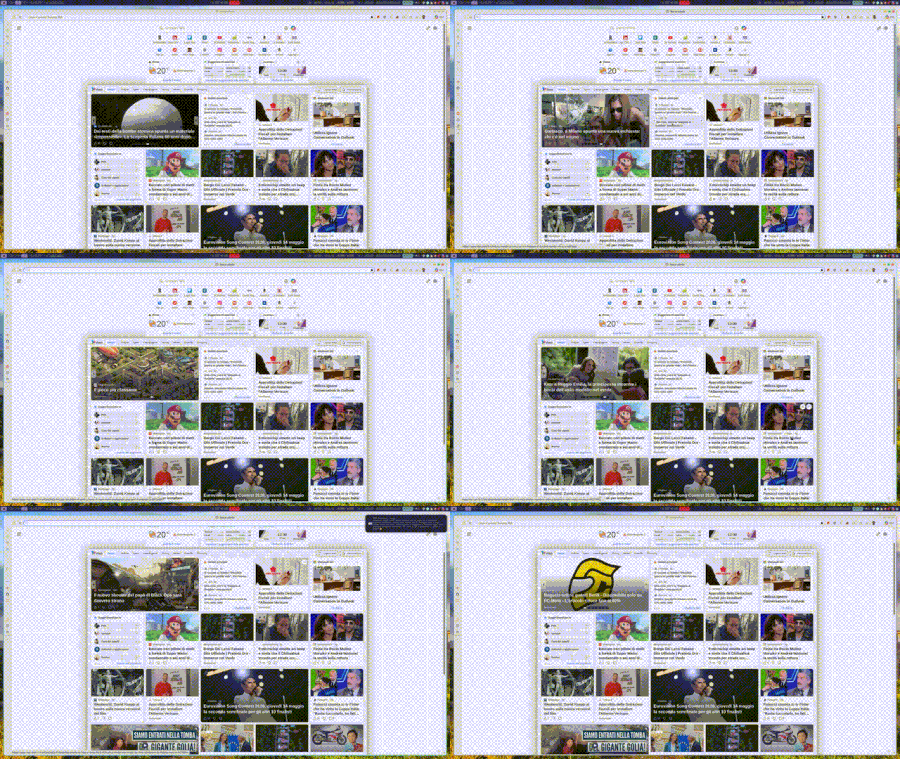
When I browse, in this example within the MSN page, and I hover over any link, I get that very ugly effect, as if the sidebar opens and closes. At times it can give you a headache because it never stops. Has anyone encountered the same problem?45Views0likes0Comments
Add Secure DNS (DNS-over-HTTPS) Support to Edge Mobile
Hello Edge Team, I’ve noticed that while Edge desktop already supports Secure DNS (DNS-over-HTTPS), the mobile version currently lacks this option. Competing browsers like Chrome and Brave allow users to configure Secure DNS directly on mobile, which provides: Improved privacy by preventing ISP-level DNS snooping Consistency across platforms so Edge users enjoy the same protections on desktop and mobile User choice to select trusted DNS providers (Cloudflare, Google, Quad9, etc) Adding Secure DNS support in Edge mobile would strengthen Edge’s privacy posture and align it with modern browser standards. Could the team consider prioritizing this feature in upcoming Insider builds? I believe many users would welcome the option to configure Secure DNS directly within Edge mobile settings. Thank you for your continued work on making Edge a competitive and privacy‑friendly browser.51Views0likes0CommentsPropuesta para mejora de Microsoft Edge
Propuesta de mejora para Microsoft Edge: Configuración de carpeta predeterminada por sitio web Asunto: Solicitud de función: Carpeta predeterminada por sitio para cargas y descargas de archivos en Microsoft Edge Estimado equipo de Microsoft Edge: Quisiera proponer una mejora que sería de gran utilidad para profesionales que trabajamos con múltiples plataformas web que requieren la carga y descarga constante de documentos. Actualmente, Edge permite controlar permisos de acceso a archivos por sitio, pero no ofrece la posibilidad de asignar una carpeta predeterminada específica para cada página o dominio. Esta función sería especialmente valiosa en entornos legales, administrativos y gubernamentales, donde distintos portales requieren manejar documentos en rutas separadas para mantener orden, trazabilidad y eficiencia. Beneficios de la función solicitada Reducir tiempos de navegación al seleccionar carpetas en cada carga de archivo. Evitar errores al subir documentos desde carpetas equivocadas. Facilitar flujos de trabajo donde cada plataforma requiere carpetas distintas (por ejemplo: "Acceso" y "Firma"). Mejorar la productividad en sectores que dependen de múltiples portales judiciales, administrativos o corporativos. Propuesta técnica Agregar en la configuración de permisos por sitio una opción como: "Asignar carpeta predeterminada para cargas/descargas en este sitio" Esto permitiría que Edge recuerde automáticamente la carpeta seleccionada cada vez que el sitio solicite subir o guardar un archivo. Estoy seguro de que esta mejora beneficiaría a miles de usuarios que trabajamos diariamente con plataformas que requieren manejo intensivo de documentos. Agradezco su atención y quedo a disposición para aportar más detalles si son necesarios. Atentamente, Víctor Hugo Escobedo Barajas No soy programador, soy abogado y este modificación directo desde configuración por sitio ayudaría bastante a reducir el tiempo de revisión de mis actividades diarias.34Views0likes0CommentsNext Update for Edge not compatible with my mac
Hi, so I'm so sorry if this isn't the right place or if I'm doing this wrong, but I'm kind of freaking out. So I use Edge on an older mac that cannot be updated as mac no longer supports updates for it. I was previously using Edge Dev and after an update got a message saying that the next update won't be compatible with my mac and I tried not to update but at some point Edge Dev restarted and thus updated and then it wouldn't open on my mac, so I switched back to regular Edge. After the last update on regular Edge, I got the same pop up saying that the next update won't be compatible with my mac and now I'm terrified that when that update comes out at some point Edge will restart and update and then I will lose my ability to use Edge. I love Edge as a browser and have so much stored in it. I have exported my passwords just in case, but am still super scared that I'll lose all the work I've put into Edge and that I'll just lose Edge as it's such a superior browser that I've come to rely on. Does anyone have any suggestions on what I should do? I can't afford to get a new computer right now and as I mentioned my Mac doesn't support updates. Any help would be unbelievably appreciated. Thanks in advance.93Views0likes0Comments
Extensions
I haven't really been paying attention to what does or does not work in Edge Dev and Canary recently. But today I had issues again with Canary. I completely cleaned out all the stored data and reinstalled it. I noticed that all the extensions disappeared. I went looking for them to replace the few I actually used and got a message telling me that they are no longer available for this version of Edge. I get the same message on Dev. But production Edge allows them to be turned on and added to. Has anyone else run into this or am I missing something in the setting that change and I have totally overlooked.77Views0likes0Comments
WebView2 - Roll back to previous version
Hello. We have enterprise applications that a re sensitive to WebView2 updates and have blocked this from automatically updating with MS Edge. On occasion, we will manually update WebView2 from Evergreen Standalone Installer from developer.microsoft.com. We have discovered that we need to roll back WebView2 from 144.x.x.x to 143.0.3650.97. The Microsoft Update Catalog for WebView2 appears to be EDGE and not the WebView2 cab files to install WebView2 only! How am I suppose to replace 144.x with 143.x? Where can I locate the WebView2 archives?55Views0likes0CommentsEdge Canary not auto updating?
Has anyone else noticed that Edge Canary is not auto updating? At least not on any regular basis. I can go to Settings ---> About and do a reload and have it update, but since I reinstalled Canary and cleaned up all the stored browsing data it won't auto update.50Views0likes0CommentsEdge Dev on Windows - Tab sync not working
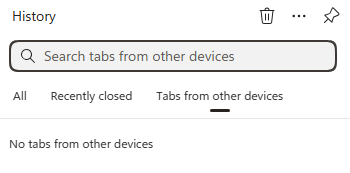
Just wondering if anyone else is seeing a bug where on Windows and Edge Dev (latest version), tab sync just says "No tabs from other devices". But if you go to Edge Stable, it does show open tabs. It also shows my recent tabs with Edge Dev on Android, so I know the sync is working, just the desktop client is not showing them. I've sent feedback for this issue but since sync is still working correctly, I am wondering if this is a UI bug.39Views0likes0CommentsWhy new design of MS Edge shows less items on the Workspaces selection list?
I have some 9 frequently used workspaces. When I want to open one of them only 6 are listed so I often must catch the narrow scrollbar to spot and select the right one. When trying to point to the scrollbar I often miss-click one of them. I'd prefer the list to be longer and the blank space between items smaller. Also it is very handy that icons there are respectively colored but it is just narrow lines. If the color appeared at a bigger surface it would be easier to spot the right one (like e.g. if one of the 3 sheets of the icon was filled). Mabye, making the list size parametrizable (6/12/24) or making the second line with tab count just optional (detailed/compact list layout) would solve this inconvenience. Thanks. (Sorry, my company blocked posting feedback from MS Edge directly. That's why I am asking here.)38Views0likes0CommentsEdge Dev Version 149.0.3984.0 (Official build) dev (64-bit) Update
Got this update on Edge Dev today, immediately thereafter its locked up my pc after it applied and i went to open a new tab (had to ctrl+alt+del and end task it) its something specific here as edge stable and beta still work. unsure what's changed or if others have the same issue? diving into logs in just a sec...146Views0likes0CommentsBookmarks are being forced into the active Tab Group (New behavior)
Hi there, I’ve noticed a very frustrating change in the latest Edge update. When I open a bookmark from the Favorites bar, it is now automatically forced into the currently active Tab Group. This behavior is counter-intuitive. For example, if I am browsing in a "Social" group and click a bookmark for "Gmail," I want it to open as a standalone tab, not as a part of the "Social" group. Currently, I have to manually drag every new tab out of the group, which is a major workflow killer. Disabling experimental flags doesn't fix this anymore. Please provide a toggle in the Settings menu to disable "Tab Group Inheritance" for bookmarks or revert this change. It should be the user's choice whether to add a new tab to a group or not.94Views0likes0Comments
CPU usages on Start Up - Same in Chrome
I'm having the same issue both in Edge and now Chrome. I'm trying to figure out how to solve it so I can switch back to Edge. When I startup the browser it uses a lot of CPU to load 10 to 15%. It stays like that for a couple minutes at least. I couldn't figure out what it was in Edge and now Chome is starting to do the same thing. The longer I use it the longer it uses high CPU. So I figure both of them are doing something similarly. Anyone have any idea what it is and how to fix it?47Views0likes0Comments
Incident critique : Edge Sync “Uninitialized”, appareils disparus, identité WAM/MSAL corrompue
Bonjour, Je rencontre un incident critique affectant directement mon identité Microsoft (MSA). Il ne s’agit pas d’un problème local mais d’un dysfonctionnement côté serveur. Voici les éléments techniques constatés : - Le conteneur Edge Sync de mon compte est en état “Uninitialized”. - Tous mes appareils ont disparu de mon compte Microsoft (Device Registration cassé). - Les services d’identité WAM / MSAL / OneAuth ne se réinitialisent plus correctement. - Impossible de créer de nouveaux passkeys ou d’utiliser les services dépendants de l’identité cloud. On dirait que ça nécéssite une intervention côté serveur : réinitialisation des identités WAM/MSAL, du conteneur Edge Sync, et du Device Registration. Je reste à l'écoute de toute aide en vous remerciant par avance.31Views0likes0Comments


Events
Recent Blogs
- 8 MIN READMicrosoft Edge for Business, the new, dedicated work experience for the Microsoft Edge browser, is now available in Microsoft Edge stable version 116. All customers who sign into Edge using Microsoft...Aug 04, 2023302KViews2likes73Comments
- Microsoft Edge for Business, the new, dedicated work experience for Microsoft Edge, is in preview today! Microsoft Edge for Business is planned to be the standard browser experience for organi...Jul 11, 202310KViews3likes2Comments