help
13 Topics
Persistent issues with Read Aloud in Edge
I have Windows 11. Today I began having an issue wherein the Read Aloud feature built into Edge doesn't work. I was initially trying to use a similar function on Internet Archive, and noticed that while all the Microsoft voices seemed to be available in the onsite dropdown, the only voices that made any sound were David, Mark, and Zira---none of the "Online (Natural)" voices. I tried to use Read Aloud as a workaround, and found all the buttons greyed out completely. Mind you, everything worked fine yesterday, and I made no changes to my computer in the intervening time. I've opened up two support tickets, but neither live chat agent was able to resolve the issue. Here are the things I've tried with their help: trying the feature on different websites updating & restarting Edge resetting Edge settings to defaults updating & restarting computer switching wifi networks connecting to a hotspot using InPrivate mode using a new Edge profile (rule out interference from extensions) checking that English tts is downloaded in Time & language > Language & region turning Online speech recognition off and back on again resetting experimental features checking sound systems (they work, but just in case) doing a system reset (?) to 24 hours ago, which took about an hour and undid all the updates I just mentioned maybe something else I don't remember? The next thing I am going to try is give my computer a long nap. It's been a while, so maybe it just needs some shut eye. Otherwise, help????1.7KViews0likes2CommentsNext Update for Edge not compatible with my mac
Hi, so I'm so sorry if this isn't the right place or if I'm doing this wrong, but I'm kind of freaking out. So I use Edge on an older mac that cannot be updated as mac no longer supports updates for it. I was previously using Edge Dev and after an update got a message saying that the next update won't be compatible with my mac and I tried not to update but at some point Edge Dev restarted and thus updated and then it wouldn't open on my mac, so I switched back to regular Edge. After the last update on regular Edge, I got the same pop up saying that the next update won't be compatible with my mac and now I'm terrified that when that update comes out at some point Edge will restart and update and then I will lose my ability to use Edge. I love Edge as a browser and have so much stored in it. I have exported my passwords just in case, but am still super scared that I'll lose all the work I've put into Edge and that I'll just lose Edge as it's such a superior browser that I've come to rely on. Does anyone have any suggestions on what I should do? I can't afford to get a new computer right now and as I mentioned my Mac doesn't support updates. Any help would be unbelievably appreciated. Thanks in advance.98Views0likes0Comments[Solved] How do I properly add a wildcard domain to Edge tracking prevention exception list?
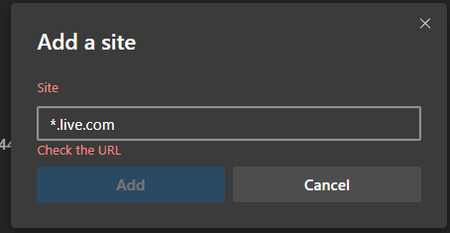
Found the solution, which was there in front of my eyes all this time but I didn't pay enough attention. Edge shows the correct syntax [*.]example.com so entering [*.]live.com is acceptable and fixes the issue! lesson learned: always pay attention to the info on the screen.14KViews2likes4Comments
Issue with the web capture tool
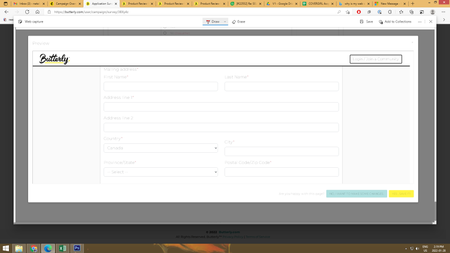
Hi, I have recently started having an issue with the Web Select and Web Capture tools. They used to work normally but the last several weeks to a month, whenever I use these tools, all the text is washed out/almost unreadable. As you can see some elements (like the logo in the corner) are still perfectly visible but the other parts of the page look washed out. This is not my computer as I can see everything perfectly on my screen until I try to take a screenshot via web capture or web select. Plz help me figure this out as I need to use this function for work. Thank you!6.8KViews1like4CommentsWhat is the new prerenderer implementation for <link rel=prerender> instead of NoStatePrefetch ?
Microsoft Edge Version 89.0.726.0 (Official build) canary (64-bit) this new flag: Prerender2 Enables the new prerenderer implementation for <link rel=prerender> instead of NoStatePrefetch. – Mac, Windows #enable-prerender2 I'm curious to know what the new prerenderer implementation is that replaces NoStatePrefetch? couldn't find any information about it in here https://developers.google.com/web/updates/2018/07/nostate-prefetch also, in the same link, it says "Fetch the first result in Google Search results" does prefetch/prerender in Edge Fetch the first result in Bing search results? johnjansen5.9KViews0likes2CommentsNeed an explanation for WebApp-StoreApp migration feature in Edge
Enable Migration of browser installed PWA to Store installed app Enables replacement of browser installed web app with Windows Store installed app. Requires the same Web App to be installed by user from browser and Windows Store. – Windows #edge-webapp-storeapp-migration this flag exists in Edge Version 88.0.692.0 (Official build) dev (64-bit) To figure out how this feature works, I installed Spotify web player in Edge and installed Spotify from Windows store, but nothing happened. I was expecting with this feature and based on its description, clicking on the PWA Spotify icon would launch Spotify app installed from the store. I'd appreciate any info regarding this feature to help understand how it works exactly.Solved2.3KViews1like5CommentsHow does Edge determine which PWA is not important to the user for auto browser restart?
Enable PWAs to automatically restart to apply a pending browser update. When a browser update is pending and only PWAs are running, this feature will restart PWAs to apply the update if they are considered not important to the user. – Mac, Windows #edge-enable-web-app-upgrade-controller Flag exists in Edge Version 88.0.692.0 (Dev) and 86.0.622.68 (stable) How does Edge determine which open PWA is not important to the user? based on usage? inactivity at that moment? or other heuristic behavior analyzing? and the default value is as always unknown, not showing whether this is enabled or disabled, by default.Solved1.2KViews1like2CommentsWhy this policy is producing error? Configure new tab page URL
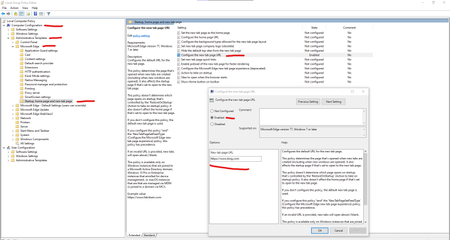
It's this Policy: https://docs.microsoft.com/en-us/DeployEdge/microsoft-edge-policies#newtabpagelocation And based on the description, I've set it correctly on Edge 87 (the installed up-to-date policy files are also for Edge 87) But it isn't being applied and I see an error in Edge:policy why does it say the policy is blocked? what am I doing wrong?9.3KViews1like13Comments