mac
105 TopicsNext Update for Edge not compatible with my mac
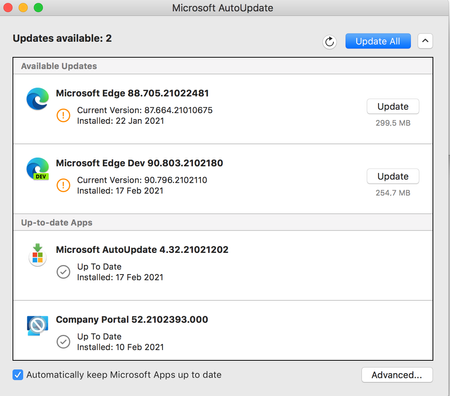
Hi, so I'm so sorry if this isn't the right place or if I'm doing this wrong, but I'm kind of freaking out. So I use Edge on an older mac that cannot be updated as mac no longer supports updates for it. I was previously using Edge Dev and after an update got a message saying that the next update won't be compatible with my mac and I tried not to update but at some point Edge Dev restarted and thus updated and then it wouldn't open on my mac, so I switched back to regular Edge. After the last update on regular Edge, I got the same pop up saying that the next update won't be compatible with my mac and now I'm terrified that when that update comes out at some point Edge will restart and update and then I will lose my ability to use Edge. I love Edge as a browser and have so much stored in it. I have exported my passwords just in case, but am still super scared that I'll lose all the work I've put into Edge and that I'll just lose Edge as it's such a superior browser that I've come to rely on. Does anyone have any suggestions on what I should do? I can't afford to get a new computer right now and as I mentioned my Mac doesn't support updates. Any help would be unbelievably appreciated. Thanks in advance.167Views0likes0Commentsoptional suggestion: new menu bar app for mac
i wish i could launch one of my edge profile (no matter from which edge) directly in the menu bar. so you create a profile launcher.app and then i can search a profile installed on my 4 browser, without need to launch a browser. at the moment we can do similar things once the browser is launched using the dock icon or using the sync icon or using the menu bar option inside edge. but there is still the limit that we can do it for one browser. we cannot search profiles installed on all 4 browser. plus every time you launch the browser, you open the last used profile. so we first need to close and then switch (which requires time). profile switching is slower in edge compared to google. now with this new app you would simply launch a profile inside an edge app, without launching the previous profile.5KViews2likes10Comments
Cannot customize keyboard shortcuts and new shortcuts are overriding my plugins
Two things: 1. Why can we still not customize/disable keyboard shortcuts for new features? Specifically, Command+Shift+X on mac (which is used by just about anyone using 1Password, so I assume quite a few) now pops up some drag and select copy text thing which I didn't want in the first place. Can't find anywhere to disable it. 2. The Command key on mac is not detected in the shortcut box, so effectively we cannot make shortcuts that use it. You must fix this. Also--extensions and system shortcuts should override Edge's shortcuts, not the other way around.1.5KViews0likes3Comments
[macOS] awful menubar behavior in fullscreen mode
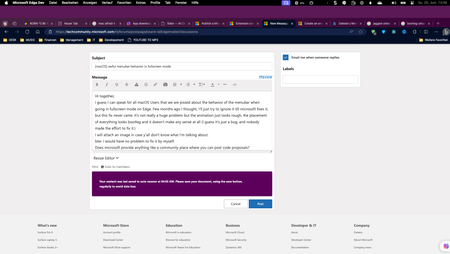
Hi together, I guess I can speak for all macOS Users that we are pissed about the behavior of the menubar when going in fullscreen mode on Edge. Few months ago I thought, I'll just try to ignore it till it gets fixed, but this fix never came and that's why I'm here :D. It's not really a huge problem but the animation just looks rough, the placement of everything looks bootleg and that behavior doesn't make any sense at all, especially because edge is the only mac app that has this problem. (I guess it's just a bug, and nobody made the effort to fix it yet.) I attached images to this thread in case y'all don't know what I'm talking about. btw: I would have no problem to fix it by myself, does microsoft has anything like a community place where you can post code proposals?556Views1like0CommentsSS48: don't remove MacOS Mojave support on Edge, even if Google now announced to us that they will
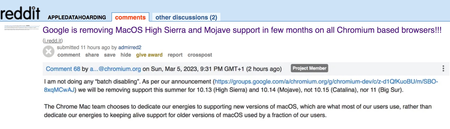
Suggestion (SS): 48 Classification: Browser Compatibility PRIORITY IN MY OPINION: 10 on a scale from 1 (low) to 10 (high) Few hours ago Senior Dev reported us the no interest of keeping MacOS Mojave support on Chrome. In 2 years they are removing the 2 best MacOS ever released, before Apple started to downgrade features in MacOS (and obviously adding some other too), especially related to all backup workflows, that now are more complex, but even to permissions and multiple other things. We reported the new downgrade for external drives implemented in MacOS 12/13 https://old.reddit.com/r/appledatahoarding/comments/11ikj38/next_macos_downgrade_available_with_monterey/, but this is not the point now. We explained already https://bugs.chromium.org/p/chromium/issues/detail?id=1413784&q=sierra%20chrome&can=1 why they should keep support for such MacOS, and later again https://bugs.chromium.org/p/chromium/issues/detail?id=1322548#c68 Now the point is: we are trying our best to revert such decision, like we wrote https://old.reddit.com/r/appledatahoarding/comments/11jufgo/google_chrome_support_will_end_in_few_months_for/, but it's important that other chromium based devs know about such problematic and evaluate to continue support, if this is technically possible. Remember that MacOS 10.14 is not like all other MacOS released by Apple, so removing such MacOS is not like removing Catalina, High Sierra etc. If there are question why MacOS Mojave support is so important, just write directly to us. We already experienced the direct consequence of removing MacOS on Chromium on all browsers and apps few months ago with Sierra. Please keep in mind that this is not just related to Chrome, but even Chromium based browsers, Mac Apps using Electron, and all other Mac Apps too (because if one is starting to remove support, especially big brands, the other will follow much easier*). So be open with your mind and don't write "i'm not using Chrome or Mojave, doesn't matter for me". There is the possibility that Google maybe know about some changes with Xcode, like we wrote https://old.reddit.com/r/appledatahoarding/comments/11jho7y/meanwhile_the_batch_deletion_of_other_2_macos_by/ but probably is not the case. If this is true, then the situation would be much worse, if now Apple really decides to remove multiple MacOS, like we previously reported with out https://old.reddit.com/r/appledatahoarding/comments/114o7zt/remember_2023_will_be_the_most_crucial_year_of/ *Keep in mind that almost 70%+ of all browsers available for MacOS (80+) are Chromium based. ------------ In case you will not doing that and Google will not keep support for Mojave, please provide directly link to download a browser version compatible with up to MacOS Sierra and one up to MacOS Mojave, instead of just download last version. Avoid auto update of the app too. So don't install new incompatible app automatically, which make no sense at all.2.3KViews0likes0Comments
Finder launched by "Save As" in MacOS resizes Edge window
When doing "Save as" where a Finder window is opened to choose the save location, the Edge window gets resized so that there's space at the right-hand side of the window. I've only observed this behavior on MacOS (never happened on Windows 10 or Windows 11). In previous versions, the window used to resize back, but as of 107.0.1418.28, it stays stuck in the new smaller size.691Views0likes0CommentsNew Update Experience for Mac available in Edge Beta / Dev / Canary
Getting updates timely and smoothly is key to keeping web browsers secure. It also helps you try new experiences sooner on a fast-moving browser like Microsoft Edge. Since Microsoft Edge launched on MacOS, we have heard your feedback on the update experience on Mac devices, specifically: Having to update through Microsoft AutoUpdate can be confusing, especially since it typically is used to update the Office suite applications. edge://settings/help was not always consistent with Microsoft AutoUpdate in showing update availability Update experience was not rapid: when you close and then reopen your browser when a new update is available, you will need to wait until the update is applied before browser restarts. We are now excited to announce an improved update experience on Mac to address your feedback, making updating faster and smoother. This experience is currently rolled out to Mac users (both Intel and M1 users) on Beta versions higher than 93.0.961.11, Dev versions higher than 91.0.852.0 or Canary versions higher than 90.0.816.0 behind a feature flag. Here are some highlights of the new experience: The new update experience is now Edge-native. It will solely be responsible for updating Edge-related products and will not be affected (e.g. blocked) by other pending product updates. Updates will happen automatically and silently, and no out-of-Edge notifications/toasts will be shown. Update sizes are now reduced by as much as 80% on average! This speeds up updates by over two thirds! edge://settings/help now more consistently reflects update status and allows seamless updates. In-app update notifications are promptly reflected when an update becomes available. When you restart the browser when an update is available, your browser will now instantly relaunch with the updated version rather than wait for update to be applied. As always, please do not hesitate to send any feedback on the update experience our way so that we can make your experience better! You can do so by selecting the "send feedback" button or going to … menu -> Help and Feedback -> send feedback.35KViews5likes43CommentsMicrosoft Edge for Mac sign in server error [2600]
Since updating to Microsoft Edge Version 81.0.416.53 for macOS, my Office 365 account has been permanently logged out of the browser. When I sign in, I receive a message prompt that reads: "A server error occurred. [2600]" Hoping there is a fix underway. Ciao for now, Marcus8.3KViews1like15Comments