edge dev
32 TopicsDev 155.0.4268.0 - HEVC cannot be played via hardware
Starting with Dev build 155.0.4268.0, HEVC content fails to playback throwing an error. This is attempting to use any hardware acceleration (NVIDIA, Intel, Qualcomm, etc). On the Stable channel, it still works as intended. I submitted feedback, but this is a rather impactful issue since a lot of websites use HEVC content.Solved606Views0likes15CommentsEdge Dev on Windows - Tab sync not working
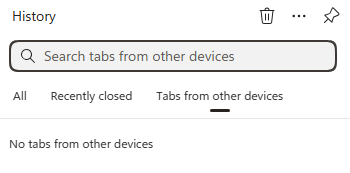
Just wondering if anyone else is seeing a bug where on Windows and Edge Dev (latest version), tab sync just says "No tabs from other devices". But if you go to Edge Stable, it does show open tabs. It also shows my recent tabs with Edge Dev on Android, so I know the sync is working, just the desktop client is not showing them. I've sent feedback for this issue but since sync is still working correctly, I am wondering if this is a UI bug.97Views0likes0Comments
Edge Dev 139.0.3365.2 does not open / crashes
When clicking the Edge Dev Icon, a full screen window in light blue colour opens, with no text or any graphics (no title bar, no symbols..), after a few seconds, this window crashes. It is not possible to start Edge dev. I tried to repair it within "installed apps" in Win Settings, but with the same result. Restarting the Computer did not solve the problem. Starting an inprivate window does work (right click on icon - in private), but if I want to check the settings, Edge crashes immediately.Solved670Views0likes3CommentsAnyone down for Edge logo options?
So is it me or the new Microsoft Edge log not as fun? You know what would be fun? Options. I would love to see a buried settings options for the type of logo we can have. Hell, I think if they give us the option to swap between the Spartan Logo, Edge logo, and New Edge logo that will be fun. I love options and Windows has always been the better bet for it. Let us have fun with one of the most important apps we use on our computers.2.3KViews1like8Comments
Edge Dev (latest version) crashes when autofill tries to open
Hey there, Yesterday i spoke with a guy from Microsoft's Support (the official one ofcourse) for like.. 4 hours... trying to resolve my Microsoft Edge crashing and the autofill on several websites (including microsoft.com itself) to not function, like.. it pops up but i can't press any of the saved items. Does anyone.. have a clue at all? The Support person already tried reinstalling, clearing cookies, cache, extensions etc etc.. it's just not working. I'm honestly clueless.555Views1like0Comments
(MAJOR BUG) Bookmarks dont shift by drag and drop when selected (even multiple selecting is broken).
(MAJOR BUG) Bookmarks dont shift by drag and drop when selected (even multiple selecting is broken). See invalid button when dragging multple bookmarks. I dont face same issues in any browser including chrome and firefox and opera and brave and vivaldi whatsoever. Only edge browser has these unique bugs. And this bug is common in all edge browsers and on all platforms. Checked before posting this.441Views0likes0Comments(MAJOR BUGS) "Found81results" is together, no space, and wrong when selected results are 137?
(MAJOR BUGS) "Found81results" is together, no space, and wrong when selected results are 137? Edges of the browser. This is edge browser, which wants us to ditch Google Chrome. Never faced such childish bugs in chrome in 20 years of usage. Common in all edge browsers on all devices. Checked personally every one of them and can confirm.724Views0likes0Comments
Cannot see the new Bing-AI button in Edge Dev
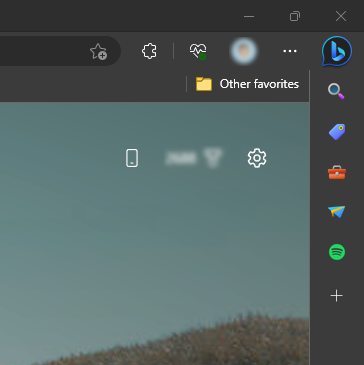
Hello, I have recently installed Edge Dev 111.0.1660.6 and later updated to 111.0.1660.9. I did this because I wanted to try out the new Bing AI features, but the button that should be in the top right corner doesn't show up for me. I already passed the waitlist and can use the Bing-Chat features, but somehow I can't access the "AI Sidebar." Can anyone here help me fix this? Thank you in advance!22KViews2likes11CommentsEdge Dev Fav icons not saving to show icon only
Hello, I am seeing across platforms with the most current of Edge Dev ver that being able to show icon only no longer is saving for my bookmarks on my Favorites Bar. I am seeing this both on my Windows 10 PC and my macOS ARM laptop too. I can right click on a bookmark in the favorites bar to show icon only. Then when I restart Edge Dev I am seeing the full name. @Eric_E. are you aware of this?Solved1.3KViews0likes2Comments