update
21 Topics
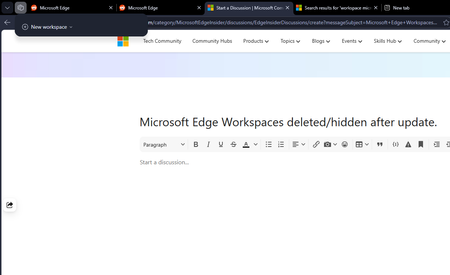
Microsoft Edge Workspaces deleted/hidden after update.
All my workspaces in Edge are hidden and/or are deleted. I updated my windows yesterday night (the restart also updated Edge which was pending) and noticed this issue this morning. I had 10+ workspaces and none of them are here to be found. Tried restarting the browser but no luck there.269Views0likes2Comments
Favicons for bookmarks broken since Edge v149 update
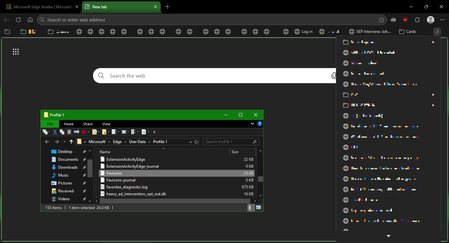
I've recently had Edge update to the v149.0.4022.52 stable-channel releases, and ALL my bookmarks now have no favicons. When I visit any webpage, Edge successfully loads the favicon for the tab of that website. But when I visit a bookmark, the favicon doesn't get updated after it has loaded for the site. And new bookmarks I add also don't show a favicon. If I go into my Edge profile-folder (which can found via edge://profile-internals/ , clicking the heading, then looking next to "Profile Path"), then it is still creating the "Favicon" and "Favicons-journal" files, but I assume isn't populating them with anything? I've tried deleting both files, restarting my PC, but even after Edge recreates them, no bookmarks are gaining any favicons. Is anyone else getting this issue...? OS: Windows 10 Home 22H2 x64 (OS Build: 19045.7291 : May 2026 ESU)Solved4.2KViews4likes23CommentsNext Update for Edge not compatible with my mac
Hi, so I'm so sorry if this isn't the right place or if I'm doing this wrong, but I'm kind of freaking out. So I use Edge on an older mac that cannot be updated as mac no longer supports updates for it. I was previously using Edge Dev and after an update got a message saying that the next update won't be compatible with my mac and I tried not to update but at some point Edge Dev restarted and thus updated and then it wouldn't open on my mac, so I switched back to regular Edge. After the last update on regular Edge, I got the same pop up saying that the next update won't be compatible with my mac and now I'm terrified that when that update comes out at some point Edge will restart and update and then I will lose my ability to use Edge. I love Edge as a browser and have so much stored in it. I have exported my passwords just in case, but am still super scared that I'll lose all the work I've put into Edge and that I'll just lose Edge as it's such a superior browser that I've come to rely on. Does anyone have any suggestions on what I should do? I can't afford to get a new computer right now and as I mentioned my Mac doesn't support updates. Any help would be unbelievably appreciated. Thanks in advance.167Views0likes0CommentsEdge Dev Version 149.0.3984.0 (Official build) dev (64-bit) Update
Got this update on Edge Dev today, immediately thereafter its locked up my pc after it applied and i went to open a new tab (had to ctrl+alt+del and end task it) its something specific here as edge stable and beta still work. unsure what's changed or if others have the same issue? diving into logs in just a sec...253Views0likes0CommentsNew Feature: Built in Picture in Picture mode (PIP) is added to Microsoft Edge Global Media Controls
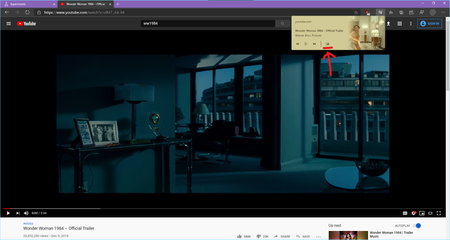
Microsoft Edge Canary Version 82.0.442.0 (Official build) canary (64-bit) The flags you need to enable: edge://flags/ 1. Global Media Controls Picture-in-Picture Enables Picture-in-Picture controls in the Global Media Controls UI. Requires #global-media-controls to also be enabled. – Mac, Windows #global-media-controls-picture-in-picture 2. Global Media Controls Enables the Global Media Controls UI in the toolbar. – Mac, Windows #global-media-controls Microsoft Edge browser now has support for Picture in Picture mode built in. it works in all websites playing video. this is another example for Twitch the PIP pop up video can be dragged to anywhere on the screen and it will stay on top of other applications125KViews11likes17Comments[Feature Suggestion] Show update history in Edge
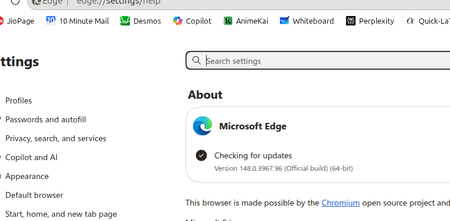
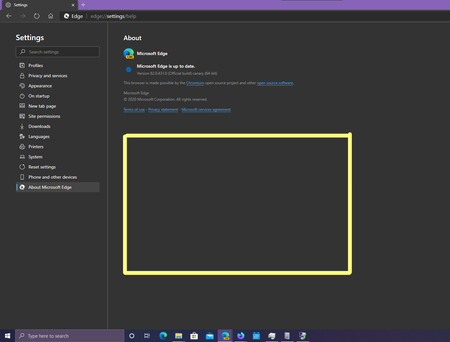
Please show the update history in edge://settings/help lots of spaces left there, it helps to keep track of installed updates on the local machine. only show update history after Edge is installed on the system, not from the beginning of the time. Firefox has this and it's very helpful, specially for insider channel. I only want to see the time and the version number of previously installed updates on my system. you can add a scroll bar to the right side to scroll down/up when the history rows are too many to fit that area. Like this:11KViews9likes8CommentsError on updating Edge canary: Failed to cache the downloaded installer. Error: 0x800b0001.
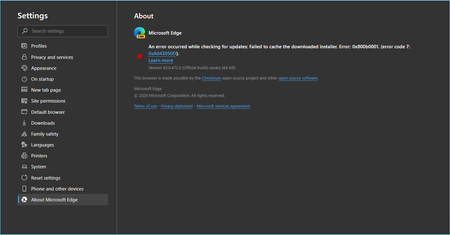
I'm getting this infamous error Failed to cache the downloaded installer. Error: 0x800b0001. restarting Edge or computer doesn't help. I can see the directory is created: AppData\Local\Microsoft\EdgeUpdate\Download\{ID}\83.0.473.0 for some reason my Fiddler doesn't show me the URL of the file being downloaded either. so I would like to fix this without reinstalling Canary 🙂Solved6.3KViews0likes12Comments
Update disabling when?
Did this thing update by itself again around one week ago? Because for about a week now when I try to updaload a video to youtube I get the blue screen of death. Out of nowhere it started doing that; it happens only when it is a new video being uploaded so I have to crash the pc once and then I can restart and continue the upload like normal. And then crash again every new video. Also all previous updates have been fully detrimental and replacing functionality instead of allowing you to choose how you actually want the experience (like the favourites/historic/download shortcut being those hateful and useless dropdowns insteaf of opening the page, or the 'end' and 'home' button no longer working etc). So, any way to disable those trashy updates or go to an older version yet?1.3KViews0likes3Comments