Recent Discussions

Dev Version 149.0.3984.0 Crashes When Launching InPrivate Window
After updating to Dev version 149.0.3984.0 any attempt to launch an InPrivate Window immediately crashes. Additionally, attempting to launch the feedback tool within the app also launches when attempting to input information.18Views0likes0Comments
Edge Dev Version 149.0.3984.0 (Official build) dev (64-bit) Update
Got this update on Edge Dev today, immediately thereafter its locked up my pc after it applied and i went to open a new tab (had to ctrl+alt+del and end task it) its something specific here as edge stable and beta still work. unsure what's changed or if others have the same issue? diving into logs in just a sec...29Views0likes0Comments"Microsoft Edge rounded corners" flag
Hello The "Microsoft Edge rounded corners" flag in edge://flags/ disappeared in last Canary version The display is reduced on web pages and even more so on laptops with small screens The display is already a bit smaller with the wider title bar Please, bring back this option Especially since there's no other way to disable it, except by switching to Chrome Thanks43Views0likes0CommentsEdge Sync Persistent Failure
Subject: Edge Sync Persistent Failure: "Our services aren't available" on syncreset page and Sync Engine stuck on "Initializing" Hi everyone, I’m seeking urgent help regarding a persistent Microsoft Edge sync issue that has lasted for several days across 5 different devices (4 Windows PCs and 1 iOS device). The Symptoms: Sync Engine Deadlock: On all my Windows devices, the edge://sync-internals page shows the Transport State as "Initializing" or "Backed off". The Total Entries often drop to 0, or it shows Network error (ERR_CONNECTION_CLOSED). Server-Side Lockdown: I am unable to access the Edge sync reset page (https://edge.microsoft.com/syncreset) from ANY browser or ANY network environment (including mobile data and different VPN nodes). It consistently returns: "Our services aren't available. We're working to restore all services as soon as possible. Please check back soon." Question: Since the syncreset page is unavailable globally for my account, it seems to be a back-end identity/gateway issue rather than a local client error. Has anyone else encountered this "Services aren't available" error on the reset page recently? Is there a way to force a server-side sync container refresh when the official reset tool is down?88Views0likes2Comments
Bookmarks are being forced into the active Tab Group (New behavior)
Hi there, I’ve noticed a very frustrating change in the latest Edge update. When I open a bookmark from the Favorites bar, it is now automatically forced into the currently active Tab Group. This behavior is counter-intuitive. For example, if I am browsing in a "Social" group and click a bookmark for "Gmail," I want it to open as a standalone tab, not as a part of the "Social" group. Currently, I have to manually drag every new tab out of the group, which is a major workflow killer. Disabling experimental flags doesn't fix this anymore. Please provide a toggle in the Settings menu to disable "Tab Group Inheritance" for bookmarks or revert this change. It should be the user's choice whether to add a new tab to a group or not.37Views0likes0Comments
CPU usages on Start Up - Same in Chrome
I'm having the same issue both in Edge and now Chrome. I'm trying to figure out how to solve it so I can switch back to Edge. When I startup the browser it uses a lot of CPU to load 10 to 15%. It stays like that for a couple minutes at least. I couldn't figure out what it was in Edge and now Chome is starting to do the same thing. The longer I use it the longer it uses high CPU. So I figure both of them are doing something similarly. Anyone have any idea what it is and how to fix it?33Views0likes0Comments
Incident critique : Edge Sync “Uninitialized”, appareils disparus, identité WAM/MSAL corrompue
Bonjour, Je rencontre un incident critique affectant directement mon identité Microsoft (MSA). Il ne s’agit pas d’un problème local mais d’un dysfonctionnement côté serveur. Voici les éléments techniques constatés : - Le conteneur Edge Sync de mon compte est en état “Uninitialized”. - Tous mes appareils ont disparu de mon compte Microsoft (Device Registration cassé). - Les services d’identité WAM / MSAL / OneAuth ne se réinitialisent plus correctement. - Impossible de créer de nouveaux passkeys ou d’utiliser les services dépendants de l’identité cloud. On dirait que ça nécéssite une intervention côté serveur : réinitialisation des identités WAM/MSAL, du conteneur Edge Sync, et du Device Registration. Je reste à l'écoute de toute aide en vous remerciant par avance.25Views0likes0Comments
Samsung S20 FE suddenly stops connecting to Windows PC via bluetooth
I have seen posts about this issue and it has just happened to me. My Samsung S20 FE was connecting to my Windows PC Bluetooth fine. All of sudden my phone will not connect. I have tried to delete, restart on both pc and phone and then pair then connect and it fails. As a result I can no longer use Windows/Phone Link which stinks. Other posts have discussed this issue and they also claim that it just happens and there is no current fix which is absurd since it was working and now it does not?????? Please get fixed.....sounds like this is happening to a lot of users!11Views0likes0CommentsBrowserCodeIntegritySetting vs. Memory integrity / HVCI
Hello all, we have set BrowserCodeIntegritySetting to '2' (Enabled: Enable code integrity guard enforcement in the browser process.) This causes the browser to crash once a user tries to logon to Citrix terminal servers with EntraID/Fido2. This is probably cased by an unsigned Citrix CtxFidoMuxdll, but from our understanding this should be properly handled and the browser should not just crash. While investigating the root cause, we found very few information about Code Integrity Guard. It seems it was shipped as part of Device Guard but nowadays is named Memory integrity or hypervisor-protected code integrity (HVCI) and independent from Device Guard. Is this understanding correct and can we expect that the feature name will be updated and a proper documentation will be added? BR, Joe42Views0likes1CommentAndroid MS Edge Autofill verification and android/PWA apps.
Hi guys, An issue I have with edge on android autofill is that when biometric checks are enabled for autofill and using non-edge or an installed PWA app, you are teleported from the PWA/android app to Microsoft edge and are not teleported back to the app being autofilled. This means that having biometric autofill checks and edge password manager as the primary autofill for android means that on some apps it is unfeasible to autofill as the log in request times out or resets after the app is no longer in view. This and the inability to save passkeys natively in the edge android browser is a big for drawback for me using edge password management over googles in built system. Happy Easter!38Views0likes0Comments
Zoom with Scroll + Modifier Key Not Working in Edge on macOS
Hello, I am using Microsoft Edge on macOS and I would like to zoom in and out of web pages using a modifier key (Command, Option, or Control) together with scroll Currently, Command + Scroll does not zoom the page. I understand that macOS may override this behavior through accessibility settings, but I would like to enable this functionality specifically in Edge without affecting system-wide behavior. Could you please advise: Is it possible to enable zoom using Scroll + Modifier Key in Edge on macOS? If not, are there any recommended workarounds or planned features for this? Thank you for your help DanceLens!17Views0likes0Comments
Unable to open any websites
Haven't been able to use Edge Canary for the past couple of days. Just get the message: This page is having a problem. Have tried repair, uninstall and reinstall, all to no avail. Works ok on my other PC. Edition Windows 11 Pro Version 25H2 Installed on 02/02/2025 OS build 26200.8039 Experience Windows Feature Experience Pack 1000.26100.300.053Views0likes0CommentsWe no longer have control
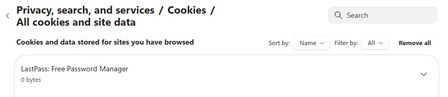
So, now with the latest updates for Canary Version 148.0.3940.0 (Official build) canary (64-bit) we no longer have site permission control as to what any particular website has permission to do/use. Our choices are greyed out and unselectable.... See in these 2 screen shots, this is for LastPass, but it is the same for Norton Safe Web. Notice; greyed out and unselectable/unchangeable. The only option is to turn the extension "OFF" as I did with Norton Safe Web extension. With all the hacking and websites being hacked into, why would I allow "Automatic Downloads"? Dennis5mile48Views0likes0CommentsFavorites keep imported folders indefinitely.
I've gone through and removed imported folder and reorganized my various folders. But when I close out Edge and reboot all the imported folders reappear. So I am unable to organize my Favorites like I should be able too. So I"ve been forces to use Google Chrome.12Views0likes0CommentsEdge Beta 147.0.3912.26: This policy is blocked, its value will be ignored.
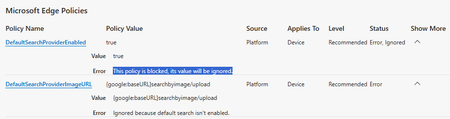
Starting with Edge Beta 147.0.3912.26 as well as Edge Dev 148.0.3928.0 I'm facing the problem, that the so called "sensitive policies" (which need an MDM or AD-Joined Device) are blocked. Error-Message in edge://policy/ shows up with: This policy is blocked, its value will be ignored. Using Edge Stable 146.0.3856.84 works fine (on the same machine). Issue is only related to the so called "sensitive policies" and ist clearly new with Edge Beta 147.0.3912.26 as well as Edge Dev 148.0.3928.0 ... I didn't change anything except updating Edge Beta and Edge Dev ... and as I said: Edge Stable still works fine on the same machine. The Release Notes https://learn.microsoft.com/en-us/deployedge/microsoft-edge-relnote-beta-channel don't show any new changes regarding those "sensitive Policies". So what happened? Did Microsoft break the Policies with those new Versions?Solved233Views0likes6CommentsExport tool for Edge Collections before deprecation
Microsoft is deprecating the 'Collections' feature in Edge, but there is currently no export option available for personal Microsoft accounts. This creates a serious problem for users who rely heavily on Collections for research, organization, and long‑term workflows. In my case, I have 166 main Collections, each containing dozens of items. Migrating this manually is simply impossible/undoable. ‼️ Please Microsoft: provide an official export tool (HTML, JSON, or migration to Favorites/Bing Saves) before removing the feature. Without this, users risk losing years of structured work and saved content. This is essential for anyone who has used Collections as a core part of their workflow.56Views0likes0CommentsWhy is my sync account being logged out automatically every day?
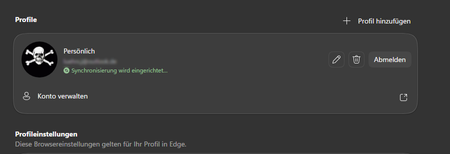
Being automatically logged out in Edge with my private sync / Microsoft account happens on the up-to-date version of Windows 11 Pro with the normal current version of Edge. I have only a single Edge profile which is private and neither Windows nor Edge is managed by a corporation. However, I edited some policies. So, it may appear to Windows or Edge that there is corporate management. "Passwordless account" and "Two-step verification" are both switched off. I do have another corporate account to access M365 which is MFA protected (Microsoft authenticator). Also there I am automatically been logged out on a daily basis. Can I change the behaviour?78Views0likes2Comments




Events
Recent Blogs
- 8 MIN READMicrosoft Edge for Business, the new, dedicated work experience for the Microsoft Edge browser, is now available in Microsoft Edge stable version 116. All customers who sign into Edge using Microsoft...Aug 04, 2023301KViews2likes73Comments
- Microsoft Edge for Business, the new, dedicated work experience for Microsoft Edge, is in preview today! Microsoft Edge for Business is planned to be the standard browser experience for organi...Jul 11, 202310KViews3likes2Comments