Recent Discussions

Why Stability Matters More Than New Features for Many Users
To Microsoft Edge Leadership and Product Management, I am writing as a long time Microsoft user who is seriously considering moving away from Microsoft Edge because of the cumulative frustration caused by frequent updates and the disruption they create. The immediate issue prompting this letter is the recent Edge update that caused website favicons in Favorites to disappear and be replaced with generic globe icons. While this may seem like a minor issue to some, it significantly affects how I use the browser. I maintain a large, organized collection of Favorites, and I rely on visual recognition of icons to quickly locate websites. Removing that functionality has made navigation slower and more frustrating. However, this letter is not really about favicons. My larger concern is the direction that modern software development appears to have taken. Years ago, software updates were less frequent and more deliberate. New versions were released perhaps once a year. Users had time to learn the software, become comfortable with it, and develop confidence that it would continue working in familiar ways. Today, it feels as though major applications are updated continuously. Changes arrive monthly, weekly, and sometimes even more frequently. Features move. Interfaces change. Workflows are altered. Bugs appear in areas that previously worked correctly. Users are expected to adapt constantly. What is most frustrating is the feeling that stability has become secondary to rapid deployment. I understand that no software is perfect. I understand that bugs happen. What concerns me is the impression that organizations increasingly accept a certain level of user disruption as an unavoidable cost of doing business. Perhaps each individual problem affects only a small percentage of users. But over time, those small percentages accumulate. Each issue chips away at customer trust and confidence. Many users do not take the time to complain. They simply become frustrated and eventually leave. History has shown that dominant technology companies can lose their position when they stop listening closely to the user experience. Yahoo once seemed untouchable as a search engine and email provider. Google succeeded because it focused on simplicity, reliability, and making things easier for users. As a customer, I want software that is dependable. I want updates that improve my experience without disrupting established workflows. I want to feel that stability is valued as highly as innovation. Most importantly, I want to feel that the people making decisions about products understand how those decisions affect the people who use them every day. The recent Edge issue may be resolved in a future update. My concern is that the issue reflects a broader trend that many users are experiencing across modern software. I hope Microsoft will place greater emphasis on quality assurance, stability, backward compatibility, and the long term user experience. Those qualities are often what build customer loyalty, and what keep users from looking elsewhere. Sincerely, A frustrated but long time Microsoft customer16Views0likes0Comments
Edge not functioning properly after playing games?
After I have played a video game, I noticed Edge has forgotten all my website and cache data? No website icons and logged out of websites. This only happens after I've played a video game, never has it happened from just opening it up.21Views0likes0Comments
Favorites Icons
Comcast just did an upgrade in my area and ever since, my "Favorites" icons on AOL and Edge are Globes and not the individual icons they once were. Not sure why it happened, but how do get them back? I've managed to get them back temporarily, but after changing "opening page" settings where they are displayed properly, they disappear.9Views0likes0Comments
Microsoft Graph Webhook Filtering Using Custom MAPI Properties for Weather Messages
Hi everyone, I'm working on an integration that uses Microsoft Graph change notifications (webhooks) to receive notifications for new email messages in a mailbox. Our use case is specific to Weather messages generated by our Messaging platform. Currently, we subscribe to mailbox notifications and receive events for all incoming emails, which results in significant post-processing on our side. I'm looking for a way to perform server-side filtering so that only Weather-related messages trigger webhook notifications. Current Situation We use Microsoft Graph webhook subscriptions on mailbox messages. Weather messages are delivered as standard emails. Subject-based filtering is sufficient for our requirements. We would like to avoid processing every incoming email after receiving notifications. Proposed Approach We are considering stamping weather emails with a custom MAPI extended property when the message is created, for example: Message subject = Weather using a custom single-value extended property. Questions Can Microsoft Graph webhook subscriptions filter notifications based on custom MAPI extended properties? If not directly in the subscription, can $filter be used on message queries against these custom properties after receiving notifications? Has anyone successfully implemented a solution where a custom MAPI property acts as a service tag for weather messages? Are there any recommended alternatives for reducing webhook traffic when only a subset of messages is relevant? Would Outlook categories, message classes, or other Exchange attributes provide a better filtering mechanism than custom MAPI properties? Our goal is to identify weather messages reliably while minimizing unnecessary webhook notifications and mailbox processing. Any guidance, examples, or best practices would be greatly appreciated. Thanks!33Views0likes0Comments
Proposal: AI‑Powered News Reliability Label for Microsoft Edge
AI‑Powered News Reliability Label for Microsoft Edge Problem: Digital news often contains misleading or exaggerated content, especially in tabloid-style articles that use sensational headlines, omit context, or distort facts to drive clicks. This creates a consumer harm because users waste time on low-quality content, misinformation spreads easily, and trust in online information continues to decline. Digital news is monetised, yet unlike physical products, it has no transparency standards. Proposed Solution: Introduce an optional, user-controlled AI reliability label that appears above online news articles in Microsoft Edge. This label would analyse the article using AI and assign a simple colour-coded reliability score: 🟩 Green — High Reliability 🟨 Yellow — Missing Context 🟧 Orange — Low Reliability 🟥 Red — Click-bait / Misleading Content The label would not block or hide content. It simply provides transparency so users can make informed decisions. Why This Is Safe: • Optional (off by default) • Does not restrict access • Does not censor or demote publishers • AI-generated analysis, not editorial judgement • Equivalent to a “nutrition label” for information Benefits to Users: • Helps avoid misleading content • Builds trust • Saves time • Improves digital literacy • Reduces exposure to sensationalism Benefits to Microsoft Edge: • Differentiates Edge from other browsers • Demonstrates responsible AI leadership • Provides a meaningful use of Copilot • Aligns with Microsoft’s safety and trust principles • Could become an industry standard Technical Feasibility: Microsoft already has the required components: Edge integration, Copilot models, SmartScreen-style UI patterns, and Responsible AI frameworks. Summary: This feature enhances user trust, improves digital literacy, and positions Edge as the first browser to address the growing problem of misleading online content—without restricting access or interfering with press freedom.36Views0likes0CommentsFavicons for bookmarks broken since Edge v149 update
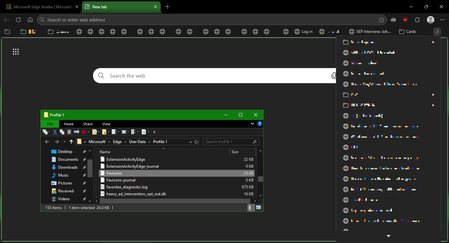
I've recently had Edge update to the v149.0.4022.52 stable-channel releases, and ALL my bookmarks now have no favicons. When I visit any webpage, Edge successfully loads the favicon for the tab of that website. But when I visit a bookmark, the favicon doesn't get updated after it has loaded for the site. And new bookmarks I add also don't show a favicon. If I go into my Edge profile-folder (which can found via edge://profile-internals/ , clicking the heading, then looking next to "Profile Path"), then it is still creating the "Favicon" and "Favicons-journal" files, but I assume isn't populating them with anything? I've tried deleting both files, restarting my PC, but even after Edge recreates them, no bookmarks are gaining any favicons. Is anyone else getting this issue...? OS: Windows 10 Home 22H2 x64 (OS Build: 19045.7291 : May 2026 ESU)2KViews4likes20Comments
Windows Edge not forgetting email address.
On one of my Windows 10 computers, I no longer want my email address associated with it. I did the following: 1- I signed out of the Microsoft account on my PC and logged in as a local account. 2- Under Email and Accounts, I deleted my email account shown in control panel. None show any longer. 3- All windows and credentials for windows and web were removed. 4- Signed out of edge. 5- Repaired and edge. (Microsoft does not allow an uninstall.) 6- Told control panel to stop automatically sign in. Now when I start edge, a welcome screen shows. Edge wants you to sign in. It still shows the email address that I want my PC to forget. The profile won't delete. I created a second profile and switched to it hoping to delete the old, suggested email profile but my old, suggested email keeps showing up. To proceed, you do need credentials, but I just assume the PC does not show anything at all and that it forgets my email address. I do not want someone that I may let someone use my computer to even know my outlook email address. Microsoft Edge offers other way to credential the machine (SMS, emails etc.) I do not want anyone who is lent the machine sees any of this either. Why is Microsoft being so "helpful" when I don't want them to be. This is all a terrible security breach. I can't safely let someone use nor sell my computer without stripping down to the bare bones. And who know, will Microsoft tell the PC the email address since it has the serial number from the motherboard. (For those of you old enough do you remember when Intel put serial numbers in 80386 CPU? Deja vu?) Simply, how do I completely expunge my email from the computer altogether and stop this email stickiness?26Views0likes0Comments
Kiosk Mode
Hi, We are running Edge in Kiosk mode and I am trying to find information how to configure it for our specific requirements in an Enterprise environment. Requirements: URLAllowlist: "domainA.com", "domainB.com" URLBlocklist: "*" User must be able to access downloads from Edge User must be able to right click to save an image for example from a website User must be able to print Edge configuration: msedge.exe --kiosk https://domainA.com --edge-kiosk-type=public-browsing Is this specific configuration even possible with the latest version? I am running: Version 148.0.3967.83 (Official build) (64-bit)72Views0likes1CommentPicture-in-Picture seek controls bypass MediaSession ad restrictions on YouTube
In Microsoft Edge, the Picture-in-Picture overlay exposes functional +10s/-10s seek controls during YouTube ad playback. The seek action advances the ad playhead even when YouTube has declared the seekforward action as unavailable via the Media Session API. Repro: InPrivate window, logged out of YouTube Play any video on youtube.com When pre-roll ad starts, click the in-player PiP icon Press +10s seek-forward on the PiP overlay Observed: a non-skippable NPCI ad followed by a Maggi ad were both bypassed in ~10 seconds of wall-clock time. The main <video> element briefly buffers during seek, consistent with HTMLMediaElement.currentTime being mutated directly rather than dispatched through the page's registered MediaSession action handlers. Cross-browser: verified the same flow in Google Chrome on the same Windows install. Seek-forward during ad playback does NOT advance the playhead, confirming YouTube's MediaSession setup is correct and isolating the issue to Edge's PiP implementation. Impact: affects any site using the Media Session API to restrict seek — live streams, DRM-protected content, ad-bound playback. Not YouTube-specific. Environment: Edge version: latest stable channel OS: Windows 11 - Chrome compared: latest stable channel48Views0likes0Comments
Edge on Wayland flickering when navigate
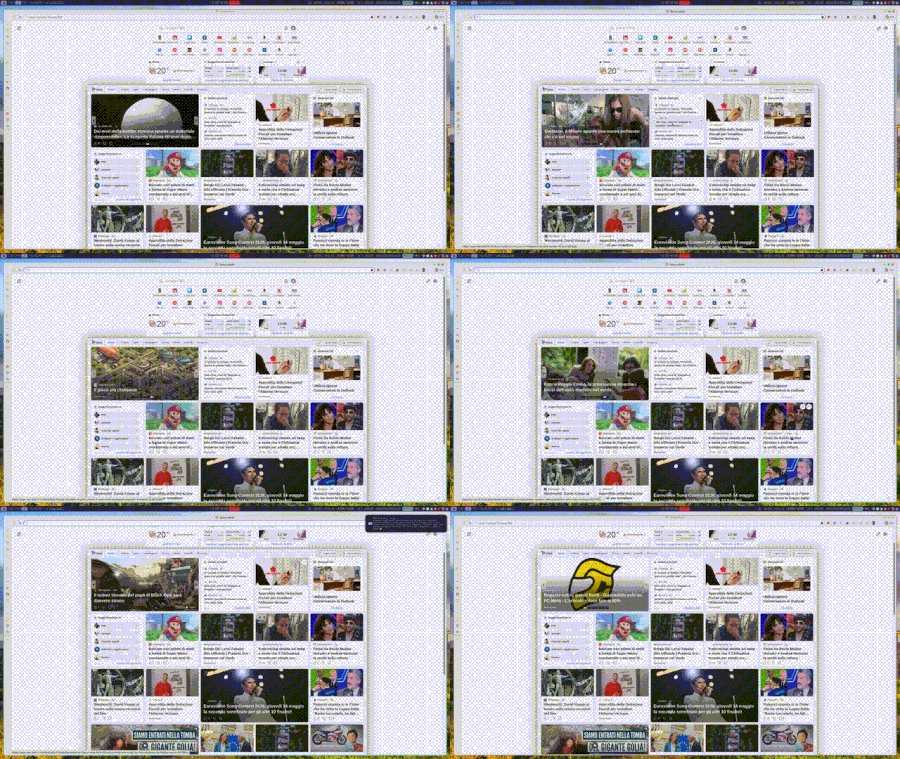
When I browse, in this example within the MSN page, and I hover over any link, I get that very ugly effect, as if the sidebar opens and closes. At times it can give you a headache because it never stops. Has anyone encountered the same problem?37Views0likes0Comments
Add Secure DNS (DNS-over-HTTPS) Support to Edge Mobile
Hello Edge Team, I’ve noticed that while Edge desktop already supports Secure DNS (DNS-over-HTTPS), the mobile version currently lacks this option. Competing browsers like Chrome and Brave allow users to configure Secure DNS directly on mobile, which provides: Improved privacy by preventing ISP-level DNS snooping Consistency across platforms so Edge users enjoy the same protections on desktop and mobile User choice to select trusted DNS providers (Cloudflare, Google, Quad9, etc) Adding Secure DNS support in Edge mobile would strengthen Edge’s privacy posture and align it with modern browser standards. Could the team consider prioritizing this feature in upcoming Insider builds? I believe many users would welcome the option to configure Secure DNS directly within Edge mobile settings. Thank you for your continued work on making Edge a competitive and privacy‑friendly browser.40Views0likes0CommentsPropuesta para mejora de Microsoft Edge
Propuesta de mejora para Microsoft Edge: Configuración de carpeta predeterminada por sitio web Asunto: Solicitud de función: Carpeta predeterminada por sitio para cargas y descargas de archivos en Microsoft Edge Estimado equipo de Microsoft Edge: Quisiera proponer una mejora que sería de gran utilidad para profesionales que trabajamos con múltiples plataformas web que requieren la carga y descarga constante de documentos. Actualmente, Edge permite controlar permisos de acceso a archivos por sitio, pero no ofrece la posibilidad de asignar una carpeta predeterminada específica para cada página o dominio. Esta función sería especialmente valiosa en entornos legales, administrativos y gubernamentales, donde distintos portales requieren manejar documentos en rutas separadas para mantener orden, trazabilidad y eficiencia. Beneficios de la función solicitada Reducir tiempos de navegación al seleccionar carpetas en cada carga de archivo. Evitar errores al subir documentos desde carpetas equivocadas. Facilitar flujos de trabajo donde cada plataforma requiere carpetas distintas (por ejemplo: "Acceso" y "Firma"). Mejorar la productividad en sectores que dependen de múltiples portales judiciales, administrativos o corporativos. Propuesta técnica Agregar en la configuración de permisos por sitio una opción como: "Asignar carpeta predeterminada para cargas/descargas en este sitio" Esto permitiría que Edge recuerde automáticamente la carpeta seleccionada cada vez que el sitio solicite subir o guardar un archivo. Estoy seguro de que esta mejora beneficiaría a miles de usuarios que trabajamos diariamente con plataformas que requieren manejo intensivo de documentos. Agradezco su atención y quedo a disposición para aportar más detalles si son necesarios. Atentamente, Víctor Hugo Escobedo Barajas No soy programador, soy abogado y este modificación directo desde configuración por sitio ayudaría bastante a reducir el tiempo de revisión de mis actividades diarias.34Views0likes0CommentsNext Update for Edge not compatible with my mac
Hi, so I'm so sorry if this isn't the right place or if I'm doing this wrong, but I'm kind of freaking out. So I use Edge on an older mac that cannot be updated as mac no longer supports updates for it. I was previously using Edge Dev and after an update got a message saying that the next update won't be compatible with my mac and I tried not to update but at some point Edge Dev restarted and thus updated and then it wouldn't open on my mac, so I switched back to regular Edge. After the last update on regular Edge, I got the same pop up saying that the next update won't be compatible with my mac and now I'm terrified that when that update comes out at some point Edge will restart and update and then I will lose my ability to use Edge. I love Edge as a browser and have so much stored in it. I have exported my passwords just in case, but am still super scared that I'll lose all the work I've put into Edge and that I'll just lose Edge as it's such a superior browser that I've come to rely on. Does anyone have any suggestions on what I should do? I can't afford to get a new computer right now and as I mentioned my Mac doesn't support updates. Any help would be unbelievably appreciated. Thanks in advance.78Views0likes0Comments
Extensions
I haven't really been paying attention to what does or does not work in Edge Dev and Canary recently. But today I had issues again with Canary. I completely cleaned out all the stored data and reinstalled it. I noticed that all the extensions disappeared. I went looking for them to replace the few I actually used and got a message telling me that they are no longer available for this version of Edge. I get the same message on Dev. But production Edge allows them to be turned on and added to. Has anyone else run into this or am I missing something in the setting that change and I have totally overlooked.75Views0likes0CommentsEdgeUpdater Popup on Intune Managed Macs
A new popup occurs routinely throughout the day since last week, approximately May 6th. "EdgeUpdater" would like to access data from other apps. MacOS Tahoe26.4.1 & Edge 148.0.3967.54 It doesn't matter if I **allow** or **don't allow**, it keeps popping back up. Anyone else having this problem or know how to make it go away? I have checked with others, it doesn’t happen on non-managed Macs. Only seems to be those with Intune.1.4KViews4likes9Comments




Events
Recent Blogs
- 8 MIN READMicrosoft Edge for Business, the new, dedicated work experience for the Microsoft Edge browser, is now available in Microsoft Edge stable version 116. All customers who sign into Edge using Microsoft...Aug 04, 2023302KViews2likes73Comments
- Microsoft Edge for Business, the new, dedicated work experience for Microsoft Edge, is in preview today! Microsoft Edge for Business is planned to be the standard browser experience for organi...Jul 11, 202310KViews3likes2Comments