Recent Discussions

Built-in Appx Apps authentication and FSLogix
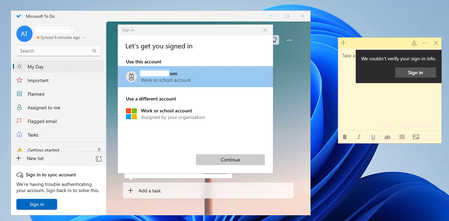
Hi, What is the state of play with Built-in Appx applications and FSLogix? We have a customer who we migrated to Windows 11 Multi-Session, EntraID only, Intune and Cloud Kerberos for FSLogix profiles. They have a strange issue that they use some of the built-in Appx applications, The Microsoft To Do app and Sticky Notes. When they open the app for the first time it logs in straight away, no issues. They close it and load it, all fine. Come to log off the session host and log back on, load the appx app, it struggles to auto sign in, both apps have the same issue, you can click a few times and it logs in, but does this every time. If we disable FSLogix, and use local profiles, it works. If we enable Roam Identity, it works (We have disabled this as I know we cannot use it) I have built a brand new session host, Removed all Intune polices apart from setting FSlogix settings, same issue, Latest FSLogix, Taken away ODFC and reset profile, same issue. Are Built-in Appx supposed to work. Just seems to be really bad at this stage if they don't, Latest FSLogix, set InstallAppxPackages to 1, (default anyway) Am I missing anything, is this supposed to work now? I would have thought this would be fine? If anyone is able to provide any assistance would be greatly appeciated. Thanks.18Views0likes1Comment
Restoring a user to Azure API Management instance who had registered using Azure B2C
I am trying to restore a Azure API Management user account that I had backed up and has identity.provider and intentity.id backed up. When I restore this user using the ARM endpoint using URI similar to one below, the user gets restored but has both "AadB2c" and "Basic" as the auth type:- "https://management.azure.com/subscriptions/${subscriptionId}/resourceGroups/${resourceGroup}/providers/Microsoft.ApiManagement/service/${apimName}/users/${userId}?api-version=2024-05-01" Why is Basic being added as the value because the backup had "AadB2c" as the Auth Type? And is there a way to avoid that and only have "AadB2C" as the Auth type.15Views0likes1CommentWhich Azure certification are you currently preparing for, or planning to take next?
I recently started exploring Microsoft Azure training and certifications, and I can clearly see how valuable they are for building cloud skills and growing a career in technology. Azure certifications help professionals learn real-world cloud concepts, improve technical knowledge, and stay updated with technologies like AI, Security, DevOps, and Data Engineering. Some of the most popular certifications are: AZ-900 – Azure Fundamentals AZ-104 – Azure Administrator AZ-204 – Azure Developer AZ-500 – Azure Security Engineer Microsoft Learn also provides free learning paths and hands-on content, which makes it easier for beginners and experienced professionals to learn at their own pace.21Views1like0CommentsAzure Managed Identity randomly returns 403 and then self-recovers
Our production apps intermittently lose Key Vault access via Managed Identity for a few minutes, then recover automatically without any config, RBAC, or deployment changes. Everything appears healthy from Azure’s side, which makes root cause analysis extremely difficult. Has anyone else seen this behavior?28Views0likes1Comment
Is there no way to get better support for Azure - esp for SEV A tickets
We have had a sev A ticket open for over 5 days, and are incurring thousands in losses every day, and despite assurances from the Azure Support that it is being solved in hours and then having confirmations that it is solved, the issue is still not solved. I have asked numerous times to get our teams in touch with actual microsoft employees, not front end contractors, who is more like level 1 support, and just running messages between customer and back end team, and really are powerless to handle any suport issues themselves, and they are on complete mercy of "other teams" yet as a customer, apparantly we cant even get on a call with these other teams, and the poor front end contractors are getting the brunt of our pain. Absolutely are in the dark, as to what is actually happening in the back end, other than "trust me bro" we are working on it. No eta, no explanation.. hard to fathom how this can go on like this113Views1like4Comments
We never really knew if our Azure followed CAF or Well-Architected — so we built something
For years we ran Azure environments professionally and CAF and WAF reviews were always the same story. A consultant every 12-18 months, a thick PDF, good intentions — and then nothing until the next one. The problem wasn't that we didn't care. It was that there was no lightweight way to track it continuously. Defender had some parts of CIS. WAF had the assessment tool. CAF had... a whitepaper and a spreadsheet we kept meaning to update. We couldn't answer basic questions like: are we getting better or worse? Which subscriptions are drifting? What would an auditor actually see if they looked at our CAF posture today? Eventually we got frustrated enough to build Anubion — it connects agentlessly to your Azure tenant and runs continuous checks across CIS, CAF, and WAF in one place, with findings prioritised and evidence stored over time. Happy to share more if anyone's interested. But also genuinely curious — how are other teams handling CAF and WAF tracking between formal assessments? If anyone is curious about their scores, you can sign up for at 14 day free trial. The setup is short and you only need a read-only service principal. Check out https://anubion.io/#request-access58Views0likes2Comments
Remote debug options for Linux container on App Services
We run .Net hosted on Linux Docker containers running in App Service. This makes debugging very difficult as while there is an option for remote debugging, this is only for Windows containers. https://learn.microsoft.com/en-us/visualstudio/debugger/remote-debugging-azure-app-service?view=visualstudio The only option I can find for Linux is the one detailed in the link below from 2018 which involves running an SSH server in the Docker container and using an extension which doesn't seem to have a stable version. az extension add --name webapp az : WARNING: No stable version of 'webapp' to install. Preview versions allowed. https://azure.github.io/AppService/2018/05/07/New-SSH-Experience-and-Remote-Debugging-for-Linux-Web-Apps.html Are there any currently supported options for remote debugging in Linux containers? Are there any plans to introduce the remote debug feature for Linux App Services?70Views0likes2Comments
Ingesting Logs through Azure Private Link
Hi, We are currently using Azure Private Link within our environment and we are attempting to ingest logs into Log Analytics. When I reached out to Microsoft Support, it appears that the CCF connectors will not work using Private Link and the Azure Functions connectors are becoming depricated. Has anyone else run into this issue and what is the solution for getting logs into Sentinel through the Private Link, specifically API log sources? Did this require a custom app for each of these log sources or some sort of custom script that lives on an AMA host within the Private Link to ingest the logs? Any advice here would be greatly appeciated. Thank you,97Views0likes2CommentsCan you backup API Management Instance without including the product subscription keys
I am following this KB to backup and restore APIM instance:- https://learn.microsoft.com/en-us/azure/api-management/api-management-howto-disaster-recovery-backup-restore?tabs=powershell But it includes the product subscription keys which can be a security concern. Can you backup API Management Instance without including the product subscription keys?62Views0likes1CommentInstalling and configuring Windows App on Thin Client environments
I am seeking technical guidance on accessing the new Windows App from Thin Client environments, following the end of support for the Microsoft Remote Desktop client (27 March 2026). Current Environment End-user devices: Thin Clients used by customers Thin Client OS types in use: Windows 10 IoT Enterprise, and/or Thin Clients running custom NComputing firmware Backend environment: Windows Server–based environment hosting a line-of-business application (accessed via RDP / RDS) Current Access Method Users currently connect using the Microsoft Remote Desktop (RDP) client, accessing either: A full desktop session, or Published RemoteApps via RDS This setup is functioning today but is impacted due to Remote Desktop app end of support. Issue / Challenge Microsoft is recommending migration from Remote Desktop app to the Windows App. However, during evaluation, we are facing blocking limitations on Thin Client devices, specifically: Windows App is not supported / cannot be installed on: Windows 10 IoT–based thin clients, and Thin clients running custom NComputing firmware These devices have: Limited hardware resources Restricted OS / firmware‑level constraints No support for installing modern Store / Windows App packages As a result, users cannot access the environment using Windows App, creating a risk of service disruption. What We Need : We request Microsoft’s official technical and product guidance on the following: Confirmation Is the Windows App officially supported on: Windows 10 IoT Enterprise? NComputing or other firmware‑based thin clients? Alternative Supported Options Are there supported alternatives for thin clients after Remote Desktop app end of support: Web-based access? Legacy RDP components still supported for Windows Server? Specific RDS client versions approved for IoT devices? Best‑Practice Architecture Recommended Microsoft‑supported architecture for: Thin client environments RDS / RemoteApp access Scenarios where Windows App installation is not possible Risk & Compliance Clarification Guidance on continued use of RDP clients in end-of-support but still operational mode, and Associated security or compliance implications, if temporary continuation is required. This information is critical to ensure business continuity for customers who cannot upgrade thin client hardware or firmware immediately.124Views0likes2CommentsFrom AWS to Azure: Practical Lessons and Best Practices from Real-World Migrations
Cloud-to-cloud migrations—especially from AWS to Azure—are often seen as straightforward “lift-and-shift” exercises. In reality, they involve careful planning across architecture, networking, identity, and deployment practices to ensure stability, scalability, and long-term maintainability. Based on my experience working on large-scale migration programs, here are some key best practices that can significantly improve the success of AWS-to-Azure transitions. 1. Start with Architecture, Not Migration One of the most common pitfalls is jumping directly into migration without defining the target architecture. Before moving workloads: Define landing zones and environment structure (Dev/UAT/Prod) Align networking, identity, and security models Map AWS services to Azure equivalents (e.g., EC2 → VM/VMSS, ALB → Application Gateway 2. Prioritize Infrastructure as Code (IaC) Manual changes during migration create long-term drift and instability. Best practices: Use IaC (Terraform/Bicep) for all infrastructure provisioning Capture any portal-level fixes back into code Maintain version-controlled deployments 3. Plan Capacity and Quotas Early Capacity-related issues are often discovered too late during migration. From experience: Validate VM sizes and availability in target regions Plan capacity reservations if needed Align quotas with expected workload scale 4. Design Networking and Private Access Upfront Networking is one of the most critical components in migration. Key considerations: Use private endpoints for PaaS services Design subnet segmentation and NSGs carefully Ensure DNS resolution works across environments. 5. Standardize Monitoring and Observability Migration is not complete until the system is observable. Enable diagnostics and logs across all resources Integrate with Log Analytics / monitoring tools Define alerts for critical failures 6. Manage Security and Access with RBAC Use Azure AD-based authentication Assign least-privilege roles Store secrets in Key Vault 7. Expect Iterations — Not One-Time Deployment Real-world migrations are iterative: Initial deployment Fixes and adjustments Re-deployments Stabilization 8. Strengthen Cross-Team Alignment Large migrations involve multiple teams: Infrastructure Application Database Platform From experience: Early alignment reduces rework Clear ownership improves execution Structured communication avoids last-minute confusion 9. Capture Learnings and Standardize Every migration teaches something: Capacity gaps Deployment challenges Configuration improvements Document: lessons learned reusable templates standard deployment patterns 10. Leverage Automation and AI for Efficiency As migrations scale, automation becomes critical. Use scripts and pipelines to reduce manual effort Automate repetitive validation steps Explore AI-driven approaches for log analysis and troubleshooting AWS to Azure migration is not just a technical shift—it’s an opportunity to modernize, standardize, and optimize your cloud platform. The key is to: design before deploying automate everything possible plan for scale and security and continuously improve based on real-world learnings124Views0likes0CommentsCloud-Native vs. Hybrid for the 2026 Workplace
When to choose Cloud-Native vs. Hybrid for the 2026 Workplace? Hi everyone, I am starting a discussion on the foundational phase of one project. As a Computer Engineer, I believe the most critical decision we face in 2026 is determining exactly when to step to a Full Cloud model versus maintaining a Hybrid Infrastructure. In my view, the decision is not about cost, it is about resiliency, high availability and more avalability. I would like to exchange views with other engineers on these area: latency, edge requirements, integration and aglility. In your experience, what are the Tipps that makes you choose one over the other for a 2026 environment? I'm looking for technical architectural insights, not sales approaches.89Views0likes2Comments
Patterns for low-code Azure config state snapshot + recovery solution for resource groups
I’m looking for patterns that capture resource configuration changes over time and support best-effort recovery (redeployment) of resource config state. I understand that authoritative IaC (Bicep) would be the most mature option, however, I am wondering if anyone has ever implemented a solution similar to what I have described above. Ideally this would be a low-code, Azure native solution.55Views0likes1CommentUsing Github Copilot from Azure Subscription
Hello, I have a question on how GitHub Copilot can be accessed and managed through an Azure subscription. If I am getting a Github Copilot license, how is my azure subscription getting linked to the billing and licensing? Specifically, I would like clarification on how the Azure subscription is linked to GitHub Copilot billing and licensing.202Views0likes2CommentsAzure Artifact Signing: SignTool "Access is denied" with active Public Trust profile
I’m blocked on Azure Artifact Signing for Windows EXE signing. What is already confirmed: - Account endpoint: https://wus2.codesigning.azure.net/ - Code signing account: notarios - Certificate profile: notarios-public-trust (Public Trust, Active) - Identity validation: Completed - User object id: 9aa27294-c04d-4aab-a7b2-3a8b10be96f9 - RBAC includes: - Artifact Signing Identity Verifier - Artifact Signing Certificate Profile Signer (also assigned at certificate profile scope) Signing command (signtool 10.0.26100.0 x64 + dlib): ... sign /v /debug /fd SHA256 /tr http://timestamp.acs.microsoft.com /td SHA256 /dlib "<...>\\Azure.CodeSigning.Dlib.dll" /dmdf "C:\temp\metadata-corr.json" "C:\temp\notarial-app-test.exe" Error every time: - SignTool Error: Access is denied. - Number of files successfully Signed: 0 I also tested Azure CLI auth and explicit AccessToken in metadata; same result. CorrelationId for troubleshooting: - notarios-20260425-1859 If anyone from Microsoft can check backend logs for that CorrelationId, I’d appreciate the exact reason and remediation.79Views0likes4CommentsProblems with FSLogix 3.26 - W11 MU - 10 users per Vm
Scenario Overview We are documenting a recurring intermittent Denial of Service (DoS) regarding user profiles in an AVD multi-session environment using Azure Files Premium (SMB). The issue consistently surfaces after updating to the FSLogix 3.26 branch (v3.26.126.19110). Root Cause Analysis (Failure Logs) Through deep log analysis, we identified a "driver poisoning" pattern unique to version 3.26: SMB/Kerberos Handshake Sensitivity: Under varying storage response times (latency spikes of ~350ms vs. the usual ~40ms), version 3.26 triggers an intermittent 1326 error (Logon failure: unknown user name or bad password). Driver Execution Flow Corruption: Unlike previous versions, after this initial network/authentication glitch, the 3.26 driver fails to release execution threads or volume handles properly. Catastrophic Failure (Error 267): The system attempts to access the SecuredProfileRegData path within the mounted VHDX, but the driver returns Event ID 26: "0x10b - The directory name is invalid". Unrecoverable "Zombie" State: Once Error 267 occurs, the VM becomes "poisoned." It blocks all subsequent login attempts and even prevents a clean uninstallation of the agent (MSI Error 0x80070643 due to files being "in use"), necessitating a full VM reboot or redeployment. Has anyone else been through this? My first step was to go back to Agent Version 2506 (2210 Hotfix 4) Evidence of Success with Version 2506 (2210 Hotfix 4) After performing a clean deployment and reverting to version 3.25.626.21064, metrics from April 24, 2026, show absolute stability on the same infrastructure: Consistent Logon Times: Average profile load time of 1.6 seconds across multiple concurrent users Storage Efficiency: FindFile response times remained stable between 39ms and 45ms, with the agent successfully retrying any momentary delays. Error Resilience: Unlike v3.26, if this version encounters an authentication glitch (e.g., on a local service account), it bypasses the error and remains functional, allowing domain users to log in without collateral blockages. Concurrency Support: Seamlessly managed over 20 simultaneously mounted volumes without pointer collisions or kernel hangs.160Views0likes1CommentAzure ExpressRoute - Cisco Meraki MX or directly into LAN?
We are in the process of deploying Azure ExpressRoute across multiple sites via a provider Layer 2 VPLS circuit and are evaluating our CPE options. Our provider is delivering a Layer 2 handoff to each site, meaning we are responsible for all Layer 3 BGP configuration on the customer edge. We currently run a full Cisco Meraki environment — Meraki MX appliances as our edge firewalls and Meraki MS switches on the LAN side — and are wondering if anyone has successfully terminated an ExpressRoute BGP session directly on a Meraki MX, or alternatively terminated it directly into the LAN without a dedicated edge router in between. Terminating ExpressRoute BGP directly on a Meraki MX appliance — is this even possible given Meraki's limited BGP support? Connecting the Layer 2 provider handoff (dot1Q or QinQ) directly into a Meraki MS LAN switch and routing from there — has anyone made this work, and what were the caveats? Running a dedicated CPE router in front of the Meraki MX — and if so, how did you handle the integration between the CPE router and the Meraki SD-WAN fabric, particularly around route advertisement and traffic steering? Our provider model uses QinQ VLAN tagging with a provider-assigned S-tag and customer-defined C-tags for private and Microsoft peering. Since the provider is only delivering Layer 2, all BGP session establishment, prefix advertisement, and routing policy must be handled entirely on our CPE. Our understanding is that Meraki MX does not support QinQ subinterfaces or the level of BGP policy control needed for ExpressRoute, but we wanted to see if anyone has found a creative workaround before we commit to dedicated CPE hardware at each site. Device recommendations welcome: If a dedicated CPE router is the only viable path, we'd also love to hear what devices others have used successfully for this use case. Our circuit is 1Gbps, so we need something that can handle that throughput comfortably with BGP active — but we're a mid-size enterprise and are looking for cost-effective options rather than carrier-grade platforms. What has worked well for you without breaking the budget? Any real-world experience, gotchas, or recommended architectures would be greatly appreciated, especially from anyone running a Meraki-only environment who has tackled this!66Views0likes1CommentDynamic hostpool scaling not working
We have set up an AVD dynamic host pool for testing. The scaling plan properly ensures that a host is created when needed. However, the host is no longer removed even after the rampdown. We observe that the total sessions counter gets stuck. If I log in with a user and then log out properly, the current sessions in the host pool overview are updated quickly. But, if I then go to Manage, Session Hosts, the total sessions on that host remain at 1. Only when I put the host in drain mode are the actual sessions updated. Still hosts are not removed. Anyone seen this before?73Views0likes1CommentDynamic hostpool sessions not updating
We have created a dynamic host pool in a test environment. We see that new hosts are being created based on the scaling plan. However, these are no longer being deleted. When we look at the status, we see that there are no active sessions, but when we zoom in on the session hosts, it shows that there is a session on two of the three hosts. The latter is incorrect, but it is likely the reason why scaling down is not taking place. Does anyone recognize this? Is there possibly a solution for this? Small addition: If I log in with a user and then log out properly, the current sessions in the host pool overview are updated quickly. However, if I then go to Manage, Session Hosts, the total sessions on that host remain at 1. When I now put the host in drinamode, only then are the actual sessions updated.82Views0likes1CommentAzure RBAC Custom Role Best Practices or Common Build Patterns
As a platform admin, I want to grant application admins Contributor access while removing their ability to write or delete most Microsoft.Network resource types, with a few exceptions such as Private Endpoints, Network Interfaces, and Application Gateways. Based on the effective control plane permissions logic, we designed two custom roles. The first role is a duplicate of the Contributor role, but with Microsoft.Network//Write and Microsoft.Network//Delete added to notActions. The second role adds back specific Microsoft.Network operations using wildcarded resource types, such as Microsoft.Network/networkInterfaces/*. Application Admin Effective Permissions = Role 1 (Contributor - Microsoft.Network) + Role 2 (for example, Microsoft.Network/networkInterfaces/, Microsoft.Network/networkSecurityGroups/, Microsoft.Network/applicationGateways/write, etc.) I understand that Microsoft RBAC best practices recommend avoiding wildcard (*) operations. However, my team has found that building roles with individual operations is extremely tedious and time-consuming, especially when trying to understand the impact of each operation. Does anyone have suggestions for a simpler or more maintainable pattern for implementing this type of custom RBAC design?169Views1like2Comments


Events
Tune in for updates, insights, and live Q&A to help you buy from the Microsoft Marketplace. Follow this page for updates on the topics that will be covered during this month's session. Note: Offic...
Wednesday, Jun 24, 2026, 09:30 AM PDTOnline
0likes
7Attendees
0Comments
Recent Blogs
- Azure Monitor Health Model is a modern observability capability that brings together telemetry, architecture, and business context of your workloads to generate health insights. It continuously aggre...Jun 04, 20266Views0likes0Comments
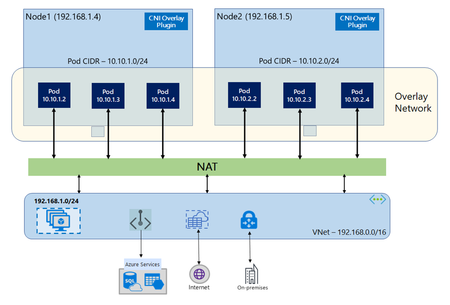
- In networking with Azure CNI Overlay, the cluster-wide pod CIDR is logically partitioned into smaller “node” blocks where each node is assigned a fixed CIDR slice (/24) by Azure. This decouples ...Jun 04, 202636Views0likes0Comments