Recent Discussions
Dynamic hostpool sessions not updating
We have created a dynamic host pool in a test environment. We see that new hosts are being created based on the scaling plan. However, these are no longer being deleted. When we look at the status, we see that there are no active sessions, but when we zoom in on the session hosts, it shows that there is a session on two of the three hosts. The latter is incorrect, but it is likely the reason why scaling down is not taking place. Does anyone recognize this? Is there possibly a solution for this? Small addition: If I log in with a user and then log out properly, the current sessions in the host pool overview are updated quickly. However, if I then go to Manage, Session Hosts, the total sessions on that host remain at 1. When I now put the host in drinamode, only then are the actual sessions updated.4Views0likes0Comments
Azure RBAC Custom Role Best Practices or Common Build Patterns
As a platform admin, I want to grant application admins Contributor access while removing their ability to write or delete most Microsoft.Network resource types, with a few exceptions such as Private Endpoints, Network Interfaces, and Application Gateways. Based on the effective control plane permissions logic, we designed two custom roles. The first role is a duplicate of the Contributor role, but with Microsoft.Network//Write and Microsoft.Network//Delete added to notActions. The second role adds back specific Microsoft.Network operations using wildcarded resource types, such as Microsoft.Network/networkInterfaces/*. Application Admin Effective Permissions = Role 1 (Contributor - Microsoft.Network) + Role 2 (for example, Microsoft.Network/networkInterfaces/, Microsoft.Network/networkSecurityGroups/, Microsoft.Network/applicationGateways/write, etc.) I understand that Microsoft RBAC best practices recommend avoiding wildcard (*) operations. However, my team has found that building roles with individual operations is extremely tedious and time-consuming, especially when trying to understand the impact of each operation. Does anyone have suggestions for a simpler or more maintainable pattern for implementing this type of custom RBAC design?46Views0likes1Comment
Sign in to Azure DevOps
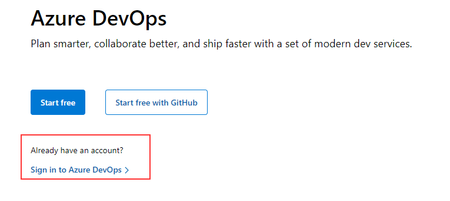
The https://dev.azure.com URL redirects to the landing page for the Azure DevOps product. I used to promote this as an URL to use to login to the product. Since this year the page is missing the "Already have an account? Sing in to Azure DevOps" link. As far as I can see there is no way to login to Azure DevOps trough this interface now. There is the usual "sing in" in the top right, which will redirect you to the azure portal (or at least for me it does). How are we supposed to login to Azure DevOps? Old login:Solved453KViews5likes12CommentsAzure Diagnostic data cannot be processed by Azure Stream Analytics due to InputDeserializerError
Planning to steam Azure resource(frontdoor) diagnostic logs to stream to Azure Stream Analytics. However, having troubles on this one as data specifically from AzureDiagnostics failed to get deserialized as input for Stream Analytics job. Error: Error while deserializing input message Id: Partition: [0], Offset: [3663944], SequenceNumber: [285]. Hit following error: Column name: ErrorInfo is already being used. Please ensure that column names are unique (case insensitive) and do not differ only by whitespaces. It's caused by a duplicating column, errorInfo and ErrorInfo on AzureDiagnostic Table, which I am unsure what distinguishes them apart when observing its values. Have any thoughts or solution in mind on how we could simplify or transform these Diagnostic log to possibly remove this duplicating column prior to getting ingested to the Stream Analytics job? Have initially thought of the following solutions, but they aren't so straight-forward and probably costs more and would like to hear other's thoughts as well. 1. Transformation using DCR. I beleive this is ideal for sending Diagnostic Logs to Log Analytics workspace. but this would mean diagnostic logs have to pass through the workspace and then get exported to Stream Analytics which to achieve, may require to add in more components in between the data pipeline. 2. Logic App. Saw somewhere where a scheduled Logic App(probably run by schedule) is used to export data using a query (KQL) from Log analytics workspace then get sent to a storage. Has to modify the destination to an event hub instead perhaps. yet again, to many layers just to pass on the data to ASA. Any other solution you can suggest to refining the incoming data to ASA while minimizing the utilization of compute resources?758Views0likes1Comment
Excluding break-glass account from MFA Registration Campaign – impact on existing users?
Hi everyone, I'm currently reviewing the configuration of a break-glass (emergency access) account in Microsoft Entra ID and I have a question regarding MFA registration enforcement. We currently have an Authentication Methods Registration Campaign enabled for all users for quite some time. We identified that the break-glass account is being required to register MFA due to this configuration. The account is already excluded from all Conditional Access policies that enforce MFA, so the behavior appears to be specifically coming from the registration campaign (Microsoft Authenticator requirement). Our goal is to exclude this break-glass account from the MFA registration requirement, following Microsoft best practices. My question is: If we edit the existing registration campaign and add an exclusion (user or group), could this have any impact on users who are already registered? Specifically, could it re-trigger the registration process or affect existing MFA configurations? We want to avoid any unintended impact, considering this campaign has been in place for a long time. Has anyone implemented a similar exclusion for break-glass accounts within an active registration campaign? Any insights or confirmation would be really helpful. Thanks in advance!Solved68Views0likes2Comments
AKS on AzureLocal: KMSv1 -> KMSv2
Hey, quick question on AKS Arc — we're running moc-kms-plugin:0.2.172-official on an Arc-enabled AKS cluster on Azure Local and currently have KMSv1=true as a feature gate to keep encryption at rest working. KMSv1 is deprecated in 1.28+ and we want to migrate to KMSv2 before it gets removed. Since moc-kms-plugin is a Microsoft-managed component we can't just swap it out ourselves. A few questions: Does version 0.2.172 already support the KMSv2 gRPC API, or is that coming in a later release? Is there a supported migration path for AKS Arc specifically, or does this come automatically through a platform update? Any docs or internal guidance you can point us to? Thanks!11Views0likes0Comments
'NO_ROUTE_FOUND' error when using truck or car as travelmode
Error when using https://atlas.microsoft.com/route/directions/json?&subscription-key=xxxxxxx&api-version=1.0&language=nl-BE&maxAlternatives=5&travelMode=truck&query=50.70012%2c3.26978:51.043181141774%2c4.0974215693209945 with mode 'bicycle' it works fine.706Views0likes1CommentLegacy SSRS reports after upgrading Azure DevOps Server 2020 to 2022 or 25H2
We are currently planning an upgrade from Azure DevOps Server 2020 to Azure DevOps Server 2022 or 25H2, and one of our biggest concerns is reporting. We understand that Microsoft’s recommended direction is to move to Power BI based on Analytics / OData. However, for on-prem environments with a large number of existing SSRS reports, rebuilding everything from scratch would require significant time and effort. Since Warehouse and Analysis Services are no longer available in newer versions, we would like to understand how other on-prem teams are handling legacy SSRS reporting during and after the upgrade. Have you rebuilt your reports in Power BI, moved to another reporting approach, or found a practical way to keep existing SSRS reports available during the transition? Any real-world experience, lessons learned, or recommended approaches would be greatly appreciated.28Views0likes0Comments
AVD Environment- FSLogix Profile Login Failure – Write Protected Error
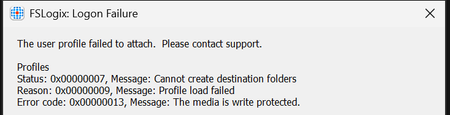
Hi, We are currently facing an issue with FSLogix user profiles in our environment and would appreciate your assistance in identifying and resolving the problem. Issue Description: Users are unable to log in successfully, and we are encountering the following error message: "No Create access → The media is write protected." Environment Details: Session Hosts: Microsoft Entra joined Users: Hybrid identities Profile Storage: Azure File Share Authentication Method: Identity-based access using Microsoft Entra Kerberos Configuration Details: We have assigned the FSLogix user group the role "Storage File Data SMB Share Contributor" on the Azure file share. Registry entry for Kerberose Ticket is also created. NTFS permissions have been configured via Azure Portal (Manage Access), granting Modify permissions to the FSLogix profile users on the file share folder. We can see that user profiles and corresponding VHDX files are being created successfully during login attempts. Problem Statement: Despite the successful creation of profiles and VHDX files, users are still unable to log in, and the error mentioned above persists. We would like your guidance on: Possible causes for the "write protected" error despite correct role and NTFS permissions. Any additional configurations or validations required for FSLogix with Entra Kerberos authentication. Recommended troubleshooting steps or logs we should review to isolate the issue. Please let us know if you need any additional logs, screenshots, or configuration details from our end. Looking forward to your support. Best regards, Ravi Yadav7Views0likes0Comments
Need to know about the pricing in transaction of azure map
I want to know answers of mine few queries regarding the billing which are mentioned below 1) When azure maps load then how much transaction it usually takes for loading ? 2) Also Each zoom in and Zoom out in Map takes the transaction ? If yes than how many transaction it takes in zoom in and Zoom out ? 3) Is number of features(like points, polygons using bubble layer or symbol layer) creating on Map, effect its cost ? 4) can we reduce the costing by cache the tiles or using any other caching technique ? Thanks & Regards Pankaj khemani1KViews0likes1Comment
Copy/Paste not working
Hi there i am using windows App on a MacBook Pro M3 and i am using Windows App to connect to a remote server, i have the clipboard settings on bidirectional but i am not able to copy and paste from local to remote as well as remote to local and it does not work at all, i am on Mac OS 15.0.1 (24A348) please look into this. Kind Regards,2.1KViews2likes4CommentsMaps country codes Northern Ireland
I am using the Maps API to get and verify addresses. As of January 1st, Northern Ireland will have a new country code; I could not find anything about this in the documentation, but does someone know if the Azure Maps API will use that country code for addresses from Northern Ireland directly? Thanks, Jeroen816Views0likes1CommentPrepare now for Remote Desktop client for Windows end of support
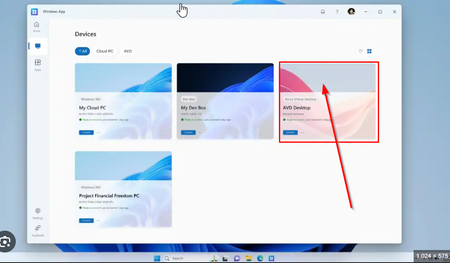
On March 27, 2026, the Remote Desktop client standalone installer (MSI) for Windows will reach end of support. Before that date, IT administrators may need to migrate their users to Windows App so they can continue connecting to their remote resources via Azure Virtual Desktop, Windows 365, and Microsoft Dev Box. Remote Desktop client will continue to receive security updates until end of support, after which it will no longer be available for download. To learn more about how to prepare for end of support on March 27, 2026, please read aka.ms/RemoteDesktopClient.2.3KViews0likes6Comments
Running Commands Across VM Scale Set Instances Without RDP/SSH Using Azure CLI Run Command
If you’ve ever managed an Azure Virtual Machine Scale Set (VMSS), you’ve likely run into this situation: You need to validate something across all nodes, such as: Checking a configuration value Retrieving logs Applying a registry change Confirming runtime settings Running a quick diagnostic command And then you realize: You’re not dealing with two or three machines you’re dealing with 40… 80… or even hundreds of instances. The Traditional Approach (and Its Limitations) Historically, administrators would: Open RDP connections to Windows nodes SSH into Linux nodes Execute commands manually on each instance While this may work for a small number of machines, in real‑world environments such as: Azure Batch (user‑managed pools) Azure Service Fabric (classic clusters) VMSS‑based application tiers This approach quickly becomes: Operationally inefficient Time‑consuming Sometimes impossible Especially when: RDP or SSH ports are blocked Network Security Groups restrict inbound connectivity Administrative credentials are unavailable Network configuration issues prevent guest access Azure Run Command To address this, Azure provides a built‑in capability to execute commands inside virtual machines through the Azure control plane, without requiring direct guest OS connectivity. This feature is called Run Command. You can review the official documentation here: Run scripts in a Linux VM in Azure using action Run Commands - Azure Virtual Machines | Microsoft Learn Run scripts in a Windows VM in Azure using action Run Commands - Azure Virtual Machines | Microsoft Learn Run Command uses the Azure VM Agent installed on the virtual machine to execute PowerShell or shell scripts directly inside the guest OS. Because execution happens via the Azure control plane, you can run commands even when: RDP or SSH ports are blocked NSGs restrict inbound access Administrative user configuration is broken In fact, Run Command is specifically designed to troubleshoot and remediate virtual machines that cannot be accessed through standard remote access methods. Prerequisites & Restrictions. Before using Run Command, ensure the following: VM Agent installed and in Ready state Outbound connectivity from the VM to Azure public IPs over TCP 443 to return execution results. If outbound connectivity is blocked, scripts may run successfully but no output will be returned to the caller. Additional limitations include: Output limited to the last 4,096 bytes One script execution at a time per VM Interactive scripts are not supported Maximum execution time of 90 minutes Full list of restrictions and limitations are available here: https://learn.microsoft.com/en-us/azure/virtual-machines/windows/run-command?tabs=portal%2Cpowershellremove#restrictions Required Permissions (RBAC) Executing Run Command requires appropriate Azure RBAC permissions. Action Permission List available Run Commands Microsoft.Compute/locations/runCommands/read Execute Run Command Microsoft.Compute/virtualMachines/runCommand/action The execution permission is included in: Virtual Machine Contributor role (or higher) Users without this permission will be unable to execute remote scripts through Run Command. Azure CLI: az vm vs az vmss When using Azure CLI, you’ll encounter two similar‑looking commands that behave very differently. az vm run-command invoke Used for standalone VMs Also used for Flexible VM Scale Sets Targets VMs by name az vmss run-command invoke Used only for Uniform VM Scale Sets Targets instances by numeric instanceId (0, 1, 2, …) Example: az vmss run-command invoke --instance-id <id> Unlike standalone VM execution, VMSS instances must be referenced using the parameter "--instance-id" to identify which scale set instance will run the script. Important: Uniform vs Flexible VM Scale Sets This distinction is critical when automating Run Command execution. Uniform VM Scale Sets Instances are managed as identical replicas Each instance has a numeric instanceId Supported by az vmss run-command invoke Flexible VM Scale Sets Each instance is a first‑class Azure VM resource Instance identifiers are VM names, not numbers az vmss run-command invoke is not supported Must use az vm run-command invoke per VM To determine which orchestration mode your VMSS uses: az vmss show -g "${RG}" -n "${VMSS}" --query "orchestrationMode" -o tsv Windows vs Linux Targets Choose the appropriate command ID based on the guest OS: Windows VMs → RunPowerShellScript Linux VMs → RunShellScript Example Scenario - Retrieve Hostname From All VMSS Instances The following examples demonstrate how to retrieve the hostname from all VMSS instances using Azure CLI and Bash. Flexible VMSS, Bash (Azure CLI) RG="<ResourceGroup>" VMSS="<VMSSName>" SUBSCRIPTION_ID="<SubscriptionID>" az account set --subscription "${SUBSCRIPTION_ID}" VM_NAMES=$(az vmss list-instances \ -g "${RG}" \ -n "${VMSS}" \ --query "[].name" \ -o tsv) for VM in $VM_NAMES; do echo "Running on VM: $VM" az vm run-command invoke \ -g "${RG}" \ -n "$VM" \ --command-id RunShellScript \ --scripts "hostname" \ --query "value[0].message" \ -o tsv done Uniform VMSS, Bash (Azure CLI) RG="<ResourceGroup>" VMSS="<VMSSName>" SUBSCRIPTION_ID="<SubscriptionID>" az account set --subscription "${SUBSCRIPTION_ID}" INSTANCE_IDS=$(az vmss list-instances -g "${RG}" -n "${VMSS}" --query "[].instanceId" -o tsv) for ID in $INSTANCE_IDS; do echo "Running on instanceId: $ID" az vmss run-command invoke \ -g "${RG}" \ -n "${VMSS}" \ --instance-id "$ID" \ --command-id RunShellScript \ --scripts "hostname" \ --query "value[0].message" \ -o tsv done Summary Azure Run Command provides a scalable method to: Execute diagnostics Apply configuration changes Collect logs Validate runtime settings …across VMSS instances without requiring RDP or SSH connectivity. This significantly simplifies operational workflows in large‑scale compute environments such as: Azure Batch (user‑managed pools) Azure Service Fabric classic clusters VMSS‑based application tiers39Views0likes0CommentsHow to change background color of differnent countries in azure maps
I want to change the background color of Europe, America, and China with orange, blue, and red respectively. I have searched azure maps document and their demo example and I didn't find the answer. By default, all countries background color is in white color but I want to change it. Is it possible? If yes please help me. Thank You in Advance859Views1like1Comment[Architecture Pattern] Scaling Sync-over-Async Edge Gateways by Bypassing Service Bus Sessions
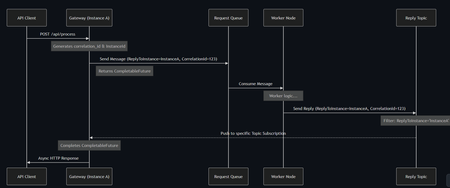
Hi everyone, I wanted to share an architectural pattern and an open-source implementation we recently built to solve a major scaling bottleneck at the edge: bridging legacy synchronous HTTP clients to long-running asynchronous AI workers. The Problem: Stateful Bottlenecks at the Edge When dealing with slow AI generation tasks (e.g., 45+ seconds), standard REST APIs will drop the connection resulting in 504 Gateway Timeouts. The standard integration pattern here is Sync-over-Async. The Gateway accepts the HTTP request, drops a message onto Azure Service Bus, waits for the worker to reply, and maps the reply back to the open HTTP connection. However, the default approach is to use Service Bus Sessions for request-reply correlation. At scale, this introduces severe limitations: 1. Stateful Gateways: The Gateway pod must request an exclusive lock on the session. It becomes tightly coupled to that specific request. 2. Horizontal Elasticity is Broken: If a reply arrives, it must go to the specific pod holding the lock. Other idle pods cannot assist. 3. Hard Limits: A traffic spike easily exhausts the namespace concurrent session limits (especially on the Standard tier). The Solution: Stateless Filtered Topics To achieve true horizontal scale, the API Gateway layer must be 100% stateless. We bypassed Sessions entirely by pushing the routing logic down to the broker using a Filtered Topic Pattern. How it works: 1. The Gateway injects a CorrelationId property (e.g., Instance-A-Req-1) into the outbound request. 2. Instead of locking a session, the Gateway spins up a lightweight, dynamic subscription on a shared Reply Topic with a SQL Filter: CorrelationId = 'Instance-A-Req-1'. 3. The AI worker processes the task and drops the reply onto the shared topic with the same property. 4. The Azure Service Bus broker evaluates the SQL filter and pushes the message directly to the correct Gateway pod. No session locks. No implicit instance affinity. Complete horizontal scalability. If a pod crashes, its temporary subscription simply drops—preventing locked poison messages. Open Source Implementation Implementing dynamic Service Bus Administration clients and receiver lifecycles is complex, so I abstracted this pattern into a Spring Boot starter for the community. It handles all the dynamic subscription and routing logic under the hood, allowing developers to execute highly scalable Sync-over-Async flows with a single line of code returning a CompletableFuture. GitHub Repository: https://github.com/ShivamSaluja/sentinel-servicebus-starter Full Technical Write-up: https://dev.to/shivamsaluja/sync-over-async-bypassing-azure-service-bus-session-limits-for-ai-workloads-269d I would love to hear from other architects in this hub. Have you run into similar session exhaustion limits when building Edge API Gateways? Have you adopted similar stateless broker-side routing, or do you rely on sticky sessions at your load balancers?35Views0likes0CommentsProyecto Escolar Tecnológico
Estamos haciendo un trabajo de investigación sobre las nuevas tecnologías aplicadas a la gestión empresarial ya que estamos desarrollando un proyecto de software para el sector de odontología y me gustaría preguntarle a los expertos: ¿Qué tecnologías se consideran "el estándar de oro" o esenciales para aplicar en 2026, y que ustedes ya han utilizado?.9Views0likes0CommentsIssue with KML display on Azure Maps
Hi, Our company is looking to utilise the Atlas Spatial IO Module as part of Azure Maps in order to allow users to upload their own KML/KMZ files and view them through our platform. However, we have a few issues which I was hoping that you could please assist with: 1. Certain KML/KMZ files which are generated from the Google Earth Desktop version are unable to be properly loaded by the Spatial IO Module. I've attached a copy of a KMZ (crash.kmz.zip - I had to rename it to .zip to upload the file) which exhibits this behavior. Attempting to load it onto the sample shown https://azuremapscodesamples.azurewebsites.net/Spatial%20IO%20Module/Drag%20and%20drop%20spatial%20files%20onto%20map.html results in an infinite loading sequence along with the following message being thrown in the console: DataCloneError: The object could not be cloned. We believe this is being caused by the empty <Icon> XML tags which are automatically generated by Google Earth. 2. We are also unable to properly load external icons which come from Google Earth despite adding in the correct CSP policies in our application. The default fallback icon is used instead. I've attached a copy of a KML file which is unable to load the icons; the same file in Leaflet correctly displays the icons used as shown in the images below. I also attached a copy of this KML file below (2007SanDiegoCountyFiresZipped.zip). In addition, logging the output of the read() function in the Spatial IO Module for the file has the icons property as empty. If you could please provide some assistance that would be much appreciated. Thanks!855Views0likes1Comment


Events

in 18 hours
Join our upcoming live webcast for a transparent discussion about this recent Azure service incident — led by our engineering teams.
Network degradation within East US AZ-02
Tracking ID: DG_Z-S08...
Thursday, Apr 23, 2026, 09:30 AM PDTOnline
0likes
2Attendees
0Comments
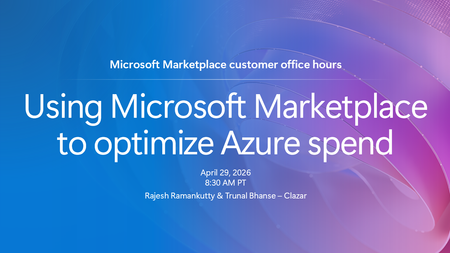
If your organization has an Azure cloud commitment, Microsoft Marketplace can be a powerful tool for optimizing how that spend is used. Tune in to explore how your organization can leverage its Azure...
Wednesday, Apr 29, 2026, 08:30 AM PDTOnline
1like
15Attendees
0Comments
Recent Blogs
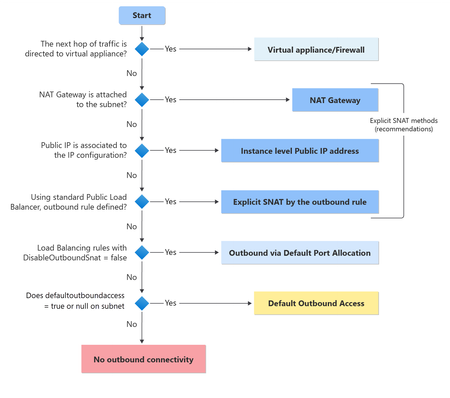
- 6 MIN READAzure is evolving to better support secure‑by‑default cloud architectures. Starting with API version 2025‑07‑01 (released after March 31, 2026), newly created virtual networks now default to u...Apr 22, 202653Views0likes0Comments
- Co-authors: Jie Su, Abhinav Dua, Mukthar Ahmed, Dhruv Joshi In a previous post, we shared how Azure Automated VM Recovery works to minimize virtual machine downtime through a three-stage approach: ...Apr 22, 2026106Views0likes0Comments