usage
923 Topics
Changing Microsoft 365 billing frequency from monthly to yearly unexpectedly increased the price
Hello everyone, I would like to raise an issue with Microsoft 365 Business Standard that I find very difficult to understand and even harder to explain to my customer. I manage two Microsoft 365 Business Standard licenses for a customer. The pricing history was as follows: Until May 2026: €23.40/month total for 2 users From June 2026: €21.66/month total for 2 users This means the annual cost at the latest monthly rate was €259.92/year On September 28, 2026, I changed only the billing frequency from monthly to yearly. During this process, I was not shown any clear warning that the actual subscription price would increase. After the change, Microsoft created a new annual subscription with: €145.56 per user/year €291.12/year for 2 users So simply changing from monthly billing to yearly billing increased the annual subscription price from the equivalent of €259.92 to €291.12. This is particularly confusing because the Microsoft website normally presents annual billing as the cheaper option. I contacted Microsoft Support today. According to the support agent: this behavior is the same worldwide the billing change cannot be reverted the agent cannot revert it it cannot be escalated to a supervisor who could revert it there is apparently no email address or written complaint channel where I can formally dispute the change What concerns me most is not only the price increase itself, but the fact that I was apparently moved to a higher price simply by changing the billing frequency, without a clear indication during the process that the subscription price itself would change. I now also have to explain to my customer why their Microsoft 365 costs suddenly increased, even though no additional licenses or services were requested. From my perspective, changing how often a subscription is billed should not silently result in a different commercial price without a very clear confirmation beforehand. Has anyone else experienced this? I would especially like to know: Is this expected Microsoft behavior? Why does changing the billing frequency trigger a new, higher price? Is there any official escalation or written complaint process for Microsoft 365 billing issues? Is there really no way to revert such a billing-frequency change shortly after it was made? I would appreciate clarification from Microsoft, because at the moment this leaves both the reseller/admin and the customer in a very poor position. Regards95Views0likes0Comments
Did MS disable access to SharePoint through File Explorer today?
Just prior to 1:00 PM Eastern today, my entire company lost the ability to access our SharePoint server through File Explorer - in unison. Our IT dept. claims that MS has been threatening to disable the feature for a while. But I'm not finding any alerts, questions, or discussions about it anywhere online; and we can't be the only ones who would have noticed if this is a Windows-wide change.245Views0likes1Comment
SharePoint file links are not working
Recently we have noticed that when you copy the link and share with others (even ourselves), the link fails to open. If we use the path link under details, that works 100% of the time. The only difference we see is there are more gibberish in the link path. Initially, we thought the PDF files were having issues but it can be any file type. Our thought is the issue is with the SharePoint site.384Views0likes2CommentsSites with long file path length
I have a big problem to solve with SharePoint online Teams sites where data was migrated from On-Prem file shares and there are more items with a long file path length than we are able to fix. In some directories, it has gotten better but employees didn't listen to us when we told them to start creating less nested folders, shorter file and folder name and to try and fix older directories. In the beginning around 2 years ago, we migrated everything and turned on OneDrive sync and found out quickly how that wasn't going to work for one department, so we then told them to work out of the browser which seemed to solve the problem. Well, not everyone kept working from only the browser and more and more people continued to get OneDrive sync issues. Now I have ran some reports to get the actual file path length for some of the sites. For the biggest site, I show the largest file path length at 397, and I figured 220 would give a good starting point to have OneDrive successfully sync without errors given that OneDrive and File Explorer will add extra characters in the path. Starting at 220 characters, there are more than 61,000 affected files with a path ranging from 220 - 397, and more than 107,000 starting at 200 characters. The first problem to solve is to get the department to stop naming files in this way and stop creating all the nested folders. They need to establish a better naming convention. The second problem to solve is fixing as many of these as possible, but with this many items to correct it seems impossible. Has anyone worked on a SP online site to programmatically fix something like this to reduce the path length? Even trying this with a script sounds impossible, but there has to be something that can be done to help? Right??364Views0likes1Comment
SPMT Needs True Mirror Mode and Resource Throttling
Subject: SPMT Needs True Mirror Mode and Resource Throttling SPMT incremental migration does not behave like a true synchronization or mirror operation. New and modified files are copied, but deleted, renamed, or moved files are not reconciled at the destination, often resulting in orphaned content and duplicates. Microsoft has previously confirmed this as expected behavior. Administrators have had reliable mirror-style functionality available since the circa 1990s through tools such as Robocopy. In comparison, SPMT's incremental migration capability feels incomplete for modern enterprise migration scenarios. Requested enhancements: Optional mirror mode similar to robocopy /MIR Delete destination content that no longer exists in the source Detect and process renames Detect and process moves Pre-migration analysis and dry-run reporting Configurable safeguards for deletions Additionally, SPMT appears to consume storage resources aggressively. During migrations, disk I/O activity can become saturated and disk idle time can fall close to zero regardless of migration batch size. This behavior can negatively impact file servers and production workloads. Requested performance controls: I/O throttling CPU throttling Concurrency controls Bandwidth limits Scheduling and business-hours policies Dynamic backoff based on source-server load Current behavior requires administrators to perform manual cleanup and reconciliation after incremental migrations while also managing significant infrastructure impact during migration runs. A modern migration tool should provide both synchronization intelligence and resource governance controls. Frankly, from an infrastructure perspective, your complaint about the I/O behavior is probably the stronger one. Many migration tools deliberately maximize throughput, but not providing an obvious way to cap I/O, threads, or overall system impact can be problematic in production environments. The lack of mirror semantics combined with aggressive scanning/copy behavior is what tends to frustrate admins the most.219Views0likes0Comments
Custom Formatter for Read-Only Fields conditional based on other columns
Hello! Does anyone know if it's possible with the fieldsettings, readonly formatting, to make it conditional based on a Person field? It's a multi people field if that makes a difference? I ideally want to make certain fields read only based on who is viewing it (without having to use a Power App customised form!). This is what I want (but I know the syntax is likely all wrong!) but not sure if it's possible to use an IF statement with boolean statements? { "sections": [ {} ], "fieldsettings": [ { "name": "Comments", "readonly": "=if([$People.email] == me, false, true)" } ] }812Views0likes2Comments
Recycle Bin and Site Content Hidden for Site Members and Site Visitors
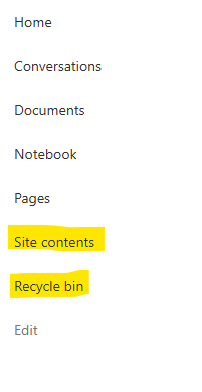
I posted this before but made a mistake with my write up, so I am reposting. I have a requirement that the Recycle bin and Site Contents should be be hidden from the Site Members and Site Visitors. Please how can I achieve this because the Server Infrastructure activation is not working for me. Any workarounds? Please help669Views0likes1CommentDynamic Mandatory Fields
In a SharePoint library, I have folders which are = a. Admin b. Events c. Furniture and Moves d. Janitorial and Maintenance e. Parking and Transportation f. Shipping and Receiving g. Supplies and Equipment h. Waste and Recycling I have Meta data across the library whose data type are all choices and are: a. Document Type = Contract, Financial, planning b. Building = Gym, Garage, Heating c. Asset Category = Office, Playground d. Fiscal Year = FY23, FY24, FY25, FY26, FY27 e. Vendor = Maple Leaf, Canadian Tire, Home Depot f. Status = Active, Pending, Not Active g. Retention Label = 3 years, 5 years h. Service Type = Admin, Events, Furniture and Moves, Janitorial and Maintenance, Parking and Transportation, Shipping and Receiving, Supplies and Equipment, Waste and Recycling Service Type and Retention Label are mandatory fields, with the Rule below for all the files in the various folders: IF Folder Name = Admin, then Service Type = Admin and Retention Label = 5 years; the mandatory fields should be Document Type, Status and Fiscal Year IF Folder Name = Events, then Service Type = Events and Retention Label = 3 years; the mandatory fields should be Document Type, Status and Fiscal Year, Building and Vendor IF Folder Name = Furniture and Moves, then Service Type = Furniture and Moves and Retention Label = 3 years; the mandatory fields should be Document Type, Status and Building IF Folder Name = Janitorial and Maintenance, then Service Type = Janitorial and Maintenance and Retention Label = 3 years; the mandatory fields should be Document Type, Status and Fiscal Year IF Folder Name = Parking and Transportation, then Service Type = Parking and Transportation and Retention Label = 3 years; the mandatory fields should be Document Type, Status and Fiscal Year IF Folder Name = Shipping and Receiving, then Service Type = Shipping and Receiving and Retention Label = 3 years; the mandatory fields should be Document Type, Status IF Folder Name = Supplies and Equipment, then Service Type = Supplies and Equipment and Retention Label = 3 years; the mandatory fields should be Document Type, Status and Fiscal Year IF Folder Name = Waste and Recycling, then Service Type = Waste and Recycling and Retention Label = 3 years; the mandatory fields should be Document Type, Status and Vendor I have used Column Default Value Settings for SharePoint to display Auto-Display the Service Type and Retention Label, but I cannot seem to perform the conditional mandatory fields using Validations setting for the other requirements. Please help612Views0likes1Comment