to do
54 Topics
Tasks sync failure - Outlook web vs mobile Outlook vs desktop Outlook
--- # 📄 **Technical Report: Persistent Outlook Web App Sync Failure Affecting Microsoft To Do / Outlook Tasks Ecosystem** **Issue Duration:** At least 3 months probably more **Platforms Affected:** - Microsoft To Do (Android) - Outlook Tasks (Windows Desktop Outlook) - Outlook Tasks (Outlook Web App) - Exchange Online (backend sync service) --- ## 1. **Executive Summary** I have experience **persistent, intermittent, and platform‑specific synchronization failures** within the Microsoft To Do / Outlook Tasks ecosystem. The critical finding is: ### **The Outlook Web App is often isolated and does not sync with any other platform.** Meanwhile: - **Windows Desktop Outlook ↔ Android To Do sync perfectly in both directions.** - **Outlook Web App ↔ (Desktop / Android)** do not sync. This isolates the issue to the **web app’s sync pipeline**, not the task data, not the account, and not the other apps. The failures present as: - **“Synchronization in progress”** stuck indefinitely - **“Synchronization failed”** when manually attempting sync - Web app showing **stale, outdated, or incomplete task lists** - Web app failing to send or receive updates from Exchange Online The same tasks that fail to sync for hours later sync successfully without any modification, proving the data is not corrupted and the failure is backend‑related. --- ## 1.1 **Cross‑Platform Sync Behavior (Critical Diagnostic Insight)** ### ✔ **Windows Desktop Outlook ↔ Android To Do** - Full two‑way sync - Immediate updates - Reliable and consistent ### ✖ **Outlook Web App ↔ Desktop Outlook** - No sync in either direction ### ✖ **Outlook Web App ↔ Android To Do** - No sync in either direction ### ✖ **Outlook Web App ↔ Exchange Online** - Appears to be failing or stalling This proves the web app is **not participating in the sync ecosystem**. --- ## 2. **Symptoms Observed** ### 2.1 **Outlook Web App** - Sync button stuck on **“Synchronization in progress”** for hours - Manual sync results in **“Synchronization failed”** - Web app shows outdated task lists - Web app does not receive updates from desktop or mobile - Web app does not send updates to desktop or mobile ### 2.2 **Android To Do** - Tasks created on Android do not appear in the web app - Tasks created in the web app do not appear on Android - Edits fail to propagate to the web app - Manual sync does not resolve the issue - Logout/login sometimes helps, inconsistently ### 2.3 **Windows Desktop Outlook** - Syncs perfectly with Android - Does not sync with the web app - Shows correct, up‑to‑date task data ### 2.4 **Platform Sync Matrix** | Action | Desktop Outlook | Android To Do | Outlook Web App | |--------|-----------------|---------------|------------------| | Create/edit task on **Desktop** | ✔ Syncs to Android | ✔ | ✖ No sync to Web | | Create/edit task on **Android** | ✔ Syncs to Desktop | ✔ | ✖ No sync to Web | | Create/edit task on **Web** | ✖ No sync to Desktop | ✖ | ✔ Stays only on Web | **Conclusion:** The Outlook Web App is **fully isolated** from Exchange Online’s task sync pipeline. --- ## 3. **Troubleshooting Steps Already Attempted** ### 3.1 **Web App** - Hard refresh (Ctrl + Shift + R) - Full browser cache clear - Logout → close browser → reopen → login - Switching lists to force metadata reload - Creating tasks to trigger sync events - Deleting tasks to force backend updates ### 3.2 **Android** - Manual sync - Clear cache - Logout/login - Device restart - Network switching - Creating/completing tasks to trigger sync ### 3.3 **Desktop Outlook** - Verified account health - Verified Exchange Online connectivity - Verified task folder integrity ### 3.4 **Account / Backend** - Verified Microsoft Account stability - Verified no multi‑account conflicts - Verified Exchange Online service health None of these steps produce consistent or lasting resolution. --- ## 4. **Frequency and Pattern** - Occurs multiple times per week - Occurs regardless of recent task edits - Occurs across multiple browsers - Occurs across multiple Android versions - Sync resumes randomly after hours - Sync resumes without any data changes - Sync resumes after logout/login, but inconsistently This pattern strongly suggests **backend sync token stalling**. --- ## 5. **Technical Analysis** ### 5.1 **Two‑Way Sync Failure Confined to Web App** Because: - Desktop ↔ Android works - Web ↔ (Desktop / Android) fails The failure is isolated to the **web app’s connection to Exchange Online**. ### 5.2 **Sync Token Stalling (Most Likely Cause)** Symptoms match known sync token stall behavior: - Endless “Synchronization in progress” - Manual sync fails - Sync resumes randomly - Sync resumes after forced metadata refresh - Sync resumes after unrelated actions (e.g., completing a task) ### 5.3 **Not a Corrupted Task Issue** Because the same tasks later sync successfully: - No malformed tasks - No unsupported metadata - No blocked sync queue - No corrupted lists ### 5.4 **Backend Sync Pipeline Instability** The pipeline: **Web App → Microsoft Sync Service → Exchange Online → Desktop / Android** appears to be failing at the **first hop** (web app → sync service). ### 5.5 **Web App Lacks Retry Logic** The web app provides: - No manual retry - No way to cancel a stuck sync - No way to reset sync session - No way to regenerate sync token Thus, when the backend stalls, the web app remains stuck indefinitely. ### 5.6 **Android Background Sync Not the Cause** Android is syncing perfectly with desktop Outlook, proving Android is not the source of the issue. ### 5.7 **Web App Sync Isolation (New Insight)** The web app is the **only** platform failing to communicate with Exchange Online. This is now clearly a **web‑app‑specific sync session failure**, not a multi‑platform issue. --- ## 6. **Impact** - Tasks frequently out of sync - Web app becomes unusable for task management - Daily workflow disrupted - Manual intervention required multiple times per week - Task state inconsistent across platforms - Reduced confidence in Microsoft To Do as a reliable ecosystem --- ## 7. **Requested Assistance** ### 7.1 **Engineering‑Level Investigation** Specifically into: - Outlook Web App sync token behavior - Web app → Exchange Online sync session stability - Backend retry logic - Web app sync error handling - Web app task API connectivity ### 7.2 **Diagnostic Tools** If available: - Sync session logs - Sync token status - Task metadata inspection tools - Backend queue visibility - Error codes beyond “Synchronization failed” ### 7.3 **Known Issues** Requesting documentation on: - Known To Do / Outlook Web sync token stalls - Known Exchange Online sync delays - Known intermittent sync failures - Known web app pipeline instability ### 7.4 **Confirmation Whether This Is a Known Issue** Given the duration and reproducibility, this appears to be a **backend‑level web app sync failure**. ### 7.5 **Request for Web App Sync Session Reset** Specifically: - Manual reset of the web app’s sync session - Forced regeneration of sync token - Flush of stuck sync queues - Verification of web app’s Exchange Online connectivity --- ## 8. **Evidence Available** I can provide: - Screenshots of “Synchronization failed” - Screenshots of “Synchronization in progress” - Timeline of sync failures - Android device logs - Browser console logs --- ## 9. **Conclusion** This is a **persistent, platform‑specific sync failure** affecting only the Outlook Web App. Desktop Outlook and Android To Do sync perfectly, proving the backend and data are healthy. The web app is isolated and failing to communicate with Exchange Online. I am requesting **engineering‑level support** to reset or repair the web app’s sync session and investigate the underlying cause. ---Solved327Views0likes1CommentAll my unassigned tasks vanished overnight
Hi, about 300 of my unassigned tasks -those not on lists- vanished overnight. All of them. My tasks on lists seem to be all there. The previous day, I was doing cleaning on that list, since the android app stopped synching, and it was sluggish before that. I had over 50000 completed tasks on that list. I moved those 300 uncomplete tasks to a temporary list, deleted all completed tasks, then moved those 300 back, and deleted the temprorary list. I most definitely did not delete those 300 tasks in question, and I checked hours before going to bed and going to bed that on my phone, in the desktop app and in my desktop browser they were all present and in synch, and addings tasks was very snappy and synched across devices. Official chat was completely useless and I couldn't even reach or be connected to anybody in the correct department after banging my head against a wall for an hour. I have little hope of fixing this, but is there anything I can do, or should I just finally bail out of using this buggy mess of a software? Thanks250Views0likes1Comment
To Do: scrolling bug
You can’t scroll all the way down in longer notes anymore in the Android app. The keyboard covers part of the note. I already tried to update it an reinstall it. Many users have this problem. This makes the app almost unusable. I'm on OneUi 7. I attached a screenshot with a transparent keyboard.239Views0likes0CommentsTeilen von Listen Microsoft To Do nicht mehr möglich
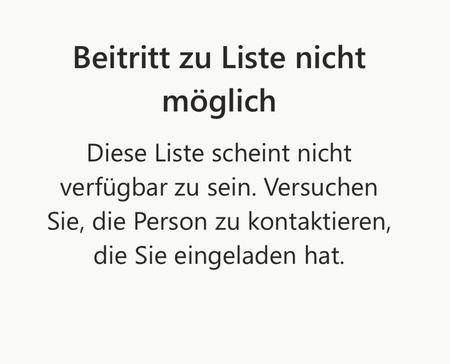
Hi everyone, I've been using Microsoft To Do for years and have always been able to share lists with my family. Now, when I send my wife or son an invitation link, they get an error message saying the list isn't available and they can't join. Here's what I've tried so far: I created a new invitation link and confirmed they're signed in with their Microsoft accounts. I tried using the app on their iPad or iPhone, and also on my MacBook. I checked if the list still exists. Despite all this, sharing still doesn't work. Has something changed with To Do sharing? Is there a new requirement or setting I need to enable? The error message attached. Translated: Any help would be greatly appreciated! Thank you in advance. Best regards Martin564Views4likes5Comments
error when sharing list
Hi all, MS support was not helpful, so hope you can support me in how to fix. My wife and I we are using private @outlook.com accounts. We are heavy users of todo and we have some shared lists between our accounts. So far all good, all fine. Now if i create a new list, no matter if in browser, ios app, .... i have to switch to another list and to switch back to see the share button. If i click it, there is the error that a problem has occured and link can't get created. Please try again. If i do so, it works and a link is created. If my wife then tries to open such link, she gets the question if she wants to access list XYZ like it should be and it always was. If she does it, there is an error "the list was not found, please contact the person who shared with you. We have the exact behaviour if she tries to share with me. The exisitng, already shared lists, are running well. Any idea or thoughts, how to overcome this issue? Greetings, DennisSolved1.5KViews9likes22CommentsTo Do Task Details Not Showing
When I am in To Do, I can only add and complete tasks. I no longer have the option to click in and see details, add notes, or edit titles. I can see the area they are supposed to pop up in, but I can't expand the side window or see any information.256Views0likes0Comments'TO DO' MICROSOFT *STAFF*
Is there a Microsoft staff member who's a specialist in To Do, pls? When you only get support staff who aren't familiar with To Do, and even the support page applies to an old version, it's necessary to give this feedback to a line mgr. They also need to view 2 transcripts from me that highlight all the extra work they're creating for themselves. Does anyone have an email address for the To Do support mgr? By PM if prefer.117Views0likes0Comments
"Insufficient privileges to complete the operation" when listing Planner tasks from Project
Hi, it's only my time posting here, please let me know if I should be doing something differently! I've searched throughout the internet and couldn't find a solution for this. I've got a user running into a problem where the `/me/planner/tasks`, `/planner/buckets/{bucketId}/tasks`, and `/planner/plans/{planId}/tasks` endpoints return a `Authorization_RequestDenied` error. Here's an example response: { "code": "Authorization_RequestDenied", "message": "Insufficient privileges to complete the operation.", "innerError": { "date": "2025-07-23T08:15:50", "request-id": "bd5f7056-a41d-439c-a0d7-d768cd82d1ea", "client-request-id": "362f376c-863e-0616-86f7-22c7c07c1352" } } While this happens for almost all of their groups and plans, it doesn't happen for one. The main difference between that which works and the other ones which don't is that all the ones that don't work were created in Microsoft Project (Platinum, I think?). The one that does was created in Planner. We can, however, list the proper plans and buckets, just not fetch the tasks. Is there any way around this? Is there some kind of special scope I should be asking for so the API calls work? Should I use the To Do API in some special way for this, instead? Thank you so much!126Views0likes0CommentsGraph API 1.0 - Listing lists doesn't return all lists (todoTaskList)
Hi, first time posting here, please let me know if I should be doing something differently! I've searched throughout the internet and couldn't find a reason for this. I've got a couple of users running into a problem where the https://learn.microsoft.com/en-us/graph/api/todo-list-lists?view=graph-rest-1.0&tabs=http endpoint only returns one list (Flagged Emails), though these users have and see many other lists in the To Do desktop (macOS) app. I've confirmed in both cases it's the same user that's identified in my app/integration and in the desktop app. They can see the tasks in that list without a problem. There are no errors requesting that list, and asking via `/users/{id|userPrincipalName}/todo/lists` also returns the same response (with that one list). Is there any known situation where this could be happening? Am I missing something obvious? Is there something else I should be trying? I've got many other customers using the To Do integration without a problem. I'm aware "My Day" and a few other special lists aren't returned. Thank you so much!1.1KViews0likes7Comments
To Do keeps asking to sign back in to keep using it
I have a problem on my Android device (Samsung Galaxy S25 Ultra) with To Do app (version 2.143.935.02). It started constantly sending me push notifications "Sign back in to myaccount to keep using To Do". When I tap on it, it stays on the circling thing that indicates that something is loading and then throws me to the default screen and on and on it goes. I already tried to clear the cache, delete the app data, uninstall and reinstall it, but nothing works. I even tried and logged in through the web version of To Do and it doesn't show my lists and tasks as well. It is also stuck on loading tasks state. Does anyone have the same issue? Has anyone solved it? I sent the logs to the developers, but I don't whether anyone is trying to solve this.341Views1like1Comment