tasks
59 Topics
Tasks sync failure - Outlook web vs mobile Outlook vs desktop Outlook
--- # 📄 **Technical Report: Persistent Outlook Web App Sync Failure Affecting Microsoft To Do / Outlook Tasks Ecosystem** **Issue Duration:** At least 3 months probably more **Platforms Affected:** - Microsoft To Do (Android) - Outlook Tasks (Windows Desktop Outlook) - Outlook Tasks (Outlook Web App) - Exchange Online (backend sync service) --- ## 1. **Executive Summary** I have experience **persistent, intermittent, and platform‑specific synchronization failures** within the Microsoft To Do / Outlook Tasks ecosystem. The critical finding is: ### **The Outlook Web App is often isolated and does not sync with any other platform.** Meanwhile: - **Windows Desktop Outlook ↔ Android To Do sync perfectly in both directions.** - **Outlook Web App ↔ (Desktop / Android)** do not sync. This isolates the issue to the **web app’s sync pipeline**, not the task data, not the account, and not the other apps. The failures present as: - **“Synchronization in progress”** stuck indefinitely - **“Synchronization failed”** when manually attempting sync - Web app showing **stale, outdated, or incomplete task lists** - Web app failing to send or receive updates from Exchange Online The same tasks that fail to sync for hours later sync successfully without any modification, proving the data is not corrupted and the failure is backend‑related. --- ## 1.1 **Cross‑Platform Sync Behavior (Critical Diagnostic Insight)** ### ✔ **Windows Desktop Outlook ↔ Android To Do** - Full two‑way sync - Immediate updates - Reliable and consistent ### ✖ **Outlook Web App ↔ Desktop Outlook** - No sync in either direction ### ✖ **Outlook Web App ↔ Android To Do** - No sync in either direction ### ✖ **Outlook Web App ↔ Exchange Online** - Appears to be failing or stalling This proves the web app is **not participating in the sync ecosystem**. --- ## 2. **Symptoms Observed** ### 2.1 **Outlook Web App** - Sync button stuck on **“Synchronization in progress”** for hours - Manual sync results in **“Synchronization failed”** - Web app shows outdated task lists - Web app does not receive updates from desktop or mobile - Web app does not send updates to desktop or mobile ### 2.2 **Android To Do** - Tasks created on Android do not appear in the web app - Tasks created in the web app do not appear on Android - Edits fail to propagate to the web app - Manual sync does not resolve the issue - Logout/login sometimes helps, inconsistently ### 2.3 **Windows Desktop Outlook** - Syncs perfectly with Android - Does not sync with the web app - Shows correct, up‑to‑date task data ### 2.4 **Platform Sync Matrix** | Action | Desktop Outlook | Android To Do | Outlook Web App | |--------|-----------------|---------------|------------------| | Create/edit task on **Desktop** | ✔ Syncs to Android | ✔ | ✖ No sync to Web | | Create/edit task on **Android** | ✔ Syncs to Desktop | ✔ | ✖ No sync to Web | | Create/edit task on **Web** | ✖ No sync to Desktop | ✖ | ✔ Stays only on Web | **Conclusion:** The Outlook Web App is **fully isolated** from Exchange Online’s task sync pipeline. --- ## 3. **Troubleshooting Steps Already Attempted** ### 3.1 **Web App** - Hard refresh (Ctrl + Shift + R) - Full browser cache clear - Logout → close browser → reopen → login - Switching lists to force metadata reload - Creating tasks to trigger sync events - Deleting tasks to force backend updates ### 3.2 **Android** - Manual sync - Clear cache - Logout/login - Device restart - Network switching - Creating/completing tasks to trigger sync ### 3.3 **Desktop Outlook** - Verified account health - Verified Exchange Online connectivity - Verified task folder integrity ### 3.4 **Account / Backend** - Verified Microsoft Account stability - Verified no multi‑account conflicts - Verified Exchange Online service health None of these steps produce consistent or lasting resolution. --- ## 4. **Frequency and Pattern** - Occurs multiple times per week - Occurs regardless of recent task edits - Occurs across multiple browsers - Occurs across multiple Android versions - Sync resumes randomly after hours - Sync resumes without any data changes - Sync resumes after logout/login, but inconsistently This pattern strongly suggests **backend sync token stalling**. --- ## 5. **Technical Analysis** ### 5.1 **Two‑Way Sync Failure Confined to Web App** Because: - Desktop ↔ Android works - Web ↔ (Desktop / Android) fails The failure is isolated to the **web app’s connection to Exchange Online**. ### 5.2 **Sync Token Stalling (Most Likely Cause)** Symptoms match known sync token stall behavior: - Endless “Synchronization in progress” - Manual sync fails - Sync resumes randomly - Sync resumes after forced metadata refresh - Sync resumes after unrelated actions (e.g., completing a task) ### 5.3 **Not a Corrupted Task Issue** Because the same tasks later sync successfully: - No malformed tasks - No unsupported metadata - No blocked sync queue - No corrupted lists ### 5.4 **Backend Sync Pipeline Instability** The pipeline: **Web App → Microsoft Sync Service → Exchange Online → Desktop / Android** appears to be failing at the **first hop** (web app → sync service). ### 5.5 **Web App Lacks Retry Logic** The web app provides: - No manual retry - No way to cancel a stuck sync - No way to reset sync session - No way to regenerate sync token Thus, when the backend stalls, the web app remains stuck indefinitely. ### 5.6 **Android Background Sync Not the Cause** Android is syncing perfectly with desktop Outlook, proving Android is not the source of the issue. ### 5.7 **Web App Sync Isolation (New Insight)** The web app is the **only** platform failing to communicate with Exchange Online. This is now clearly a **web‑app‑specific sync session failure**, not a multi‑platform issue. --- ## 6. **Impact** - Tasks frequently out of sync - Web app becomes unusable for task management - Daily workflow disrupted - Manual intervention required multiple times per week - Task state inconsistent across platforms - Reduced confidence in Microsoft To Do as a reliable ecosystem --- ## 7. **Requested Assistance** ### 7.1 **Engineering‑Level Investigation** Specifically into: - Outlook Web App sync token behavior - Web app → Exchange Online sync session stability - Backend retry logic - Web app sync error handling - Web app task API connectivity ### 7.2 **Diagnostic Tools** If available: - Sync session logs - Sync token status - Task metadata inspection tools - Backend queue visibility - Error codes beyond “Synchronization failed” ### 7.3 **Known Issues** Requesting documentation on: - Known To Do / Outlook Web sync token stalls - Known Exchange Online sync delays - Known intermittent sync failures - Known web app pipeline instability ### 7.4 **Confirmation Whether This Is a Known Issue** Given the duration and reproducibility, this appears to be a **backend‑level web app sync failure**. ### 7.5 **Request for Web App Sync Session Reset** Specifically: - Manual reset of the web app’s sync session - Forced regeneration of sync token - Flush of stuck sync queues - Verification of web app’s Exchange Online connectivity --- ## 8. **Evidence Available** I can provide: - Screenshots of “Synchronization failed” - Screenshots of “Synchronization in progress” - Timeline of sync failures - Android device logs - Browser console logs --- ## 9. **Conclusion** This is a **persistent, platform‑specific sync failure** affecting only the Outlook Web App. Desktop Outlook and Android To Do sync perfectly, proving the backend and data are healthy. The web app is isolated and failing to communicate with Exchange Online. I am requesting **engineering‑level support** to reset or repair the web app’s sync session and investigate the underlying cause. ---Solved297Views0likes1Comment
New Planner UI - What problem is actually being resolved?
This new UI is a step backwards. I get that people naturally resist change at first, but Microsoft keeps making interfaces more spaced out and less information-dense, which is frustrating in a business environment where efficiency matters. I can now only see about half of what fit on screen before. Even my Planner board headers are cut off because the font sizes and spacing have been increased unnecessarily. Microsoft has a bad habit of redesigning UIs without solving an actual problem. A lot of these changes feel like they’re being made by people who don’t actively use the tools day to day in real working environments.433Views7likes1Comment
To Do Task Details Not Showing
When I am in To Do, I can only add and complete tasks. I no longer have the option to click in and see details, add notes, or edit titles. I can see the area they are supposed to pop up in, but I can't expand the side window or see any information.234Views0likes0CommentsEntire Task List Lost
Last week, I had been working most of the day, when my entire task list was suddenly lost. There is nothing. No completed tasks, no in progress, none of the recurring ones. Everything is gone, and this is going to really disrupt my work for... who knows how long. Is there any way to get them back?880Views3likes11Comments
Tasks tab does not load
At a customer the tasks tab in the Project-app in PowerApps refuses to load by a specific user. Last week I was there for a training and it seemed the same problem occurred to me as well. The correct url's are already added to the pop-up (known issue). The tasks tab will only load after deleting cookies and other browser history; this has to be done with every browser session. It al worked fine untill recently. What could be the issue here?193Views1like1Comment
Mention people in the comments of Tasks
How do you mention someone in the comments section of a task? I've seen other queries about this dating back to 2017, and in 2019 Microsoft said they are working on it... so has this been done? Example: My colleague and I have been assigned a task - to upload content onto the website. In the checklist it notes my colleague will write the content, and then I will upload it. I'm trying to tag her in my comment to say, "@ let me know when the copy is ready for me to upload." Is there actually no way to do this?11KViews4likes10Comments
Task assignments and overall task % completion
Hi! Most probably this might not be possible in MS Project / Project Online, but it doesn’t hurt to check with the Project Community. We have a task assigned to two resources, and the Project Manager's idea is that either of these two resources can complete the whole task to 100%, not only their 50% of it. We have tried various combinations of Fixed Duration / Work / Units with and without Effort Driven but haven’t found any combination that works so one of the two resources can complete the task to 100%. It always ends up being half. For example, the resource goes to My Tasks and submits 80%, but in the project, it shows 40%. We have also looked into using the Team Resource option, but it requires the resources to take an extra step, assigning the task from the Team to themselves, which is not what we are looking for. Does this requirement have any solution, or should we stop investigating and give up? Thank you.317Views0likes1CommentIntroducing the all-new 'My Day' view in 'Tasks by Planner and To Do' App for Microsoft Teams!
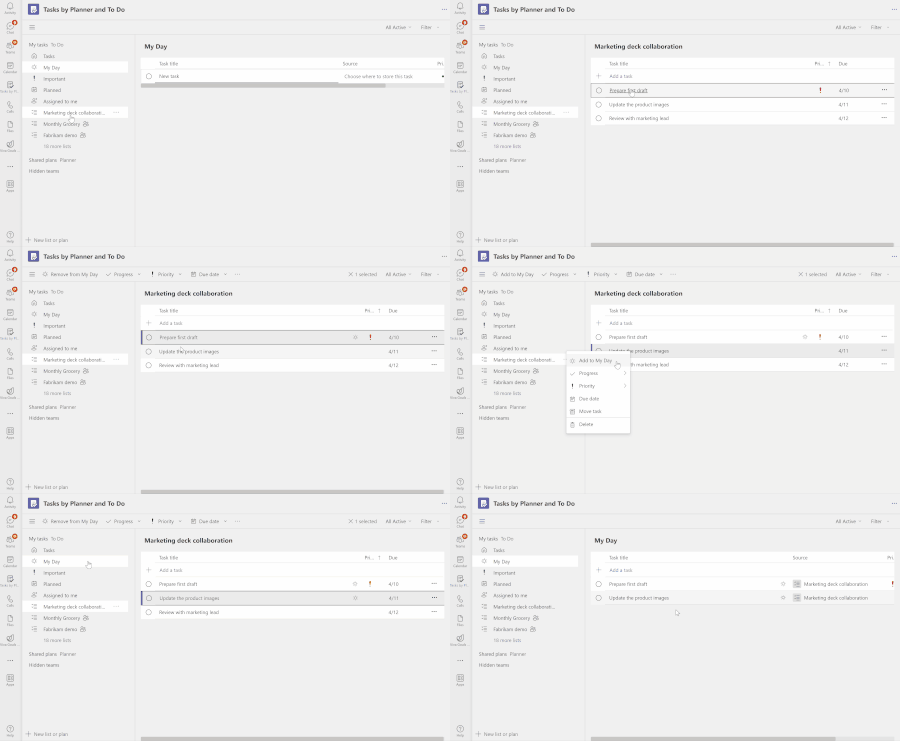
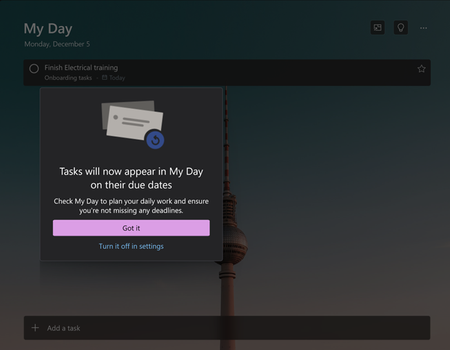
Feeling overwhelmed by tasks from multiple sources and struggling to stay organized? We have great news for you! We are thrilled to introduce the 'My Day' view in the 'Tasks by Planner and To Do' app for Microsoft Teams. This feature aims to help you effectively organize and prioritize your tasks, consolidate your task lists, and declutter your workspace.38KViews4likes37CommentsFire-and-Forget Methods in C# — Best Practices & Pitfalls
When building modern applications, there are often situations where you want to perform tasks in the background without holding up the main flow of your application. This is where “fire-and-forget” methods come into play. In C#, a fire-and-forget method allows you to run a task without awaiting its completion. A common use case is sending a confirmation email after creating a user, but this also brings some limitations, particularly when dealing with scoped services. In this blog, we’ll walk through an example and explain why scoped services, like database contexts or HTTP clients, cannot be accessed in fire-and-forget methods. Why Fire-and-Forget? Fire-and-forget is useful in situations where you don’t need the result of an operation immediately, and it can happen in the background, for example: Sending emails Logging Notification sending Here’s a common scenario where fire-and-forget comes in handy: sending a welcome email after a user is created in the system. public async Task<ServiceResponse<User?>> AddUser(User user) { var response = new ServiceResponse<User?>(); try { // User creation logic (password hashing, saving to DB, etc.) _context.Users.Add(user); await _context.SaveChangesAsync(); // Fire-and-forget task to send an email _ = Task.Run(() => SendUserCreationMail(user)); response.Data = user; response.Message = user.FirstName + " added successfully"; } catch (Exception ex) { // Error handling } return response; } The method SendUserCreationMail sends an email after a user is created, ensuring that the main user creation logic isn’t blocked by the email-sending process. private async Task SendUserCreationMail(int id) { // This will throw an exception be _context is an scoped service var user = await _context.Users.FindAsync(id); var applicationUrl = "https://blogs.shahriyarali.com" string body = $@" <body> <p>Dear {user.FirstName},</p> <p>A new user has been created in the system:</p> <p>Username: {user.Username}</p> <p>Email: {user.Email}</p> <p>Welcome to the system! Please use the provided username and email to log in. You can access the system by clicking on the following link:</p> <p><a href='{applicationUrl}'>{applicationUrl}</a></p> <p>Best regards,</p> <p>Code With Shahri</p> </body>"; var mailParameters = new MailParameters { Subject = $"New User Created - {user.Username}", Body = body, UserEmails = new List<UserEmail> { new() { Name = user.FirstName, Email = user.Email } } }; await _mailSender.SendEmail(mailParameters); } In the code above, the SendUserCreationMail method is executed using Task.Run(). Since it's a fire-and-forget task, we don’t await it, allowing the user creation process to complete without waiting for the email to be sent. The Problem with Scoped Services A major pitfall with fire-and-forget tasks is that you cannot reliably access scoped services (such as DbContext or ILogger) within the task. This is because fire-and-forget tasks continue to run after the HTTP request has been completed, and by that point, scoped services will be disposed of. For example, if _mailSender was scoped services, they could be disposed of before the SendUserCreationMail task completes, leading to exceptions. Why Can’t We Access Scoped Services? Scoped services have a lifecycle tied to the HTTP request in web applications. Once the request ends, these services are disposed of, meaning they are no longer available in any background task that wasn’t awaited within the request lifecycle. In the example above, since the fire-and-forget email sending isn’t awaited, attempting to use scoped services will throw an ObjectDisposedException. To safely access scoped services in a fire-and-forget method, you can leverage IServiceScopeFactory to manually create a service scope, ensuring that the services are available for the task. private async Task SendUserCreationMail(int id) { // Create a service scope. using var scope = _serviceScopeFactory.CreateScope(); var _context = scope.ServiceProvider.GetRequiredService<DataContext>(); var user = await _context.Users.FindAsync(id); var applicationUrl = "https://blogs.shahriyarali.com" string body = $@" <body> <p>Dear {user.FirstName},</p> <p>A new user has been created in the system:</p> <p>Username: {user.Username}</p> <p>Email: {user.Email}</p> <p>Welcome to the system! Please use the provided username and email to log in. You can access the system by clicking on the following link:</p> <p><a href='{applicationUrl}'>{applicationUrl}</a></p> <p>Best regards,</p> <p>Code With Shahri</p> </body>"; var mailParameters = new MailParameters { Subject = $"New User Created - {user.Username}", Body = body, UserEmails = new List<UserEmail> { new() { Name = user.FirstName, Email = user.Email } } }; await _mailSender.SendEmail(mailParameters); } Conclusion Fire-and-forget methods in C# are useful for executing background tasks without blocking the main application flow, but they come with their own set of challenges, particularly when working with scoped services. By leveraging techniques like IServiceScopeFactory, you can safely access scoped services in fire-and-forget tasks without risking lifecycle management issues. Whether you're sending emails, logging, or processing notifications, ensuring proper resource management is crucial to prevent errors like ObjectDisposedException. Always weigh the pros and cons of fire-and-forget and consider alternative approaches like background services or message queuing for more robust solutions in larger systems. To explore more on this topic, you can check out the following resources on Microsoft Learn: Task.Run Method Task asynchronous programming model19KViews2likes2Comments