surface laptop
24 Topics
Microsoft Surface Laptop model 2037
Recently, I purchased a Surface Laptop 7 (model 2037). When I connect the standard charger, the trackpad or mouse often freezes or stops responding. I tested with another Surface Laptop charger, but the problem persisted. After researching, I discovered it might be a grounding power delivery driver interaction issue. To work around it, I've been charging the laptop solely with a Type-C cable. Is anyone else experiencing this problem with their Surface Laptop 7? Is there a solution besides using 2 Type-C ports to charge the Surface Laptop 7? The "MagSafe" charging feature on the laptop I looked forward to using has a toddler who loves to play with cables and pull on them, so I can't use the feature with the standard Microsoft Surface Laptop charging brick.288Views0likes1Comment
Surface 7 malfunction
I’m about to start my first year of university this September, and honestly, I never imagined I’d be dealing with this. I bought my Surface Laptop 7 last year during my final year of high school because I wanted a reliable laptop that would last throughout my four years at university. As a student, this was a huge investment for me, and I chose Microsoft because I trusted the quality and durability of the product. Unfortunately, just one day after the seller's warranty expired, the laptop suddenly stopped working. I was told that the main board had malfunctioned. What makes this even more upsetting is that I have taken great care of the laptop. It has never been dropped, never been exposed to water or any liquid, and has only been used for normal schoolwork. I simply didn't expect such a major hardware failure after only a year of use. With university starting in September, I'm devastated. I depend on this laptop for my studies, and replacing or repairing it is a significant financial burden. To make things even more difficult, there is no Microsoft-authorised service centre in Vietnam, so getting support has been incredibly challenging.363Views1like1CommentSurface IT tookit - unusable
I hate Microsoft with a passion everyday they get more greedy, more incompetent, and continue to force PWA (Websites that pretend their programs so that they can advertise to you within your programs. Just wanted to get that out there how much I hate dealing with Microsoft. I'm a 20 year Computer tech, so I'm Ok with computers. Trying to download an image for a customer surface pro 4 laptop. Download the surface It Toolkit - over the last 2 days it says Creative recovery USB Failed Every single Time. Tried multiple USB ports, tried re-downloading the image again, tried cleaning the partition and formatting the partition and USB stick. Do you think that MS would know how to make software usable - absolutely not - they can't even come up with an error message apart from Failed. Yes it's a 16 GB USB Stick. Can anyone assist with why Microsoft is so incompetent at basic programs to download images and to give proper error messages apart from a simple Failed when it comes to formatting USB - right after it completes the Validating Image. Do people on this forum get paid from Microsoft? Or do all of these people simply give out their own time so that MS can continue to focus their efforts on how to make more money while allowing the community to sort out there mess? I hate you Microsoft.278Views0likes0Comments
Battery Report Summary – Surface Laptop 7 (Snapdragon X Elite)
Report Date: November 27, 2025 Device: Microsoft Surface Laptop 7, Snapdragon X Elite Charge Cycles: 9 1. Key Data Battery Name: SurfaceBattery Manufacturer: SWD Design Capacity: 52,330 mWh Full Charge Capacity: 53,850 mWh Cycle Count: 9 2. Usage Observations Despite the battery being new (only 9 cycles), the report shows abnormally fast discharge. Examples from the report: On November 25, the battery dropped from 30% (16,340 mWh) to 23% (12,520 mWh) in ~20 minutes of use. On November 27, during “connected standby,” the battery fell from 77% (41,200 mWh) to 55% (29,440 mWh) within about one hour. These behaviors are inconsistent with expectations for a new device with full capacity. . Technical Analysis Battery authenticity: The data indicates the battery is original (manufacturer SWD, capacity matches design). Primary issue: The discharge rate is unusually fast and unstable, which is not normal for a battery with so few cycles. Possible causes: Defect in the Battery Management System (BMS). Internal cell imbalance. Firmware/driver issue affecting power management. 4. Conclusion and Request The Surface Laptop 7 is showing abnormal battery behavior despite being new and original. Any idea where this problem comes from? Any solution? Thanks in advance!724Views0likes3Comments
Surface laptop 7th & Thunderbolt 3 external display issue
Hello, I have a surface laptop 7th under Windows 7 with the snapdragon processor offering 2 USB 4 ports. I don't manage to get my external display working through thunderbolt 3 connection. When I go to the device controller panel, I see the serial bus constantly refreshing. Otherwise, Windows 11 and the graphic card drivers are up to date. Would really appreciate if someone can help me. Thanks181Views1like0Comments
Various multiple monitor issues on Surface Laptop Studio (1) since driver updates.
Issues started directly after NVIDIA - Display - 32.0.15.7344 or Surface - Extension - 14.54.139.0 both installed on 2025-10-21 Issues occur when a second monitor is attached, and either extend or duplicate screens is selected. Using only one screen has no issue. Checked with different cables, bypassing HUB and different monitors. All show the same issues. Issues are (but not limited to) 3D (Vulkan) applications in non full-screen mode glitch with a triangle like tearing between the frames. This is a screenshot from a derivate of the Vulkan tutorial. To illustrate the tearing I alternate the clear colour to black and green. With only one monitor selected (either one) the green flashes as expected. With two monitors, even with duplicate display(!), this tearing which seems to be the presentation not waiting for the chain to finish rendering. Again this was all fine before the update. In borderless full window mode it is okay, as the NVIDIA driver doesn't use the INTEL integrated swap chain. Clear type tech is not working, and text is chroma distorted. Happens in all apps, including Microsoft ones. I can literally have an app like visual studio running on the second monitor and the text has serve chroma distortion, and then I change monitor setting to just that monitor and the text is correct. and back and forth. General glitches on apps when resizing, frames of windows appear for a second.222Views0likes0Comments
Surface Laptop 7, will not boot after system restore
Brand new Surface 7 13.8", just received the package yesterday. I've set it up for my wife, but shortly after network just started timing out querying the router's DNS server (Router is fine, multiple other phones, windows 10 & 11, linux, mac machines work without a hitch). Tried some fixes to no avail, and decided on a system restore just in case I've messed something up during setup. System restore looked like it worked, but laptop restarted and ended up with a bluescreen (something kernel something). System restore is there just fir that, right? Well, I've started it nine hours ago. Now it's just boot looping with the "preparing" bit and then shuts back down. It's been like that the whole day. I've even tried to get a USB stick to have the requisite livecd/recovery media, but it doesn't the new Surface ARM-based processor. What can we even do at this point?394Views0likes1CommentNew Surface Laptop 5G for Business, Copilot+ PC
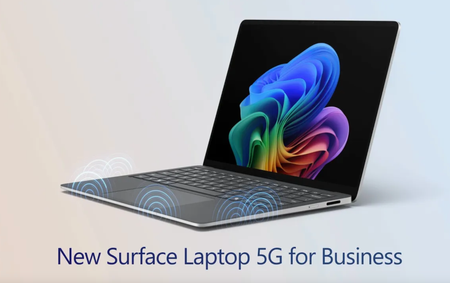
Stay securely connected with rearchitected 5G design — including six smart-switching antennas, eSIM and Wi-Fi 7 — without relying on hotspots. As the first Surface Laptop to feature 5G, it enables enterprise-ready AI features for deeper insights, productivity boosts, and powerful local inferencing wherever work happens. Stay connected anywhere. The first Surface laptop with built-in 5G — supporting NanoSIM, eSIM, smart signal switching, and international roaming. See it here. High-performance AI experiences. Surface Laptop 5G is powered by Intel Core Ultra processors with AI Boost. Watch here. No IT setup required. Surface Laptop 5G can arrive business-ready with zero-touch deployment and managed 5G policies. Check it out. QUICK LINKS: 00:00 — Surface Laptop 5G for Business 00:28 — Built-in 5G 01:30 — Hardware 02:06 — Intel® Core™ Ultra 02:41 — Built-in open-source AI models 03:20 — Management controls for IT 03:52 — Enterprise-Grade Security 04:16 — Wrap up Link References Check out https://surface.com/business Unfamiliar with Microsoft Mechanics? As Microsoft’s official video series for IT, you can watch and share valuable content and demos of current and upcoming tech from the people who build it at Microsoft. Subscribe to our YouTube: https://www.youtube.com/c/MicrosoftMechanicsSeries Talk with other IT Pros, join us on the Microsoft Tech Community: https://techcommunity.microsoft.com/t5/microsoft-mechanics-blog/bg-p/MicrosoftMechanicsBlog Watch or listen from anywhere, subscribe to our podcast: https://microsoftmechanics.libsyn.com/podcast Keep getting this insider knowledge, join us on social: Follow us on Twitter: https://twitter.com/MSFTMechanics Share knowledge on LinkedIn: https://www.linkedin.com/company/microsoft-mechanics/ Enjoy us on Instagram: https://www.instagram.com/msftmechanics/ Loosen up with us on TikTok: https://www.tiktok.com/@msftmechanics Video Transcript: -Surface Laptop 5G for Business with Intel Core Ultra Series 2 processors brings together intelligent connectivity, ultra-fast performance, and premium design. It’s built for AI as a Copilot+ PC to deliver new, connected, on-device, and hybrid experiences, all while keeping your business data protected with enterprise-grade security. -Now, not all 5G laptops are created equal. Surface Laptop 5G supports both physical Nano and eSIM for flexibility to connect from anywhere. In fact, we’ve rearchitected Surface Laptop to optimize connectivity, while still maintaining the sleek and lightweight design. It’s been engineered from the ground up for optimal signal strength with a strategically-placed six-antenna array, along with a newly developed custom composite palm rest. This material and antenna placement helps ensure superior signal transparency so it’s not blocked by your desk or your legs. The signal dynamically switches between antennas based on how you interact with the device to ensure the strongest possible connection. -For example, whether you’re typing or using the touch pad, the 5G signal is routed to the least obstructed antennas. And as you move between spaces or locations during your day, you don’t need to worry about staying connected. There’s no need to connect to hotspots or untrusted networks because it’s designed to seamlessly transition between 5G and known Wi-Fi networks, and includes support for Wi-Fi 7. -Now, continuing our hardware tour, on the right side, you’ll see a Surface Connect port. This is positioned next to the removable NanoSIM tray. Then on the left side of the device, there are two USB-C Thunderbolt ports, a USB-A and a 3.5mm headphone port. Moving up the device, Surface Laptop 5G comes with a signature 3:2 aspect ratio, 13.8" PixelSense touch display. The screen is anti-reflective, and not only does it come with Dolby Vision IQ support, but it has an impressive dynamic refresh rate of up to 120Hz. -Next, let’s move on to what powers the Surface Laptop 5G for Business. This is the first Surface Copilot+ PC to support Intel with 5G and it comes with a choice of Intel Core Ultra 5 and 7 processors. It supports up to 32GB of memory on package and has integrated Intel Arc Graphics. The Intel AI Boost Neural Processing Unit, or NPU, is capable of running up to 48 TOPS without compromising battery life. And the device comes with up to one terabyte of M.2 Gen 4 SSD storage. All of this makes it optimized to run connected Copilot experiences, like powerful reasoning agents capable of generating deep insights with your work data, as well as the on-device foundational models from Windows AI Foundry. This includes 40 plus local and ready-to-use open source models like Phi Silica for text generation, built-in OCR for text recognition in images, super resolution to upscale images and video, image segmentation for background removal, and more. Your productivity experiences and factor-enhanced with AI, including improved Windows search, which combines keyword and vector-based search for more relevant results. -Next, let’s look at the enterprise-grade management controls for IT. Here, Microsoft Intune can be used to provision 5G connectivity with your network policies from the first time Surface Laptop connects to the internet, which helps ensure that only known and trusted networks can be connected to. Together with Windows Autopilot deployment, Surface Laptop 5G can be shipped directly to your workforce with your defined security policies and apps so that they’re business-ready before connecting to your managed resources. Surface Laptop 5G meets the Secured-core PC standard with a Microsoft Pluton security processor. Additionally, authentication with Windows Hello facial recognition benefits from enhanced sign-in security using virtualization. This is all part of Microsoft’s end-to-end, chip-to-cloud security that helps keep your information, devices, and users safe wherever they work from. -So that was a quick tour of how the new Surface Laptop 5G for Business was thoughtfully engineered to bring together intelligent connectivity, ultra-fast performance, and premium design. Check out surface.com/business for availability and more information. Thanks for watching.1.4KViews3likes0CommentsOverheating problems with Surfaces
Since the temperatures have risen, we already have four devices(Surface Laptop & Pro) that are constantly throttling to the point of crashing due to overheating. Surface Support only allows us to replace the entire device, so I'll try it here. Are you also experiencing these problems? Did Microsoft provide a bad firmware update in this case?537Views0likes2Comments
Trouble Activating Ultimate Performance Plan on My Surface Laptop
Hi everyone, I’m trying to enable the Ultimate Performance power plan on my Surface device. I’ve already used the command powercfg -duplicatescheme e9a42b02-d5df-448d-aa00-03f14749eb61, and it shows up in my system. However, when I try to activate it using powercfg /setactive [GUID], I get an “Invalid Parameters” error—even though the GUID matches exactly what was listed under powercfg /list. My current active plan is “High performance” (custom-made). Has anyone else encountered this issue on a Surface laptop? Is this plan blocked or incompatible with certain Surface models, or am I missing a step? Would appreciate any insights or tips! Thank you so much for your attention and participation.771Views0likes2Comments