support
14 Topics
Some users not able to add personal dashboard card
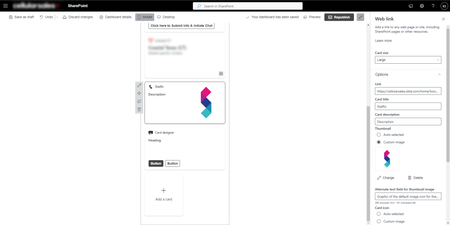
We are getting feedback that some users are not able to add the personal quick links card in the dashboard. I have gone through it with one of the users where they click the customize button, add the card, add a link and save it. But when they go back to the dashboard it is no longer there. We have tried it in the dashboard in teams and in the browser, we have tried to do a hard refresh but it is gone. Also when they go to customize the dashboard again it is gone and they can try to add it again (still not working). This happens for some users, while other users have no problems adding the card. Any suggestions how to fix this?244Views1like3Comments
401 Unauthorized error in MS Teams
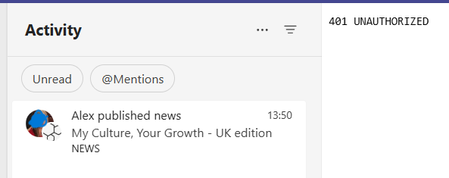
When a news post is published in our intranet in Sharepoint, a MS Teams notification is sent from the system to all colleagues who are used to collaborating (they are in his “circles” according to VIVA Insights) with the author of the post. Although the publication is successful and the link to the news post is active, sometimes those who click on the notification from MS Teams receive a “401 Unauthorized” error message that makes the post unviewable from MS Teams. In the past we fixed this issue on the specific client by clearing the Teams cache, but we have more than 6000 clients... This creates a flaw in the user experience that we need to fix. Thanks!488Views0likes1Comment
Change the logo across all platforms
Hi, is there a way to change the Viva Connections icon across all platforms? We have updated it in Teams, but are having trouble updating it elsewhere (like through office.com). We would like the new icon to appear consistently across all Viva Connections experiences. Is there any method to achieve this? Thanks in advance!285Views0likes1Comment
Viva connections for mobile "Home page" button
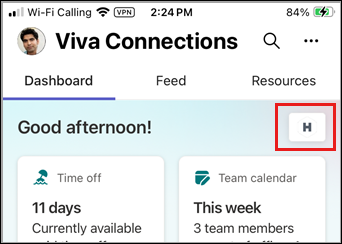
So in Viva Connections for mobile you have this small button at the top of the dashboard tab. This button opens an internal browser inside viva connections to the organization's home page. Can this button be customizable? can we remove it completely? I'm asking because this "internal browser" opened is Google's Chrome, which is blocked by our CA policy, that allows only edge browsers for company's resources. And when our employees click this button they get an error.384Views0likes2CommentsWhen SharePoint page is promoted to Viva Engage, Viva Connection web part not showing all content
Page is promoted to Viva Engage and in Viva Engage the post is there. When its picked up by Viva Connections web part on our home page. The entry doesn't show the content, the thumbnail image, title and description aren't showing.452Views0likes2CommentsSearch in Viva Connections rapidly slowed down
Hi, first of all, I'm not sure if I'm in the right place, so if not, i really apalogise if this does not belong here. Our company helped one of our customers do deploy Viva Connections. It mostly worked fine, but then one issue appeard. They have two cards there - Search for users and Search through intranet. What happened is that when anyone tries to search for anything, it takes between 20 and 30 seconds to load. It is supposed, and it was, load within 5 seconds or so. I haven't find what could cause the issue since it looks like that's the only appear of this kind of an issue. Have anyone seen anything like this? Thank you282Views0likes1Comment
Viva Connections - Best practices for adoption and PUSH notification in the mobile version
Dear All, we are at Hybridge Consulting adoption partners for Viva. We have potential clients from Hungary with concrete questions. One is about the PUSH Notification on the mobile Version of Viva Connections - When is it available? best practices, especially with which adaptive cards are the most common and liked, or what is a best practice dashboard for clients. I would appreciate your thoughts, Regards, Eszter383Views0likes1CommentHow to use Object ID and Tenant ID in Adaptive Cards?
Hi, Thanks for looking at this post. I am trying to use object id and tenant id in adaptive cards to post adaptive cards in outlook mail and receiving response from the user on Button Action. But I am unfamiliar about using those credentials and receiving response from user in Adaptive Cards. Can anyone help me with an example of how to add them in adaptive cards? Thanks.379Views0likes0CommentsUse announcements in Viva Connections
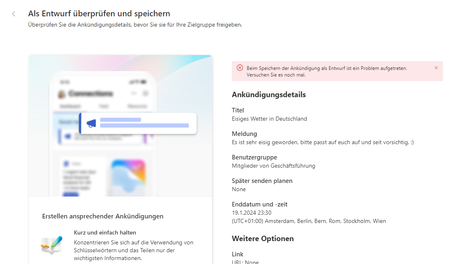
Hi, does anyone know the error shown in the attachment "A problem occurred while sending the announcement. Please try again." ? All users have a Viva Suite license, and the creator has owner rights on the SharePoint page. I am looking forward to the exchange with you.Solved1KViews0likes6Comments