support
221 TopicsSharePoint - SSL Offloading
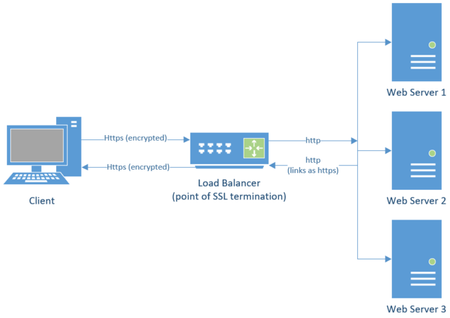
What is SSL Offloading? Configuring SSL Offloading with SharePoint Web Applications Host Names Site Collections SharePoint Apps (App Domain Common Issues URLs returned to users are incorrect List or library Dropdown menu not loading After configuring SSL offloading for a web application users receive a 404 or 503 Additional Information Creating IIS bindings for SharePoint Web Applications through PowerShell15KViews4likes4Comments
Partner Center enrollment blocked — Trust Code 715-123160, requesting manual review
Our company Veri-Tech, Inc. (DUNS 144980978, EIN 41-4881091) is a newly incorporated ISV building a Microsoft 365 compliance SaaS platform. We are attempting to enroll in the Microsoft AI Cloud Partner Program on our veri-tech.net tenant but enrollment is blocked by the trust check. We were previously using the domain Veri-Docs.net and suspect that may be one of the issues. We still own that domain but migrated to Veri-Tech.net. We cannot open a support ticket because the workspace dropdown is empty (known issue for blocked enrollments). Reference: 715-123160 Transaction ID: 5af23702-444a-4445-8e95-2deee3725858 Correlation ID: 37a4fe58-7dd2-47e3-86d8-63201771fed7 Tenant: veri-tech.net (9f4013fc-c093-45b1-9774-fce211cd0359) DUNS: 144980978 Contact: mailto:email address removed for privacy reasons Requesting expedited manual review and enrollment reset. Thank you
Announcing the retirement for Office Online Server
What’s changing? Microsoft is announcing the end of support and retirement for Office Online Server effective December 31, 2026. After this date, Office Online Server will no longer receive security updates, bug fixes, or technical support from Microsoft. This change is part of our ongoing commitment to modernizing productivity experiences and focusing on cloud-first solutions. To help stay secure and compliant, begin planning now to move to supported options, such as Microsoft 365. What does end of support mean? No more security updates. Systems running Office Online Server may be vulnerable to the evolving threat landscape. No bug fixes or technical support. Potential compliance risks. Unsupported software may put regulated organizations at risk of non-compliance. Why is this happening? Office Online Server was designed to provide browser-based versions of Word, Excel, PowerPoint, and OneNote for on-premises environments. As organizations have adopted Microsoft 365, Microsoft is focusing its browser-based Office app investments on Office for the Web to deliver secure, collaborative, and feature-rich experiences through Microsoft 365. What is the alternative for Office Online Server? If your organization relies on Office Online Server for browser-based document editing and collaboration, our recommended path is to transition to Microsoft 365, which includes cloud-powered versions of Word, Excel, PowerPoint, and OneNote. Microsoft 365 offers: Real-time collaboration and sharing. Automatic updates and ongoing support. Enhanced security and compliance features. Integration with Microsoft Teams, Outlook, SharePoint Online, and OneDrive for Business. Access to Microsoft 365 Copilot for AI-powered productivity. Learn more about Microsoft 365. And for organizations with 150+ licenses, consider engaging Microsoft FastTrack to support your planning and migration to Microsoft 365. SharePoint Embedded enables real-time collaboration on Word, Excel, and PowerPoint documents directly within line-of-business or custom applications using Microsoft 365’s native co-authoring services. This allows users to securely create, edit, comment, and manage Office files without leaving the app—while still benefiting from enterprise-grade compliance, versioning, and lifecycle management through Microsoft Purview. Learn more. For organizations using SharePoint Server Subscription Edition or Exchange Server Subscription Edition, Microsoft 365 Apps for Enterprise and Office LTSC 2024 remain supported desktop clients for viewing and editing documents hosted on those servers. If your organization uses Office Online Server to host Excel workbooks in Power BI Report Server, that functionality will no longer be supported. Alternatives include viewing workbooks in the Excel desktop application or migrating to the Power BI service. Prepare to make your move Support for Office Online Server ends December 31, 2026. Continuing to use it after this date may expose your organization to security, compliance, and productivity risks. We therefore strongly encourage all customers to begin planning their transition to supported solutions today. Microsoft is committed to helping you prepare. Use the resources below to help you get started: Explore Microsoft 365 offerings for modern, cloud-powered collaboration. Engage your Microsoft account team and Microsoft FastTrack (150+ seats) for migration planning. See the instructions for how to disconnect Office Online Server from a SharePoint Server farm. Thank you for being a Microsoft customer!28KViews1like45Comments
New Partner Signup for Company Stuck in catch 22 loop
I want to start by saying that I've had the displeasure for more than a decade as a developer publishing apps on the fruit company and lil green robot company's platforms without anywhere as close to the amount of user confusion and dead ends as here on Microsoft. I started my user journey to sign up for a company account at https://storedeveloper.microsoft.com/en-US/onboarding After a few steps I was delightfully greeted with this, despite being obviously logged into the account to even access these forms: I later found out that the account maybe needs to be re-verified since the platform might not share verification state with the windows live account. After verifying my email again, I fill out all my company info with DUNS number and opt to import all info. Therefore negating any risk of mismatch between whats in DUNS and what's entered. I'm then shown this. So I'm honestly incredibly confused here. If we believe the yellow warning box, then there is nothing to do and the application is closed. But then the red text says pending partner action, that I have things to do. But if I go to the legal info page, I see that I have actions to do. What those are I have no idea Ok so at this point I obviously start searching for support routes. We have two avenues that I've seen mentioned over and over in: https://techcommunity.microsoft.com/discussions Option A How to appeal a rejected partner profile in the verification process | Microsoft Community Hub Option Bhttps://partner.microsoft.com/en-us/support?stage=1 According to option A, an employment verification failure is when I can't confirm that the email domain is owned by the company. After following links, I'm led to https://learn.microsoft.com/en-us/partner-center/enroll/verification-responses#check-your-verification-status According to this document, I'm to click the "Resolve" button to begin dragging documents in. Except in reality, the version of the site Im seeing has a get support button which takes me to : https://learn.microsoft.com/en-us/partner-center/support/report-problems-with-partner-center Im now shown two more options to resolve things myself. Option #1: use the ai assistant. But the Ai Assistant flow requires a workspace which I don't have. I presume because I don't have a valid account. Therein creating a catch22 Option#2: Use traditional support: Except the ? button is not there in my portal: What is going on here? What am I supposed to be doing to resolve this? What a strenuous career it is that I’ve chosen! I cannot make you understand. I cannot make anyone understand what is happening inside me. I cannot even explain it to myself.
Unable to pass Employment Verifcation step in Partner Center
Hello everyone, I am stuck at the Employment Verification step while trying to enroll in the Microsoft Partner Center. I have already submitted the required documents, including the domain invoice and the assignment letter, but Microsoft responded with: "Based on the information you have provided to date, we have determined that your organization does not currently meet the requirements to pass verification." This leaves me very confused, as the reply does not explain what exactly is missing or what additional documents are required. I have carefully checked the documentation, but there is no clear guidance. As a company focusing on IT security, this is extremely frustrating. We recently shifted from Linux to Windows development, and without a Microsoft Partner account we are unable to proceed with building kernel-level antivirus solutions for our users. This has a devastating impact on our business. Could anyone please share their experience or advise on what specific documents or requirements Microsoft usually expects in order to pass Employment Verification? Any help would be greatly appreciated. Thank you!644Views2likes15CommentsProduct key not accepted
I bought a new laptop. It's not accepting my product key for Microsoft Office Professional Plus 2013. It keeps asking for the key. I tried using Word as admin: it didn't work. Sunday (April 5th) I be kicked out of Office 2013 (even though I BOUGHT it, marketed as life time use). I need a solution ASAP. 🙏🏼🚨16Views0likes0CommentsURGENT: Enrollment blocked with Trust error 715-123160 – no workspace to create ticket
I am trying to registrar a business to Partner portal, but rolling gives this error: "Microsoft runs on trust. We engage in a rigorous set of evaluation and certification processes; as a result your request was blocked. If you require further information please reach out to Microsoft support with reference number: 715-123160 and transaction ID: 275008d3-60a1-4e52-a820-95d879223f75." Please escalate to Partner Onboarding / Trust Review team for manual review and unblock. Details: reference 715-123160 transaction id: 275008d3-60a1-4e52-a820-95d879223f75 Correlation id: 6d6c52ef-ab4c-480a-9abe-1e3fe420657f Business: FI21142489 and Manmade Software OySolvedMicrosoft runs on trust - renewal blocked – order fails before payment (error 715-123160)
Hi, My context is the following, I have a US based LLC because my work is centered around Dynamics 365F&O and my customers are not in Colombia, but in the US. I am an ISV and have a marketplace offer in AppSource. I am an SMB. I can survive thanks to my consulting income. I'm trying to sell my ISVs as an MS partner but I haven't been able to land a deal yet. But I run my business from Colombia. But I have US Banks, US Customers, US Invoices, etc. This is a completely legal and compliant setup. I made the mistake when I enrolled as a Microsoft Partner of giving my US details instead of my Colombian details. I thought it made perfect sense, I had no idea I would be flagged for this. I have had problems with my partner center ever since, I can't get approved as a Developer. When I try to renew my Partner Success Core Benefits I get this: https://www.microsoft.com/en-us/legal/compliance/integrityIf you require further information please https://partner.microsoft.com/partner/support with reference number: XXX-XXXXX and transaction ID: XXXX. I opened up a support ticket, because my renewal is up. And at the very end of a week of back and forth I get this: Microsoft runs on trust, and therefore we engage in a rigorous set of evaluation and certification processes across third party individuals and organizations. As a result of our internal processes, we are unable to proceed with your request. Please note that this decision cannot be changed by opening a new support case. Thank you for your understanding What can I do? I know other people are facing the same issue.
URGENT: Blocked from Partner Center Enrollment ("Runs on trust") - Support portals inaccessible
Hello Microsoft Partner Community Team, I am urgently seeking assistance with an automated enrollment block. We are trying to register our business, Connect In Cloud Ltd (UK Companies House: 09550508), for the Microsoft AI Cloud Partner Program, but we have triggered the "Microsoft runs on trust" security block. I am completely unable to raise a standard support ticket because my Partner Center dashboard shows no active workspaces, meaning the support form will not allow me to submit a request. Furthermore, the standard business phone support lines drop the call after instructing me to use the broken portal. I need a moderator to please escalate this directly to the Vetting and Enrollment team so I can provide my business documentation, verify my identity, and have this block cleared. Here are my exact error details from the blocked screen: Error: Microsoft runs on trust... your request was blocked. Reference Number: 715-123160 Transaction ID: 4b89b272-50fe-4f37-8f5f-15f539cbaed0 Correlation ID: f13ebdd3-5d9d-4b45-a31d-0049e3489a11 Thank you in advance for your help in getting an internal support ticket opened for us