support
301 Topics
Verified by email, but Legal info still shows Verification status None
Hello, Our company (Atlas Software LLC) is stuck on partner verification and we have not been able to get a response through support. What we have done and what we see: - We submitted all the requested documents, and we received an email from Microsoft saying our account was verified. - In Partner Center, the Developer program (Microsoft 365 and Copilot / Teams) shows "Authorized". - Our AI Cloud Partner Program enrollment is "Active". - However, Account settings > Legal info still shows Verification status "None" ("Program Not Found"). Because of this, we cannot complete Microsoft Entra publisher verification, which we need to publish our Teams / Microsoft 365 Copilot app in the store. We opened a support request on October 5 (TrackingID#2610050010000197), added a note to it, and emailed the support engineer, but we have not had a reply. It looks like the verification was completed on one side but not linked to our account's legal information. Could someone from the Partner Center team check this or tell us the right way to get it fixed? Thank you.
AI Cloud Partner Program enrolled but vetting record missing ("Program Not Found")
Our company, Dill Technologies, Inc., is enrolled in the Microsoft AI Cloud Partner Program. The enrollment page shows the program under "Active In," and the agreement was accepted on 10/3/2026. However, our Verification status has stayed at "None" since enrollment, and the Verification Summary page returns "Program Not Found – Failed to load vetting details." Verification never started, and there's no self-service way to begin it. Support ticket 2610050010001898 hasn't resolved it. Support told us to complete enrollment, which is already complete, and attachments fail to upload on the ticket. Could a community manager please escalate this to the Vetting / Trust & Safety team to manually initiate legal entity verification? We need it to complete publisher verification for our Microsoft Entra multitenant app. I'm happy to share our Partner ID and business documents privately.AI Cloud Partner Program enrolled but vetting record missing ("Program Not Found")
Our company, Dill Technologies, Inc., is enrolled in the Microsoft AI Cloud Partner Program. The enrollment page shows the program under "Active In," and the agreement was accepted on 10/3/2026. However, our Verification status has stayed at "None" since enrollment, and the Verification Summary page returns "Program Not Found – Failed to load vetting details." Verification never started, and there's no self-service way to begin it. Support ticket 2610050010001898 hasn't resolved it. Support told us to complete enrollment, which is already complete, and attachments fail to upload on the ticket. Could a community manager please escalate this to the Vetting / Trust & Safety team to manually initiate legal entity verification? We need it to complete publisher verification for our Microsoft Entra multitenant app. I'm happy to share our Partner ID and business documents privately.
Identity verification closed after a corrected name typo, and no route to support
Our Partner Center identity verification failed and was closed ("no further action will be taken"). The cause was a typo in the primary contact name, which has since been corrected to match the ID exactly. In Help + support the assistant doesn't offer a support request, so we can't ask for the existing verification to be reopened. Could a moderator help reopen verification on the existing account, or point us to the right channel? Happy to share account details privately.
Verification "Authorized" but Partner Center remains deactivated. No support channel reachable.
We are a company seeking help with a Partner Center account state inconsistency (Seller ID available by direct message to a Community Manager or Microsoft employee). Timeline: - Our Windows Hardware Developer Program enrollment was rejected at the Employment Verification stage. - Microsoft Vetting Operations instructed us in writing to update our profile to a company-owned domain and provide domain registration documentation. We complied fully and same-day: registered and verified a company domain on the enrolling tenant, updated the seller contact and company approver to an address on that domain, and supplied registrar documentation. - The verification pipeline re-ran: Email, Identity, and ultimately all stages completed. Legal Info now shows Verification Status: AUTHORIZED. - However, the Partner Center account itself returns "your Partner Center account has been deactivated" on every workspace — Hardware, Programs, and the support wizard — so we cannot file an in-portal support case from the deactivated account. - Email follow-ups to the Vetting Operations thread and to an assigned Dev Center support engineer have gone unanswered for over a week. We hold multiple correlation IDs (most recent: f4fd02fd-d21f-462f-8765-1ea3d6132ad2, 02 Oct 2026). Our read: the account object was deactivated when the earlier application was closed, and was never re-activated when the verification subsequently authorized — a state inconsistency between the vetting record and the account. Ask: could a Community Manager or Microsoft employee escalate this to the team that can re-activate a verified account? The verification work is complete; only the deactivation flag remains, and it is blocking a driver-signing deliverable. We can provide the Seller ID, case numbers, correlation IDs, and full documentation through any private channel indicated. Thank you. Access restricted We're sorry, you don't have permission to access this page because your Partner Center account has been deactivated. For assistance, please contact your Partner Center administrator or support. Correlation ID: f4fd02fd-d21f-462f-8765-1ea3d6132ad2 Correlation vector: leO3sWI4S0K2fExK.4 Time: 02 Oct 2026 22:36:07 +00:00
MAICPP enrollment blocked — tile greyed out, no workspace, support ticket submission fails
Hello Partner Compliance team, We are trying to enroll a tenant in the Microsoft AI Cloud Partner Program (MAICPP) in order to complete publisher verification for an Entra ID app registration on a custom domain. The "Microsoft AI Cloud Partner Program" option is greyed out and cannot be selected on the program-selection screen at partner.microsoft.com. We have already verified: The custom domain shows "Verified" in Entra ID under Identity > Settings > Domain names Signed in with the tenant's Global Administrator account, confirmed as Global Admin in Entra ID Retried in multiple browsers and in private/incognito sessions with all Microsoft sessions signed out first, with the same result each time We have also tried, and both have failed: The normal in-portal Partner Center support ticket flow, which fails because no workspace exists yet for this account The no-sign-in support form at partner.microsoft.com/support, where the Submit button returns "There is a problem submitting your request, try again!" Because no Partner Center workspace has ever been created for this tenant, we have no self-service way to open a ticket. Could someone from the team please manually review this and either unblock the enrollment tile or open a case on our behalf? Happy to provide the Tenant ID, domain, and any further details privately via DM. Thank you.Partner Center enrollment blocked – 715-123160 – requesting manual review
Our Microsoft AI Cloud Partner Program enrollment was blocked by the automated trust filter. Reference number: 715-123160. Correlation ID: 60efdff8-0e40-4745-8d33-d7b950000571. Company: Newox Group AB (Sweden), org. no. 559318-6280, trading as Aida Labs (aidalabs.io). Tenant domain: aidalabs.io (verified). We are an ISV building a B2B analytics SaaS with a planned Microsoft Teams integration. Since no workspace was created, we cannot open a ticket in Partner Center, and the Swedish support phone numbers listed in the M365 admin center do not connect. Please route this to the Partner Center vetting team for manual review. We can provide our company registration certificate immediately.
Identity verification rejected (middle name mismatch) — can't contact support
Hello moderators, Our Microsoft AI Cloud Partner Program enrollment has been rejected at the identity verification step, and I have no in-product path to resolve it or to open a support ticket. Requesting escalation to the Vetting team. What happened: - Submitted MAICPP enrollment on Sep 18, 2026 for a newly formed US entity. - Identity verification was rejected for a name mismatch: my Partner Center account name did not include my middle name, while my government-issued ID does. - The verified credential itself was issued successfully by the third-party ID verifier — the failure was the name comparison, not the ID check. - I have since corrected the name on the account in my tenant so it matches the government ID exactly. Current state on the Verification status page: - Contact verification: Verified - Identity verification: Not Verified — no Resolve or Fix now action available on the row - Business verification: In Progress – Microsoft Action, ETA Sep 23, 2026 (not rejected) - Overall: Not Verified, with the banner stating the account does not currently meet the requirements to pass verification All required supplemental documents already uploaded: Georgia Certificate of Organization, IRS EIN letter, and the domain registration record for our primary contact email domain. Why I am posting here rather than filing a ticket: the Partner Center support flow requires selecting a Workspace, and the dropdown returns no results — no workspace exists because the account never passed vetting. The Contact support links on the verification banner and the Legal info page do not produce a working request form either. I'm in a loop where the only escalation path appears to be blocked. Ask: could a moderator please have Vetting re-trigger identity verification against the corrected account name? If the rejection is final and requires a different remediation, I would appreciate knowing specifically which field is failing so I can address it directly. Happy to provide tenant ID, Seller ID, and the legal entity details by DM rather than posting them publicly. Thank you. Brian D'ArcyOffice Home and Student 2019 license bound to Microsoft account but keeps prompting for activation
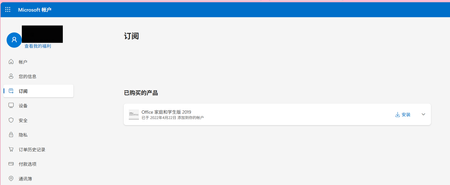
Hello, I own Office Home and Student 2019 perpetual license, and this license is already bound to my Microsoft account. I can confirm the license exists on the account.microsoft.com/services page. However, local Office applications keep showing "Unlicensed Product" and repeatedly ask for activation. I have completed these troubleshooting steps: Signed out all accounts inside Office, closed all Office programs, rebooted PC and signed‑in again with my correct Microsoft account. Cleared local Office license cache by running ospp.vbs commands. Performed Quick Repair and Online Repair for Microsoft Office. Unfortunately, the activation problem still remains. I have attached two screenshots: Screenshot showing my Microsoft account page with Office Home and Student 2019 license. Screenshot showing Word unlicensed‑product warning. Could you please help fix the license synchronization issue between my account and local device? Thank you.120Views0likes0Comments