skype
37 Topics
Skype not working anymore
Good day, we are a business (https://www.walkspanishmadrid.com/) and have a Skype number to contact our clients and receive calls from them; we also had skype credit and now it seems we cant use it on Skype or Microsoft teams any suggestions on how educational companies are dealing with situations like this? Thank you199Views0likes0Comments
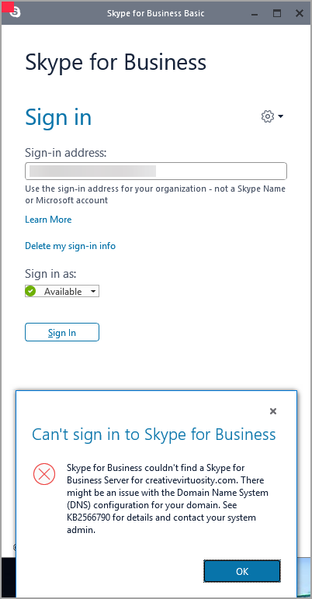
Can't Sign in to Skype Error
Hello: I am trying to either remove Skype for Business or enable it. I am unable to remove it out of Default Applications and clicking Uninstall does not work at all. The installation is stuck on my local machine. Can someone direct me on how to remove the application? When I try to enable Skype for Business, I get the following error message:257Views0likes0CommentsDecommission Skype 2015 On-Prem servers
I want to decommission our Skype On-Prem (2015) servers and cleanup AD from the RTC delegations and groups (RTC* and CS*). I've been following the guide: https://learn.microsoft.com/en-us/skypeforbusiness/hybrid/decommission-remove-on-prem However, when doing step 1 of "Prepare to remove the Skype for Business deployment" and run the commands, the command Get-CsAudioTestServiceApplication returns an object. In step 2 there is no corresponding Remove-cmdlet, so we tried disabling it with the Set-cmdlet. Moving on to "Remove your on-premises Skype for Business deployment", when getting to step 3 I run "Publish-CsTopology -FinalizeUninstall" but gets the following error. Publish-CsTopology : Command execution failed: Cannot publish topology changes. Users or contacts are still homed on a pool that would be deleted. Move or remove the users or contacts before continuing. At line:1 char:1 + Publish-CsTopology -FinalizeUninstall + ~~~~~~~~~~~~~~~~~~~~~~~~~~~~~~~~~~~~~ + CategoryInfo : InvalidOperation: (:) [Publish-CsTopology], Inva lidOperationException + FullyQualifiedErrorId : ProcessingFailed,Microsoft.Rtc.Management.Deploy ment.PublishTopologyCmdlet Running the command generates a html file with the result, where the same error can be found and the following suggestion: "UserPoolInUseResolution: Consult your Skype for Business Server documentation to learn how to move or disable objects still homed on the pool. To find those objects, execute the following cmdLets: Get-CsUser, Get-CsExUmContact, Get-CsCommonAreaPhone, Get-CsAnalogDevice, Get-CsRgsWorkflow, Get-CsDialInConferencingAccessNumber, Get-CsAudioTestServiceApplication, Get-CsTrustedApplicationEndpoint, Get-CsPersistentChatEndpoint." So I'm guessing we need to get rid of that Audio Test Service Application, anyone got any ideas how to do that? I can't find anything for it in the GUI either. The main objective is to clean up any remnents in AD, the entire Skype environment will be removed and all servers decommissioned. I'm guessing that the Disable-CsAdDomain and Disable-CsAdForest cmdlets does this somewhat. Is the above steps a requirement to be able to run these cmdlets, or would this be a viable option?1.9KViews0likes3Comments
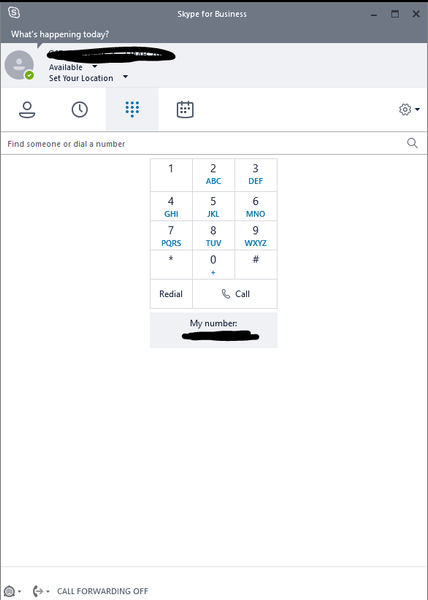
Skype for Business Voicemail Icon missing
Hello, since some days my Voicemail Icon is missing. This step doesn't work: Exit Skype for Business and Outlook client. Navigate to Users > username > AppData > Local > Microsoft > Office > 16.0 > Lync Delete sip_profileName folder. Delete all files in Tracing folder. Do not delete the folder itself. Login to Skype for Business again. Any Idea? Thanks + Regards2.1KViews0likes0CommentsMoving users from Skype for Business On-Prem to Teams get-cspowershellendpoint error
Hello gang, I am currently trying to move some users from my on prem Skype for Business 2015 server to Teams. When I select a user and select Move to Teams I am asked to log on to my Office 365 account and when I put my credentials in I am returned the following error. I have 2 questions 1) How can I be able to get past this error 2) Is there any way that I can run a powershell command that will automatically do this for me via some kind of CSV file that I can prepopulate with users I want to move? Thanks!
SH1 devices (20H2) revert to Skype overnight
I'm having trouble with many of our SH1 devices. Overnight they seem to lose connectivity and revert back to Skype. I also cannot login using just my short name like I used to. It says cannot access contacts. (pic attached) Now I have to click on use Work or School account, put in my full email address (two times I think) before I can login. I read that 20H2 was supposed to fix the Teams selection issue but they have updated and the issue persists. I'm relatively new to my team and SHs aren't "my" product but they have been broken for at least 6 months. Luckily, very few people are here on-site; maybe 10% of capacity. My colleague tells me he has a ticket open with Microsoft, but here we are, sitting on 10s of thousands of dollars of equipment that doesn't work. Here' the thing though: Unplug from ethernet and they maintain their connectivity and preference for using Teams. I believe we have the accounts configured incorrectly for our environment but I just don't know where to start...1.1KViews0likes2Comments
Teams\Skype Room Deployment Kit
Hello All, I am attempting to deploy the Teams Room Deployment kit via the CreateSRSMedia.ps1 script and I am running into some troubles finding the correct version of Windows OS build to use with the latest SRS Deployment Toolkit. When running the script, with the following Windows installation media, I get the following error: Your Windows installation media is version 10.0.19041.867. Your SRSv2 kit requires version 10.0.18362.418. Please enter the path to the root of your Windows install media: I am currently using Win_Pro_10_20H2.5_64BIT_English_Ent ISO which was downloaded from the Volume Licensing Center. What is confusing me is, what is version 10.0.19041.867 and what is SRSv2 version 10.0.18362.418? Also, how do we determine which SRS kit we use for which build? Also, I downloaded the latest version of the CreateSRSMedia script as well. I am hoping ANYONE can re-direct me to the correct OS build for the latest SRS Deployment Toolkit, 4.8.19.0?1.7KViews0likes2CommentsMTR and sign in : server cannot be reached
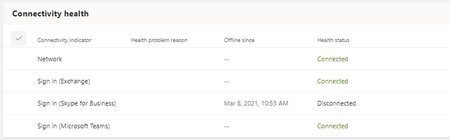
Hello Microsoft community, We have an issue with a MTR for a customer, Teams is onnecting correctly but I think we are facing some issues with Skype connection. We get the following message on the MTR : "Server cannot be reached or the version of the server is not compatible ...." Teams Meetings are working fine. On the TAC : Have you already seen this issue ? Thank you. Nick2.4KViews0likes1Comment
Teams external messages not connecting - connecting with Skype
I have an annoying problem, which prevents me from communicating with my clients: 1. I look for an external user from my Teams client. 2. The chat initially comes up with the correct person, but at the bottom says something like "due to org policy changes, certain functions are no longer allowed, click here to switch" and it switches to the external user's address with a skype logo on it. 3. The message i then send to that user says "This user is unavailable or offline. We've sent an email instead." I know that this user can communicate correctly and is online, but my messages never get through. 4. My organization is set for Teams only. Can you tell me what i'm doing wrong? Communications with a different client go through correctly - not with a skype logo. Is this a setting i need to update or have the external client update?1.6KViews0likes1Comment