remote desktop client
17 Topics
Single-Sign On
After troubleshooting an issue for a customer, we determined that the prerequisites for enabling SSO at the AVD host pool level is not strictly enforced when a user goes to execute the SSO workflow from MSRDC or the Windows App. Meaning, that if an administrator does not enable the -IsRemoteDesktopEnabled flag on the Service Principals "Microsoft Remote Desktop" and "Windows Cloud Login" respectively. Setup: Deploy Entra ID Joined session hosts to a host pool and enable the "Microsoft Entra single sign-on" RDP property to "Connections will use Microsoft Entra authentication to provide single sign-on" or update the RDP connection string with 'enablerdsaadauth:i:1'. Result: User will not receive the 'Windows Security' dialog box to access the session host with their Entra ID credentials. Caveat: Be aware that to sign in with Entra ID credentials, minimally, the host pool RDP settings must contain 'targetisaddjoined:i:1'. Microsoft states this is going away and blending into 'enablerdsaadauth:i:1', which also enables SSO. It seems a bit odd of a move in my opinion and having two separate RDP properties makes sense if a company does not want SSO. But it is in alignment with Microsoft's push for passwordless authentication. For the Microsoft AVD team, why does this behavior exist and is it on the roadmap to be fixed if it's a known gap?904Views1like4Comments
Webclient offline download fails
I'm following the instructions here to download the webclient to install on a server without internet https://learn.microsoft.com/en-us/windows-server/remote/remote-desktop-services/remote-desktop-web-client-admin#how-to-install-the-remote-desktop-web-client-without-an-internet-connection and getting an error when running Save-RdWebClientPackage "MethodInvocationException: Exception calling "DownloadFile" with "2" argument(s): "An exception occurred during a WebClient request.""255Views0likes1Comment
Latest Remote Desktop client not starting on W10 LTSB 1607
Hello. We're using about 50 thin-clients to connect to our AVD systems. The HP t530 thin-clients are running Windows 10 Enterprise 2016 LTSB / ver 1607 / build 14393 / RS1 and have the Remote Desktop client for Windows (msi) installed, with auto update enabled. This all worked fine until the most recent releases of the Remote Desktop client. Starting with version 1.2.6186 the app simply doesn't start anymore. There's no gui, no errors, nothing. Just for a few seconds the spinning blue circle next to the cursor. It does create msrdcw_xxx.etl files in %temp%\DiagOutputDir\RdClientAutoTrace, however i couldn't locate any obvious errors in it. Upgrading to 1.2.6187 does fixes the problem temporary (but that's probably because it's actually based on the older 1.2.6081 version). Upgrading to the latest releases 1.2.6188, 1.2.6227 and 1.2.6228 reintroduces the problem. It's not something in the thin-client image, also did a fresh Win10 1607 install with latest Windows Updates, same problem. Is there anything i can do or try, except blocking all future updates and staying on 1.2.6187?1.1KViews0likes7Comments
RDP is locked to 30FPS for MacOS clients
I have found that even after going through the guide below, RDP connection remains locked to 30FPS if I connect to my Windows machine from my Mac. https://learn.microsoft.com/en-us/troubleshoot/windows-server/remote/frame-rate-limited-to-30-fps Is there any way to set the frame rate to 60FPS while using the Mac client for RDP? Thank you.271Views0likes0CommentsMSTSC fails to connect with AD account if Win10 remote and over VPN
Background: Server 2012 R2 with domain. SonicWall VPN. Windows 10 Pro host workstations. Remote Desktop connectivity has recently been failing for remote Windows 10 users connecting to their Windows 10 workstations over a VPN if they use their Active Directory credentials. It used to work. If we remote into the same Windows 10 workstation host with same Active Directory credentials on the inside of the LAN (no vpn), it works. If we remote into the same Windows 10 workstation host with Active Directory credentials over the VPN from a Windows 7 workstation, it works. Only the remote OS has changed from original working scenario. If we remote into the same Windows 10 workstation with local credentials (to that host workstation) over the VPN from a Windows 10 workstation, it works. It seems to only be the combination of the VPN, Windows 10 as the remote workstation, and Active Directory credentials. If we change any one of those three conditions, it works. This suggests something about how credentials are checked from Win10 over the VPN is different than from Win7, and it seems to have changed within the last one or two months (updates?). How do I get remote Win10 workstations able to connect with Remote Desktop on Win 10 hosts using Active Directory credentials over the VPN? Head scratcher. Thanks in advance. Mark Raintree969Views0likes2CommentsAVD remote desktop client Bug
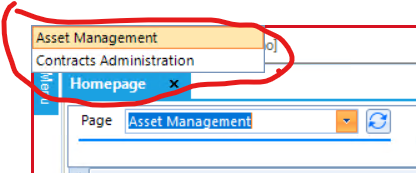
Remote desktop client when connected to AVD workspace, breaks desktop application drop down list and pushes it in upper right corner of the screen. Only reproducible in Remote desktop client, everything works as expected in web client. Remote desktop client: 1.2.4240.0 (x64) Bug Screen Shot. Expected behavior.Solved3.6KViews2likes5Comments
Remote Desktop client for Mac - email discovery
Dear all, we are currently offering a hybrid environment to our users (classic RDS web access servers PLUS Azure Virtual Desktop resources). For AVD, we enabled email discovery, which works perfectly fine on the Windows Remote Desktop client. On macOS clients, we need to advise users to subscribe to their AVD workspace via URL. If they put in their email address, the autodiscover offers the classic RDS web access only. Could this be changed, so users with macOS clients can use email discovery for AVD, too? Thanks in advance! BR Helena1.2KViews0likes0Comments
Disable usage data in Remote Desktop client
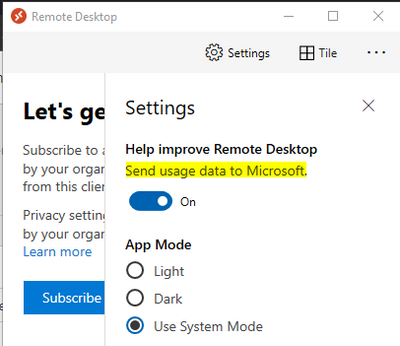
Hi, As an IT admin, I wanted to disable the "Send Usage data" in Remote Desktop Client. Can someone please tell me how can I disable this option for users? Also can you please tell where this setting information is getting stored if I disable(turn off) manually? Regards, Anique719Views0likes0CommentsWhy on earth are there so many Windows RDP clients which all have different features ?
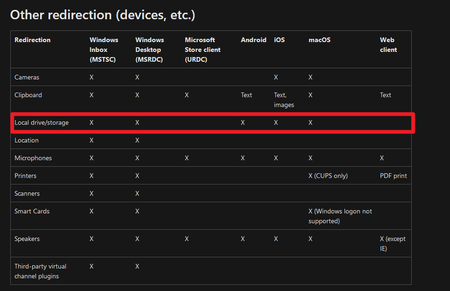
https://docs.microsoft.com/en-us/windows-server/remote/remote-desktop-services/clients/remote-desktop-app-compare#other-redirection-devices-etc For the love of god please just create one Windows RDP client that does everything. I'm a heavy user of remote desktop for administration and day to day work across a number of workstations. For some reason i have to use one client for proper seamless display scaling (Microsoft store) yet use another client to map my local drives (traditional mstsc.exe). This should not be the case for Windows RDP clients, given if using iOS or android i can apparently map drives and have scaling at the same time. For a company the size as Microsoft why can't you just create one RDP client for Windows that does everything. Why am i posting this here ? Because the page i referenced links to this feedback channel when i click the feedback link.679Views0likes0CommentsHow to disable usage data in Remote Desktop client
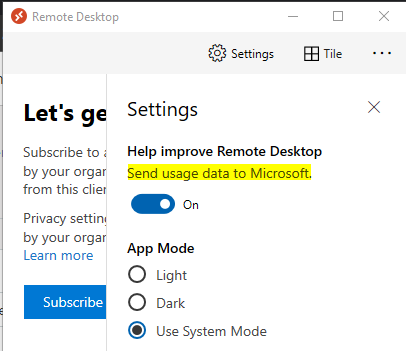
Hi, As an IT admin, I wanted to disable the "Send Usage data" in Remote Desktop Client. Can someone please tell me how can I disable this option for users? Also can you please tell where this setting information is getting stored if I disable(turn off) manually? Regards, Anique1.9KViews0likes1Comment