remote desktop client
17 Topics
AVD remote desktop client Bug
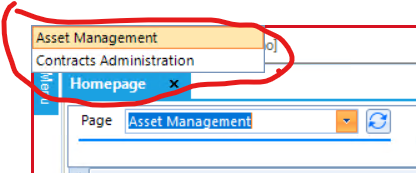
Remote desktop client when connected to AVD workspace, breaks desktop application drop down list and pushes it in upper right corner of the screen. Only reproducible in Remote desktop client, everything works as expected in web client. Remote desktop client: 1.2.4240.0 (x64) Bug Screen Shot. Expected behavior.Solved3.5KViews2likes5CommentsSingle-Sign On
After troubleshooting an issue for a customer, we determined that the prerequisites for enabling SSO at the AVD host pool level is not strictly enforced when a user goes to execute the SSO workflow from MSRDC or the Windows App. Meaning, that if an administrator does not enable the -IsRemoteDesktopEnabled flag on the Service Principals "Microsoft Remote Desktop" and "Windows Cloud Login" respectively. Setup: Deploy Entra ID Joined session hosts to a host pool and enable the "Microsoft Entra single sign-on" RDP property to "Connections will use Microsoft Entra authentication to provide single sign-on" or update the RDP connection string with 'enablerdsaadauth:i:1'. Result: User will not receive the 'Windows Security' dialog box to access the session host with their Entra ID credentials. Caveat: Be aware that to sign in with Entra ID credentials, minimally, the host pool RDP settings must contain 'targetisaddjoined:i:1'. Microsoft states this is going away and blending into 'enablerdsaadauth:i:1', which also enables SSO. It seems a bit odd of a move in my opinion and having two separate RDP properties makes sense if a company does not want SSO. But it is in alignment with Microsoft's push for passwordless authentication. For the Microsoft AVD team, why does this behavior exist and is it on the roadmap to be fixed if it's a known gap?616Views1like4CommentsmacOS Remote Desktop client app - automatic logon (no credential prompt)
Sorry if this isn't a good place to post this question. But I'm trying to locate the right place for macOS RDClient feedback now that https://support.microsoft.com/en-us/topic/uservoice-pages-430e1a78-e016-472a-a10f-dc2a3df3450a. I am trying to automate the launch of RD Client without prompting for a credential. The macOS RD client (GUI) allows storing passwords securely in the macOS Keychain and will use them to automatically log on when double-clicked from the bookmarks. On Windows, I understand there is a way to use a little-known "password 51:b:<myEncryptedPassword>" attribute to pass an encrypted string as a password from the .RDP file. AFAICT there is no way to completely automate the RDP logon without password prompt on MacOS, for the following reasons: - No way to pass a password credential (encrypted or otherwise) via https://docs.microsoft.com/en-us/windows-server/remote/remote-desktop-services/clients/remote-desktop-uri - No way to control the RDClient app via AppleScript - Bookmarks within app support saving credentials in Keychain, but there's no way to initiate a connection to a 'bookmark' via the URL scheme (bookmarks are stored in a totally separate SQLite database, and password is not contained within) - https://github.com/PowerShell/PowerShell/pull/9199, so the hidden `password 51:b:myEncryptedPassword` attribute does not work. - No way to save an .RDP file or any shortcut/alias that includes the password (this would be bad for security even if it were possible!) Anyone got an ideas here?4KViews1like1Comment