registration
104 Topics
The webinar description has disappeared from the registration page.
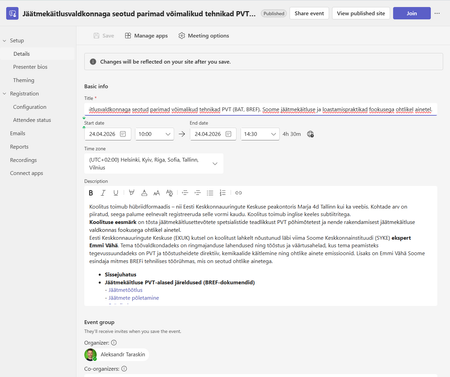
Today I discovered that the seminar description has disappeared from the registration page for our seminar. The description itself is in the original form in Teams desktop, but it is missing from the registration page. The same thing happens on registration pages for events from other organizations. I'm attaching screenshots. For example https://events.teams.microsoft.com/event/001cac17-2954-48d0-9857-b3b1bc52a970@d52e4e8e-7dc3-45d9-a6c2-d0bc694268be. Please help us with a solution, we need to have a description of the event on the registration website.170Views0likes0CommentsAurora Update RSS feed work-around
With the new UI, RSS feeds are not supported. We understand from feedback that many of you use RSS feeds, so we are looking into enabling them in the UI. In the meantime, you can get your RSS feeds working again by editing the URL you are using today. If you look at the old URL and after the tld: https://techcommunity.microsoft.com Append /t5/s to the original link, then the old RSS should work for you. Using the Exchange blog as an example you would change https://techcommunity.microsoft.com/gxcuf89792/rss/board?board.id=exchange to https://techcommunity.microsoft.com/t5/s/gxcuf89792/rss/board?board.id=exchange This should assist for right now while we work on a more permanent solution.2.9KViews22likes0CommentsProblems Registering for the Hardware Program
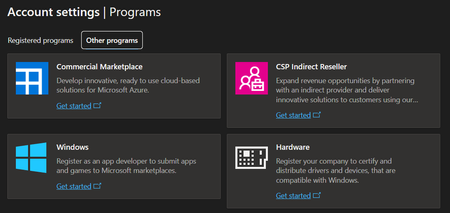
I recently (a couple weeks ago) created a Microsoft Partner Center account and that account was quickly verified. I now need to register for the Hardware program so that we can sign and release drivers for our hardware. If I try to register for the Hardware Program by clicking on "Get Started" on the hardware option in the "Programs" section of the Partner Center dashboard (shown below), I get an error saying that my account is not a Microsoft Account. Not only is my account a Microsoft Account, it is the primary account associated with our Partner Center and a Global Admin for our Entra ID Tenant. I have re-tried this many times over the past 2 weeks including trying in multiple different browsers, clearing cookies, trying in a Private window, and even on a different computer that I had never previously signed in on. I get the same error every time. I tried opening a support case but it was almost immediately closed saying that my problem had been solved. It had not been solved. I have also seen suggestions to register for the program using this link: https://partner.microsoft.com/en-us/dashboard/Registration/Tenant/Hardware?step=GetStarted?step=GetStarted# If I try that, I get a completely different error. In that case, it tells me that my organization already has an account and to contact my administrator. I am the administrator. It is possible that we have an account as I registered for something similar a couple years ago. But, if so, I cannot find any way or place to log into it. Finally, I have seen comments somewhere that the Hardware Dev. Center may be down and that is why this is failing? But, I can't find any verification of that from Microsoft. At this point, this issue is completely preventing us from signing and releasing new or updated drivers for our hardware which is preventing us from making product improvements or releasing new products. Can anyone help? Thanks!
SharePoint - Event Registration
Good morning everyone. I'm just starting with SharePoint at work. I was excited first Disappointed then realized that I was just ignorant 🙂 Now, I'm trying to use the Event Webpart and allow participant to register. I found a similar question answered by RobElliott here but I think it's already too advanced for me right now. I understand that the event links to a form, that this form once submitted will interact with a list and from the result of this interaction, will send a positive/negative message to the participant. Could someone guide me on how exactly to do that ?2.3KViews0likes0Comments
Branching in Registration Not Working Properly
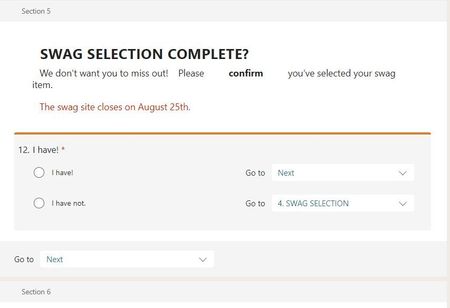
Hello - I've been playing with this for over an hour and I'm at a loss. There's a yes/no question (you cannot select multiple options) where I'd like the "yes" to continue to the next and final page and the "no" to return to the subsequent page. For some reason, the "yes" is continuing as it should but the "no" is only allowing me to "submit" the entire form instead of retuning to the subsequent page. My branching for the "no" option indicates the correct previous page, not the end of form, so I have no idea what's going on but I feel like I'm losing my mind over here! I've even tried to add the question with branching to other pages to see if it would work, but to no avail. See below images. Thank you for your help! Branching to previous Swag page. Only allows person to select "Submit", not return to the swag page, for which it is clearly branched.1.1KViews0likes1Comment
Live Event Registrations & Speakers
Hi all, I have to organize a webinar with Teams Live about once per month and I had a few questions that I couldn't find the answer to on the support website. Maybe you can help me here? 1. What is the maximum number of speakers that I can invite to my live event? 2. If I have to make changes to my webinar (e.g. add a speaker) will the registrations' link change for the attendees? I'm worried that I'll have to notify all registrants to that point if I make a few changes to the event. Which changes would cause the Link to change? I literally could not find an answer to these questions and I'm relatively new to this. Can someone help me out, please?613Views0likes0Comments