question
44 Topics
macOS 27.2 breaks Universal Print Setup Allow Prompt
When setting up a new device with Universal Print on macOS 27, the initial window where you "Allow" the new preference pane only points to the root Library folder and not the PreferencePanes folder. The allow button does nothing. This is on the latest version of the app 1.1.0. Anyone else having this issue?22Views0likes1Comment
Deploy Universal Print printers to users through PowerShell?
Hi all, we're currently using PrinterLogic to manage printers for users and we're hoping to move to Universal Print. Ideally, we'd like a seamless one-to-one transition, meaning that each PrinterLogic printer is silently replaced with the equivalent Universal Print (UP) printer. My instinct was to use a PowerShell script deployed through Intune as it can foreach through the user's printers, remove them, look up the relevant UP printer's details, and install it. The problem I've run into is that there doesn't seem to be a way to install available UP printers through PowerShell. I've tried adding the entries manually to the registry, sending arguments to the UPPrinterInstaller executable directly, and even attempted to feed the raw SyncML XML payload straight into the OMADM local execution engine. None of these things have worked, so I'm reaching out to the community to see if any of you have a solution.297Views0likes1Comment
HP Pinter Wi-Fi Connectivity problems
I bought a new HP DeskJet 2700, and I am trying to connect my printer to the Wi-Fi. My network is working fine, yet the printer is unable to detect it and keeps showing offline. Is there anything that I am missing while doing the wireless setup?686Views1like5Comments
MSLE Office Hours — French (FRANÇAIS)
Bienvenue à l'heure de permanence de MSLE animée par Cecilia, notre responsable de la communauté francophone de MSLE. Cette réunion vous offre l’opportunité de poser des questions, clarifier des concepts et recevoir des conseils personnalisés sur des sujets tels que le programme MSLE, l’intégration des cours de MSLE dans vos cours, l’exploration des parcours de certification, et bien plus encore. Rejoignez l’heure de permanence iciMSLE Office Hours — French (FRANÇAIS)
Bienvenue à l'heure de permanence de MSLE animée par Cecilia, notre responsable de la communauté francophone de MSLE. Cette réunion vous offre l’opportunité de poser des questions, clarifier des concepts et recevoir des conseils personnalisés sur des sujets tels que le programme MSLE, l’intégration des cours de MSLE dans vos cours, l’exploration des parcours de certification, et bien plus encore. Rejoignez l’heure de permanence iciMSLE Office Hours — French
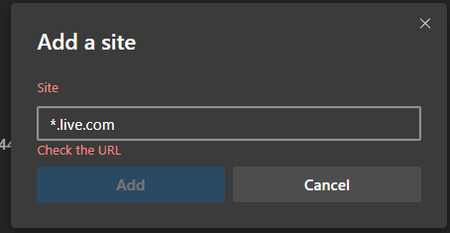
MSLE Office Hours — French Bienvenue à l'heure de permanence de MSLE animée par Cecilia, notre responsable de la communauté francophone de MSLE. Cette réunion vous offre l’opportunité de poser des questions, clarifier des concepts et recevoir des conseils personnalisés sur des sujets tels que le programme MSLE, l’intégration des cours de MSLE dans vos cours, l’exploration des parcours de certification, et bien plus encore. Rejoignez l’heure de permanence ici[Solved] How do I properly add a wildcard domain to Edge tracking prevention exception list?
Found the solution, which was there in front of my eyes all this time but I didn't pay enough attention. Edge shows the correct syntax [*.]example.com so entering [*.]live.com is acceptable and fixes the issue! lesson learned: always pay attention to the info on the screen.15KViews2likes4Comments
Task with multiple resources showing as multiple rows in Power BI table; instead of just the one row
Question please. I have Project on the Web schedule with many tasks, and some have multiple resources assigned. When I pull the tasks into a table in Power BI report I am getting a row for each task with the resource, instead of the task listing both resources on one row. So if there are 4 resources, the task shows 4 times, once per resource. The tables tasks and resources have a relationship, so is this the way it is supposed to work? How can I just show a list of unique tasks and all the resources assigned in one row per task? Grouping of some sort? So 1 task with 4 resources, shows as 1 task with 4 resources all in one row. Thank youSolved375Views0likes3Comments
Issue Setting Custom Template in Sharepoint Library
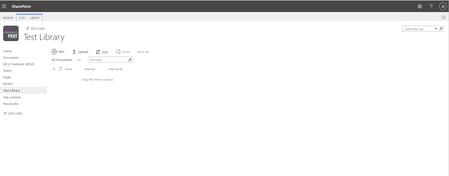
Hello, I am having trouble setting up a custom excel template for a document library. In the settings, it says to place the template in the Forms folder of the library, which I cannot find for the life of me. I also tried creating a new Sharepoint site and library to test some things out, and the library looks completely different from the ones that are created on the original site. The first screenshot shows the original site and second shows the test site. On the test site, the library actually lets me upload a template when I click "new". This option does not appear on the original site's library. Any help is appreciated!Solved1.6KViews0likes4Comments